
ModelRelay
Composable AI workflows for Swift: small typed steps, a model per step, tools, MCP and on-device models.
- 11
- MIT
- 4 wk ago
Repo Juanpe/ModelRelay, read from GitHub 20 h ago. Juanpe has not joined Take My Repo.
In short
Juanpe/ModelRelay is a public repo on GitHub by Juanpe. Composable AI workflows for Swift: small typed steps, a model per step, tools, MCP and on-device models. It declares the MIT license on GitHub. It is written mainly in Swift, has 11 stars and last changed on 2026-10-28. Nobody has reviewed it on Take My Repo yet, which says nothing about its quality. Read from GitHub on 2026-11-24.
Similar repos
ColossalAI
Making large AI models cheaper, faster and more accessible

ModelRelay
Small steps. Different models. One workflow.
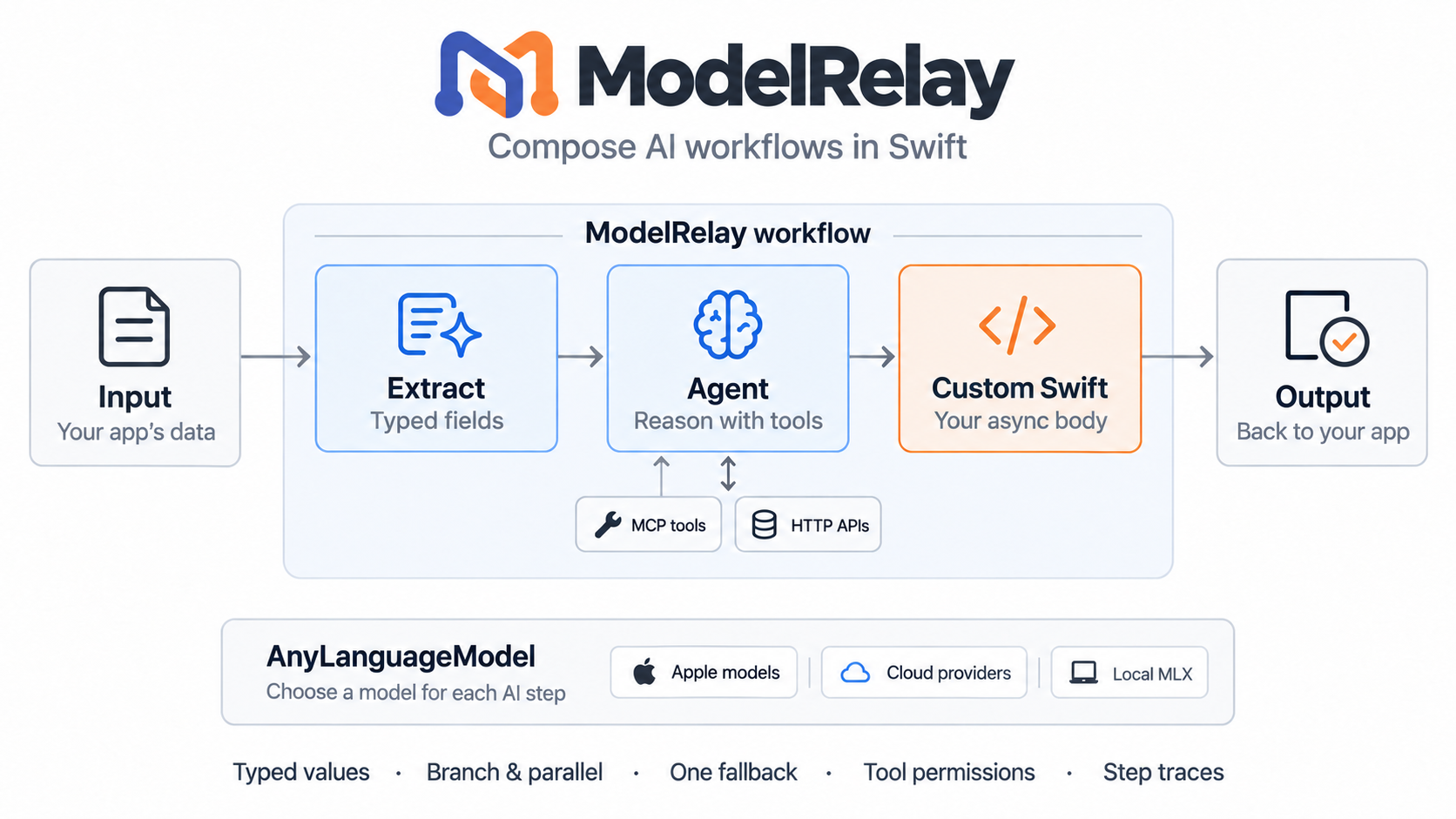
An AI feature often needs more than one prompt. Read a receipt, extract its fields, check the numbers, ask a tool, then let the user review the result.
ModelRelay helps you connect those steps in Swift. Choose a model for each task, pass typed results between them, and keep control over tools, permissions and execution.
Built on AnyLanguageModel for inference and conversations. ModelRelay adds the workflow around them. Your app brings the interface, data and storage.
Let's build something 🙂
🌟 Features · 🤔 Why ModelRelay? · 📲 Installation · 🐒 Usage · 🧠 Models · 💡 Use cases · 🛠 Advanced · 📚 Guides · 🤖 AI agents · 📱 Runline app · ❤️ Contributing
🌟 Features
- 🧩 Compose in Swift: small steps, result builders, branches and parallel work.
- 🧠 Choose models per step: Apple models, cloud providers, OpenAI-compatible servers and opt-in local MLX.
- 🤝 Connect agents: share a native conversation or hand selected results to another model.
- 🧰 Bring your tools: HTTP APIs, MCP tools and reusable tool kits.
- 🎯 Ask typed questions: extract fields, classify text or use decision models such as Jev.
- 👨💻 Add your own logic: async Swift bodies, without a script runner.
- 🔒 Set boundaries: write approval, local-only data policies and execution budgets.
- ⏸ Review and resume: checkpoint contracts, approval gates, step records and metadata-only events.
🤔 Why not just use Apple's APIs?
You can! Foundation Models already provides stateful sessions and streaming, structured generation and tool calling. For a prompt, an extraction or a conversation with Apple's model, using it directly is often the simplest choice.
ModelRelay is for the process around those calls:
| You need… | With Apple APIs directly | ModelRelay adds |
|---|---|---|
| 🧩 Multiple steps | Connect calls with Swift concurrency and your own state | Named results, branches and parallel blocks in one Workflow |
| 🧠 Different models | Integrate providers and choose when to call each | Per-step catalog IDs and one explicit fallback, using AnyLanguageModel providers |
| 🤝 Shared context | Keep sessions and pass selected results yourself | Named conversations and explicit handoffs between agents |
| 🧰 External tools | Implement Tool types and service integrations |
Reusable kits, HTTP/MCP integrations and write approval |
| 🔒 Execution rules | Add application-level checks and counters | Preflight validation, privacy labels and workflow-wide attempt/concurrency limits |
| ⏸ Review and recovery | Persist transcripts plus your own job state | Approval gates and start / resume checkpoints with a host-owned store |
| 📡 Progress | Stream generated content and inspect session history | Workflow events, step records and a final execution report |
Apple also supports custom model providers on OS 27+. ModelRelay's value is reusable workflow orchestration, not exclusive access to tools, structured output or other models.
Support apps from iOS 18. ModelRelay's workflows, remote models, tools, MCP and checkpoints work on iOS 18 and later. Apple's model features still require their supported OS and hardware. Platform requirements →
You could build this coordination yourself. ModelRelay packages it without replacing the native inference runtime. It does not make Apple's model faster or remove its hardware, availability or entitlement requirements. Workflow events are not token streaming, and recovery still needs your durable storage. Execution boundaries → · Recovery contract →
📲 Installation
Build with Xcode 27 / Swift 6.4. Your app can target iOS 18+, macOS 15+ or visionOS 2+. This package currently targets Apple platforms, not Linux.
| Capability | Minimum OS |
|---|---|
| Workflows, remote models, tools, MCP and checkpoints | iOS 18 / macOS 15 / visionOS 2 |
| Apple's on-device text model and tools | iOS 26 / macOS 26 / visionOS 26 |
| Apple model image input and Private Cloud Compute | iOS 27 / macOS 27 / visionOS 27 |
Apple models also need compatible hardware and model availability. Private Cloud Compute requires its entitlement. Use another registered provider on older systems, or configure an explicit fallback.
Add ModelRelay with Swift Package Manager:
// swift-tools-version: 6.4
import PackageDescription

let package = Package(
    name: "MyClient",
    platforms: [.macOS(.v15), .iOS(.v18), .visionOS(.v2)],
    dependencies: [
        .package(url: "https://github.com/Juanpe/ModelRelay.git", "0.2.0" ..< "0.3.0", traits: []),
    ],
    targets: [
        .target(name: "MyClient", dependencies: [
            .product(name: "ModelRelay", package: "ModelRelay"),
        ]),
    ]
)
Releases follow Semantic Versioning.
During 0.x, patch updates stay compatible; breaking changes require a new
minor version. The range above accepts 0.2.x, not 0.3.0.
Changelog → · Version policy and publishing →
📦 Which products do I need?
One package, separately importable products. Start with the core and add integrations when you need them:
| Product | What it adds |
|---|---|
ModelRelay |
Workflows, typed values, builders, execution and custom Swift bodies |
ModelRelayHTTP |
HTTP request steps and HTTP agent tools through URLSession |
ModelRelayCloud |
Specialized decision models, including Jev |
ModelRelayMCP |
MCP tools over Streamable HTTP and optional OAuth helpers |
ModelRelayMLX |
Convenience presets for native MLX providers |
For ordinary cloud generation, register AnyLanguageModel's providers directly.
ModelRelayCloud is for specialized decisions, not a required cloud adapter.
Apple's on-device model, Private Cloud Compute and text recognition are built
in; register other providers in your ModelCatalog.
ModelRelay has one direct third-party package dependency: AnyLanguageModel. Selecting fewer products avoids building unused targets, but SwiftPM may still resolve optional transitive dependencies.
Using MLX? Add the ModelRelayMLX product and change traits: [] to
traits: ["MLX"]. It is disabled by default and also needs Xcode's Metal
Toolchain (xcodebuild -downloadComponent MetalToolchain).
🐒 Usage
Start with three steps:
1️⃣ Import
import ModelRelay
2️⃣ Describe your workflow
Let's turn a receipt into typed fields:
let workflow = Workflow(
    name: "Receipt to expense"
) {
    Step.extract("expense", instruction: "Extract the expense from this receipt.", model: .appleOnDevice) {
        Field("merchant", .text)
        Field("total", .number)
        Field("currency", .choice(["EUR", "USD", "GBP"]))
    }
}
name is the workflow's display name. Step names identify results that
later steps can reference.
3️⃣ Run it
let report = try await WorkflowExecutor().run(
    workflow,
    input: .text("BLUE BOTTLE COFFEE · TOTAL EUR 8.30")
)

print(report.output["total"]?.textValue ?? "") // e.g. 8.3
That's it! Your app receives a Value, not a string it has to parse by hand.
💡 This example uses Apple's on-device model, which must be available on your device. Other models and fallbacks need to be registered in a
ModelCatalogfirst.
See models and setup for Jev, Ollama and other providers.
Want to try it without a model or API key? The standalone example runs a deterministic workflow:
swift run --package-path Examples/StandaloneClient StandaloneClient
🧩 The main pieces
| You want to… | Start here |
|---|---|
| Describe the process | Workflow, Step, Field |
| Pass data in and get it back | Value, WorkflowExecutionReport |
| Choose model implementations | ModelCatalog |
| Execute a workflow | WorkflowExecutor.run |
| Save progress and wait for review | start / resume, WorkflowExecutionCheckpointStore |
By default, each step reads the previous result. Select an earlier result
with input: "expense", or insert one into text with {{expense.total}}.
See the usage recipes for all step types and data-flow rules.
🧠 Pick your models
Use Jev to make a decision, Ollama to summarize, and another model to draft the reply. Each step chooses a registered model ID; the workflow stays the same.
| Want to use… | Register… | Example |
|---|---|---|
| 🗳 Jev | CloudModels.jev + DecisionsAPIModel from ModelRelayCloud |
Route and score a ticket |
| 🦙 Ollama | Native OllamaLanguageModel |
Summarize with Qwen |
| ☁️ OpenAI / Anthropic | Native OpenResponsesLanguageModel / AnthropicLanguageModel |
Cloud providers |
| 🔌 OpenAI-compatible servers | Native OpenAILanguageModel with your base URL |
Bring an endpoint |
| 🍎 Apple models / OCR | Built in: .appleOnDevice, .applePrivateCloud, .appleTextRecognition |
Use Apple's models |
| ⚡️ On-device MLX | ModelRelayMLX presets with the MLX trait |
Run Qwen in-process |
Jev answers typed questions; it is not a text generator. Ollama serves a model over HTTP; MLX runs it inside your process. Native providers come from AnyLanguageModel, without another ModelRelay adapter.
Setup and examples → · Mix Jev and Ollama in one workflow →
💡 What can you build?
Your users don't need a workflow editor. You define the process; they use the feature inside your app.
| Feature | A possible workflow |
|---|---|
| 📬 A support inbox | Extract the request → classify urgency → look up an order with tools → hand context to a reply agent → review before sending |
| 🧾 An expense assistant | Read a receipt image → extract totals → classify the expense → validate with Swift → review before submitting |
Questions
What is ModelRelay?
Juanpe/ModelRelay is a public repo on GitHub by Juanpe. Composable AI workflows for Swift: small typed steps, a model per step, tools, MCP and on-device models.
Is ModelRelay open source?
It declares the MIT license on GitHub.
Does ModelRelay run on macOS, Windows or Linux?
Its maker tagged it for macOS. That is declared by the maker; Take My Repo has not tested it.
How do I install ModelRelay?
Open "Take it" on its page: Take My Repo writes an install plan for your machine and hands it to your AI agent (Claude Code, Codex or Cursor), which asks you before each step. Take My Repo has not tested it on any machine.






