

ECC
The agent harness performance optimization system. Skills, instincts, memory, security, and research-first development for Claude Code, Codex, Opencode, Cursor and beyond.
- 309k
- JavaScript
- MIT
- 19 h ago
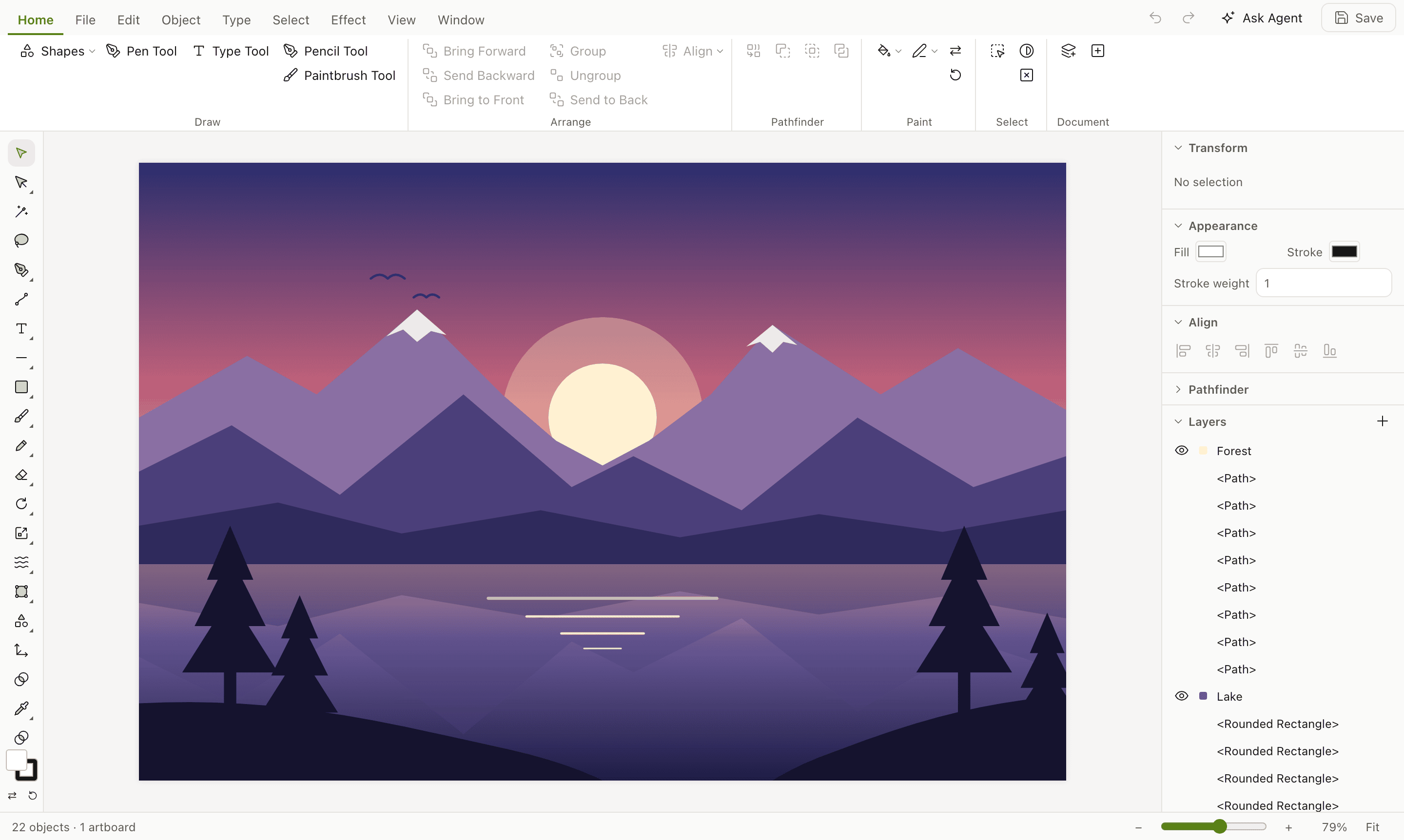
Kition Vector: a vector graphics editor, for people and AI agents
Repo KitionAI/kition-vector, read from GitHub 23 h ago. KitionAI has not joined Take My Repo.
KitionAI/kition-vector is a public repo on GitHub by KitionAI. Kition Vector: a vector graphics editor, for people and AI agents. It declares the Apache-2.0 license on GitHub. It is written mainly in Rust, has 0 stars and last changed on 2026-11-22. Nobody has reviewed it on Take My Repo yet, which says nothing about its quality. Read from GitHub on 2026-11-23.
The agent harness performance optimization system. Skills, instincts, memory, security, and research-first development for Claude Code, Codex, Opencode, Cursor and beyond.
Kition Vector: a vector graphics editor, for people and AI agents
Illustrations on artboards · SVG, PDF and PNG export · .svg, .ai and .eps for viewing · Tools for agents
Use it in Kition · Embed it · Give it to your agent · Showcase · Developer docs · KHP
An illustration or an icon set usually lives in one desktop program, in a file only that program edits well. You send a PNG round for comments and carry every change back by hand. An AI assistant can suggest a colour or a layout, but it cannot open the drawing and change it.
Vector puts a vector illustration editor in a browser tab, on a .kvector drawing: the tools, the
artboards and the layers in one view. The same engine runs headless for an AI agent: it reads every
layer and object, works with the editor's own commands, and runs the same check. An agent can work
in a draft that you review before anything changes in your file.
.kvector holds the artboards, the layers and every object.
Open it, save it, save a copy or revert to the saved version..svg, .ai or .eps file for viewing in the same
editor.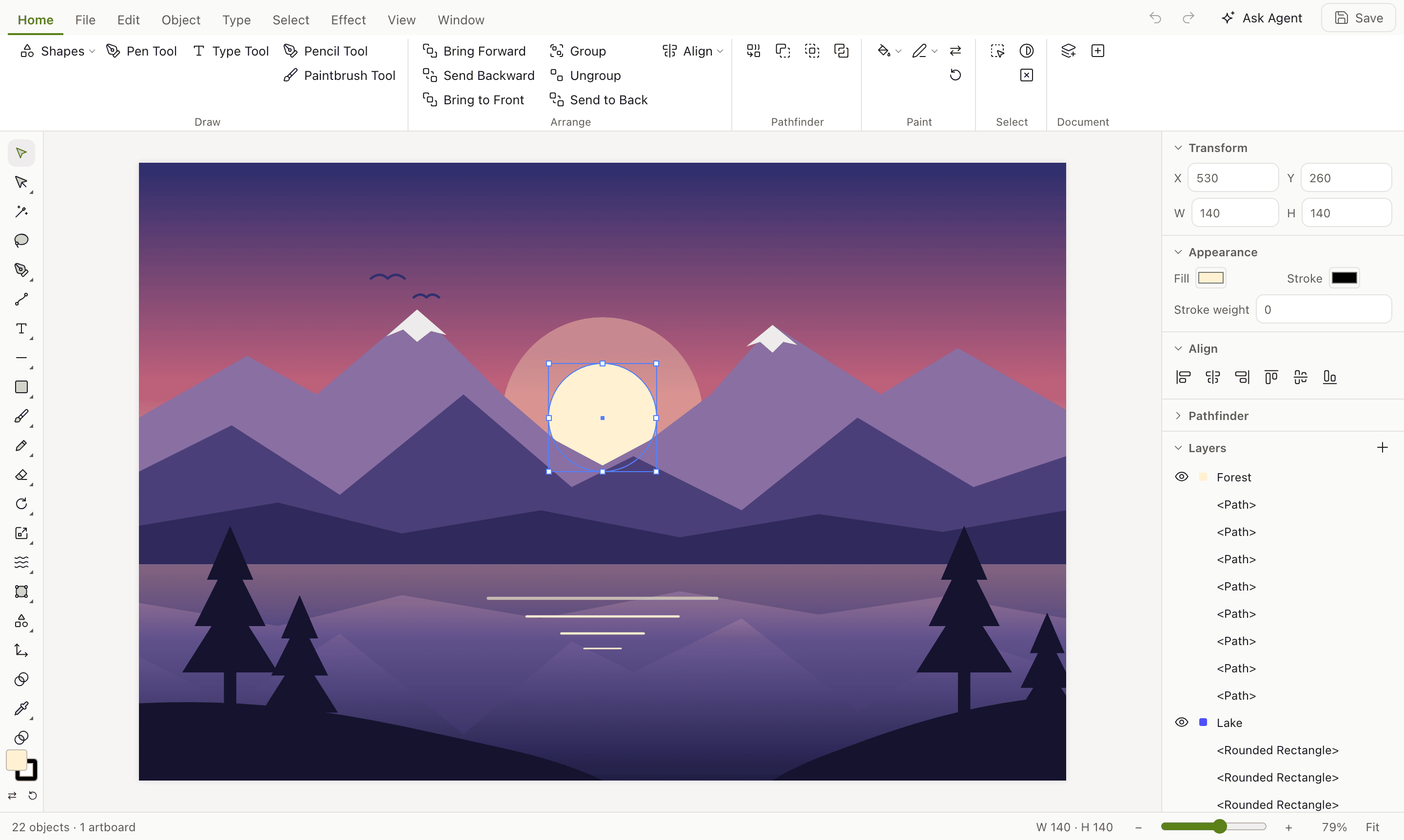 Selection: click the sun; its handles appear, and Transform and Appearance show its place, size and fill. |
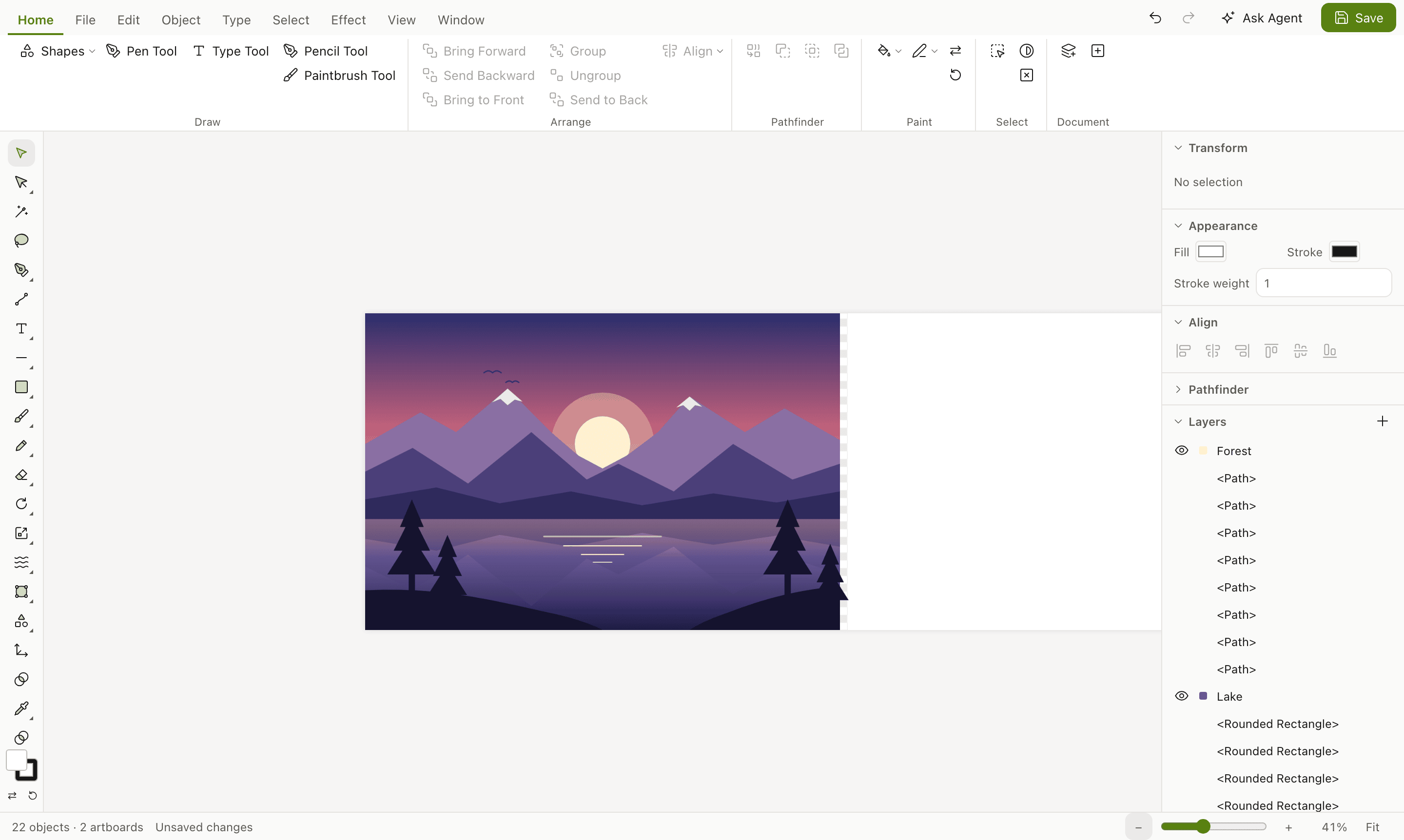 Artboards: New Artboard adds one beside the last; an agent adds them with the same command. |
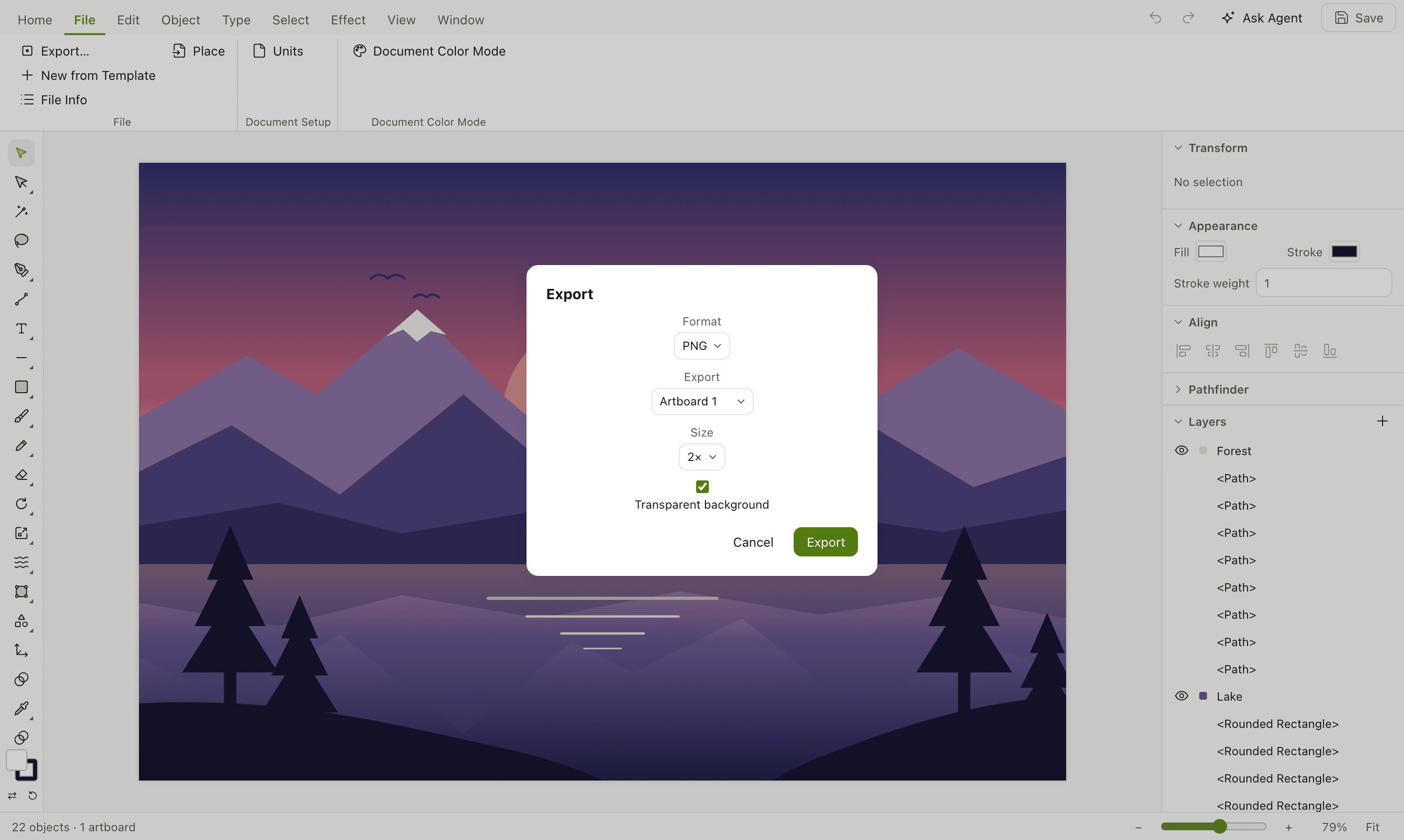 Export: File › Export writes SVG, PDF or PNG; here one artboard as a PNG at 2×. |
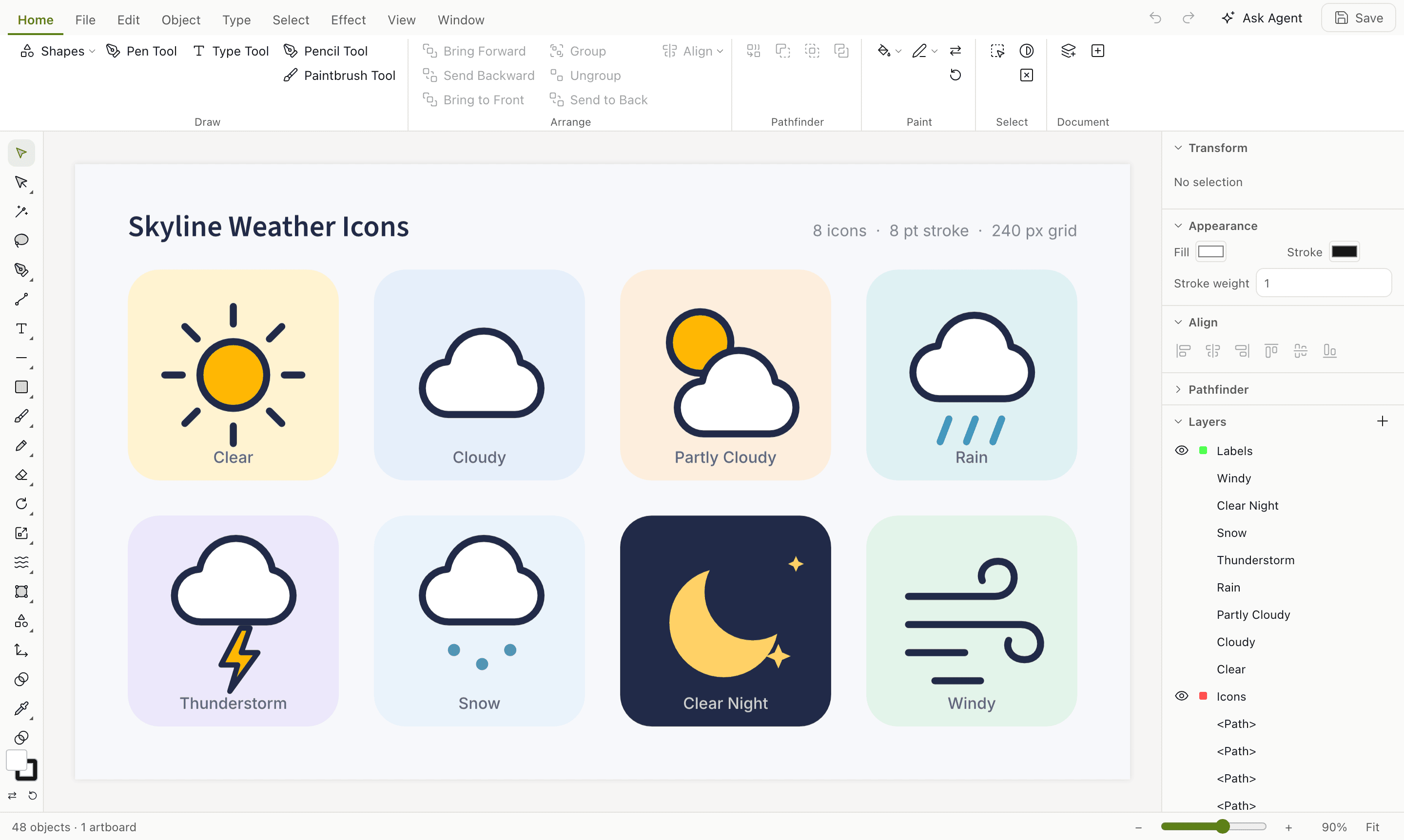 SVG for viewing: an .svg opened in the editor, here the weather icons exported from Vector. |
 |
 |
 |
 |
Every sample is built with Vector's own commands. See all of them.
| Opens | Creates | Exports |
|---|---|---|
.kvector; .svg, .ai and .eps for viewing |
.kvector |
.svg, .pdf, .png |
Open or create a .kvector file in Kition and it opens in this editor. Kition's agent works on the
same drawing, with the same commands. Download Kition.
Vector's editor is a static package you host yourself, mounted into your page with
@kition/embed. Download
kition-vector-<version>.tgz from the latest release
and serve its vector-ui/ folder on its own origin, with the headers in the
embed reference.
Then:
import { KitionEmbed } from '@kition/embed'

const editor = await KitionEmbed.mount(document.getElementById('vector')!, {
  kit: { id: 'kit.vector', url: 'https://kits.example.com/vector-ui/' }, // the package you host
  file: { id: 'poster-2026', name: 'Poster.kvector' },
  storage: {
    read: async (id) => api.read(id),                                     // { bytes, version }
    write: async (id, bytes, { expectedVersion }) => api.write(id, bytes, expectedVersion), // refuse a stale version
    create: async (name, bytes) => api.create(name, bytes),              // exports (SVG, PDF, PNG) become new files
  },
})
Every save carries the version it read, so an edit made elsewhere is never written over. The embed guide adds people and permissions, co-editing, and an agent working in the open editor.
The engine also runs headless, and kition, the Kition SDK's command line, serves it as MCP tools
(vector_inspect, vector_run, vector_check, ...) on a folder of drawings, for any MCP client.
Nothing is compiled: you need neither Rust nor the Kition app. Install kition, then connect your
agent in the folder:
npm install -g @kition/cli        # Node.js 20 or later; gives the kition command
kition agent add claude           # or codex, cursor: registers kition's MCP server
Without installing it:
claude mcp add kition -- npx -y @kition/cli mcp --workspace "$PWD". Without Node.js, install
kition with curl -fsSL https://github.com/KitionAI/kition-sdk/releases/latest/download/install.sh | sh
(Windows: irm https://github.com/KitionAI/kition-sdk/releases/latest/download/install.ps1 | iex)
and run the same kition agent add.
kition holds no kit. The first time the agent opens a .kvector file, through the kit_inspect
tool the server offers until Vector is installed, kition downloads Vector's headless executable
into ~/.kition/kits and the vector tools appear. kition kit install vector downloads it ahead of
time, and kition kit upgrade moves it to the newest version. Claude Desktop, Cursor, Codex and the
other commands are in the SDK's
agent guide
and kition guide. To run a
build of your own (working on the kit itself), see
docs/development.md.
A real session on a copy of the landscape above, trimmed:
> vector_inspect {"path":"lake.kvector"}
Opened `lake.kvector`: 1200 × 800
{"details":{"artboards":[{"height":800.0,"name":"Artboard 1","width":1200.0,"x":0.0,"y":0.0}],"colorMode":"Rgb",
  "layers":[{…,"children":[{"anchors":3,…,"id":27,"kind":"Path",…,"stroke":"#2b2d6e",…},…],…,"name":"Forest",…},
  {…,"name":"Lake",…},{…,"name":"Near Range",…},{…,"name":"Far Range",…},{…,"name":"Sky",…}],…},"revision":"zxf0",…}

> vector_run {"path":"lake.kvector","basis":"zxf0","steps":[
    {"command":"artboard.new","params":{"name":"Square","width":800,"height":800}}]}
Ran 1 commands on `lake.kvector` (saved): 2020 × 800 Changes: objects 1 created, 1 changed.
{"changes":{"changed":[{"edits":[{"after":[1,2],"before":[1],"field":"~artboards"}],…,"id":"drawing","type":"Drawing"}],
  "created":[{…,"id":"artboard:2","type":"Artboard","values":{"id":2,"props":{"name":"Square",…},
    "rect":{"x0":1220,"x1":2020,"y0":0,"y1":800}}}],…},
  "completed":[{"command":"artboard.new","result":{"index":1}}],"diagnostics":{"new":[],"resolved":[]},
  "revision":"zxf1","saved":true}

> vector_check {"path":"lake.kvector"}
Checked `lake.kvector`: the kit found nothing wrong.
{"diagnostics":[]}
The agent read the landscape's five layers and their objects, then added a square artboard, Square, 800 by 800, beside the first one. The check found nothing wrong. The agent's guide is agent/guide.md.
Version 0.1.2 · KHP 1.0, conformance level basic.
| Works today | Partly there | Not yet |
|---|---|---|
Opening, saving, saving a copy and reverting .kvector drawings |
The pen and shape tools, and editing anchors | Recording and playing back actions |
Opening .svg, .ai and .eps files for viewing |
Fill, stroke, swatches and gradients | Scripting over the editor's commands |
| Export to SVG, PDF and PNG | Layers, groups, stacking order and transforms | 3D beyond a first Revolve |
| An agent that reads the drawing, adds artboards, fixes what the check reports and works in a draft | Point, area and path type with character and paragraph formats | Generative AI features |
| Classic, Single line and Focus display modes | Artboards, Pathfinder and the other Object menu commands | Some preferences: stored, not acted on yet |
Known gaps: docs/gaps.md. What's next: docs/roadmap.md.
Build and test instructions are in docs/development.md. Read CONTRIBUTING.md before opening a pull request, and ask questions in Discussions or on Discord.
Kition is the open pro suite for AI: 16 kits, editors that people and AI agents use on the same files, and the products around them (all repositories).
| Product | What it is | Links |
|---|---|---|
| Kition Desktop | The open pro suite for AI: 16 editors and an agent in one desktop app | GitHub · kition.ai |
| Kition SDK | Put Kition's editors in your product, and give the same files to your AI agent | GitHub · developer.kition.ai |
KitionAI/kition-vector is a public repo on GitHub by KitionAI. Kition Vector: a vector graphics editor, for people and AI agents.
It declares the Apache-2.0 license on GitHub.
Its maker has not tagged a system, so it is unknown here. Its README says what it needs.
Open "Take it" on its page: Take My Repo writes an install plan for your machine and hands it to your AI agent (Claude Code, Codex or Cursor), which asks you before each step. Take My Repo has not tested it on any machine.
Reverse engineer anything with agents, from app behavior down to native binaries.
Its last change on GitHub was on 2026-11-22. Take My Repo does not judge from that whether it is maintained.
Nobody has reviewed it on Take My Repo yet, which says nothing about its quality.
Take My Repo cannot say: it does not audit code and has not run kition-vector. What is known comes from GitHub. It declares the Apache-2.0 license on GitHub. Its last change was on 2026-11-22. It has 0 stars, which measure popularity, not safety. Nobody has reviewed it on Take My Repo yet, which says nothing about its quality. Read the source before you run it. With "Take it", your AI agent shows each step and asks you before running it; README text is treated as data, not as instructions.


