
Blazor.GraphEditor
A simple graph editor for Blazor.
- 117
- MIT
- 20 mo ago
Repo KristofferStrube/Blazor.GraphEditor, read from GitHub 1 min ago. KristofferStrube has not joined Take My Repo.
In short
KristofferStrube/Blazor.GraphEditor is a public repo on GitHub by KristofferStrube. A simple graph editor for Blazor. It declares the MIT license on GitHub. It is written mainly in C#, has 117 stars and last changed on 2025-04-08. Nobody has reviewed it on Take My Repo yet, which says nothing about its quality. Read from GitHub on 2026-11-24.
Blazor.GraphEditor
A simple graph editor for Blazor.

Demo
The WASM sample project can be demoed at https://kristofferstrube.github.io/Blazor.GraphEditor/
Getting Started
Prerequisites
You need to install .NET 7.0 or newer to use the library.
Installation
You can install the package via NuGet with the Package Manager in your IDE or alternatively using the command line:
dotnet add package KristofferStrube.Blazor.GraphEditor
The package can be used in Blazor WebAssembly and Blazor Server projects. In the samples folder of this repository, you can find a project that shows how to use the GraphEditor component in both Blazor WASM.
Import
You need to reference the package to use it in your pages. This can be done in _Import.razor by adding the following.
@using KristofferStrube.Blazor.GraphEditorAdd to service collection
To use the component in your pages you also need to register some services in your service collection. We have a single method that is exposed via the Blazor. library which adds all these services.
var builder = WebAssemblyHostBuilder.CreateDefault(args);
builder.RootComponents.Add<App>("#app");
builder.RootComponents.Add<HeadOutlet>("head::after");

builder.Services.AddScoped(sp => new HttpClient { BaseAddress = new Uri(builder.HostEnvironment.BaseAddress) });

// Adding the needed services.
builder.Services.Add();

await builder.Build().RunAsync();
Include needed stylesheets and scripts
The libraries that the component uses also need to have some stylesheets and scripts added to function.
For this, you need to insert the following tags in the <head> section of your index.html or Host.cshtml file:
<link href="_content/BlazorColorPicker/colorpicker.css" rel="stylesheet" />
<link href="_content/Blazor.ContextMenu/blazorContextMenu.min.css" rel="stylesheet" />
<link href="_content/KristofferStrube.Blazor./kristofferStrubeBlazor.css" rel="stylesheet" />
The library uses Scoped CSS, so you must include your project-specific .styles.css CSS file in your project for the scoped styles of the library components. An example is in the test project in this repo:
<link href="KristofferStrube.Blazor.GraphEditor.WasmExample.styles.css" rel="stylesheet" />
At the end of the file, after you have referenced the Blazor Server or Wasm bootstrapper, insert the following:
<script src="_content/Blazor.ContextMenu/blazorContextMenu.min.js"></script>
Adding the component to a site.
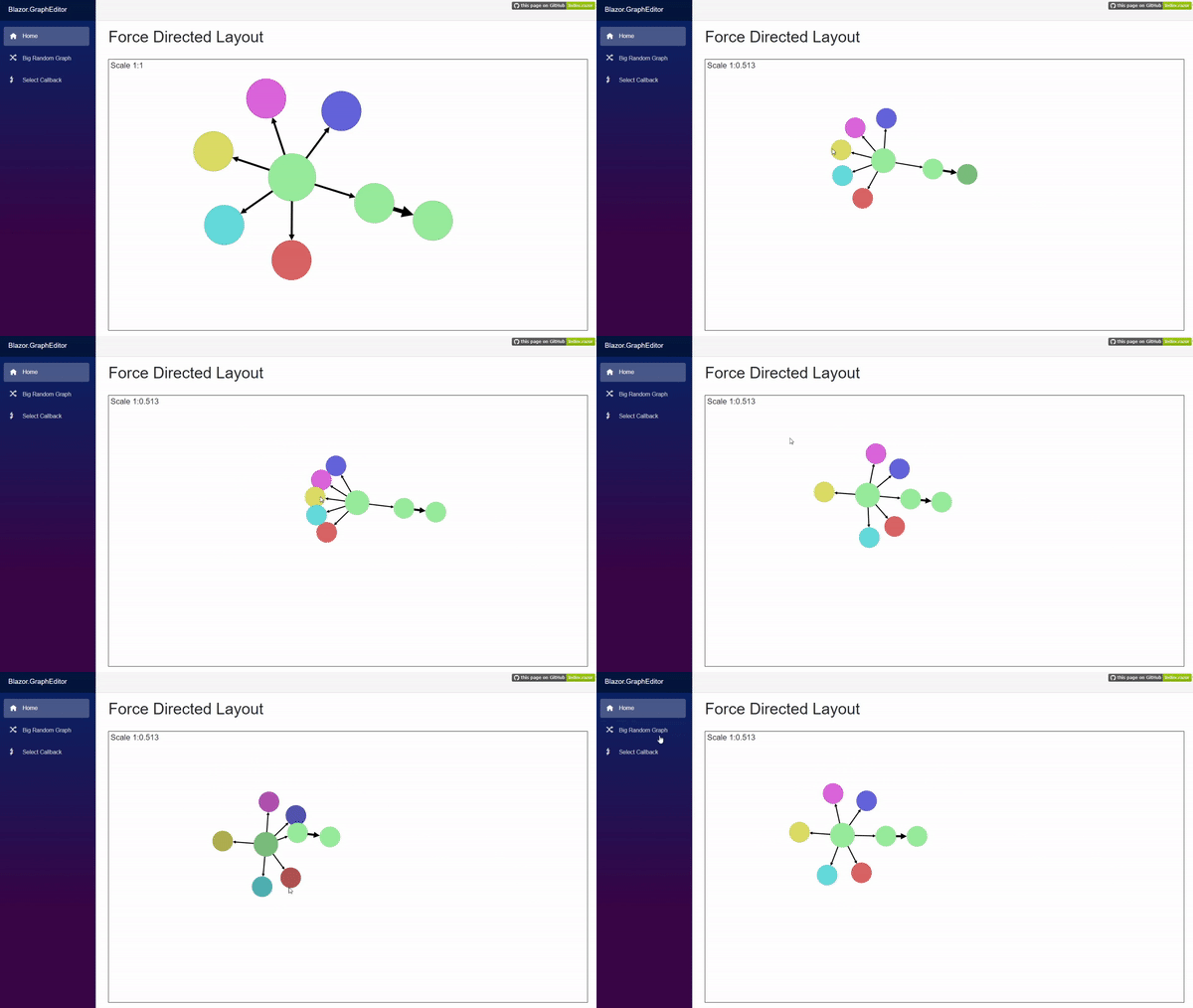
Now, you are ready to use the component in your page. A minimal example of this would be the following:
<div style="height:80vh;">
    <GraphEditor
        @ref=GraphEditor
        TNode="Page"
        TEdge="Transition"
        NodeIdMapper="n => n.id"
        NodeRadiusMapper="n => n.size"
        NodeColorMapper="n => n.color"
        EdgeFromMapper="e => e.from"
        EdgeToMapper="e => e.to"
        EdgeWidthMapper="e => e.weight*5"
        EdgeSpringConstantMapper="e => e.weight"
        EdgeSpringLengthMapper="e => e.length"
        />
</div>
@code {
    private GraphEditor<Page, Transition> GraphEditor = default!;
    private bool running = true;

    protected override async Task OnAfterRenderAsync(bool firstRender)
    {
        if (!firstRender) return;
        while (!GraphEditor.IsReadyToLoad)
        {
            await Task.Delay(50);
        }

        var pages = new List<Page>() { new("1", size: 60), new("2", "#3333AA"), new("3", "#AA33AA"), new("4", "#AA3333"), new("5", "#AAAA33"), new("6", "#33AAAA"), new("7"), new("8") };

        var edges = new List<Transition>() {
            new(pages[0], pages[1], 1),
            new(pages[0], pages[2], 1),
            new(pages[0], pages[3], 1),
            new(pages[0], pages[4], 1),
            new(pages[0], pages[5], 1),
            new(pages[0], pages[6], 1),
            new(pages[6], pages[7], 2, 150) };

        await GraphEditor.LoadGraph(pages, edges);

        DateTimeOffset startTime = DateTimeOffset.UtcNow;
        while (running)
        {
            await GraphEditor.ForceDirectedLayout();
            /// First 5 seconds also fit the viewport to all the nodes and edges in the graph.
            if (startTime - DateTimeOffset.UtcNow < TimeSpan.FromSeconds(5))
                GraphEditor..FitViewportToAllShapes(delta: 0.8);
            await Task.Delay(1);
        }
    }

    public record Page(string id, string color = "#66BB6A", float size = 50);
    public record Transition(Page from, Page to, float weight, float length = 200);

    public void Dispose()
    {
        running = false;
    }
}
Questions
What is Blazor.GraphEditor?
KristofferStrube/Blazor.GraphEditor is a public repo on GitHub by KristofferStrube. A simple graph editor for Blazor.
Is Blazor.GraphEditor open source?
It declares the MIT license on GitHub.
Does Blazor.GraphEditor run on macOS, Windows or Linux?
Its maker has not tagged a system, so it is unknown here. Its README says what it needs.
How do I install Blazor.GraphEditor?
Open "Take it" on its page: Take My Repo writes an install plan for your machine and hands it to your AI agent (Claude Code, Codex or Cursor), which asks you before each step. Take My Repo has not tested it on any machine.