dify
Build Agentic workflows, RAG pipelines, with rich AI model and tool support on one collaborative workspace. Deploy on cloud, VPC, or self-hosted, so teams move from prototype to production without rebuilding the stack.
- 162k
- Python
- 12 min ago
Claude plans, ZCode codes, git verifies. Hand a development task to the local ZCode (GLM) agent in an isolated worktree, with a hard-rule + model-review permission gate. 把开发任务派给本机 ZCode 执行,worktree 隔离,红线加模型审批,git diff 验收
Repo KyoMio/zcode-executor, read from GitHub 1 d ago. KyoMio has not joined Take My Repo.
KyoMio/zcode-executor is a public repo on GitHub by KyoMio. Claude plans, ZCode codes, git verifies. Hand a development task to the local ZCode (GLM) agent in an isolated worktree, with a hard-rule + model-review permission gate. 把开发任务派给本机 ZCode 执行,worktree 隔离,红线加模型审批,git diff 验收. It declares the Apache-2.0 license on GitHub. It is written mainly in JavaScript, has 8 stars and last changed on 2026-11-23. Nobody has reviewed it on Take My Repo yet, which says nothing about its quality. Read from GitHub on 2026-11-24.
Build Agentic workflows, RAG pipelines, with rich AI model and tool support on one collaborative workspace. Deploy on cloud, VPC, or self-hosted, so teams move from prototype to production without rebuilding the stack.
Reverse engineer anything with agents, from app behavior down to native binaries.
中文 · English
Claude plans. ZCode codes. Git verifies.
A plugin for Claude Code and other coding agents that hands a well-specified development task to the local ZCode agent (GLM), runs it in an isolated git worktree, guards every write with a hard-rule check plus a model-based review, and lets you verify the result with git diff and tests instead of trusting the agent's own report.
Claude Code is good at thinking a task through. ZCode grinds out the code at a fraction of the cost. Left alone, either one will happily go off-script. This plugin puts the two in their places:
tasks/T-xxx.md; the message to ZCode is just a doorbell.~/.zcode-executor/worktrees/<repo>, never in your main checkout.fast + low screen runs, followed by slow review only when needed. The models can only allow or ask; they never deny on your behalf.git diff and your test suite.Paste this to your agent (Claude Code, Codex, or anything with a shell):
Read https://github.com/kyomio/zcode-executor/blob/main/README.md and install zcode-executor by following its Install section, then run zcode-executor doctor.
You don't drive the CLI yourself. You describe the task to your agent, and it runs the skill: writes a task file, adds a worktree, dispatches to ZCode, waits, then checks the result with git diff and your tests before telling you it's done. If ZCode asks for something the gate won't pass on its own, the agent stops and asks you.
Two ways to trigger it:
Call the skill directly
/zcode-executor add a --json flag to the status command, keep the tests green
(The full name is /zcode-executor:zcode-executor; the short form works unless another plugin claims it.)
Or just say so in plain language
Hand the lib/queue.mjs refactor off to zcode.
Either way, say what "done" looks like — which command should pass, which file should exist, what output you expect. The agent turns that into the acceptance criteria in the task file, and the task file is the contract; the message sent to ZCode is only a doorbell.
git diff and tests. This is what the CLI commands and the skill are about.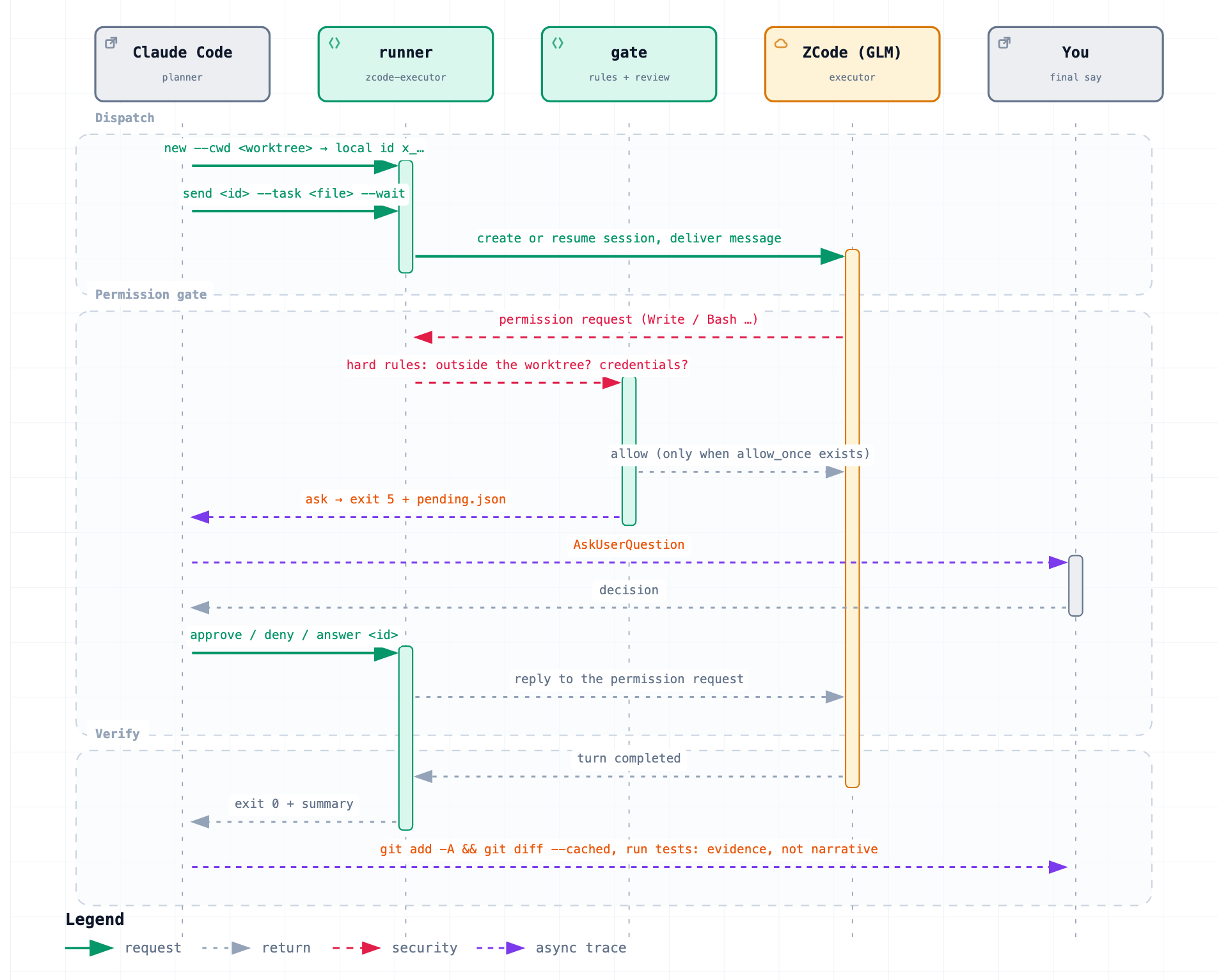
Sequence diagram rendered with archify from assets/how-it-works.en.json.
One runner process per session, always in the background; the CLI only reads files under ~/.zcode-executor/runs/<id>/. Nothing costs tokens except send and the review calls.
The workload below is what it took to build this project: 35 task files, 4 executor sessions, 957M prompt tokens and 2.39M output tokens on the executor side. The same tokens priced three ways at public API list prices, with the cache-read rate fixed at 95% for both models:
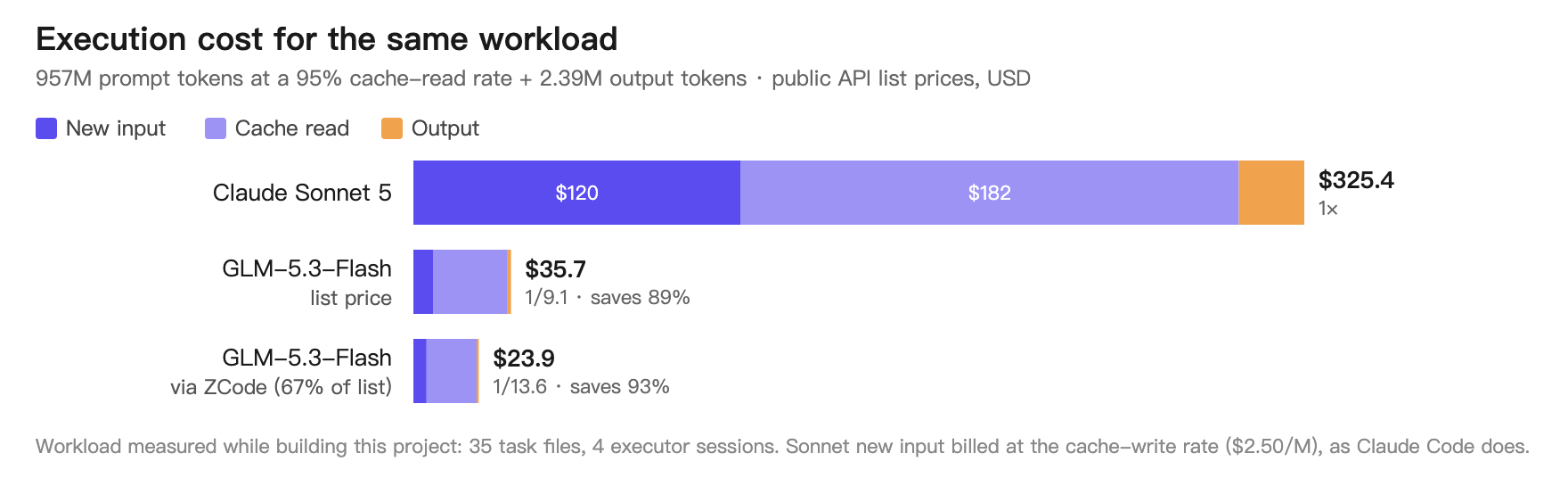
| Executor | New input | Cache read | Output | Total | vs Sonnet 5 |
|---|---|---|---|---|---|
| Claude Sonnet 5 | $119.6 | $181.9 | $23.9 | $325 | 1× |
| GLM-5.3-Flash, list price | $7.2 | $27.3 | $1.2 | $35.7 | 1/9.1, saves 89% |
| GLM-5.3-Flash via ZCode (67% of list) | $4.8 | $18.3 | $0.8 | $23.9 | 1/13.6, saves 93% |
Prices used (USD per million tokens): Sonnet 5 $2.50 cache write / $0.20 cache read / $10 output; GLM-5.3-Flash $0.15 / $0.03 / $0.50. Sonnet's new input is billed at the cache-write rate because Claude Code writes every turn into the cache. Cache reads dominate: in an agent loop the whole context is re-read every turn, so the cache-read price is what decides the gap. The measured cache-read rate was actually 99.3%; at that rate the ratio is 7.5× and 11.2×. The planner's cost is the same in every scenario and is left out. Prices as of September 2026: Claude, Z.ai.
This repository is both the plugin and its own marketplace.
claude plugin marketplace add kyomio/zcode-executor      # or a local path
claude plugin install zcode-executor@zcode-executor --scope user
bin/zcode-executor is added to Bash's PATH while the plugin is enabled; the skill appears as /zcode-executor:zcode-executor. Saying "let zcode do it" triggers it.
The plugin also ships a Claude Code mod (a module of function hooks, hooks/): type /zcode to open the watch pane, a live view of this project's zcode sessions. It also opens by itself when Claude sends a task, and adds a status-line summary and toasts. Nothing to configure; it needs a Claude Code version with function-hook mods (the API is in early access).
The npm package is the DSH plugin: the root package.json carries the dsh definition (cordis.patch.yml bundle + right-sidebar client), and the plugin code is the built output under dsh-plugin/lib/ (sources in dsh-plugin/). In the DSH desktop app's plugin page, just install by the npm package name zcode-executor — the app registers the bundle by itself; no manual link: or config editing. The plugin teaches the DSH agent the full dispatch flow (the skill auto-symlinks into ~/.dsh/skills/) and adds the "zcode 任务" tab to the official right sidebar — the same live watch pane, refreshing about once a second at zero quota. Local development: pnpm install && npm run build inside dsh-plugin/, then restart the desktop app.
The repo root ships a native kimi.plugin.json (skills only; the Claude Code mod above is Claude-only and not included). Register it into the personal market once, then install from the 个人 tab:
kimi-daimon kimi-plugin register-personal /path/to/zcode-executor
Like the agents below, Kimi Work does not put the plugin's bin/ on PATH — the skill falls back to bin/zcode-executor relative to the plugin root, or npx zcode-executor. Saying 「让 zcode 去做」「派给 zcode」 triggers the skill.
codex plugin marketplace add kyomio/zcode-executor        # or a local path
codex plugin add zcode-executor@zcode-executor
Two differences from Claude Code: Codex does not put a plugin's bin/ on PATH (the skill tells the agent where the binary lives), and the default workspace-write sandbox blocks writes to ~/.zcode-executor — add it to [sandbox_workspace_write] writable_roots in ~/.codex/config.toml or approve when prompted.
This repository doubles as a Copilot CLI plugin marketplace.
copilot plugin marketplace add kyomio/zcode-executor
copilot plugin install zcode-executor@zcode-executor
A gemini-extension.json at the repo root makes it a Gemini CLI extension; the bundled skills/ are discovered automatically.
gemini extensions install https://github.com/kyomio/zcode-executor
Antigravity (agy) loads the native .antigravity-plugin/plugin.json; skills under skills/ load automatically.
agy plugin install https://github.com/kyomio/zcode-executor
pi reads the pi field in package.json and installs the package directly.
pi install npm:zcode-executor
No manifest needed — link the skill into its user skills directory:
ln -s "$(npm root -g)/zcode-executor/skills/zcode-executor" ~/.openclaw/skills/zcode-executor
The repo root ships a Hermes plugin.yaml; install, then enable:
hermes plugins install kyomio/zcode-executor
hermes plugins enable zcode-executor
.grok-plugin/ carries its marketplace manifests, and the skill itself is one symlink away (it also reads ~/.agents/skills/):
ln -s "$(npm root -g)/zcode-executor/skills/zcode-executor" ~/.grok/skills/zcode-executor
None of the seven agents above puts the plugin's bin/ on PATH the way Claude Code does — run npm install -g zcode-executor once, or let the skill fall back to npx zcode-executor; the SKILL.md covers both.
npm install -g zcode-executor   # zero dependencies, nothing to build
zcode-executor doctor           # zero-token self-check
Or run it without installing: npx zcode-executor doctor. The skill ships in the package at $(npm root -g)/zcode-executor/skills/zcode-executor/; copy or symlink it into your agent's skills directory. The CLI itself has no Claude-specific dependency.
SKILL=$(npm root -g)/zcode-executor/skills/zcode-executor
mkdir -p ~/.claude/skills && ln -s "$SKILL" ~/.claude/skills/zcode-executor
Swap in your own agent's directory from this table:
| Agent | User skills directory |
|---|---|
| Claude Code | ~/.claude/skills |
| Codex | ~/.codex/skills |
| Gemini CLI / Antigravity | ~/.gemini/skills |
| Grok Build | ~/.grok/skills |
| Hermes | ~/.hermes/skills |
| OpenClaw | ~/.openclaw/skills |
| opencode | ~/.config/opencode/skills |
| Shared (several agents read it) | ~/.agents/skills |
git clone https://github.com/kyomio/zcode-executor && cd zcode-executor
npm link && zcode-executor doctor
ln -s "$PWD/skills/zcode-executor" ~/.claude/skills/zcode-executor
Swap in your agent's directory from the table in the npm section above.
/Applications/…, /opt/ZCode/…, /usr/share/zcode/…); installed anywhere else, point ZCODE_BIN at zcode.cjs.node:sqlite).~/.zcode/v2/credentials.json (individual and team plans; only the four keys it needs are ever read, plus zcodejwttoken for off-peak sends) — or an API-key provider in ~/.zcode/v2/config.json. Both files are read-only; nothing is ever written back.This is how zcode-executor itself was built:
zcode-executor; the permission gate handles the routine approvals.git diff and runs the tests; if they hold, it dispatches an Opus subagent for a line-by-line code review. Findings go back to the same ZCode session as a follow-up task file.The split keeps the expensive model on judgment and the cheap one on typing.
The pane is not Claude Code-only: the Claude Code plugin and the DSH plugin each ship one, both fed by the same watch --json stream.
Claude Code (terminal or the desktop Code tab): type /zcode to open a live pane showing what this project's zcode sessions are doing:
KyoMio/zcode-executor is a public repo on GitHub by KyoMio. Claude plans, ZCode codes, git verifies. Hand a development task to the local ZCode (GLM) agent in an isolated worktree, with a hard-rule + model-review permission gate. 把开发任务派给本机 ZCode 执行,worktree 隔离,红线加模型审批,git diff 验收.
It declares the Apache-2.0 license on GitHub.
Its maker tagged it for macOS, Windows and Linux, or as Docker or cross-platform. That is declared by the maker; Take My Repo has not tested it.
Makes your AI agent think like the laziest senior dev in the room. The best code is the code you never wrote.
The agent harness performance optimization system. Skills, instincts, memory, security, and research-first development for Claude Code, Codex, Opencode, Cursor and beyond.
Open "Take it" on its page: Take My Repo writes an install plan for your machine and hands it to your AI agent (Claude Code, Codex or Cursor), which asks you before each step. Take My Repo has not tested it on any machine.
Its last change on GitHub was on 2026-11-23. GitHub counts 0 open issues and pull requests. Take My Repo does not judge from that whether it is maintained.
Nobody has reviewed it on Take My Repo yet, which says nothing about its quality.
Take My Repo cannot say: it does not audit code and has not run zcode-executor. What is known comes from GitHub. It declares the Apache-2.0 license on GitHub. Its last change was on 2026-11-23. It has 8 stars, which measure popularity, not safety. Nobody has reviewed it on Take My Repo yet, which says nothing about its quality. Read the source before you run it. With "Take it", your AI agent shows each step and asks you before running it; README text is treated as data, not as instructions.