Bootstrapper
A lightweight, agnostic module loader and scheduler for Roblox. Eliminate load-order bugs and race conditions by organizing your modules into a deterministic pipeline. Define exactly what runs, and in what order, every single frame.
Why use this?
As Roblox projects scale, developers often fall into the trap of decentralized execution. Every module, controller or service connects to RunService independently, and, before long, you have dozens of scripts updating independently every frame. Without strict control over whether your InputController runs before or after your CharacterController, you inevitably run into state bugs, race conditions, and one-frame delays.
Bootstrapper solves this by treating execution flow as a single, managed pipeline. By organizing your modules into simple arrays and updating them in a strict sequence, you completely eliminate unpredictable load orders and execution desyncs. Bootstrapper makes sure things happen exactly when you tell them to and doesn't care if you write OOP, functional, or procedural code.
Features
- Deterministic Execution: Load modules alphabetically or provide a strict manual sequence. Your game will start exactly the same way every single time.
- Centralized Scheduler: Iterate over your modules and fire their updates synchronously.
- Luau Method Syntax: Use standard dot or colon notation (
. or :) in your string arguments to explicitly call functions or inject self for object methods.
- Flexible Event Binding: Hook a sequence of modules directly to
RunService events, RBXScriptSignals, or custom Signal objects.
- Built-in Profiling: Modules are loaded and run under their own memory category, so the Developer Console shows memory usage per module. Call
Bootstrapper.setProfiling(true) to do the same for bound methods and label them in the MicroProfiler.
- Lazy Require: Pass raw
ModuleScript instances directly as argument. Bootstrapper will automatically require them.
Installation
Wally
Add this to your wally.toml:
ldgerrits/bootstrapper@2.0.0
Model File
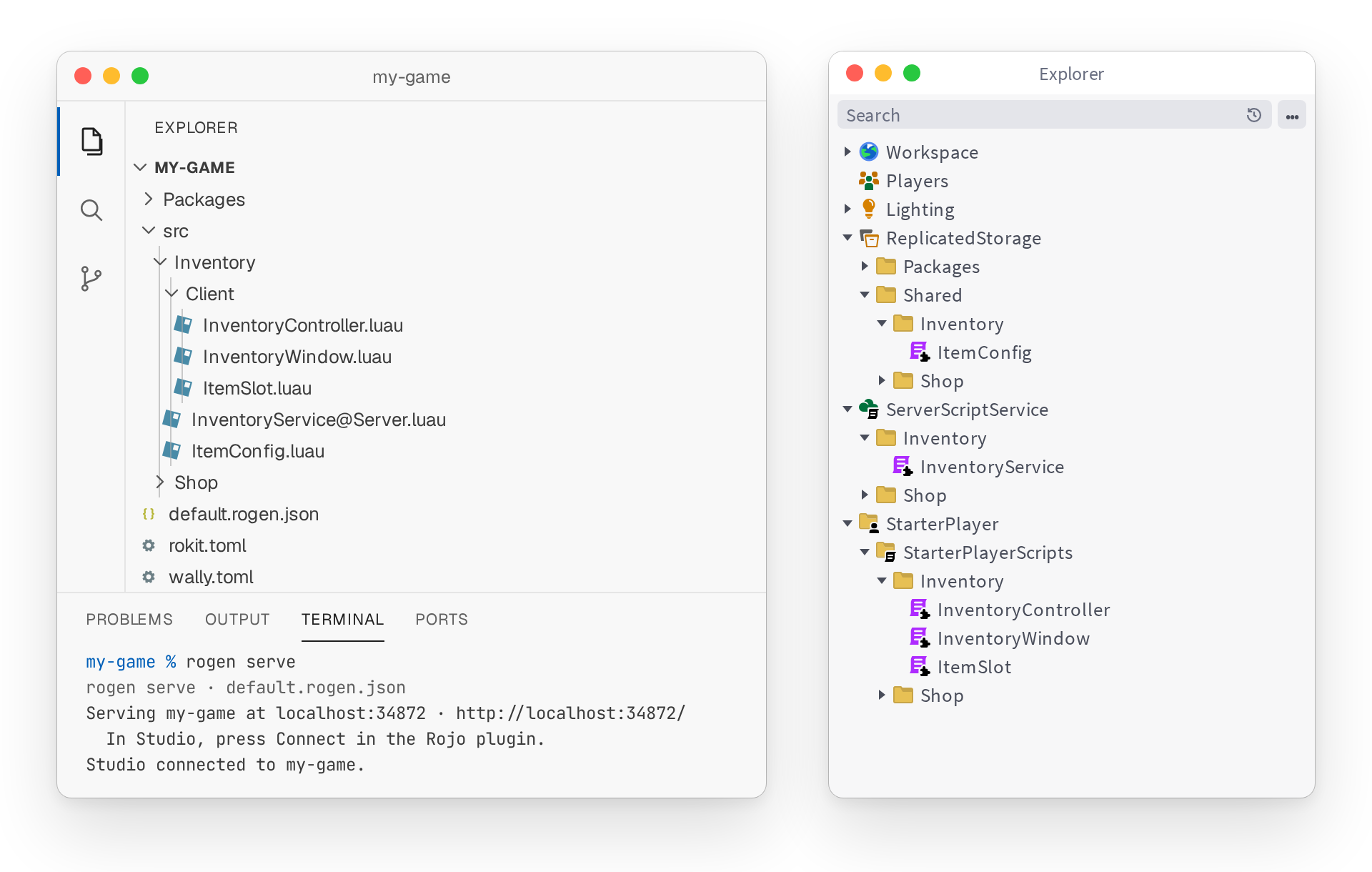
Download Bootstrapper.rbxm from the latest release and drag it into ReplicatedStorage in Studio.
Quick Start
local Bootstrapper = require(packages.Bootstrapper)

-- Strict boot sequence (manual order for core systems)
local bootSequence = { path.to.DataService, path.to.PlayerService, path.to.ZoneService }
Bootstrapper.run(bootSequence, ':init') -- injects self
Bootstrapper.spawn(bootSequence, ':start') -- injects self

-- Automatic discovery (A-Z sorted)
local systems = Bootstrapper.loadChildren(path.to.Systems, Bootstrapper.byName('System$'))

-- Use '.run()' for a strict A-Z sequence, or '.runConcurrent()' if not
Bootstrapper.run(systems, '.init') -- does NOT inject self

-- Use '.spawn()' or '.spawnConcurrent()' for methods that keep running
Bootstrapper.spawnConcurrent(systems, '.start') -- does NOT inject self

-- Maintains alphabetical execution every frame.
Bootstrapper.bindToHeartbeat(systems, '.onUpdate') -- does NOT inject self

-- Run every second without drift.
Bootstrapper.bindToInterval(systems, '.onTick', 1.0) -- does NOT inject self
Usage
1. Finding & Loading Modules
Load modules from a folder. Bootstrapper automatically requires them and returns a deterministically sorted array (alphabetical by Name), ensuring your game starts the same way every time.
local Bootstrapper = require(path.to.Bootstrapper)

local services, errors = Bootstrapper.loadDescendants(path.to.Services, Bootstrapper.byName('Service$'))
2. Manual Sequences
You can use .load() to define a manual order using an array of ModuleScript instances. This sequence can be stored and reused for all lifecycle stages. Like the other load functions, it takes an optional predicate.
local services, errors = Bootstrapper.load({
    path.to.DataService,
    path.to.PlayerService,
    path.to.AssetService,
})

-- Use the resulting services array for everything else
Bootstrapper.run(services, '.init')
3. Dot vs. Colon Notation
When passing a method name to any Bootstrapper function, you can dictate how the function is executed:
-- Injects 'self' into every module's '.onUpdate()' method
Bootstrapper.bindToHeartbeat(services, ':onUpdate') -- injects self
Bootstrapper.bindToHeartbeat(services, 'onUpdate') -- functionally the same as ':onUpdate'


-- Calls '.tick()' statically, without passing the module table
Bootstrapper.bindToInterval(services, '.tick', 1.0) -- does NOT inject self
4. Lazy Require
You don't have to call a loader function. Pass an array of ModuleScripts directly to any function, and Bootstrapper handles the require() automatically.
-- This works even if the modules haven't been required yet
Bootstrapper.bindToHeartbeat({
    path.to.CombatService,
    path.to.VFXService,
}, '.onUpdate')
5. Execution Flow Control
-
.run(): Sequential & Yielding. Yields until every module finishes in order. Returns every loaded module except those whose method errored, plus an error map.
-
.runConcurrent(): Concurrent & Yielding. Fires all methods simultaneously and yields until every module finishes. Methods start in order but may finish in any order. Returns every loaded module except those whose method errored, in their original order, plus an error map.
-
.spawn(): Sequential & Non-yielding. Executes the sequence in a background thread while maintaining order.
-
.spawnConcurrent(): Concurrent & Non-yielding. Fires all methods simultaneously. Best for independent tasks where order doesn't matter.
.run() and .runConcurrent() warn when they are still yielding after 10 seconds. Use .spawn() or .spawnConcurrent() for methods that never return, such as game loops.
The error map is keyed by each module's full name, such as ServerScriptService.Services.DataService.
-- Sequential & Yielding
-- Drops modules whose init errored, so they are not started below
local services, errors = Bootstrapper.run(services, '.init')

-- Concurrent & Yielding
Bootstrapper.runConcurrent(services, '.loadData')

-- Sequential & Non-yielding
Bootstrapper.spawn(services, '.postInit')

-- Concurrent & Non-yielding
Bootstrapper.spawnConcurrent(services, '.start', gameState)
6. Event Binding
Route RunService events or signals directly to module methods. All binding functions follow the same signature: (modules, methodName, [context]).
local cleanupRenderStep = Bootstrapper.bindToRenderStep(services, '.onRender', Enum.RenderPriority.Last.Value)
local cleanupInterval = Bootstrapper.bindToInterval(systems, '.onTick', 1.0)
local cleanupGameState = Bootstrapper.bindTo(services, '.onGameState', GameState.Changed)

-- Disconnect everything when they are no longer needed
cleanupRenderStep()
cleanupInterval()
cleanupGameState()