
dotfiles
🚧🛠️ .files and setup configs - to help overcome my fear of setting up a new machine
- 1
- 16 mo ago
Repo LSYS/dotfiles, read from GitHub 1 min ago. LSYS has not joined Take My Repo.
In short
LSYS/dotfiles is a public repo on GitHub by LSYS. 🚧🛠️ .files and setup configs - to help overcome my fear of setting up a new machine. It declares no license on GitHub. Public does not mean open source: without a license, nobody is granted the right to reuse it. It is written mainly in Shell, has 1 stars and last changed on 2025-07-29. Nobody has reviewed it on Take My Repo yet, which says nothing about its quality. Read from GitHub on 2026-11-20.
My .files and setup configurations

show/hide
My key concerns/needs
- WSL
- Use package managers whenever possible (
apt,brew,winget,choco,npm) - Dotfiles are symlinked from this repo into
$HOME - (Mini)Conda, Jupyter, Python
- LaTeX + reveal-md for typesetting
- Bash with
Oh-My-Posh
Installation: Main Scripts
Using the bootstrap script
The bootstrap file will take care of installing almost everything in my Linux subsystem. Just cd into the local folder of this repo and run ./bootstrap. This bootstrap script calls the individual installers to set up the dotfiles, bin/, and package installers using APT, Homebrew (Linuxbrew), and NPM.
cd $HOME
git clone https://github.com/LSYS/dotfiles.git
cd dotfiles
./bootstrap
Using the PowerShell scripts
The PowerShell scripts in win/ will take care of installing Windows OS applications using winget and, to a smaller extent for applications that cannot be installed from winget, Chocolatey.
To install apps using winget and Chocolatey:
cd win
./winget.ps1
./choco.ps1
Installation: Order of Installation (Win)
-
Install
WSL: OpenPowerShellas administratorwsl --install -d Debian # confirm that bash is running which $SHELL
-
Install Native Windows apps: Open
PowerShell(./choco.ps1need Admin)./winget.ps1 ./choco.ps1
This will install
WindowsTerminalandOh-My-Posh. Typeoh-my-posh font install
to install the fonts and choose Meslo (recommended). Seth the font in WindowTerminal setting (settings.json)
{ "profiles": { "defaults": { "font": { "face": "MesloLGM NF" } } } } -
Open WSL (
Debian) in WindowsTerminal and run thebootstrapinstaller:cd $HOME/dotfiles && ./bootstrap
This will call the following installers:
dotfiles.shwin/wslconfig.shbin/install.shpackages/apt.shpackages/brew.shpackages/npm.shmonty/install.sh
-
Once
Oh-My-Poshis installed viapackages/brew.sh. Check that it workseval "$(oh-my-posh init bash)"
and symlink the poshthemes to home (where
bash/.bash_profilewill look for the themes)cd $HOME && mkdir poshthemes && cd poshthemes ln -s /home/linuxbrew/.linuxbrew/opt/oh-my-posh/themes/*
Additional Details
Bash
Will be installed in ./dotfiles.sh.
.
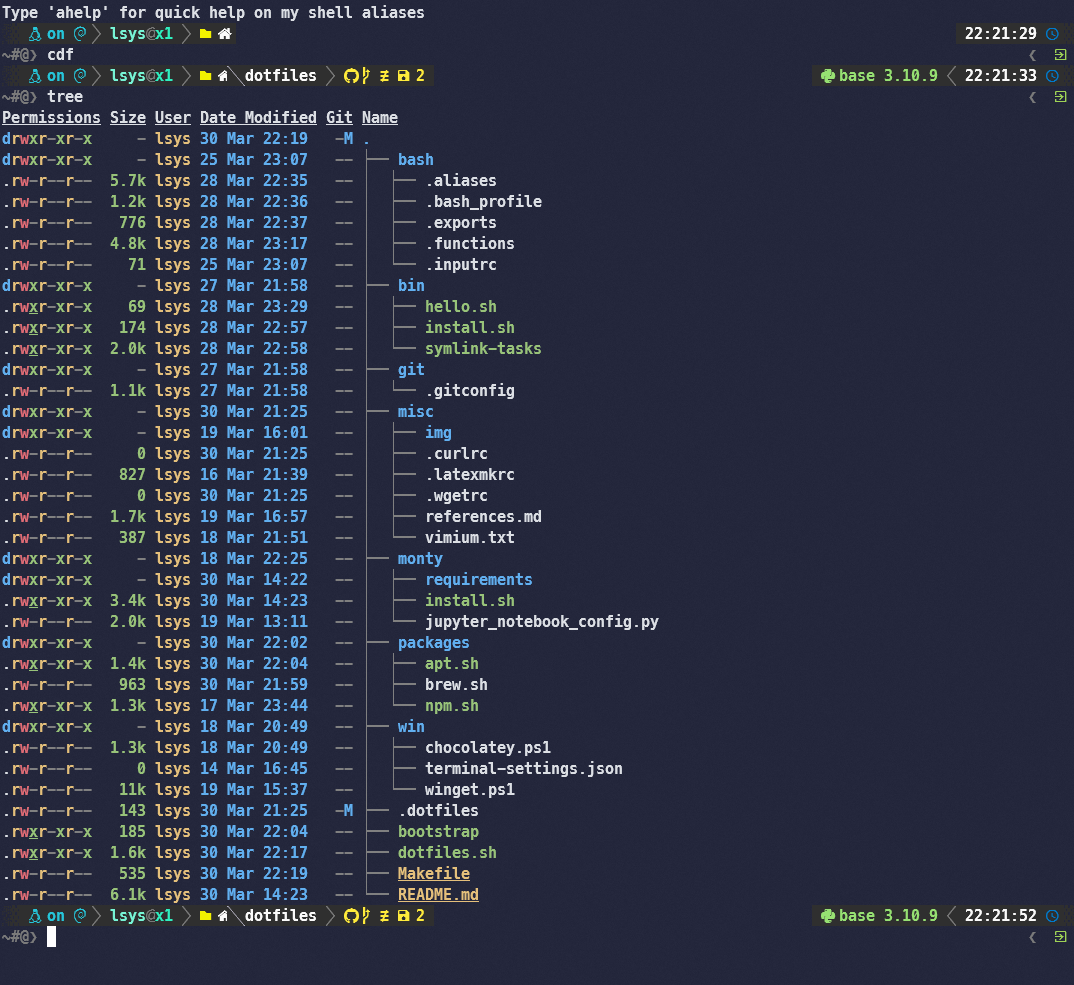
├── bash
│  ├── .aliases
│  ├── .bash_profile
│  ├── .exports
│  ├── .functions
│  └── .inputrc
.aliases: Shell aliases defined here (including some forGit).bash_profile: General bash settings (includingOh-My-Poshand sources other bashdotfiles).exports: Forenvironment variables(e.g., custom shell utilities andcondais specified here).functions: For functions too big foraliasesbut too small forbin/.inputrc: Config for input (case-insensitive completionhere)- Run
make cleancrto sanitize shell scrips for \cr carriage returns (might lead to unexpected, and quiet, breakages)
(Note: .bash_profile is the first config that will be read by bash. So this file will source all other relevant dotfiles.)
Git
Will be installed in ./dotfiles.sh.
├── git
│  └── .gitconfig
.gitconfig: Includes Git aliases.
Python + (Mini)Conda (./monty/)
Will be installed by ./monty/install.sh.
├── monty
│  ├── install.sh
│  ├── jupyter_notebook_config.py
│  └── requirements
│     ├── base.txt
│     ├── dev.txt
│     ├── docs.txt
│     └── gis.txt
jupyter_notebook_config.py: Needed to make sure notebooks open in browser (native from Windows)install.sh: Installs Miniconda, Jupyter Notebook (and its extensions), installs base packages into base, createsvenv(s) and installs the relevant packages into thevenv(s).
Packages
Will be installed by packages/apt.sh, packages/brew.sh, and packages/npm.sh.
├── packages
│  ├── apt.sh
│  ├── brew.sh
│  └── npm.sh
apt.sh: Installs utilities fromAPT.brew.shSets up and installLinuxbrew.npm.sh: Sets upNVMandNPM. Installsreveal-md(reveal.js) and other utilities only available fromNPM.
Windows
Will be installed by win/winget.ps1 and win/choco.ps1 (using PowerShell; win/choco.ps1 will require admin priviledges).
├── win
│  ├── .wslconfig
│  ├── .wslconfig-x1
│  ├── chocolatey.ps1
│  ├── terminal-settings.json
│  ├── winget.ps1
│  └── wslconfig.sh
winget.ps1: Installswingetand follow up by installing other applications (e.g. Chrome, WindowsTerminal, Oh-My-Posh, GNUMake, PowerToys, 7zip, Slack, Sublime Text, Git etc.).chocolatey.ps1: InstallsChocolateyand other Windows app that cannot be installed bywinget(e.g., MikTex, TexStudio, tree, postgresql, pgadmin4, du, etc.). This will requirePowerShelladmin priviledges.wslconfig.sh: Installs.wslconfigtoc/Users/<username>
Miscellaneous (./misc/)
├── misc
│  ├── img
│  ├── .curlrc
│  ├── .latexmkrc
│  ├── .wgetrc
│  ├── references.md
│  └── vimium.txt
References
Questions
What is dotfiles?
LSYS/dotfiles is a public repo on GitHub by LSYS. 🚧🛠️ .files and setup configs - to help overcome my fear of setting up a new machine.
Is dotfiles open source?
It declares no license on GitHub. Public does not mean open source: without a license, nobody is granted the right to reuse it.
Does dotfiles run on macOS, Windows or Linux?
Its maker has not tagged a system, so it is unknown here. Its README says what it needs.
How do I install dotfiles?
Open "Take it" on its page: Take My Repo writes an install plan for your machine and hands it to your AI agent (Claude Code, Codex or Cursor), which asks you before each step. Take My Repo has not tested it on any machine.
Is dotfiles still maintained?
Its last change on GitHub was on 2025-07-29. Take My Repo does not judge from that whether it is maintained.
What do people who ran dotfiles say?
Nobody has reviewed it on Take My Repo yet, which says nothing about its quality.