
AutoSubtitle
AI-powered video subtitle generator with Whisper + LLM translation
- 16
- 9 mo ago
Repo Linwei-Chen/AutoSubtitle, read from GitHub 1 min ago. Linwei-Chen has not joined Take My Repo.
In short
Linwei-Chen/AutoSubtitle is a public repo on GitHub by Linwei-Chen. AI-powered video subtitle generator with Whisper + LLM translation. It declares no license on GitHub. Public does not mean open source: without a license, nobody is granted the right to reuse it. It is written mainly in Python, has 16 stars and last changed on 2026-03-07. Nobody has reviewed it on Take My Repo yet, which says nothing about its quality. Read from GitHub on 2026-11-24.

AutoSubtitle
AI-powered video subtitle generator with translation
Speech recognition (Whisper) + LLM translation + SRT generation, all in one GUI.
Features • Screenshots • Installation • Usage • Build macOS App • Project Structure • FAQ • License
Features
- Speech Recognition — Powered by faster-whisper (CTranslate2), runs locally on CPU with no cloud dependency
- Multi-language Support — Auto-detect or manually select source language (Japanese, English, Chinese, Korean, French, German, Spanish, Russian)
- LLM Translation — Translate subtitles via any OpenAI-compatible API (LM Studio, Ollama, OpenAI, DeepSeek, etc.)
- Bilingual Subtitles — Generated SRT files contain both original and translated text
- Batch Processing — Import entire folders, process hundreds of videos overnight unattended
- Burn-in Option — Optionally hardcode subtitles into the video file (FFmpeg)
- Bilingual UI — Switch between Chinese and English interface with one click
- macOS App — Build as a standalone
.appbundle with DMG installer, no Python required - Drag & Drop — Drag video files directly into the app window
- Smart Folder Import — Recursively scans folders, automatically skips videos that already have subtitles
Supported Formats
| Input Video | Output |
|---|---|
.mp4 .mkv .avi .mov .ts .m2ts .webm .wmv |
.srt subtitle file (+ optional burned-in video) |
Whisper Models
| Model | Size | Speed | Accuracy | Recommended For |
|---|---|---|---|---|
tiny |
~75 MB | Fastest | Low | Quick tests |
base |
~150 MB | Fast | Fair | Short clips |
small |
~500 MB | Medium | Good | General use |
medium |
~1.5 GB | Slow | Great | Recommended |
large-v3 |
~3 GB | Slowest | Best | Maximum accuracy |
Models are downloaded automatically on first use and cached at ~/.cache/vr-subtitle-app/whisper/.
Sensitivity Presets
| Preset | Best For |
|---|---|
| Conservative | Noisy environments, only clear speech |
| Standard | Balanced, works for most videos |
| Sensitive | Videos with low audio volume |
| Max | Catches all speech, may include false positives |
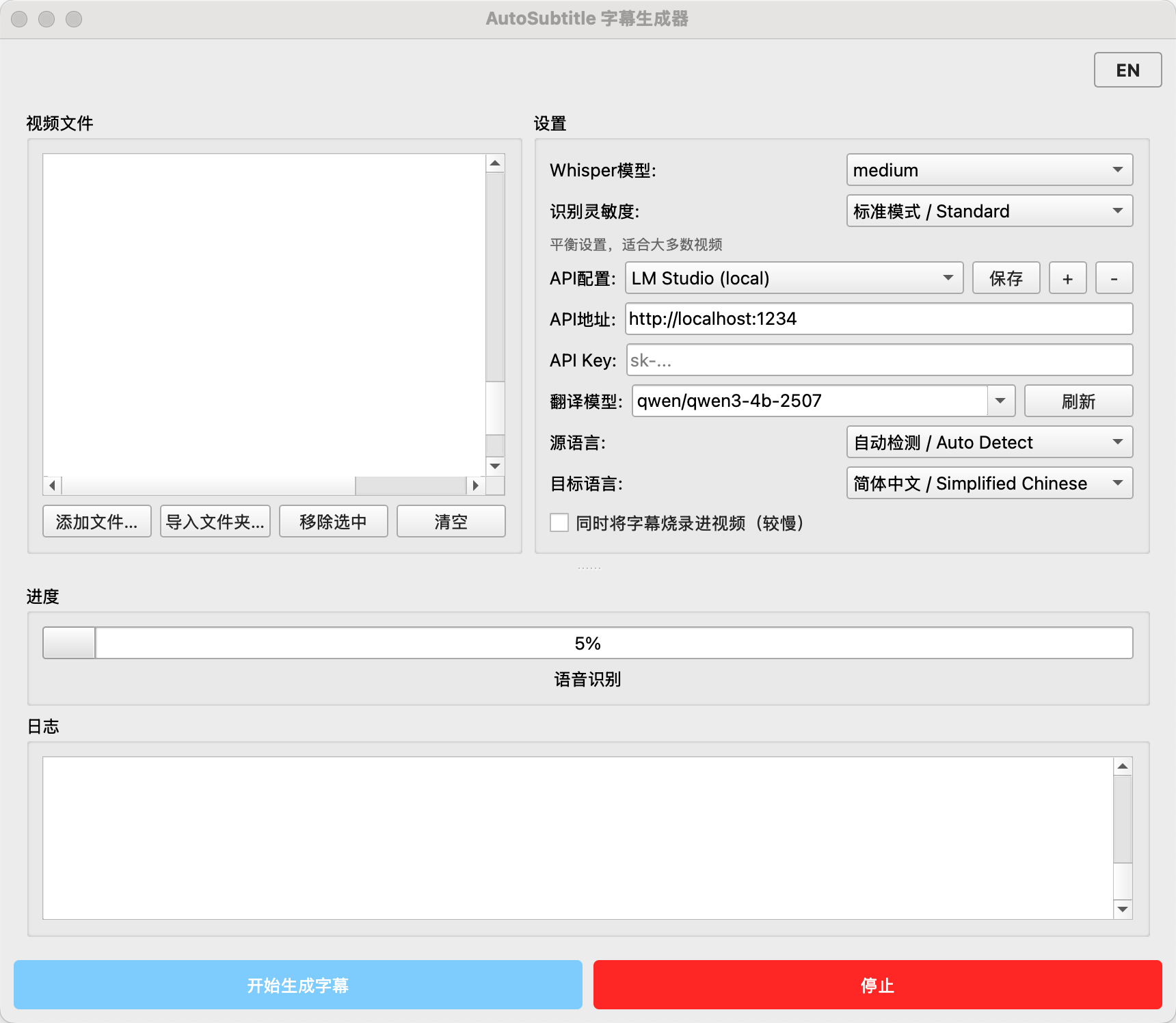
Screenshots

Installation
Prerequisites
- Python 3.10+ (3.11 recommended)
- FFmpeg — must be in your system PATH
From Source
# Clone the repository
git clone https://github.com/Linwei-Chen/AutoSubtitle.git
cd AutoSubtitle

# (Recommended) Create a virtual environment
conda create -n autosub python=3.11
conda activate autosub
# or: python -m venv venv && source venv/bin/activate

# Install dependencies
pip install -r requirements.txt

# Run
python main.py
macOS DMG (Pre-built)
Download the latest .dmg from the Releases page.
Note: The app is unsigned. On first launch:
- Right-click the app → Open, or
- Run in Terminal:
xattr -cr /Applications/AutoSubtitle.app
Usage
Quick Start
- Launch the app (
python main.pyor openAutoSubtitle.app) - Add videos — Click "Add Files" / "Add Folder", or drag & drop
- Select Whisper model —
mediumis recommended for most cases - Configure translation API — Enter your API URL and key (see below)
- Choose languages — Source language (or Auto Detect) and target language
- Click Start — Sit back and wait
Translation API Setup
AutoSubtitle works with any OpenAI-compatible chat completions API:
| Provider | API URL | API Key |
|---|---|---|
| LM Studio (local) | http://localhost:1234 |
(leave empty) |
| Ollama (local) | http://localhost:11434 |
(leave empty) |
| OpenAI | https://api.openai.com |
sk-... |
| DeepSeek | https://api.deepseek.com |
sk-... |
You can save multiple API profiles and switch between them.
Click Refresh to fetch available models from the API, or type a model name directly (e.g., gpt-4o-mini, deepseek-chat).
Batch Processing
- Click Add Folder to import an entire directory
- The app recursively scans for video files and skips those that already have a matching
.srt - Click Start — all files are processed sequentially in a background thread
- You can safely minimize the window or leave it running overnight
Output
- SRT file is saved next to the original video with the same filename:
video.mp4→video.srt - If Burn subtitles is checked, a new video file is created:
video.mp4→video_subtitled.mp4 - SRT format is bilingual (original + translation):
1
00:00:01,200 --> 00:00:03,800
これは日本語のテストです
This is a Japanese test

2
00:00:04,100 --> 00:00:06,500
字幕が自動で生成されます
Subtitles are generated automatically
Build macOS App
Build a standalone .app bundle and DMG installer:
# 1. Make sure you have a conda environment with all dependencies
conda create -n vr-sub python=3.11
conda activate vr-sub
pip install -r requirements.txt

# 2. Run the build script (downloads static FFmpeg, builds with PyInstaller, creates DMG)
chmod +x build_macos.sh
./build_macos.sh
The output DMG will be at dist/AutoSubtitle.dmg.
What the Build Script Does
- Installs PyInstaller
- Downloads static
ffmpegandffprobebinaries (if not already present) - Builds the app bundle with PyInstaller using
vr_subtitle.spec - Creates a compressed DMG image
Build Customization
Edit vr_subtitle.spec to customize:
hiddenimports— Add additional Python packagesexcludes— Remove unnecessary packages to reduce sizeinfo_plist— Modify app metadata, bundle identifier, etc.
Project Structure
AutoSubtitle/
├── main.py                  # GUI entry point (PyQt5 MainWindow + worker thread)
├── i18n.py                  # Bilingual UI strings (Chinese/English)
├── process_video.py         # Standalone CLI script for single video
├── requirements.txt         # Python dependencies
│
├── engines/
│   ├── whisper_engine.py    # Speech recognition (faster-whisper + Silero VAD)
│   ├── translator.py        # LLM translation (OpenAI-compatible API)
│   ├── languages.py         # Language code mappings + prompt generation
│   └── subtitle.py          # SRT file generation
│
├── utils/
│   ├── ffmpeg_utils.py      # Audio extraction + subtitle burning (FFmpeg)
│   └── config.py            # Persistent user config (~/.config/autosubtitle/)
│
├── assets/
│   ├── icon.icns            # macOS app icon
│   └── icon_1024.png        # Source icon (1024x1024)
│
├── build_macos.sh           # One-click macOS build script
├── vr_subtitle.spec         # PyInstaller configuration
└── entitlements.plist       # macOS hardened runtime entitlements
Architecture
┌──────────────────────────────────────────────────┐
│                   PyQt5 GUI                       │
│         (main thread — UI + signals)              │
└──────────────────┬───────────────────────────────┘
                   │ start
                   ▼
┌──────────────────────────────────────────────────┐
│              SubtitleWorker (QThread)             │
│                                                   │
│  for each video in queue:                         │
│    1. FFmpeg: extract audio → WAV (16kHz mono)    │
│    2. Whisper: transcribe → segments              │
│    3. LLM API: translate each segment             │
│    4. Write bilingual .srt file                   │
│    5. (Optional) FFmpeg: burn subtitles           │
│                                                   │
│  ► Entire batch runs in one thread               │
│  ► No main-thread dependency between files        │
└──────────────────────────────────────────────────┘
Configuration
User configuration is stored at ~/.config/autosubtitle/config.json:
{
  "profiles": [
    {
      "name": "LM Studio (local)",
      "api_base": "http://localhost:1234",
      "api_key": ""
    },
    {
      "name": "OpenAI",
      "api_base": "https://api.openai.com",
      "api_key": "sk-..."
    }
  ],
  "active_profile": 0
}
Crash logs (if any) are written to ~/.config/autosubtitle/crash.log.
FAQ
Q: The app says "connection failed" when I click Refresh
Make sure your translation API is running. For local models:
- LM Studio: Start the local server (default port 1234)
- Ollama: Run
ollama serve(default port 11434)
For cloud APIs, check that your API key is correct.
Q: Whisper model download is slow
Models are downloaded from Hugging Face on first use. If you're in China or have slow connectivity, consider setting an HF mirror:
export HF_ENDPOINT=https://hf-mirror.com
python main.py
Q: Can I use it without translation (transcription only)?
Currently the app always runs the translation step. As a workaround, set the source and target language to the same language — the LLM will effectively pass through the original text.
Q: macOS says the app is damaged / can't be opened
The app is unsigned. Run this command to remove the quarantine flag:
xattr -cr /Applications/AutoSubtitle.app
Or: Right-click → Open → Open.
Q: Processing stops when I minimize the window (macOS)
This has been fixed. The app disables macOS App Nap via Info.plist and NSProcessInfo activity assertions. If you experience this on an older version, please update.
Q: How much memory does it use?
| Whisper Model | Approx. RAM |
|---|---|
| tiny | ~300 MB |
| base | ~500 MB |
| small | ~1 GB |
| medium | ~2 GB |
| large-v3 | ~4 GB |
The model is loaded once and reused across all files in a batch.
Q: What about GPU acceleration?
Currently the app runs Whisper on CPU with int8 quantization. GPU support (CUDA/Metal) could be added by modifying device and compute_type in engines/whisper_engine.py.
Dependencies
| Package | Purpose |
|---|---|
| faster-whisper | Speech recognition (CTranslate2 backend) |
| PyQt5 | GUI framework |
| requests | HTTP client for translation API |
| srt | SRT subtitle file parsing/generation |
| FFmpeg | Audio extraction and subtitle burning (external binary) |
Contributing
Questions
What is AutoSubtitle?
Linwei-Chen/AutoSubtitle is a public repo on GitHub by Linwei-Chen. AI-powered video subtitle generator with Whisper + LLM translation.
Is AutoSubtitle open source?
It declares no license on GitHub. Public does not mean open source: without a license, nobody is granted the right to reuse it.
Does AutoSubtitle run on macOS, Windows or Linux?
Its maker tagged it for macOS, Windows and Linux, or as Docker or cross-platform. That is declared by the maker; Take My Repo has not tested it.