
simdjson
Parsing gigabytes of JSON per second : used by Facebook/Meta Velox, the Node.js runtime, ClickHouse, WatermelonDB, Apache Doris, Milvus, StarRocks
- 25k
- C++
- Apache-2.0
- 18 h ago
Explore different ways to extend python with high performance tools to enhance performance of the system.
Repo MDRCS/High-Performance-Python, read from GitHub 1 min ago. MDRCS has not joined Take My Repo.
MDRCS/High-Performance-Python is a public repo on GitHub by MDRCS. Explore different ways to extend python with high performance tools to enhance performance of the system. It declares the MIT license on GitHub. It is written mainly in C++, has 3 stars and last changed on 2020-06-23. Nobody has reviewed it on Take My Repo yet, which says nothing about its quality. Read from GitHub on 2026-11-24.
Parsing gigabytes of JSON per second : used by Facebook/Meta Velox, the Node.js runtime, ClickHouse, WatermelonDB, Apache Doris, Milvus, StarRocks
Explore different ways to extend python with high performance tools to enhance performance of the system.
Remembering the Pareto principle (or the 80/20 rule) is useful: we need only use Cython in the 20 percent of the code that occupies 80 percent (or more) of the runtime. The other 80 percent of the code can (and should) remain unmodified.
In general, computing units have advanced quite slowly over the past decade (see Figure 1-1). Clock speeds and IPC have both been stagnant because of the physical limitations of making transistors smaller and smaller. As a result, chip manufacturers have been relying on other methods to gain more speed, including simultaneous multithreading (where multiple threads can run at once), more clever out-of-order execution, and multicore architectures.
Multithreading : Hyperthreading presents a virtual second CPU to the host operating system (OS), and clever hardware logic tries to interleave two threads of instructions into the execution units on a single CPU. When successful, gains of up to 30% over a single thread can be achieved. Typically, this works well when the units of work across both threads use different types of execution units—for example, one performs floating-point operations and the other performs integer operations.
Python Problem with Multicore programming : Furthermore, a major hurdle with utilizing multiple cores in Python is Python’s use of a global interpreter lock (GIL). The GIL makes sure that a Python process can run only one instruction at a time, regardless of the number of cores it is currently using. This means that even though some Python code has access to multiple cores at a time, only one core is running a Python instruction at any given time. Using the previous example of a survey, this would mean that even if we had 100 question askers, only one person could ask a question and listen to a response at a time. This effectively removes any sort of benefit from having multiple question askers! While this may seem like quite a hurdle, especially if the current trend in computing is to have multiple computing units rather than having faster ones, this problem can be avoided by using other standard library tools, like multiprocessing, technologies like numpy or numexpr, Cython, or distributed models of computing.
Memory Units For example, most memory units perform much better when they read one large chunk of data as opposed to many small chunks (this is referred to as sequential read versus random data). If the data in these memory units is thought of as pages in a large book, this means that most memory units have better read/write speeds when going through the book page by page rather than constantly flipping from one random page to another. While this fact is generally true across all memory units, the amount that this affects each type is drastically different.
Here is a short description of the various memory units that are commonly found inside a standard workstation, in order of read/write speeds:2
Spinning hard drive Long-term storage that persists even when the computer is shut down. Generally has slow read/write speeds because the disk must be physically spun and moved. Degraded performance with random access patterns but very large capacity (10 terabyte range).
Solid-state hard drive Similar to a spinning hard drive, with faster read/write speeds but smaller capacity (1 terabyte range).
RAM Used to store application code and data (such as any variables being used). Has fast read/write characteristics and performs well with random access patterns, but is generally limited in capacity (64 gigabyte range).
L1/L2 cache Extremely fast read/write speeds. Data going to the CPU must go through here. Very small capacity (megabytes range).
++ Many modes of communication exist, but all are variants on a thing called a bus : The frontside bus, for example, is the connection between the RAM and the L1/L2 cache. It moves data that is ready to be transformed by the processor into the staging ground to get ready for calculation, and it moves finished calculations out. There are other buses, too, such as the external bus that acts as the main route from hardware devices (such as hard drives and networking cards) to the CPU and system memory. This external bus is generally slower than the frontside bus.
Network Communication : In addition to the communication blocks within the computer, the network can be thought of as yet another communication block. This block, though, is much more pliable than the ones discussed previously; a network device can be connected to a memory device, such as a network attached storage (NAS) device or another computing block, as in a computing node in a cluster. However, network communications are generally much slower than the other types of communications mentioned previously. While the frontside bus can transfer dozens of gigabits per second, the network is limited to the order of several dozen megabits.
IDEALIZED COMPUTING When the code starts, we have the value of number stored in RAM. To calculate sqrt_number, we need to send the value of number to the CPU. Ideally, we could send the value once; it would get stored inside the CPU’s L1/L2 cache, and the CPU would do the calculations and then send the values back to RAM to get stored. This scenario is ideal because we have minimized the number of reads of the value of number from RAM, instead opting for reads from the
$ python -m cProfile -o fib.prof fib.py $ pip3 install snakeviz --user
$ snakeviz fib.profile
Cython is two closely related things:
• Cython is a programming language that blends Python with the static type system of C and C++.
• cython is a compiler that translates Cython source code into efficient C or C++ source code. This source can then be compiled into a Python extension module or a
  standalone executable.

+  Cython’s beauty is this: it combines Python’s expressiveness and dy‐ namism with C’s bare-metal performance while still feeling like Python.

Comparing Python, C, and Cython
Consider a simple Python function fib that computes the nth Fibonacci number:1

As mentioned previously, Cython understands Python code, so our unmodified Python fib function is also valid Cython code. To convert the dynamically typed Python version
to the statically typed Cython version, we use the cdef Cython statement to declare the statically typed C variables i, a, and b. Even for readers who haven’t seen Cython
code before, it should be straightforward to understand what is going on.

check the implementations in ./benchmarks

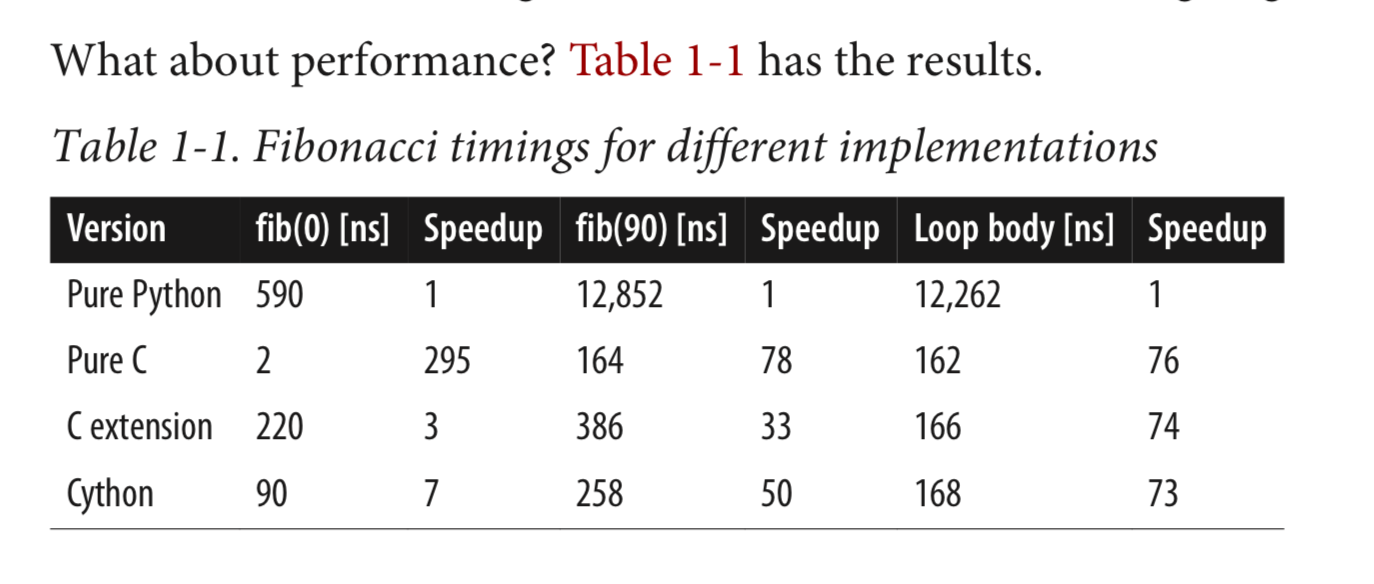
Pure Python
The first row (after the header) measures the performance of the pure-Python ver‐ sion of fib, and as expected, it has the poorest performance by a significant
margin in all categories. In particular, the call overhead for fib(0) is over half a microsec‐ ond on this system. Each loop iteration in fib(90) requires nearly
150 nanosec‐ onds; Python leaves much room for improvement.

Pure C
The second row measures the performance of the pure-C version of fib. In this version there is no interaction with the Python runtime, so there is minimal call
overhead; this also means it cannot be used from Python. This version provides a bound for the best performance we can reasonably expect from a simple serial fib
function. The fib(0) value indicates that C function call overhead is minimal (2 nanoseconds) when compared to Python, and the fib(90) runtime (164 nanosec‐ onds)
is nearly 80 times faster than Python’s on this particular system.

Hand-written C extension
The third row measures a hand-written C extension module for Python 2. This extension module requires several dozen lines of C code, most of it boilerplate that calls
the Python/C API. When calling from Python, the extension module must convert Python objects to C data, compute the Fibonacci number in C, and convert the result back
to a Python object. Its call overhead (the fib(0) column) is corre‐ spondingly larger than that of the pure-C version, which does not have to convert from and to Python
objects. Because it is written in C, it is about three times faster than pure Python for fib(0). It also gives a nice factor-of-30 speedup for fib(90).

Cython
The last row measures the performance for the Cython version. Like the C exten‐ sion, it is usable from Python, so it must convert Python objects to C data before it can
compute the Fibonacci number, and then convert the result back to Python. Because of this overhead, it cannot match the pure-C version for fib(0), but, no‐ tably, it has
about 2.5 times less overhead than the hand-written C extension. Be‐ cause of this reduced call overhead, it is able to provide a speedup of about a factor of 50 over
pure Python for fib(90).

So, when properly accounting for Python overhead, we see that Cython achieves C-level performance. Moreover, it does better than the hand-written C extension module on
the Python-to-C conversions.

That said, if we determine via profiling that the bottleneck in our program is due to it being I/O or network bound, then we cannot expect Cython to provide a significant improvement
in performance. It is worth determining the kind of performance bottle‐ neck you have before turning to Cython—it is a powerful tool, but it must be used in the right way.
check code in the directory -> ./wrapping-c-code-with-cython

+ code wrap_fib.pyx :
The cdef extern block may not be immediately transparent, but certain elements are easily identified: we provide the cfib.h header filename in the cdef extern from statement,
and we declare the cfib function’s signature in the block’s indented body. After the cdef extern block, we define a fib Python wrapper function, which calls cfib and returns its result.

++ After compiling the preceding Cython code into an extension module named wrap_fib
we can use it from Python:
    >>> from wrap_fib import fib
    >>> help(fib)
    Help on built-in function fib in module wrap_fib:
        fib(...)
            Returns the nth Fibonacci number.
    >>> fib(90) 2.880067194370816e+18 >>>

Cython’s wrap‐ per code is better optimized than a hand-written version of the same.
MDRCS/High-Performance-Python is a public repo on GitHub by MDRCS. Explore different ways to extend python with high performance tools to enhance performance of the system.
It declares the MIT license on GitHub.
Its maker has not tagged a system, so it is unknown here. Its README says what it needs.
Dear ImGui: Bloat-free Graphical User interface for C++ with minimal dependencies
Open "Take it" on its page: Take My Repo writes an install plan for your machine and hands it to your AI agent (Claude Code, Codex or Cursor), which asks you before each step. Take My Repo has not tested it on any machine.
Its last change on GitHub was on 2020-06-23. GitHub counts 0 open issues and pull requests. Take My Repo does not judge from that whether it is maintained.
Nobody has reviewed it on Take My Repo yet, which says nothing about its quality.
Take My Repo cannot say: it does not audit code and has not run High-Performance-Python. What is known comes from GitHub. It declares the MIT license on GitHub. Its last change was on 2020-06-23. It has 3 stars, which measure popularity, not safety. Nobody has reviewed it on Take My Repo yet, which says nothing about its quality. Read the source before you run it. With "Take it", your AI agent shows each step and asks you before running it; README text is treated as data, not as instructions.