
Shakespeare-Method
The Shakespeare-Method repository contains the code we used to develop a new method to identify attributed and unattributed potential adverse events using the unstructured notes portion of electronic health records.
- 7
- GPL-3.0
- 5 y ago
Repo MIT-LCP/Shakespeare-Method, read from GitHub 1 d ago. MIT-LCP has not joined Take My Repo.
In short
MIT-LCP/Shakespeare-Method is a public repo on GitHub by MIT-LCP. The Shakespeare-Method repository contains the code we used to develop a new method to identify attributed and unattributed potential adverse events using the unstructured notes portion of electronic health records. It declares the GPL-3.0 license on GitHub. It is written mainly in HTML, has 7 stars and last changed on 2022-03-03. Nobody has reviewed it on Take My Repo yet, which says nothing about its quality. Read from GitHub on 2026-11-22.
Similar repos

Shakespeare-Method
Text mining electronic health records
The Shakespeare-Method repository contains the code we used (in a user friendly tutorial style) to develop a new method to identify attributed and unattributed potential adverse events using the unstructured notes portion of electronic health records. This repository consists of ipython notebooks that are meant to be linear and easy to follow without having to understand the entire codebase. The level of abstraction has been kept to a minimum for this reason. Copies of the notebooks rendered as PDFs are provided in the /pdf/ directory for quick viewing.
Many methods for finding AEs in text rely on pre-defining possible AEs before searching for pre-specified words and phrases or manual labeling (standardization) by investigators. We developed a method to identify possible AEs, even if unknown or unattributed, without any pre-specifications or standardization of notes. Our method is inspired by word-frequency analysis methods used to uncover the true authorship of disputed works credited to William Shakespeare.
We chose two use cases, “Transfusion” and “Time Periods”. Transfusion was chosen because new transfusion adverse event (AE) types were becoming recognized during the study data period; therefore, we anticipated an opportunity to find unattributed potential AEs (PAEs) in the notes. With the “Time Periods” case we wanted to simulate near real time surveillance. We chose time periods in the hope of detecting PAEs due to contaminated heparin during mid-2007 to mid-2008 that were announced in early 2008. We hypothesized that the prevalence of contaminated heparin may have been widespread enough to manifest in EHRs through symptoms related to heparin adverse events, independent of clinicians’ documentation of attributed AEs.
We used EHRs for adult critical care admissions at a major teaching hospital, 2001-2012 (MIMIC III Database). For each case, we formed a group of interest and a comparison group. We concatenated the text notes for each admission into one document sorted by date, and deleted replicate sentences and lists. We identified statistically significant words in the group of interest vs. the comparison group. Documents in the group of interest were filtered to those words, followed by topic modeling on the filtered documents to produce topics. For each topic, the three documents with the maximum topic scores were manually reviewed to identify PAEs.
Definitions of terms in MIMIC III notes
We started a spreadsheet of unfamiliar (to us) terms, definitions, and references found in the MIMIC III text. Most of these terms are not standard terms available in standard sources such as UMLS. A description and the file of definitions can be downloaded from this repository as a .csv or .xlsx.
The Shakespeare Method has five steps:
- Step 1. Convert each document into a vector of n-gram (term) frequencies.
- Step 2. Create two groups of vectors: target and comparison.
- Step 3. Extract terms in the target group that are significant for the target group.
- Step 4. Apply topic analysis to the target group filtered vectors.
- Step 5. Review the original documents that have topic scores of interest to interpret the topics and find potential adverse events.
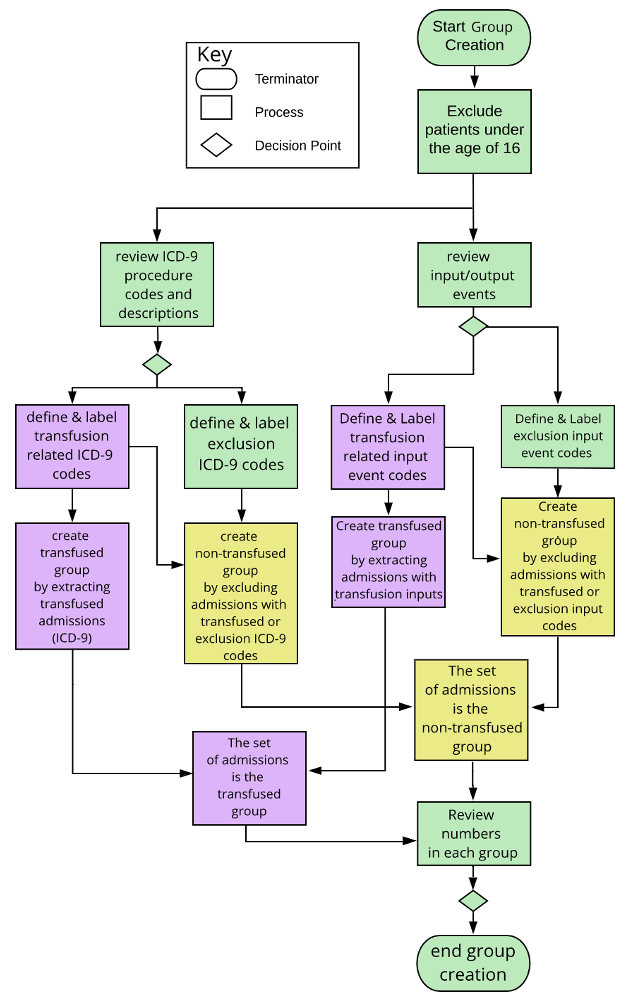
Step 2 is described in detail in Bright RA, Bright-Ponte, SJ, Palmer LA, Rankin, SK, Blok S. Use of Diagnosis Codes to Find Blood Transfusion Adverse Events in Electronic Health Records. medRxiv 2020.12.30.20218610. https://doi.org/10.1101/2020.12.30.20218610.
The other steps are described in detail in this repository. A flowchart of this process can be seen below.

Citations
To acknowledge use of the code, please cite the DOI provided via Zenodo:
Summer K. Rankin, Katherine Dowdy, Roselie A. Bright. (2021, May 26). MIT-LCP/Shakespeare-Method: Macbeth (Version v0.3). Zenodo. http://doi.org/10.5281/zenodo.4811611
@software{summer_k_rankin_2021_4811611,
  author       = {Summer K. Rankin and Kate Dowdy and Roselie A. Bright},
  title        = {MIT-LCP/Shakespeare-Method: Macbeth},
  month        = may,
  year         = 2021,
  publisher    = {Zenodo},
  version      = {v0.3},
  doi          = {10.5281/zenodo.4811611},
  url          = {https://doi.org/10.5281/zenodo.4811611}
}
and the papers describing the Shakespeare Method
Roselie A. Bright, Summer K. Rankin, Kate Dowdy, Sergey V. Blok, Susan J. Bright, and Lee Anne M. Palmer. (2021, Aug 11). Finding Potential Adverse Events in the Unstructured Text of Electronic Health Care Records: Development of the Shakespeare Method. JMIRx Med 2021;2(3):e27017 doi: 10.2196/27017 https://xmed.jmir.org/2021/3/e27017
@article{bright_roselie_2021_27017,
  author       = {Roselie A. Bright, Summer K. Rankin, Kate Dowdy, Sergey V. Blok, Susan J. Bright, and Lee Anne M. Palmer},
  title        = {Finding Potential Adverse Events in the Unstructured Text of Electronic Health Care Records: Development of the Shakespeare Method},
  month        = aug,
  year         = 2021,
  journal      = {JMIRx Med},
  volume       = {2},
  number       = {3},
  pages        = {e27017},
  doi          = {10.2196/27017},
  url          = {https://xmed.jmir.org/2021/3/e27017}
}
Bright RA, Bright-Ponte, SJ, Palmer LA, Rankin, SK, Blok S. Use of Diagnosis Codes to Find Blood Transfusion Adverse Events in Electronic Health Records. Journal of Patient Safety: February 21, 2022, doi: 10.1097/PTS.0000000000000946 https://journals.lww.com/journalpatientsafety/Abstract/9000/Use_of_Diagnosis_Codes_to_Find_Blood_Transfusion.98879.aspx
@article{bright_roselie_2022,
    author = {Roselie A. Bright, Susan J. Bright, Lee Anne M. Palmer, Summer K. Rankin, Sergey V. Blok},
    title = {Use of Diagnosis Codes to Find Blood Transfusion Adverse Events in Electronic Health Records},
    month = feb,
    year = 2022,
    journal = {Journal of Patient Safety},
    doi = {10.1097/PTS.0000000000000946},
    url = {https://journals.lww.com/journalpatientsafety/Abstract/9000/Use_of_Diagnosis_Codes_to_Find_Blood_Transfusion.98879.aspx}
    }
Structure of repository
x.y_description
x=major section of analysis
y=order within section
- 1.y = labeling, preprocessing, cleaning, tokenization, vectorization
- 2.y = feature selection
- 3.0 = LDA topic modeling
Data
This project uses the MIMIC III Database. The MIMIC-III database was ingested into in a PostgreSQL (version 10.11 downloaded January 12,2020) database using PostgreSQL scripts from (https://github.com/MIT-LCP/mimic-code/tree/master/buildmimic/postgres, accessed January 12, 2020.
Connecting python to PostgreSQL
The packages we used to connect python to posgreSQL are called psycopg2 and sqlalchemy. You will need to install PostgreSQL and build the MIMIC Database and put the passwords and usernames into the environment variables or directily into the notebook in order to connect to the data. This is typically the first thing in each notebook under package imports.
Directly putting in variables looks like the following:
    conn = psycopg2.connect("dbname=*the_name_of_your_mimic_postgres_database* \
           user=*the_postgres_username_you_set* \
           password=*the_password_you_set_for_postgres_database* \
           options=--search_path=*the _schema_name_in_postgres_for_mimic_database*");

    engine = create_engine('postgresql://username_for_postgres:password_for_posgres@localhost/*mimic_db*')
To see an example of this, let's say I have created a mimic database in my postgreSQL that is called study_mimic, and the username for my PostgreSQL is cool_data_scientist and the password for postgreSQL is data_scientist_password. When you build the mimic database you will give it a schema. You can use anything, but it is common for people to call it mimiciii
So, to connect to this fictional instance of the data we would use these variables like so:
import psycopg2
from sqlalchemy import create_engine, update
conn = psycopg2.connect("dbname=study_mimic user=cool_data_scientist \
                         password=data_scientist_password options=--search_path=mimiciii");
engine = create_engine('postgresql://cool_data_scientist:data_scientist_password@localhost/study_mimic')
cur = conn.cursor();
cur.execute("""SET search_path = mimiciii;""")
If you do not set a password for your local instance of postgres, you can remove that variable.
If your postgres is not running locally, you replace localhost with the url.
The alternative to putting passwords directly into your code (not the most secure practice) is to create environment variables in your new conda environments (see section below for this) and access those. If I create environment variables for the connect and engine parts, they can be accessed using os.environ.get.
import psycopg2
from sqlalchemy import create_engine


POSTGRES_CONNECT = os.environ.get("POSTGRES_CONNECT")
POSTGRES_ENGINE = os.environ.get("POSTGRES_ENGINE")

conn = psycopg2.connect(POSTGRES_CONNECT)

cur = conn.cursor();
cur.execute("""SET search_path = mimiciii;""")

engine = create_engine(POSTGRES_ENGINE)
Environment
Anaconda environments were used to manage python packages and versions. We used both python2 and python3 environments that can be created by using the shakesPy2_environment.yml for python 2.
In a terminal window, after you have installed Anaconda, go into the folder where this repository exists and type the following.
cd Shakespeare-Method
conda env create -f shakesPy2_environment.yml
conda activate shakesPy2_environment
and use env_py3.yml to create a python 3 environment (bloatectomy requires python 3.7 and above).
cd Shakespeare-Method
conda env create -f env_py3.yml
conda activate env_py3
1.0 Create Adult Inputs Table
- Python2 environment
- Time and Transfused studies This notebook is the first of 2 steps to create the cohorts.
Input
patients
admissions
inputevents_mv
inputevents_cv
chartevents
Output
patients_adult
inputevents_mv_adult
inputevents_cv_adult
chartevents_adult
inputs_all
1.1a Transfused Cohort Selection
1.1a_create_transfused_cohort.ipynb
- Python2 environment
- Transfused Study Only
Label admissions and concatenate all notes for a single admission into one note (in chronological order).
Save notes in new tables transfused_notes_sink and ctrl_notes_sink.
Uses ICD-9 codes to create control, transfused, and grey (excluded) groups.
Get chart input items from the 20180717D_ITEMS_related_to_blood_full.csv to create a labeled dictionary of input items that belong to T=transfused, N=non-transfused, or G=grey(exclusion group).
Transfused Group = the union of admissions that have ever had a Transfused ICD-9 code or a Transfused input item.
Control (Non-transfused) = union of admissions that meet all 4 of the following conditions:
- No transfused ICD-9
- No grey ICD-9
- No transfused input item
- No grey input item
Input:
procedures_icd
inputs_all
20180717D_ITEMS_related_to_blood_full.csv
D_items
Output: Postgres tables
transfusion_icd9
grey_icd9
ctrl_icd9
transfusion_items_dict
D_items_labeled
inputs_all_labeled
transfused_hadm_id
grey_hadm_id
ctrl_ids
1.1b Time-based Cohort Selection
1.1b_create_time_based_cohort.ipynb
- Python2 environment
- Time Study Only
Create a table in Postgres of admissions (and corresponding notes) related to heparin time periods by using a specific file that reveals the de-identified dates.
1.1.0 Import hadm_ids for which time key exists
1.1.1 Keep only adults from Carevue
1.1.2 Pull admissions that match the hadm_ids with time key
1.1.3 Pull admit times/ discharge times from admissions table
1.1.4 Save to a new table in posgres
1.1.5 Get notes for those admissions
1.1.6 Calculate which admissions have any leap days
1.1.7 Calculate and apply time shift to all dates to get true dates
1.1.8 Double check the time shifts are correct (compare deltas)
1.1.9 Make tables for notes in this study
Input:
Questions
What is Shakespeare-Method?
MIT-LCP/Shakespeare-Method is a public repo on GitHub by MIT-LCP. The Shakespeare-Method repository contains the code we used to develop a new method to identify attributed and unattributed potential adverse events using the unstructured notes portion of electronic health records.
Is Shakespeare-Method open source?
It declares the GPL-3.0 license on GitHub.
Does Shakespeare-Method run on macOS, Windows or Linux?
Its maker has not tagged a system, so it is unknown here. Its README says what it needs.


