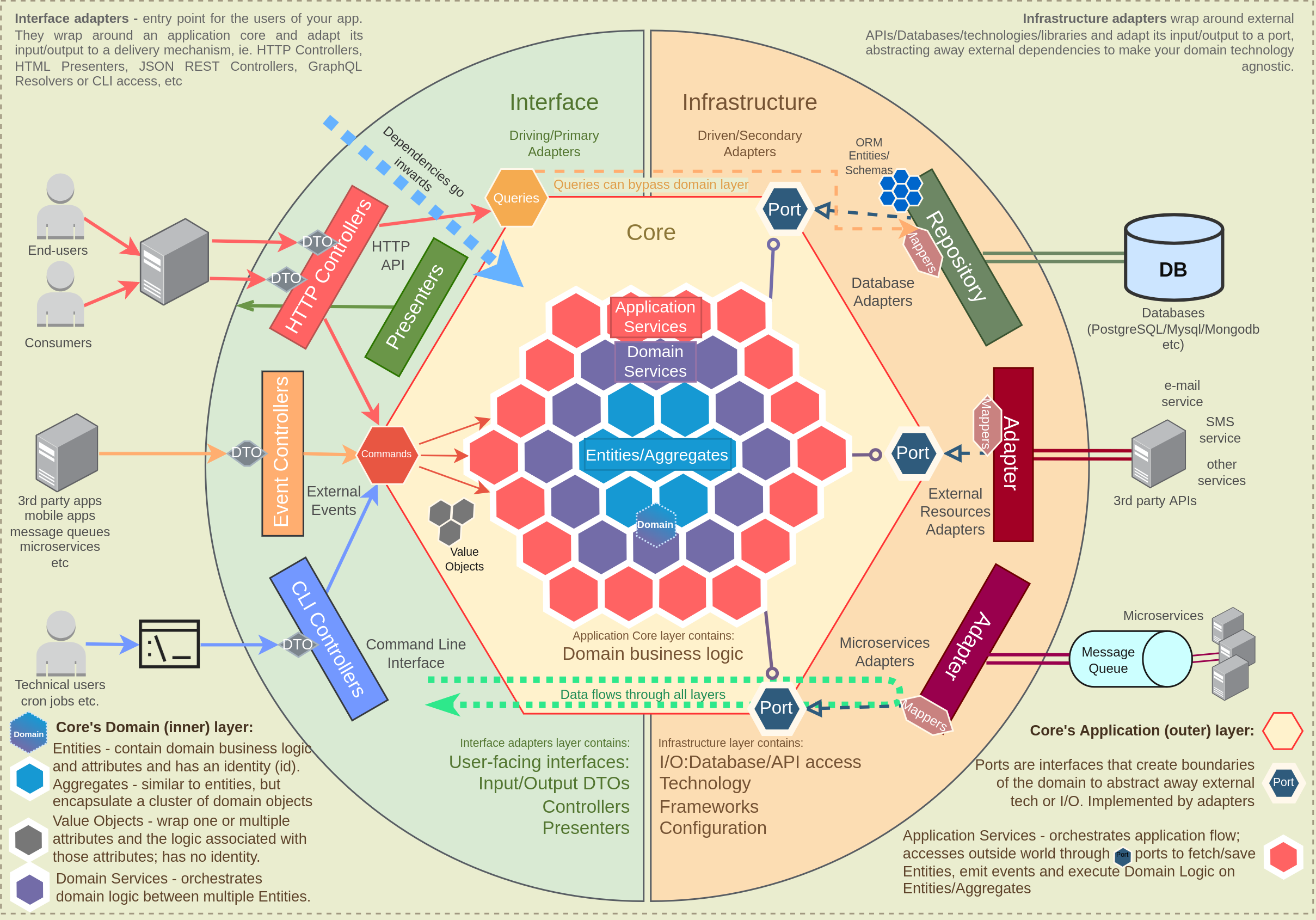
CleanArchitecture
Clean Architecture Solution Template: A proven Clean Architecture Template for ASP.NET Core 10
- 19k
- C#
- MIT
- 2 d ago
Dependency-injection first, domain-driven PDF library for .NET 10 and .NET 11: merges whole documents or selected pages, with every PDF byte read and written in-house.
Repo MPCoreDeveloper/SharpCorePDF, read from GitHub 2 d ago. MPCoreDeveloper has not joined Take My Repo.
MPCoreDeveloper/SharpCorePDF is a public repo on GitHub by MPCoreDeveloper. Dependency-injection first, domain-driven PDF library for .NET 10 and .NET 11: merges whole documents or selected pages, with every PDF byte read and written in-house. It declares the MIT license on GitHub. It is written mainly in C#, has 1 stars and last changed on 2026-11-19. Nobody has reviewed it on Take My Repo yet, which says nothing about its quality. Read from GitHub on 2026-11-23.
Clean Architecture Solution Template: A proven Clean Architecture Template for ASP.NET Core 10
A dependency-injection first, domain-driven PDF creation, editing and reading library for .NET 10 and .NET 11. The merge story comes first: merge, inspect and edit existing PDF files — select, reorder, rotate, duplicate and delete pages, override document information, and record a stationery or watermark layer over or under a page — plus the bounded authoring a merge often needs: a cover page written from nothing.
Every PDF byte is read and written by this library. There is no dependency on a third-party PDF
engine, no native binary and no licence to accept: the reader, the writer and the merge engine are
part of the package, and they are covered by tests against real-world documents and validated with
independent implementations (qpdf via pikepdf, and pypdf).
What it saves you: the measured allocation and wall time, the half-width working set, and an
illustrative cloud-cost model are on docs/cloud-savings.md.
The product boundary is recorded in ADR-001.
The capability target is PDFsharp 6.5 for creation and processing and PdfPig 0.1.x for reading and layout
analysis; rendering, conversion, OCR, conformance validation, services and CLIs stay outside the product.
1.8.0 ships that target for creation, editing and reading — authoring, page editing, over/under layers
and stationery, reading with layout analysis, signatures and PDF/A — with the exceptions docs/parity.md
still records; that file names the release of every row and the test and external command behind it.
Current capability is described below, not the target.
using SharpCorePDF.Domain.Aggregates;
using SharpCorePDF.Domain.Ports;
using SharpCorePDF.Infrastructure.Extensions;

var plan = MergePlan.Create()
    .AddFile(@"C:\reports\summary.pdf")                // every page
    .AddFile(@"C:\reports\appendix.pdf", pages: "1-3") // one-based, "1,3-5,8-"
    .AddFile(@"C:\reports\annex.pdf", pages: "3,1");   // in this order

await merger.MergeToFileAsync(plan, @"C:\reports\combined.pdf");
Page selections in the notation people write: 5, 2-7, 3-, -4, comma separated, in the
order they are given. Page numbers are always one-based.
Everything of every source travels with its pages: content streams, images, fonts, resources, annotations, bookmarks and form widgets. Stream bytes are copied verbatim — nothing is re-compressed.
One flat page tree in the result, with the inheritable page attributes (Resources, MediaBox,
CropBox, Rotate) materialised onto each page, which is what makes partial selections and
reordering possible.
Bookmarks of every source are merged into one tree whose top level items follow the source order.
Document level features — viewer preferences, page layout and mode, the interactive form, named
destinations and embedded files — are carried over from the primary source, because they cannot
sensibly exist twice in one document; page labels are dropped by default and XMP metadata is kept
unless MetadataPolicy says otherwise.
Document information is taken from the primary source, merged from all sources, or suppressed;
an explicit MetadataOverride wins for the fields it can set. Producer and ModificationDate are
output options, not override fields, and fixing the date makes the output reproducible byte for byte.
Encrypted sources are opened, not refused. The standard security handler is implemented for revisions 2 to 6 — RC4, AES-128 and AES-256, including the hardened hash revision 6 introduced — so a source is merged with its user or owner password and every string and stream of it is read in the clear. A document that opens with no password at all, which is the shape of a file that is only protected against editing, needs to be told nothing.
The result can be encrypted, and is written in the clear unless you ask otherwise. Supplying
MergeOutputOptions.Encryption protects the merged document under passwords you choose — RC4-40,
RC4-128, AES-128 or AES-256 (the default), with the permission bits the format defines — and the
strings and streams of the result are sealed as they are written:
var plan = MergePlan.Create()
    .AddFile(@"C:\reports\summary.pdf")
    .AddFile(@"C:\reports\appendix.pdf")
    .WithOutput(options => options with
    {
        Encryption = new PdfEncryptionOptions
        {
            Algorithm = PdfEncryptionAlgorithm.AesWith256BitKey,
            UserPassword = "opens-it",
            OwnerPassword = "owns-it",
            Permissions = PdfPermissions.PrintOnly,
        },
    });
A merge of encrypted sources under new passwords needs nothing from the old ones, and a source that was only protected against editing can be merged and re-protected in one step.
Diagnostics instead of surprises: damaged cross-reference tables are rebuilt by scanning the
file, unselected pages that something still points at are folded onto a page that exists, and
anything the merge had to change is reported in MergeResult.Warnings as a PdfWarning whose
Kind names the condition — the part a caller may match on, while its message is only text.
The fonts a document depends on can be read without opening them. IPdfFontInspector.ReadFontsAsync
answers which fonts a file uses and whether each program travels with it — one entry per font with its
kind, where the program lives (/FontFile, /FontFile2, /FontFile3), the encoding the document
states, whether a /ToUnicode map is present, whether the name carries a subset tag, and the pages that
select it. A standard font that relies on the one the reader already has is reported as carrying no
program rather than as a defect, and a resource that does not resolve is a FontUnreadable warning
beside the fonts that were read. Chapter 26 has the whole answer.
One call can describe the whole file. IPdfDiagnoser.DiagnoseAsync returns a
PdfDiagnosticsReport — the document, its fonts, its signatures, an optional PDF/A pre-flight and the
merged, de-duplicated warnings — assembled from the same use cases the rest of the library uses, so it
cannot disagree with them. The report is read-only and never returns stream contents; a document that
stays closed is reported with IsReadable/RequiresPassword instead of throwing. The
tools/SharpCorePDF.Diagnostics console prints it as text or JSON.
A cover page can be written from nothing and merged in front. PdfDocumentBuilder adds pages of
a chosen size, draws lines of text with one of the twelve standard fonts or a TrueType program you
supply, and places PNG, JPEG, BMP and GIF images at fixed positions — a top-left origin, y
downwards, and the text at a baseline. An embedded font is subsetted, carries a ToUnicode map and
needs no system font; an RGBA PNG gets a soft mask, a JPEG is passed through untouched and a BMP or a
GIF is decoded to its first frame. The document can also carry an XMP packet, a bookmark tree, and
pages copied out of another file, so a cover and the chapters it binds come from one builder. The
result is a PdfByteArraySource, so it merges without a temp file:
var cover = PdfDocumentBuilder.Create()
    .AddPage(PdfPageSize.A4, page => page
        .DrawImage(logoPng, x: 40, y: 30, width: 152, height: 87)
        .DrawText("Veuillez trouver ci-joint le décompte", 150, 400,
            PdfTypeface.Standard(StandardFont.Helvetica), 12))
    .Build("cover.pdf");

var plan = MergePlan.Create()
    .AddSource(PdfSource.Create(cover))
    .AddFile(@"C:\reports\statement.pdf");
It is authoring for fixed-position content, not a page-flow engine: no tables, page breaks or columns,
and vector drawing is shapes placed at coordinates rather than a scene graph. Images are PNG, JPEG, BMP
and GIF (with the refusals docs/parity.md names). A paragraph
does wrap and align inside a fixed box — PdfTextLayouter.Layout measures with the face's own data and
hands DrawTextLayout the lines to draw. Chapter 15 covers the shape surface — paths, fill and stroke,
dashes, clipping, transforms, the saved graphics state and the opacity and blend mode a page selects with
SetAlpha — and Chapter 16 covers measuring and wrapping. The
author-page and draw-shapes scenarios in examples/ show both: one writes a cover and merges it in
front of a document, the other draws a clipped, dashed, rotated page from nothing.
An existing document can be edited into a new one. IPdfDocumentEditor applies an immutable
PdfEditPlan to a source: rotate a page, delete it, move it, duplicate it, and override document
information. Page numbers are one-based and refer to the document state produced by the preceding
operations, so a plan reads from top to bottom. The pages that survive are copied verbatim into a
fresh document; the source is never modified and no temporary file is created beside it.
using SharpCorePDF.Domain.Aggregates;
using SharpCorePDF.Domain.ValueObjects;
using SharpCorePDF.Infrastructure.Sources;

var edit = PdfEditPlan.Create()
    .RotatePage(1, PageRotation.Clockwise90)   // add a quarter turn
    .DeletePage(4)
    .MovePage(3, 1)
    .DuplicatePage(2, 4)                        // append the copy
    .SetMetadata(new PdfMetadata { Title = "Revised statement" });

await using var output = File.Create(@"C:\reports\statement-edited.pdf");
var result = await editor.ApplyAsync(
    new PdfFileSource(@"C:\reports\statement.pdf"), edit, output);
Bookmarks and named destinations are redirected to the first surviving page they named, or to the
first page of the result when the named page was removed; page labels are dropped when the page order
changes, and XMP is dropped when the information dictionary is overridden. Both decisions are reported
in PdfEditResult.Warnings. Chapter 14 of the manual covers the operations, the ordering rules and the
boundary of the feature.
A page can be composed from another document's page. PdfEditPlan.Overlay and .Underlay record
one page of another PDF over or under a page, and PdfStationery maps a background template to a
PageRange, with a default for the pages no assignment covers:
var stationery = PdfStationery.Create()
    .Assign(new PdfFileSource(@"C:\stationery\letterhead.pdf"), PageRange.Single(1))
    .AssignDefault(new PdfFileSource(@"C:\stationery\footer.pdf"));

var plan = PdfEditPlan.Create().ApplyStationery(stationery);
The layer is a form XObject that keeps the resources of the document it came from, so a name it uses
for a font or an image cannot collide with the page's own; the page's content streams are copied
unchanged, so vector graphics and selectable text survive and nothing is rasterized. Assignments are
tried last first, AssignNone opts a range out, and a one-page template repeats while a multi-page one
maps page for page. Chapter 14 of the manual covers the placement, opacity, blend and PDF/A rules.
The dependency injection package wires everything behind its ports:
using SharpCorePDF.DependencyInjection;
using SharpCorePDF.Domain.Ports;

services.AddSharpCorePDF();                                      // default engine options
services.AddSharpCorePDF(PdfEngineOptions.Default with { ... });  // explicit options
services.AddSharpCorePDF(configuration);                         // from the "SharpCorePDF" section
services.AddSharpCorePDF(configuration, "My:Pdf:Section");       // from a section of your choosing

var merger = provider.GetRequiredService<IPdfMerger>();
var inspector = provider.GetRequiredService<IPdfInspector>();
var reader = provider.GetRequiredService<IPdfContentReader>();
Every package targets net10.0 and net11.0 and carries both legs: NuGet hands a net10.0 app the
lib/net10.0 assembly and a net11.0 app the lib/net11.0 one, with exactly the same API on both.
Nothing else is supported yet — there is no netstandard2.0 or net8.0 leg, so a project that targets
.NET 8 or .NET 9 cannot install these packages.
IPdfInspector.InspectAsync describes a document — version, page count and sizes, rotation, metadata,
bookmarks, embedded files, form presence, warnings — and opens an encrypted one with the password it is
given instead of throwing. A document whose encryption stays closed is reported with
PdfDocumentInfo.IsReadable cleared and PdfDocumentInfo.RequiresPassword set when a password is what
stands in the way, so a caller can ask for one instead of being told the document is simply unusable.
IPdfContentReader reads what the document already contains, without changing it. ReadImagesAsync
returns every distinct image a page range paints, naming every page that draws it and the position of its
first draw; ReadAnnotationsAsync returns comments, highlights, stamps and links with their geometry, text
and resolved target; ReadFormFieldsAsync returns the interactive form with fully-qualified field names;
ReadOutlineAsync returns the bookmark tree; ReadEmbeddedFilesAsync returns the attachments with a
distinct identifier each; ReadMetadataAsync returns the XMP packet byte-exact beside the values parsed
from it; ReadTextAsync returns the text the pages draw as blocks of words of glyphs, ordered the way a
reader takes them, with the coordinates and the font each glyph was drawn in; and ReadPageDetailsAsync
yields one page at a time, so a 200-page index never holds a report for the whole document. Every read is a
PdfReadResult<T> — the records plus the warnings that name what could not be read, instead of an
exception. Bytes travel inside a record only within
PdfEngineOptions.MaxInlineContentBytes (256 KiB by default); above that the record says so, ByteLength
stays truthful, and CopyImageDataAsync
MPCoreDeveloper/SharpCorePDF is a public repo on GitHub by MPCoreDeveloper. Dependency-injection first, domain-driven PDF library for .NET 10 and .NET 11: merges whole documents or selected pages, with every PDF byte read and written in-house.
It declares the MIT license on GitHub.
Its maker has not tagged a system, so it is unknown here. Its README says what it needs.
Open "Take it" on its page: Take My Repo writes an install plan for your machine and hands it to your AI agent (Claude Code, Codex or Cursor), which asks you before each step. Take My Repo has not tested it on any machine.
The fastest HTTP/2 Go Web Framework. New, modern and easy to learn. Fast development with Code you control. Unbeatable cost-performance ratio :rocket:
WinMerge is an Open Source differencing and merging tool for Windows. WinMerge can compare both folders and files, presenting differences in a visual text format that is easy to understand and handle.
Learn Domain-Driven Design, software architecture, design patterns, best practices. Code examples included
Its last change on GitHub was on 2026-11-19. Take My Repo does not judge from that whether it is maintained.
Nobody has reviewed it on Take My Repo yet, which says nothing about its quality.
Take My Repo cannot say: it does not audit code and has not run SharpCorePDF. What is known comes from GitHub. It declares the MIT license on GitHub. Its last change was on 2026-11-19. It has 1 stars, which measure popularity, not safety. Nobody has reviewed it on Take My Repo yet, which says nothing about its quality. Read the source before you run it. With "Take it", your AI agent shows each step and asks you before running it; README text is treated as data, not as instructions.