
dsh-commandcode-provider
Command Code provider plugin for DeepSeek Harness (dsh). Adds Command Code model access, live model catalog, plan-aware model selection, reasoning effort, image input, web search, and multi-account support.
- 490
- MIT
- 3 h ago
Repo Mars-Sea/dsh-commandcode-provider, read from GitHub 1 min ago. Mars-Sea has not joined Take My Repo.
In short
Mars-Sea/dsh-commandcode-provider is a public repo on GitHub by Mars-Sea. Command Code provider plugin for DeepSeek Harness (dsh). Adds Command Code model access, live model catalog, plan-aware model selection, reasoning effort, image input, web search, and multi-account support. It declares the MIT license on GitHub. It is written mainly in TypeScript, has 490 stars and last changed on 2026-11-22. Nobody has reviewed it on Take My Repo yet, which says nothing about its quality. Read from GitHub on 2026-11-22.
dsh-commandcode-provider
English | 简体中文
Unofficial DeepSeek Harness LLM provider plugin for Command Code, ported from pi-commandcode-provider (MIT).
Community integration. You need your own Command Code account, API key or subscription, and Command Code's terms apply. Not affiliated with Command Code, Inc.
Quick start
| Verified engines | dsh 0.2.2-rc.1 through 0.2.2-rc.5, and 0.2.3-alpha.2 |
| Node.js | >=24.9 — raised from 22 in 0.16.0, see Node.js 24.9 or newer |
| Install — web | dsh plugin --profile web add @mars-sea/dsh-commandcode-provider@latest |
| Install — terminal | dsh plugin --profile dsh-tui add @mars-sea/dsh-commandcode-provider@latest |
| Config file | $DSH_HOME/settings.yaml → llm-commandcode: |
| API key env | COMMANDCODE_API_KEY |
| Usage dashboard | /commandcode |
Features
- Plugin bundle — one
dsh plugin addinstalls acommandcodeprovider route with the live model catalog. - Settings page — accounts (keys, browser sign-in, live quota, dedicated models), model visibility, privacy switches, connection options.
- Annotated catalog — plan tier, deal/
FREEbadge, peak/off-peak, image support and context window in the picker; free models first. - Custom model names — override a model's display name by catalog id so external tools that match on the name string (peak-hour reminders, cache-pricing plugins) keep working; the model id, request body, pricing and picker order are unchanged.
- Multi-account rotation — an exhausted account hands over to the next one; pin a preferred account or route models to dedicated ones.
- Browser sign-in — run the official authorization flow from the settings page; the approved key lands in the local credential store.
- Plans & quota panel — optional sidebar card with the serving account's plan, 5-hour and weekly windows, balances and reset times.
- Session cost estimate — published-rate estimates (
≈) beside the composer token counter, priced per request from durable session history. - Model analysis — tokens, estimated cost, response timing and failures by session or date range. Scope.
- Web search — the dsh
web_searchtool is served by Command Code (/alpha/web-search) with the same key and endpoint as chat. - Zero data retention — optional ZDR routing (
x-cmd-zdr: 1), off by default. - Context & output limits — override the metered context window globally or per model, and cap or omit the per-turn
max_tokens. - Reasoning effort & images — effort levels in the picker; Vision models accept images.
- Terminal UI — the same install serves a dsh-TUI profile with its own
/settings→ Command Code page.
Screenshots
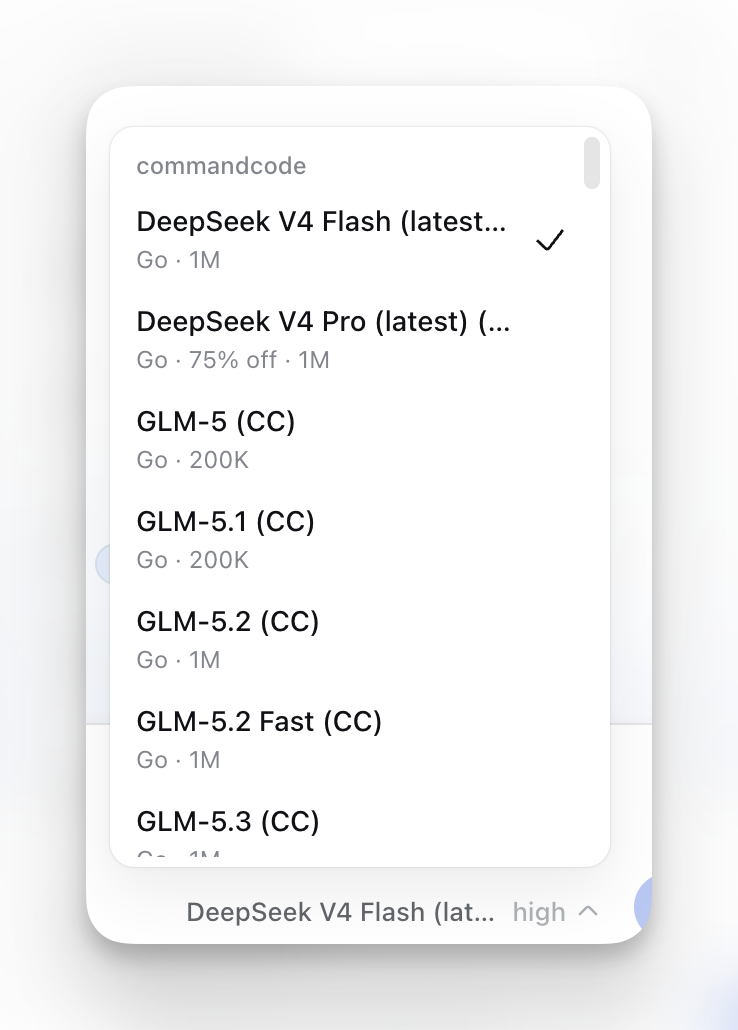
Model picker — plan tier, deal/FREE, peak/off-peak, Image and context annotations:

Usage dashboard — /commandcode per-account report:

Settings page — accounts with live quota, model visibility, privacy switches, connection options:

Install
dsh plugin --profile web add @mars-sea/dsh-commandcode-provider@latest
Version 0.19.0 admits DSH >=0.2.2-rc.1 <0.2.3-0 and >=0.2.3-alpha.2 <0.2.4-0. Profiles on previously supported 0.2.1 RC or 0.2.2 alpha versions can keep using plugin 0.18.3. If your engine is 0.2.3-alpha.1, update to 0.2.3-alpha.2 first. The six tested versions are recorded in dsh.compatibility.dshReleases. Engine compatibility and verification
Node.js 24.9 or newer is required
The Node.js floor was raised from 22 to 24.9 in 0.16.0. On Node 22 or 23, upgrade Node before updating this plugin.
The supported DSH release lines require Node.js 24.9 or newer.
nvm install 24 && nvm use 24 (or any Node 24.9+ distribution) resolves it. Node 24 is a current LTS line.
Older dsh releases are no longer supported: the last plugin release for dsh 0.1.7 is 0.11.17, for 0.1.2–0.1.6 it is 0.11.11, and for the 0.5.0-era line 0.9.1 — all installed by exact version, none maintained.
pnpm 11 holds back new releases.
minimumReleaseAgedefaults to 1440 minutes, so a version published less than a day ago is skipped and@latestresolves to the previous release — silently, with a success exit code. To install a release from the last 24 hours, name it exactly:@mars-sea/dsh-commandcode-provider@0.11.15. This applies to every profile, including the terminal UI below.
Updating
Prefer the Web plugin page. A profile that installed this plugin from the npm registry is marked updatable by dsh: sidebar Plugins → open this plugin → the Versions section below its rows lists newer releases, and Update replaces the installed one. An available update also shows an Updatable badge on the card and Update to in the detail header. The host checks the target first, then removes the old version and installs the target, rolling back to the previous version if that install fails. With HMR the new version starts immediately; without HMR dsh reports that a restart is required. API keys live in the dsh credential store and settings in the profile's cordis.patch.yml, so neither is lost when the package is replaced.
Only registry installs under their own package name get a Versions section. Bundles installed from link: / a local path, a Git address, or a tarball (for example dsh plugin add /path/to/dsh-commandcode-provider during development), and bundles shipped with the installation, do not show it. Use the CLI below for those, or remove the bundle and reinstall with the registry command above. The section recommends the newest non-prerelease, non-deprecated version whose engines.dsh admits the running dsh; prereleases can be revealed manually.
CLI (fallback) — same tag as the install, then restart the web app. Each profile updates separately, because the terminal UI owns its own plugin list:
dsh plugin --profile web update @mars-sea/dsh-commandcode-provider@latest
dsh plugin --profile dsh-tui update @mars-sea/dsh-commandcode-provider@latest
dsh plugin updateis a pnpm passthrough, not the host's plugin-update path;minimumReleaseAgeabove can silently skip a fresh release there too, so name an exact version when needed.
Get an API key and verify it works
Easiest via the official CLI (Node.js 22+):
npm i -g command-code@latest
cmd login        # macOS/Linux; native Windows: cmdc login
Or skip the CLI: click Sign in to Command Code under Settings → Command Code — the browser opens the commandcode.ai authorization page (the same flow cmd login runs) and the key is stored locally once you approve. You can also create a key on the Keys page and paste it, or export COMMANDCODE_API_KEY="user_...".
The sign-in flow needs the Host and your browser on the same machine (loopback callback). With a remote Host, paste the key manually; a literal composition-level
apiKey, if set, still takes precedence over a signed-in credential.
To verify: after restart, enter your API key in Settings → Command Code and save. Settings → Models shows a Command Code card, and the model picker lists the live catalog under commandcode. Send a message with a model your plan includes.
Terminal UI (dsh-TUI)
Each dsh profile owns its own plugin list, so the web install does not reach the terminal — add the plugin to the dsh-tui profile as well, pinned to an exact version (within 24 hours of a release a bare name resolves to the previous build, leaving a fresh install with no /settings → Command Code page and no commandcode models):
dsh plugin --profile dsh-tui add @mars-sea/dsh-commandcode-provider@latest
Then pick the provider in the model selector, or name it directly:
/model commandcode/deepseek/deepseek-v4.1-flash
/model lists every registered provider, with the live catalog and its plan/deal/context annotations; the /commandcode dashboard works there too.
Entering the key. The TUI has no web Models page, so the plugin declares its own page — /settings → Command Code — with the API key, API base, out-of-plan filter, active account and command language. The key field is write-only: it shows whether a key is configured and writes what you type to the credential store, never to a settings document. The same page lists the whole catalog as checkboxes grouped by plan tier, free models first; everything starts checked, and the choice is stored as per-model overrides next to the visibleModels list the web page edits. Custom display names (modelNames) are configurable on the Web settings page only for now; the terminal settings page does not expose them yet (the same boundary as contextWindow, issue #86).
Alternatively set the key outside the TUI. The first match wins:
- A literal
apiKeyin the composition config wins over everything and is always used. - Otherwise the credential reference is resolved (
apiKeyEnv,COMMANDCODE_API_KEYby default). In a profile that mounts the credentials service (Web, desktop, SDK, ACP) that service owns the order: since 0.2.1-alpha.3 a saved credential wins over the launching environment; earlier releases had the environment first. - A headless profile mounts no credentials service on purpose, so only the launching environment, the project
.envand$DSH_HOME/.envapply — a key saved on the page never reaches a headless run. - The last resort is
~/.commandcode/auth.json, written by the official CLI.
export COMMANDCODE_API_KEY="user_..."   # launching environment
cmd login                               # writes ~/.commandcode/auth.json
Making Command Code the default. dsh-TUI pins its own agent route, so its agent-default-model setting does not override it. Override the agent-loop row in your profile patch ($DSH_HOME/profiles/dsh-tui/cordis.patch.yml):
- id: agent-loop
  inject: [tuiStartup]
  config:
    agents:
      - id: main
        provider: commandcode
        model: deepseek/deepseek-v4.1-flash
        reasoningEffort: max
        cwd: !!js process.cwd()
Usage dashboard
The plugin registers a /commandcode slash command showing per-account usage:
/commandcode (or /commandcode status)
Its copy follows the shell's locale: explicit lang: 'en' | 'zh' in the llm-commandcode plugin config wins, otherwise LC_ALL/LANG is read, otherwise it falls back to zh. The web settings page is independent — it follows the browser's language preference.
Account rotation
With several Command Code subscriptions, the plugin switches to the next account automatically when one hits its usage limit:
- Setup — Add account in the Accounts card at Settings → Command Code, then sign in or paste an API key. Account actions (add, rename, replace or clear a key, remove, pin) apply immediately; only the other settings wait for the Save bar. The top-level key always serves first as the
defaultaccount. - Manual switching — Pin this account in an account's ⋯ menu makes it preferred; if it is exhausted, requests fall back to the others and return once its window resets. Unpin returns to automatic rotation.
- Dedicated models — expand an account and pick its Dedicated models from the live catalog. Those requests serve from that account while it is usable; an exhausted account falls back to the normal rotation. A model belongs to one account at a time (stored as
modelAccountRules). - Show only favorite models — the Visible models picker in the Models & context card keeps only the checked models in the picker; unchecked shows all (the default).
Each account row shows its plan, status and 5-hour/weekly meters; expand it for the full report, or run /commandcode. When a refreshed report shows a spent window, that account also leaves automatic selection until the window resets. The equivalent YAML is in Configure.
Configure
Provider ID. This plugin registers the commandcode model route. If you also configure Command Code under llm-pi-ai.config.providers in your profile's cordis.patch.yml, give that entry a distinct key such as commandcode-pi. A duplicate commandcode key can prevent pi-ai from registering its providers and disable Add model provider. To recover, rename the pi-ai entry, update any model selections that reference it, and reload the profile or restart DSH. See issue #129.
Settings → Command Code groups the options as Accounts (keys, sign-in, live quota, pinning, dedicated models), Models & context (out-of-plan filter, visible models, context length, output limit), Privacy & security (zero data retention), Integrations & display (web search, sidebar quota card) and Advanced (API base URL, timeouts, transport retries, image offload). The same options live in $DSH_HOME/settings.yaml and apply immediately, without a restart:
llm-commandcode:
  apiKeyEnv: COMMANDCODE_API_KEY        # first (default) account
  activeAccount: COMMANDCODE_API_KEY_2   # optional: pin the active account
  accounts:                              # optional: rotation order after it
    - label: Go #2
      apiKeyEnv: COMMANDCODE_API_KEY_2
  modelAccountRules:                     # optional: route models to accounts (first match wins)
    - models:                            # catalog model ids (multi-select)
        - deepseek/deepseek-v4-pro
      account: COMMANDCODE_API_KEY_2
  visibleModels:                         # optional: only these models in pickers; unset shows all
    - deepseek/deepseek-v4-pro
  apiBase: https://api.commandcode.ai
  workingDir: /path/to/project           # optional
  modelsCachePath: ~/.commandcode/models-cache.json
  requestTimeoutMs: 300000              # default 300s (the official CLI's own budget)
  streamIdleTimeoutMs: 300000           # default 300s
  # offloadSeenImagesForCache: true     # opt in to CLI cache mitigation
  showSidebarQuota: true                 # optional: sidebar plans & quota card (default off)
  zdr: true                              # optional: zero-data-retention upstreams only (default off)
  # contextWindow: 131072                # optional: custom context length for every model
  # contextWindowOverrides:              # optional: per-model context lengths; wins over contextWindow
  #   deepseek/deepseek-v4-pro: 65536
  # maxOutputTokens: 65536               # optional: per-turn output limit; 0 sends no max_tokens
  # modelNames: { "deepseek/deepseek-v4.1-flash": "DeepSeek V4.1 Flash" }   # optional: display-name overrides by catalog id
Context, output and image tuning
| Option | Effect |
|---|---|
contextWindow, contextWindowOverrides |
Replace the catalog context_length the harness meters and compacts on (issue #86). Use it when the catalog over-reports the window (sessions then fail with context_length_exceeded) or under-reports it (sessions compact too early). Whole tokens in 1 – 10,000,000; 32K/1M shorthand accepted. |
maxOutputTokens |
Per-turn max_tokens cap. Every request already carries max_tokens, resolved as the smallest of the model's published ceiling, the runtime-learned ceiling and the gateway cap of 131,072 — a passive hard limit that cuts the answer with no warning to the model. A positive number can only tighten it; 0 sends no field at all, which is the fix for answers cut off mid-sentence (0 affects the CLI and OpenAI transports only; Claude's Anthropic Messages endpoint requires the field). An empty field clears the setting — it is not the same as writing 0. |
offloadSeenImagesForCache |
On the CLI transport a new image can make the reported prompt cache retreat to the first historical image even when every previous request message is byte-identical. Enabling it replaces an older image with a stable text placeholder once this model has answered with it, so later text stays cached without replaying old pixels. It mitigates the cost spike but does not repair Command Code's multimodal cache behavior, and the model cannot inspect an offloaded image again without rereading the source file. Off by default. Live evidence. |
modelNames |
Optional map of catalog model id → custom display name; only the picker label (LlmModelInfo.name) changes, so external tools that match on the model name string (peak-hour reminders, cache-pricing plugins) can be made to line up — our default (CC) suffix and upstream's (latest) suffix are what break them. Unset or empty (the default) keeps the name exactly as today: ${catalogName} (CC), with any upstream (latest) preserved; an unknown model with no catalog row still shows the bare id. The model id, request body, pricing, peak labels, price table, commandcode/prices wire and Remote descriptor count are unchanged; sorting still uses the catalog original name, so renaming never reorders the picker. Configurable on the Web settings page only for now — the terminal settings page is not wired up. |
Web search
When your deployment mounts the web capability (@deepseek-ai/dsh-web + @deepseek-ai/dsh-tool-web), the model's web_search tool is served by this plugin's commandcode search provider — it calls the Command Code Provider API's /alpha/web-search endpoint with the same API key and base URL as chat, so no separate search key, endpoint or model is needed.
On by default. The "Serve dsh web search with Command Code" toggle (webSearch) selects commandcode as the active search backend; turning it off hands the selection back to whichever backend was there before (a sibling search plugin such as modsearch keeps working). The change takes effect on the next search — no restart.
- The provider registers as
commandcodeonctx.webonly when the web service is present; without it this stays a chat-only plugin. - When the official Web search settings already pin another backend, that explicit choice wins: the plugin keeps
commandcoderegistered but unselected and reports that state. It takes over only while nothing else pins the field, remembers the backend it displaced, and restores it when the toggle goes off or the plugin unloads. To pin it durably, setsearchProvider: commandcode(or$DSH_WEB_SEARCH_PROVIDER=commandcode). numResultsfrom the dsh tool is clamped to the Command Code range (1–10, default 5); results map to the dshWebSearchSourceshape (url/title/snippet).
This reuses the Command Code Provider API directly (like the official CLI's built-in
web_search), so it is distinct from a DeepSeek-native search backend.
Zero data retention (ZDR)
Command Code can serve a request only through upstreams that retain no prompts or completions and never train on them — the same opt-in the official CLI exposes as CMD_ZDR=1, and the x-cmd-zdr: 1 header on the Provider API (official docs).
Off by default. Turn it on with the "Zero data retention (ZDR)" toggle (zdr) in the Privacy & security card, or in your profile config.
- The header is sent on every chat request while ZDR is on. A model without an available ZDR upstream fails with
422 cmd_zdr_no_providers; the request is never retried without the header. - If a refusal still happens (coverage churn, or no spare ZDR capacity at that moment), the error names the cause and how to turn ZDR off instead of surfacing as a bare HTTP 422.
- ZDR usually costs more: capacity is limited and billed at each upstream's pass-through rates, and which upstream serves a request can change per request. The session-cost readout keeps quoting the ordinary catalog rates; the real per-request price shows in Command Code's Studio usage page.
Notes & limitations
- Image input is model-gated — only Vision models accept images; text-only models refuse them, and dsh rejects switching a text-only model into an image-bearing session. The adapter reports the size actually put on the wire (long edge 1568, encoded bytes capped at 1 MiB), and the provider caps a single request (around 50 MB, undocumented); images beyond that budget are replaced by a short "image omitted" note, and an over-sized request is retried once with a smaller image budget.
- No
stopsequences — requests carrying one fail. - Historical reasoning is replayed on both transports so a tool-calling loop keeps its chain of thought:
/provider/v1/chat/completionspasses it back asreasoning_content,/alpha/generatecarries it as areasoningblock inside the rebuilt assistant turn. Only tool calls with a paired tool result are replayed. - Tool parameter schemas are normalized to the object root the provider requires, so a tool declared without one (a third-party plugin's hand-written schema, an MCP server's
inputSchema, a generated root$ref) no longer fails the turn withschema must be a JSON Schema of 'type: "object"'. - The model catalog is browsable without a key; chat requests need one.
Permissions & privacy
The plugin only communicates between your local dsh profile and your Command Code account: locally it touches only the credential store and the models cache (plus ~/.commandcode/auth.json as a last-resort fallback); on the network it calls only the Command Code API. No telemetry. With zero data retention on, chat requests require a ZDR upstream; models without one fail instead of running without the protection.
Disabling / uninstalling
- Disable without removing: edit your profile's
cordis.patch.ymland comment out (or remove) thellm-commandcoderow, or setdisabled: true, then restart. - Uninstall completely:
dsh plugin --profile web remove @mars-sea/dsh-commandcode-provider. Your API key in the dsh credential store and~/.commandcode/auth.jsonare left untouched.
Development
npm install
npm run typecheck   # tsc --noEmit
npm run build       # tsdown -> lib/
To try a local build in a profile: dsh plugin --profile web add /path/to/dsh-commandcode-provider. After changing src/, re-run npm run build and restart the app.
The package exports the plugin root, /client, /locale/*.json, and /package.json. Source remains in the repository; the unpackaged ./src/* export was removed. npm run test:pack checks declared entry points against the actual packed file list.
Reference docs
The engineering detail behind this README lives under docs/agent-reference/:
- adapter and wire contracts — transports, streaming, images, tool calls, reasoning replay, output budget, ZDR header
- accounts and retry — credential resolution, account rotation, rate limits, web search selection
- client and settings — settings pages, browser sign-in, TUI settings, model selection
- usage and cost — session cost readout, price snapshot, compaction accounting
- engine compatibility — supported dsh versions, peer ranges,
engines.dshadmission - model catalog — catalog sync, plan tiers, effort levels, deals, ZDR exception set
Community & feedback
GitHub Repository · GitHub Releases · npm Package · Linux.do 社区
License
MIT — see LICENSE. Portions ported from pi-commandcode-provider (MIT).
Questions
What is dsh-commandcode-provider?
Mars-Sea/dsh-commandcode-provider is a public repo on GitHub by Mars-Sea. Command Code provider plugin for DeepSeek Harness (dsh). Adds Command Code model access, live model catalog, plan-aware model selection, reasoning effort, image input, web search, and multi-account support.
Is dsh-commandcode-provider open source?
It declares the MIT license on GitHub.
Does dsh-commandcode-provider run on macOS, Windows or Linux?
Its maker tagged it for Windows and Linux. That is declared by the maker; Take My Repo has not tested it.
How do I install dsh-commandcode-provider?
Open "Take it" on its page: Take My Repo writes an install plan for your machine and hands it to your AI agent (Claude Code, Codex or Cursor), which asks you before each step. Take My Repo has not tested it on any machine.