
materialize
The live data layer for apps and AI agents. Create up-to-the-second views into your business, just using SQL
- 6.4k
- Rust
- 14 h ago
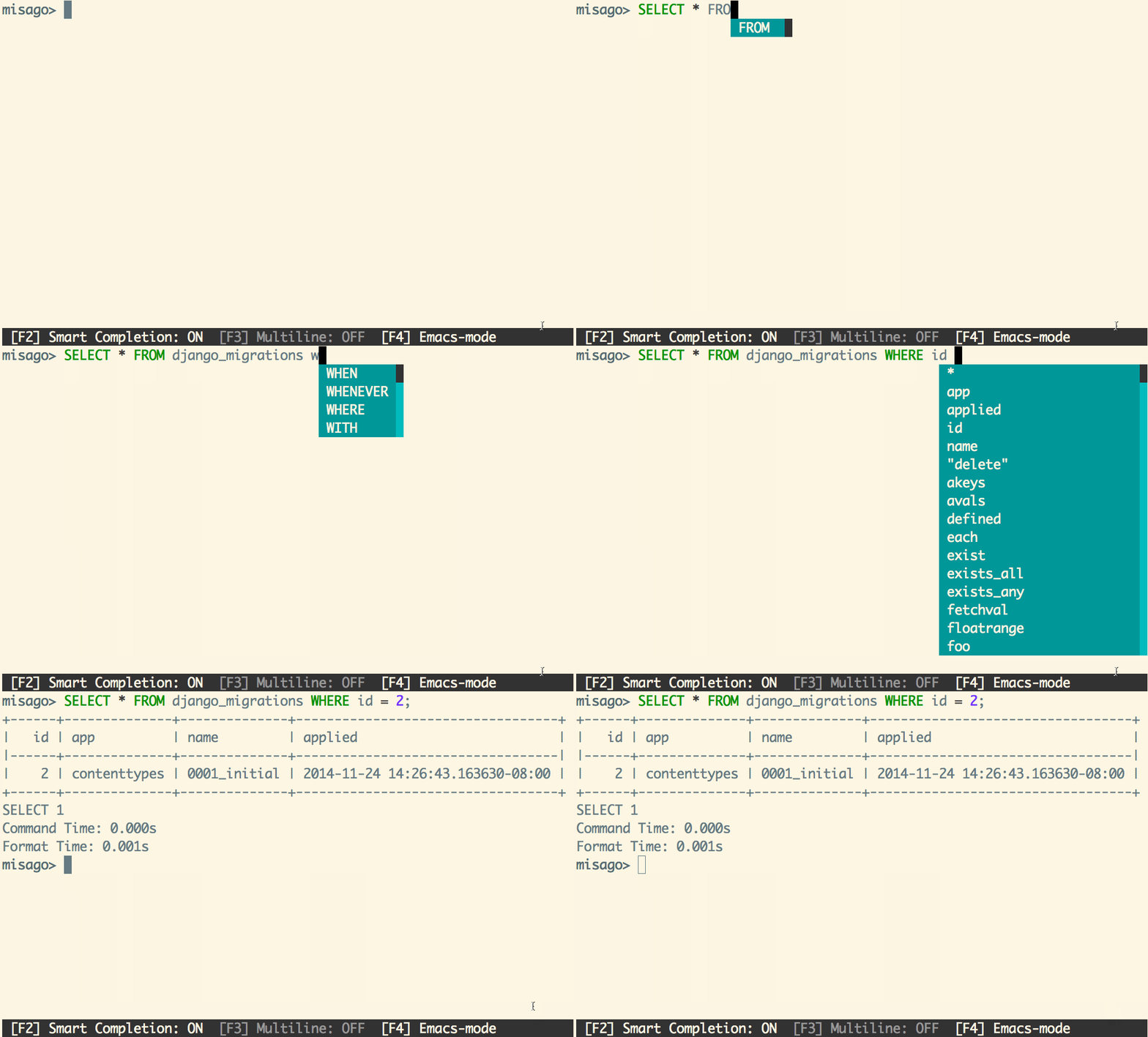
materialize command line interface with autocompletion
Repo MaterializeInc/mzcli, read from GitHub 1 min ago. MaterializeInc has not joined Take My Repo.
MaterializeInc/mzcli is a public repo on GitHub by MaterializeInc. materialize command line interface with autocompletion. It declares the BSD-3-Clause license on GitHub. It is written mainly in Python, has 13 stars and last changed on 2022-01-20. It is archived: its maker no longer maintains it. Nobody has reviewed it on Take My Repo yet, which says nothing about its quality. Read from GitHub on 2026-11-22.
See https://materialize.com for an introduction to Materialize.
The easiest way to get started with mzcli with a remote materialized is to use docker:
docker run -it materialize/mzcli mzcli --help
Or you can install mzcli using pip or pipx (recommended):
pipx install mzcli
This is a work-in-progress materialize client that does auto-completion and
syntax highlighting. It is a soft fork of pgcli, and will hopefully one day be
even less of a fork from mzcli, but due to materialize's extra functionality
this will be a long-lived tool for interacting with materialized.


New releases of mzcli are automatically built from main and published
to Docker Hub.
$ mzcli [database_name]

or

$ mzcli postgresql://[user[:password]@][netloc][:port][/dbname][?extra=value[&other=other-value]]
Examples:
$ mzcli local_database

$ mzcli postgres://amjith:pa$$w0rd@example.com:5432/app_db?sslmode=verify-ca&sslrootcert=/myrootcert
For more details:
$ mzcli --help

Usage: mzcli [OPTIONS] [DBNAME] [USERNAME]

Options:
  -h, --host TEXT            Host address of the postgres database.
  -p, --port INTEGER         Port number at which the postgres instance is
                             listening.
  -U, --username TEXT        Username to connect to the postgres database.
  -u, --user TEXT            Username to connect to the postgres database.
  -W, --password             Force password prompt.
  -w, --no-password          Never prompt for password.
  --single-connection        Do not use a separate connection for completions.
  -v, --version              Version of mzcli.
  -d, --dbname TEXT          database name to connect to.
  --mzclirc FILE             Location of mzclirc file.
  -D, --dsn TEXT             Use DSN configured into the [alias_dsn] section
                             of mzclirc file.
  --list-dsn                 list of DSN configured into the [alias_dsn]
                             section of mzclirc file.
  --row-limit INTEGER        Set threshold for row limit prompt. Use 0 to
                             disable prompt.
  --less-chatty              Skip intro on startup and goodbye on exit.
  --prompt TEXT              Prompt format (Default: "\u@\h:\d> ").
  --prompt-dsn TEXT          Prompt format for connections using DSN aliases
                             (Default: "\u@\h:\d> ").
  -l, --list                 list available databases, then exit.
  --auto-vertical-output     Automatically switch to vertical output mode if
                             the result is wider than the terminal width.
  --warn [all|moderate|off]  Warn before running a destructive query.
  --help                     Show this message and exit.
mzcli also supports many of the same environment variables as psql for login options (e.g. PGHOST, PGPORT, PGUSER, PGPASSWORD, PGDATABASE).
The SSL-related environment variables are also supported, so if you need to connect a postgres database via ssl connection, you can set set environment like this:
export PGSSLMODE="verify-full"
export PGSSLCERT="/your-path-to-certs/client.crt"
export PGSSLKEY="/your-path-to-keys/client.key"
export PGSSLROOTCERT="/your-path-to-ca/ca.crt"
pgcli -h localhost -p 5432 -U username postgres
The mzcli is written using prompt_toolkit.
Auto-completes as you type for SQL keywords as well as tables and columns in the database.
Syntax highlighting using Pygments.
Smart-completion (enabled by default) will suggest context-sensitive completion.
SELECT * FROM <tab>will only show table names.SELECT * FROM users WHERE <tab>will only show column names.
Primitive support for psql back-slash commands.
Pretty prints tabular data.
A config file is automatically created at ~/.config/mzcli/config at first launch.
See the file itself for a description of all available options.
While we are not mzcli, the following documentation expresses our sentiments and still correctly represents the development workflow.
If you're interested in contributing to this project, first of all I would like to extend my heartfelt gratitude. I've written a small doc to describe how to get this running in a development setup.
https://github.com/dbcli/mzcli/blob/master/DEVELOP.rst
Please feel free to file an issue if you need help, or jump in our community slack.
MaterializeInc/mzcli is a public repo on GitHub by MaterializeInc. materialize command line interface with autocompletion.
It declares the BSD-3-Clause license on GitHub.
Its maker has not tagged a system, so it is unknown here. Its README says what it needs.
Open "Take it" on its page: Take My Repo writes an install plan for your machine and hands it to your AI agent (Claude Code, Codex or Cursor), which asks you before each step. Take My Repo has not tested it on any machine.
No. It is archived on GitHub: its maker no longer maintains it.
Nobody has reviewed it on Take My Repo yet, which says nothing about its quality.
The live data layer for apps and AI agents. Create up-to-the-second views into your business, just using SQL
Generate authentic looking mock data based on a SQL, JSON or Avro schema and produce to Kafka in JSON or Avro format.
Official repo for the Materialize + Redpanda + dbt Hack Day 2022, including a sample project to get everyone started!

