
worldmonitor
Real-time global intelligence dashboard. AI-powered news aggregation, geopolitical monitoring, and infrastructure tracking in a unified situational awareness interface
- 91k
- TypeScript
- AGPL-3.0
- 4 h ago
Neovim dashboard plugin
Repo MeanderingProgrammer/dashboard.nvim, read from GitHub 7 h ago. MeanderingProgrammer has not joined Take My Repo.
MeanderingProgrammer/dashboard.nvim is a public repo on GitHub by MeanderingProgrammer. Neovim dashboard plugin. It declares the MIT license on GitHub. It is written mainly in Lua, has 25 stars and last changed on 2026-04-05. Nobody has reviewed it on Take My Repo yet, which says nothing about its quality. Read from GitHub on 2026-11-22.
Neovim dashboard plugin
vim.pack.add({
    'https://github.com/MeanderingProgrammer/dashboard.nvim',
})
require('dashboard').setup({})
{
    'MeanderingProgrammer/dashboard.nvim',
    event = 'VimEnter',
    config = function()
        require('dashboard').setup({})
    end,
}
The setups below show the default values, which if used will result in an empty screen.
It is recommended to provide directories at least, and a header for some fun.
require('dashboard').setup({
    -- Sequence that determines keymaps
    autokeys = 'abcdefghijklmnopqrstuvwxyzABCDEFGHIJKLMNOPQRSTUVWXYZ1234567890',
    -- Dashboard header
    header = {},
    -- Format to display date in
    date_format = nil,
    -- List of directory paths, or functions that return paths
    directories = {},
    -- Sections to add at bottom, these can be string references to
    -- functions in sections.lua, custom strings, or custom functions
    footer = {},
    -- Buffer local options
    bo = {
        bufhidden = 'wipe',
        buflisted = false,
        filetype = 'dashboard',
        swapfile = false,
    },
    -- Window local options
    wo = {
        cursorcolumn = false,
        cursorline = false,
        number = false,
        relativenumber = false,
        spell = false,
        statuscolumn = '',
        wrap = false,
    },
    -- Gets called after directory is changed and is provided with the
    -- directory path as an argument
    on_load = function(path)
        -- do nothing
    end,
    -- Highlight groups to use for various components
    highlight_groups = {
        header = 'Constant',
        icon = 'Type',
        directory = 'Delimiter',
        hotkey = 'Statement',
    },
})
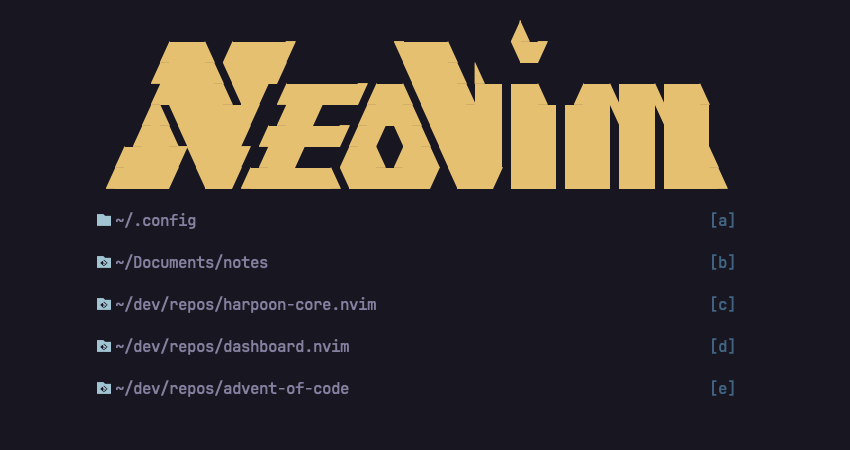
headerBy default no header is provided by the plugin. As it is just an array of strings you can create your own or use another plugin which provides the ascii art.
For example using MaximilianLloyd/ascii.nvim
in lazy.nvim to achieve the look in the screenshots:
{
    'MeanderingProgrammer/dashboard.nvim',
    event = 'VimEnter',
    dependencies = {
        { 'MaximilianLloyd/ascii.nvim', dependencies = { 'MunifTanjim/nui.nvim' } },
    },
    config = function()
        require('dashboard').setup({
            header = require('ascii').art.text.neovim.sharp,
            directories = {
                '~/.config',
                '~/Documents/notes',
                '~/dev/repos/harpoon-core.nvim',
                '~/dev/repos/dashboard.nvim',
                '~/dev/repos/advent-of-code',
            },
        })
    end,
}
Using this exact setup will result in the same Dashboard as the screenshot at the top, assuming these are valid directories on your system.
You can also use methods provided by the ascii plugin to randomize the look on every load, for example:
require('ascii').get_random_global()
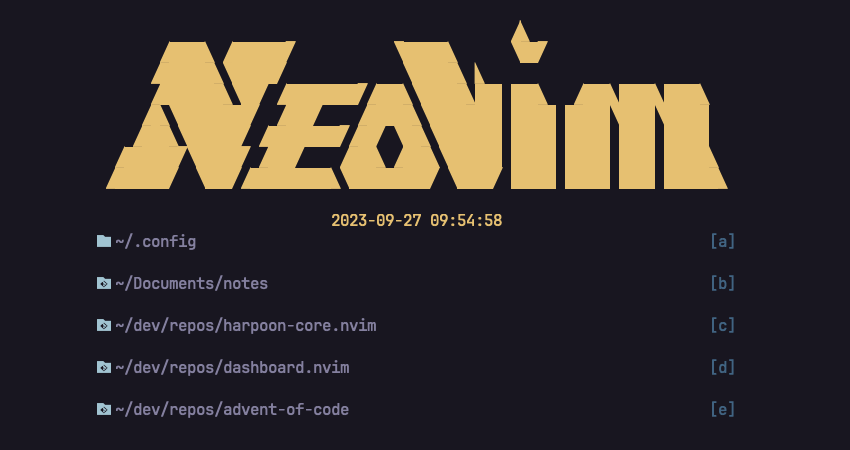
date_formatThis will add the date right after the header in the format specified.
The date is static and will not be updated until the dashboard is reloaded.
This will build off of the header option so the difference in screenshots is
more clear.
{
    'MeanderingProgrammer/dashboard.nvim',
    event = 'VimEnter',
    dependencies = {
        { 'MaximilianLloyd/ascii.nvim', dependencies = { 'MunifTanjim/nui.nvim' } },
    },
    config = function()
        require('dashboard').setup({
            header = require('ascii').art.text.neovim.sharp,
            date_format = '%Y-%m-%d %H:%M:%S',
            directories = {
                '~/.config',
                '~/Documents/notes',
                '~/dev/repos/harpoon-core.nvim',
                '~/dev/repos/dashboard.nvim',
                '~/dev/repos/advent-of-code',
            },
        })
    end,
}
footerResolving each value in the footer sections happens as follows:
sections.lua has a function with that name call that function and get
the result. Valid values for this are version and startuptime.The popular dashboard-nvim plugin was
used as a reference point in the development of this plugin. These plugins do very
different things other than sharing the concept of being a dashboard. In many ways
dashboard-nvim is better and has a lot of neat features but I was looking for
something more user defined as opposed to inferred.
MeanderingProgrammer/dashboard.nvim is a public repo on GitHub by MeanderingProgrammer. Neovim dashboard plugin.
It declares the MIT license on GitHub.
Its maker has not tagged a system, so it is unknown here. Its README says what it needs.
Open "Take it" on its page: Take My Repo writes an install plan for your machine and hands it to your AI agent (Claude Code, Codex or Cursor), which asks you before each step. Take My Repo has not tested it on any machine.
Its last change on GitHub was on 2026-04-05. Take My Repo does not judge from that whether it is maintained.
Nobody has reviewed it on Take My Repo yet, which says nothing about its quality.
Real-time global intelligence dashboard. AI-powered news aggregation, geopolitical monitoring, and infrastructure tracking in a unified situational awareness interface
π RuView turns commodity WiFi signals into real-time spatial intelligence, vital sign monitoring, and presence detection — all without a single pixel of video.
:tada: A magical vue admin https://panjiachen.github.io/vue-element-admin


