Fast State-of-the-Art Static Embeddings in Rust
model2vec-rs is a Rust crate providing an efficient implementation for inference with Model2Vec static embedding models. Model2Vec is a technique for creating compact and fast static embedding models from sentence transformers, achieving significant reductions in model size and inference speed. This Rust crate is optimized for performance, making it suitable for applications requiring fast embedding generation.
Quickstart
You can utilize model2vec-rs in three ways:
- As a library in your Rust projects
- As a standalone Command-Line Interface (CLI) tool for quick terminal-based inferencing
- From Python, through the Python bindings
1. Using model2vec-rs as a Library
Integrate model2vec-rs into your Rust application to generate embeddings within your code.
a. Add model2vec-rs as a dependency:
cargo add model2vec-rs
b. Load a model and generate embeddings:
use anyhow::Result;
use model2vec_rs::model::StaticModel;

fn main() -> Result<()> {
    // Load a model from the Hugging Face Hub or a local path.
    // Arguments: (repo_or_path, hf_token, normalize_embeddings, subfolder_in_repo)
    let model = StaticModel::from_pretrained(
        "minishlab/potion-base-8M", // Model ID from Hugging Face or local path to model directory
        None,                       // Optional: Hugging Face API token for private models
        None,                       // Optional: bool to override model's default normalization. `None` uses model's config.
        None                        // Optional: subfolder if model files are not at the root of the repo/path
    )?;

    let sentences = vec![
        "Hello world".to_string(),
        "Rust is awesome".to_string(),
    ];

    // Generate embeddings using default parameters
    // (Default max_length: the config's `max_length` (512 if unset), all sentences in one batch;
    // change it with `model.with_max_length(...)`)
    let embeddings = model.encode(&sentences);
    // `embeddings` is a Vec<Vec<f32>>
    println!("Generated {} embeddings.", embeddings.len());

    // To generate embeddings with custom arguments:
    let custom_embeddings = model.encode_with_args(
        &sentences,
        Some(256), // Optional: custom max token length for truncation
        512,       // Custom batch size for processing
        None,      // Optional: override the model's normalization setting
    );
    println!("Generated {} custom embeddings.", custom_embeddings.len());

    // `encode_flat` returns one row-major `Vec<f32>` of
    // `sentences.len() * model.dim()` values. Use it when you want contiguous
    // output or only read the rows; prefer `encode` if you need an owned
    // `Vec<f32>` per sentence.
    let flat = model.encode_flat(&sentences);
    for row in flat.chunks_exact(model.dim()) {
        println!("First value: {}", row[0]);
    }

    Ok(())
}
Alternative: Loading from in-memory bytes (wasm / embedded use cases):
When filesystem access is unavailable, use from_bytes instead of from_pretrained:
use model2vec_rs::model::StaticModel;

let model = StaticModel::from_bytes(
    include_bytes!("path/to/tokenizer.json").as_ref(),
    include_bytes!("path/to/model.safetensors").as_ref(),
    include_bytes!("path/to/config.json").as_ref(),
    None, // normalize: None reads the value from config.json
)?;

let embeddings = model.encode(&["Hello world".to_string()]);
Quantizing an f32 model to int8:
use model2vec_rs::model::StaticModel;

let model = StaticModel::from_pretrained("minishlab/potion-base-8M", None, None, None)?.quantize_int8();
quantize_int8 stores the embeddings as int8 with one scale per column and a power-of-two scale per row, using a quarter of the memory and encoding faster, since pooling then sums integers. Outputs stay very close to the f32 model (cosine similarity above 0.9997 on the potion models).
See the feature flags section for wasm and local-only build configurations.
2. Using the model2vec-rs CLI
a. Install the CLI tool:
This command compiles the crate in release mode (for speed) and installs the model2vec-rs executable to Cargo's binary directory ~/.cargo/bin/.
cargo install model2vec-rs --features cli
Ensure ~/.cargo/bin/ is in your system's PATH to run model2vec-rs from any directory.
The CLI is opt-in; default library builds do not include Clap.
From a checkout, use cargo run --release --features cli -- ....
b. Generate embeddings via CLI:
The compiled binary installed via cargo install is significantly faster (often >10x) than running via cargo run -- ... without release mode.
Encode a single sentence:
model2vec-rs encode-single "Hello world" "minishlab/potion-base-8M"
Embeddings will be printed to the console in JSON format. This command should take less than 0.1s to execute.
Encode multiple lines from a file and save to an output file:
echo -e "This is the first sentence.\nThis is another sentence." > my_texts.txt
model2vec-rs encode my_texts.txt "minishlab/potion-base-8M" --output embeddings_output.json
3. Using model2vec-rs from Python
The python/ directory contains Python bindings that expose the Rust encoder to Python as model2vec_rs.StaticModel:
from model2vec_rs import StaticModel

model = StaticModel.from_pretrained("minishlab/potion-base-8M")
embeddings = model.encode(["Hello world", "Rust is awesome"])  # np.ndarray, shape (2, dim)
See the bindings README for installation, the API and benchmarks.
Features
- Fast Inference: Optimized Rust implementation for fast embedding generation.
- Hugging Face Hub Integration: Load pre-trained Model2Vec models directly from the Hugging Face Hub using model IDs, or use models from local paths.
- Model Formats: Supports models with f32, f16, and i8 weight types stored in
safetensors files. Int8 models (model2vec's quantize_to="int8") stay int8 in memory, and f32 models can be quantized to int8 at load time with quantize_int8.
- Flexible Loading: Load models from the Hub (
from_pretrained), raw bytes (from_bytes), or owned/borrowed/shared data (from_owned, from_borrowed, from_shared, and from_owned_i8, from_borrowed_i8, from_shared_i8 for int8 embeddings) for embedded and WASM use cases, or for data owned elsewhere, such as NumPy arrays. Models built from owned/borrowed/shared data truncate at 512 tokens by default; change this with with_max_length.
- Batch Processing: Encodes multiple sentences in batches.
- Configurable Encoding: Allows customization of maximum sequence length and batch size during encoding.
Feature flags
The crate exposes a few feature combinations for different runtimes:
default: native build with onig tokenization and optional Hugging Face Hub downloadscli: build the command-line executable with Clap (not enabled by default)fancy-regex: alternative tokenizer backend for native buildslocal-only: disable remote model downloads and restrict loading to local paths or from_bytes(...)wasm: minimal WebAssembly-oriented feature set for in-memory loading via from_bytes(...)
Typical invocations:
# native local-only build
cargo build --no-default-features --features onig,local-only

# wasm (requires getrandom backend config)
RUSTFLAGS='--cfg getrandom_backend="wasm_js"' \
cargo check --no-default-features --features wasm --target wasm32-unknown-unknown
What is Model2Vec?
Model2Vec is a technique to distill large sentence transformer models into highly efficient static embedding models. This process significantly reduces model size and computational requirements for inference. For a detailed understanding of how Model2Vec works, including the distillation process and model training, please refer to the main Model2Vec Python repository and its documentation.
This model2vec-rs crate provides a Rust-based engine specifically for inference using these Model2Vec models.
Models
A variety of pre-trained Model2Vec models are available on the HuggingFace Hub (MinishLab collection). These can be loaded by model2vec-rs using their Hugging Face model ID or by providing a local path to the model files.
Performance
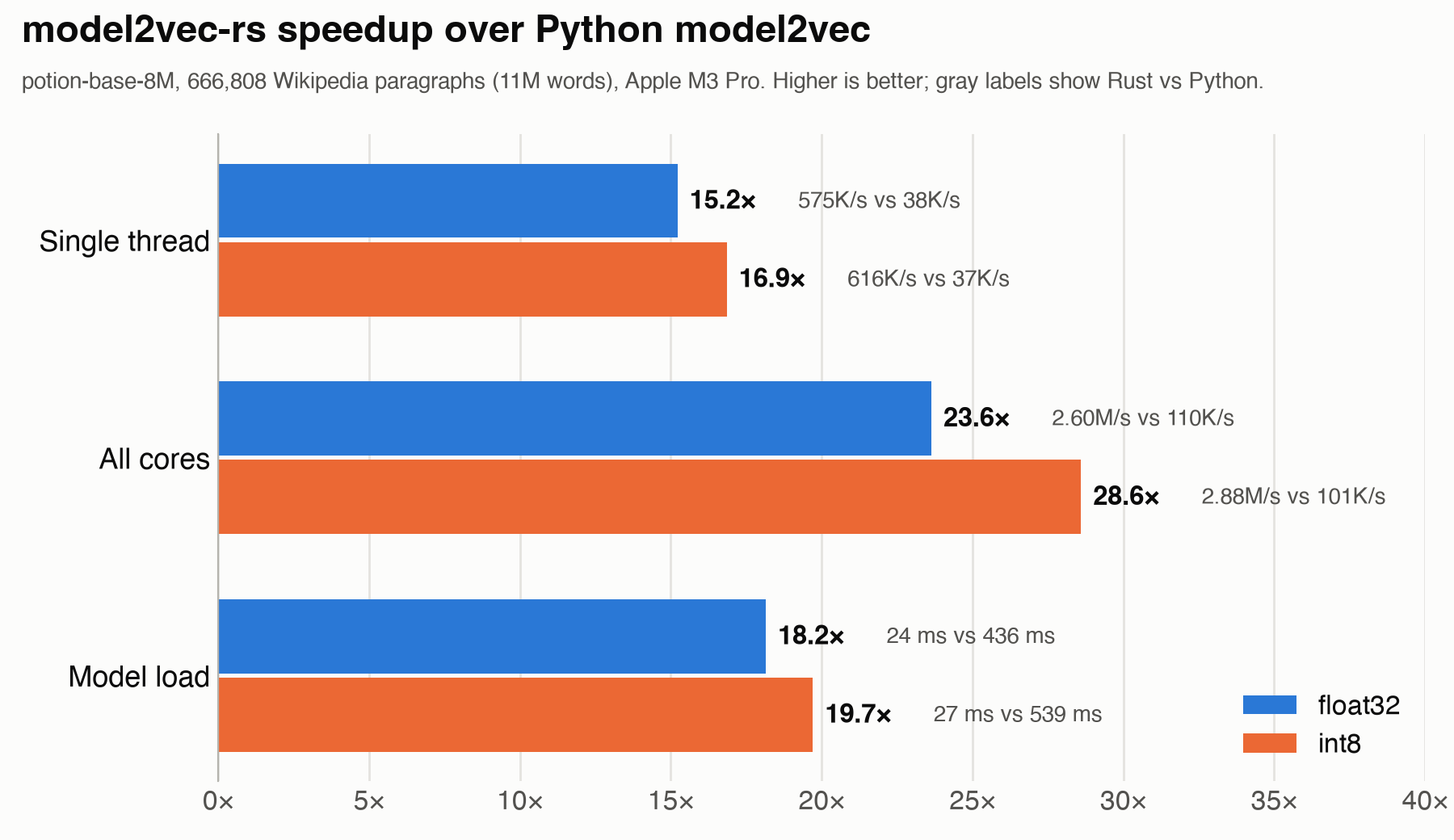
We compared model2vec-rs with the Python version of Model2Vec by encoding the same 666,808 texts with blink-8m in both.
| Implementation |
Single thread |
All cores |
Model load |
| Rust |
1.13M texts/second |
4.93M texts/second |
30 ms |
| Python |
45K texts/second |
134K texts/second |
464 ms |
| Speedup |
25.4× |
36.9× |
15.5× |
On a single thread, the Rust version is roughly 25× faster than the Python version, and about 37× faster when using all cores. With int8 models the speedup is larger:
To reproduce these numbers, run this from the repository root (it needs Rust and uv):
uv run scripts/python_compare.py --model minishlab/blink-8m --no-python-multiprocessing
The script downloads the corpus, builds benches/python_compare.rs, runs both implementations and prints the table above. For the int8 bars of the chart, add --quantize int8, then pass both results to scripts/speedup_chart.py. See scripts/python_compare.py for the options.
Benchmark details: