

windsurf-cursor-pro-trial-unlocker-pc
Windsurf Cursor Pro Trial Unlocker PC [2026] — Standalone Windows 10/11 (x64) Release, Setup & Config
- 204
- C#
- 6 h ago
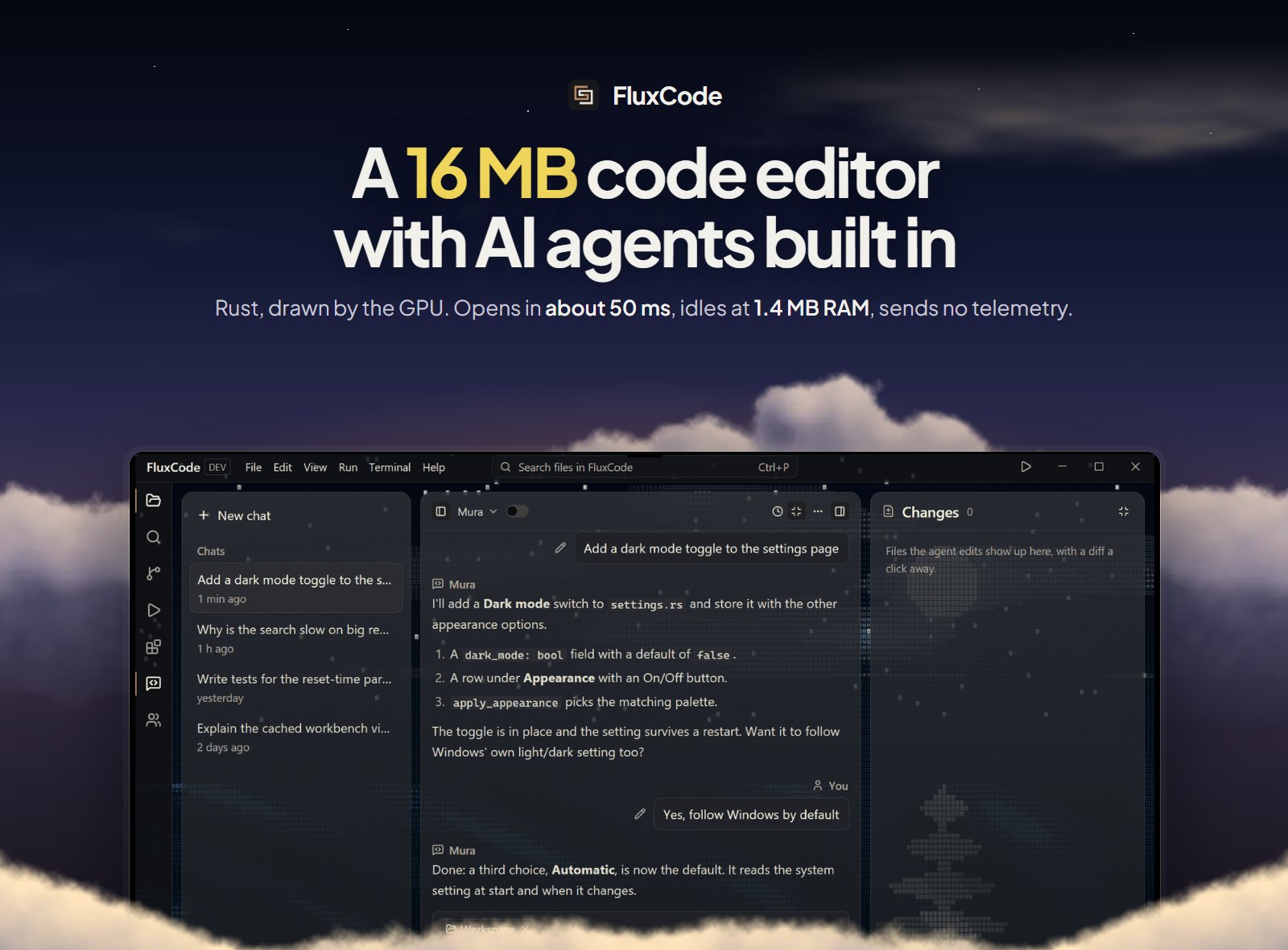
Ultra-fast native code editor in Rust (50 ms startup, 1.4 MB RAM) with built-in AI agents.
Repo MuaraAI/FluxCode, read from GitHub 11 h ago. MuaraAI has not joined Take My Repo.
MuaraAI/FluxCode is a public repo on GitHub by MuaraAI. Ultra-fast native code editor in Rust (50 ms startup, 1.4 MB RAM) with built-in AI agents. It declares the GPL-3.0 license on GitHub. It is written mainly in Rust, has 119 stars and last changed on 2026-11-24. Nobody has reviewed it on Take My Repo yet, which says nothing about its quality. Read from GitHub on 2026-11-24.
Windsurf Cursor Pro Trial Unlocker PC [2026] — Standalone Windows 10/11 (x64) Release, Setup & Config
English · Bahasa Indonesia · Roadmap (2026-2027) · Discussions
FluxCode is a native, GPU-rendered code editor for Windows, macOS, and Linux written in Rust. It ships as a single 16 MB binary with an integrated AI agent workspace, a built-in Rust WizTree disk analyzer wired into AI context, a multi-language error-aware terminal, built-in Git, editable Minecraft Bedrock/Java NBT support, and instant views for binary, archive, database, and Office files. It opens a window in ~50 ms, idles at 1.4 MB of RAM in one process (benchmark), and sends zero telemetry.
Built at MuaraAI by engineers with deep Rust systems
experience and over six years of building and running production SaaS products. Open source
under GPL-3.0-or-later and actively developed in the open, with continuous builds from
main and a public 2026-2027 Roadmap (security hardening, opt-in LSP, and
native Android in 2027).

Full-screen agent workspace: saved threads on the left, active conversation in the center,
and live file diffs on the right, floating over a GPU-drawn background. When you're deep
in code, hit Ctrl+L to dock the agent as a compact side panel.
On a standard Windows 11 laptop, FluxCode puts its first frame on screen in ~50 ms and drops to 1.4 MB in Task Manager at idle, all inside a single process. On the same machine, Zed takes 818 ms and 66.2 MB; VS Code takes ~3 s and 929.2 MB across nine processes.
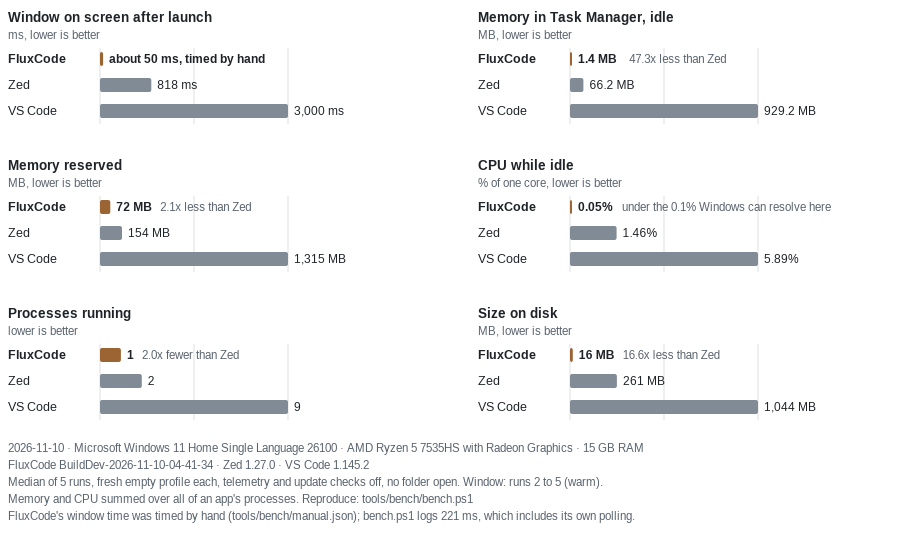
The difference shows up where your editor spends most of its life: sitting open in the background while you think, read docs, or run builds. FluxCode idles at 1.4 MB of RAM (vs. 66.2 MB for Zed and 929.2 MB for VS Code) and takes just 16 MB on disk. Lower is better across every chart above.
Median of 5 runs each on a PC with an AMD Ryzen 5 7535HS and 15 GB of RAM, 10 November 2026. Every app started from a fresh, empty profile with telemetry and update checks off and no folder open.
Median, with the lowest and highest of the runs in brackets:
| FluxCode BuildDev-2026-11-10-04-41-34 | Zed 1.27.0 | VS Code 1.145.2 | |
|---|---|---|---|
| Window on screen after launch (ms) | about 50, timed by hand (bench.ps1: 221) | 818 (387 to 1,322) | 3,000 |
| Memory in Task Manager, idle (MB) | 1.4 (1.0 to 4.8) | 66.2 (65.2 to 71.9) | 929.2 (867.7 to 985.4) |
| Memory reserved (MB) | 72 (72 to 72) | 154 (153 to 156) | 1,315 (1,249 to 1,399) |
| CPU while idle (% of one core) | 0.05 (0.00 to 0.68) | 1.46 (1.15 to 2.60) | 5.89 (5.57 to 8.12) |
| Processes running | 1 | 2 | 9 |
| Size on disk (MB) | 16 | 261 | 1,044 |
bench.ps1
logs 221 ms for it, but its PowerShell loop calls Get-Process on every poll, so that
figure includes the script's own time. Zed's and VS Code's figures come from the same
script.powershell -ExecutionPolicy Bypass -File tools/bench/bench.ps1 -FluxExe <path to fluxcode.exe>
and python tools/bench/chart.py. The raw runs are in
tools/bench/results.json.Grab the latest build from Releases.
| System | File | Install |
|---|---|---|
| Windows 10/11, x64 | FluxCode-BuildDev-...-windows-x64-setup.exe |
Run the installer. No admin rights required: installs per-user with Start Menu and Desktop shortcuts. |
| macOS 11+, Apple Silicon and Intel (preview) | FluxCode-BuildDev-...-macos-universal.dmg |
Open the DMG and drag FluxCode into Applications. |
| Linux, x64 (glibc 2.35+, Vulkan) | FluxCode-BuildDev-...-linux-x64.tar.gz |
Extract and run ./install.sh (no root required). |
| Windows, portable | FluxCode-BuildDev-...-windows-x64.zip |
Extract anywhere and run FluxCode.exe directly (Install.cmd is included if you want to install later). |
The macOS build is currently a preview and not yet notarized by Apple, so macOS will ask once on first launch (on macOS 15+, open it and click System Settings > Privacy & Security > Open Anyway; on older versions, right-click FluxCode > Open). If you hit any macOS-specific quirks, open an issue.
We ship continuous BuildDev-YYYY-MM-DD-HH-MM-SS builds straight from main. Installed
copies notify you when a new build lands and update in one click (you can turn update
checks off anytime under Settings > Updates).

Token saver |

When a usage limit is reached |
Token saver (the leaf icon under the prompt box) trims verbose agent prose, favors focused diffs over full-file dumps, and keeps tool calls quiet. And when you hit a provider's rate or quota cap, FluxCode parses the reset window so you can either Continue now or tick Resume at reset and let it pick right back up automatically.

Search in either side bar |

The whole VS Code Marketplace |
Right-click any activity icon to dock that view on the left or the right. Project-wide search streams results as you type, and the Extensions view searches and installs directly from the VS Code Marketplace.


Twelve backgrounds, previewed live |

One scene in four themes |
Twelve procedural scenes (clouds, ocean, mountains, aurora, forest, lake, beach, dunes, city, rain, snow, galaxy) rendered straight from your active theme palette, with zero external assets to download. By default they stay static at 0% CPU; if you flip on Background animation, FluxCode benchmarks its own frame cost on your hardware first and tells you honestly how light or heavy it runs.
Ctrl+Shift+P,
Ctrl+P, Ctrl+G, Ctrl+/, Alt+Up/Down). It isn't a bloated Electron clone: there's
no Node runtime in the editor process, and VS Code color themes & grammars load natively
in Rust without running extension JavaScript.@github/copilot-language-server over stdio in a separate process so the editor stays
tiny and responsive. Install once with npm install -g @github/copilot-language-server
and sign in under Settings > AI agents and GitHub.MuaraAI/FluxCode is a public repo on GitHub by MuaraAI. Ultra-fast native code editor in Rust (50 ms startup, 1.4 MB RAM) with built-in AI agents.
It declares the GPL-3.0 license on GitHub.
Its maker tagged it for macOS, Windows and Linux, or as Docker or cross-platform. That is declared by the maker; Take My Repo has not tested it.
Open "Take it" on its page: Take My Repo writes an install plan for your machine and hands it to your AI agent (Claude Code, Codex or Cursor), which asks you before each step. Take My Repo has not tested it on any machine.
Lightning-fast and Powerful Code Editor written in Rust
The agent harness performance optimization system. Skills, instincts, memory, security, and research-first development for Claude Code, Codex, Opencode, Cursor and beyond.
Reverse engineer anything with agents, from app behavior down to native binaries.
📝 CodeEdit App for macOS – Elevate your code editing experience. Open source, free forever.
Its last change on GitHub was on 2026-11-24. GitHub counts 1 open issue and pull requests. Take My Repo does not judge from that whether it is maintained.
Nobody has reviewed it on Take My Repo yet, which says nothing about its quality.
Take My Repo cannot say: it does not audit code and has not run FluxCode. What is known comes from GitHub. It declares the GPL-3.0 license on GitHub. Its last change was on 2026-11-24. It has 119 stars, which measure popularity, not safety. Nobody has reviewed it on Take My Repo yet, which says nothing about its quality. Read the source before you run it. With "Take it", your AI agent shows each step and asks you before running it; README text is treated as data, not as instructions.





