
CodeSpot
The maintainer has not written a description at the source.
- 0
- MIT
- 4 wk ago
Repo Mujtaba1i/CodeSpot, read from GitHub 1 min ago. Mujtaba1i has not joined Take My Repo.
In short
Mujtaba1i/CodeSpot is a public repo on GitHub by Mujtaba1i. It declares the MIT license on GitHub. It is written mainly in Swift, has 0 stars and last changed on 2026-10-30. Nobody has reviewed it on Take My Repo yet, which says nothing about its quality. Read from GitHub on 2026-11-26.

CodeSpot
Spotlight-style HTTP status code lookup for macOS.
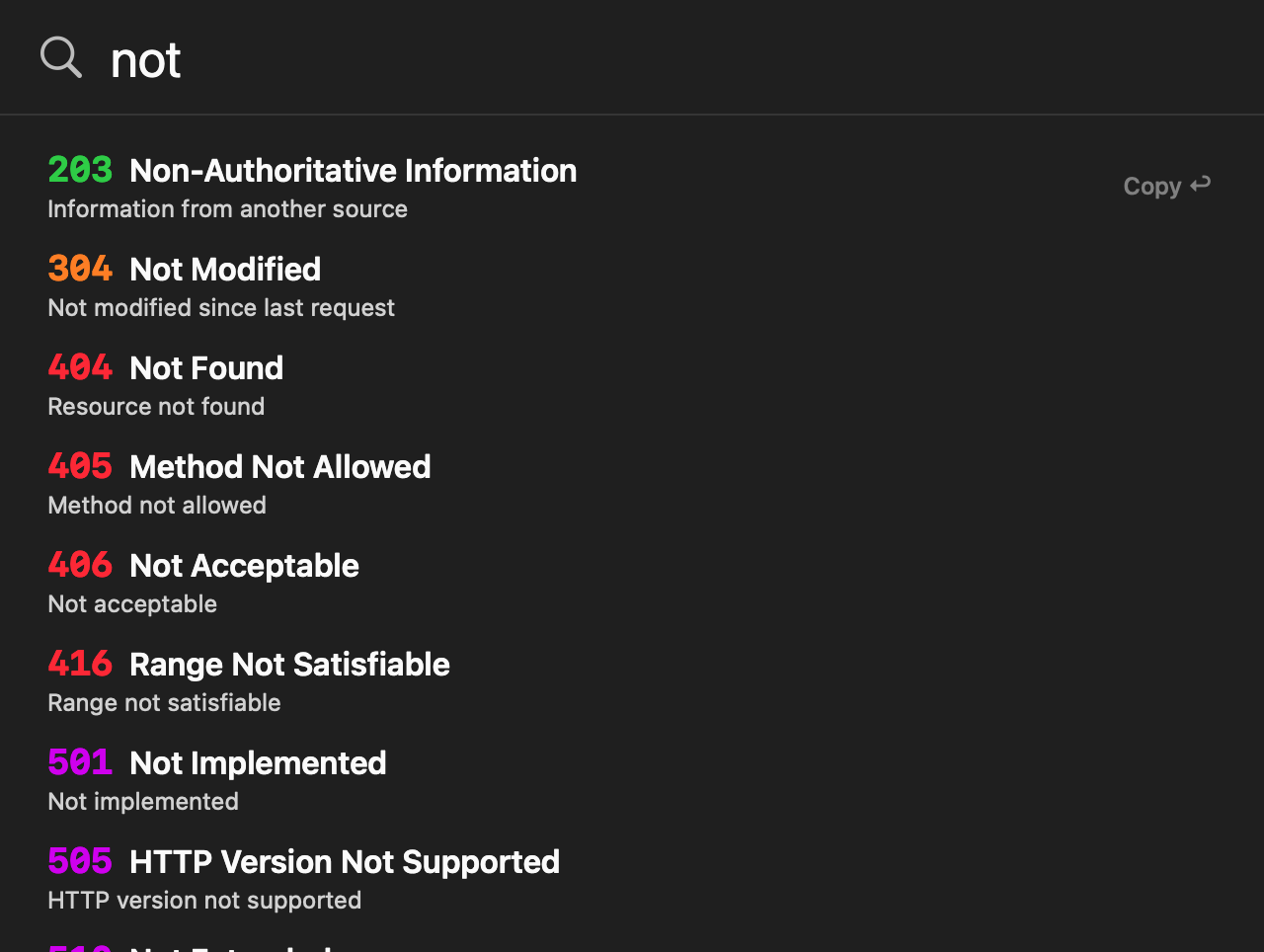
Press a shortcut, type 404 or not found, and see the code, its name and what it means as you type.
Native · Liquid Glass · works offline · about 20 MB of memory

Highlights
| Feels like Spotlight A Liquid Glass bar opens where Spotlight does, pops in with a little bounce, and grows downward as results appear. |
Live search Search by code ( 404, 5) or by words (not found). Codes that start with what you typed come first. |
| Color-coded 1xx blue, 2xx green, 3xx orange, 4xx red, 5xx purple, with the name beside the code and the meaning below. |
86 codes The everyday standard codes, plus well-known ones from nginx, Cloudflare, IIS, Laravel and Shopify. |
Copy in one key↩ copies 404 Not Found and closes. |
MDN docs Hold ⌘ and press ↩ to open the code's MDN page. Codes MDN doesn't cover say so. |
Your shortcut⌃⌥Space by default. CodeSpot warns you if macOS already uses the one you pick. · new |
Private No network access and no analytics. Only your browser goes online, when you open MDN. |
Esc, clicking elsewhere or opening Spotlight closes it. CodeSpot lives in the menu bar (or hidden), remembers where you drag it, and can start at login.
| MDN mode | Code without an MDN page |
|---|---|
 |
 |
Install
- Download
CodeSpot.dmgfrom Releases. - Open it and drag CodeSpot into Applications.
- The first time, right-click CodeSpot and choose Open. It isn't notarized, so macOS asks once.
Needs macOS 14 Sonoma or newer, on Apple silicon or Intel. Liquid Glass needs macOS 26; older versions get the classic blur.
Usage
| To | Do |
|---|---|
| Open or close CodeSpot | ⌃⌥Space |
| Search | Type a code or words. Type a space to list every code. |
Copy 404 Not Found |
↑ / ↓ to select, then ↩ or click |
| Open the MDN page | Hold ⌘ and press ↩ or click |
| Open Settings | ⌘ + , in the panel, or menu bar icon › Settings… |
| Move the panel | Drag it by its edge. Menu bar › Reset Panel Position puts it back. |
Settings: the shortcut, the key that opens MDN (⌘, ⌥, ⌃ or ⇧), launch at login, and whether the menu bar icon shows. With the icon hidden, ⌘ + , in the panel still opens Settings.
Troubleshooting
"CodeSpot can't be opened" or "is damaged"
That's Gatekeeper, because the app isn't notarized. Right-click it in Applications and choose Open, or run:
xattr -dr com.apple.quarantine /Applications/CodeSpot.app
The shortcut doesn't open anything, or it switches my keyboard language
macOS's own shortcuts always win over apps. The usual culprit is Select next source in Input menu, which is ⌃⌥Space once you have more than one keyboard language. Pick another shortcut in CodeSpot's Settings (it warns you about clashes), or turn the macOS one off in System Settings › Keyboard › Keyboard Shortcuts › Input Sources.
You can always open the panel from the menu bar icon, or by opening CodeSpot again from Finder or Spotlight.
Launch at login doesn't stick
Move CodeSpot to Applications first, then turn the setting off and on again. macOS remembers where the app was when you turned it on.
Building from source
CodeSpot is plain Swift and AppKit. The Xcode Command Line Tools are enough. Show the steps.
xcode-select --install          # once
git clone https://github.com/Mujtaba1i/CodeSpot.git
cd CodeSpot
./build.sh                      # -> CodeSpot.app  (UNIVERSAL=1 for arm64 + x86_64)
.build/release/CodeSpot --selftest
open CodeSpot.app
To try a change, rebuild and restart the running copy: ./build.sh && pkill -x CodeSpot; open CodeSpot.app.
Other tools: ./make-dmg.sh makes CodeSpot.dmg, swift tools/make-icon.swift redraws the icon, and CodeSpot --snapshot "404" out.png [--mdn] renders the results view to a PNG.
Releases: GitHub Actions builds a universal DMG and publishes a release only when you push a version tag (git tag v1.1.0 && git push origin v1.1.0). Normal pushes run nothing. The release notes list every commit since the previous tag.
Project layout
Sources/CodeSpot/
├── main.swift         startup, --selftest and --snapshot
├── HTTPCodes.swift    the codes, search and MDN links (self-tested)
├── SearchView.swift   search field, results list, MDN mode
├── Panel.swift        the floating glass panel, animations, positioning
├── App.swift          menu bar, global shortcut, shortcut recorder
├── HotKey.swift       global hotkey and macOS clash check (self-tested)
└── Settings.swift     the Settings window
Resources/             Info.plist and the app icon
tools/make-icon.swift  draws the icon
Roadmap
CodeSpot starts with HTTP status codes, and is meant to grow into a small, fast launcher you can extend.
- Warn about shortcuts macOS already uses
- Extensions: your own lookups in Python or C, in the spirit of Albert
- Signed and notarized releases, with no Gatekeeper prompt
Missing a code, or have an idea? Open an issue.
Contributing
Bug reports, ideas and pull requests are all welcome. Please run ./build.sh && .build/release/CodeSpot --selftest before opening a pull request, and write clear commit messages: they become the release notes.
Acknowledgements and license
Inspired by Apple's Spotlight. CodeSpot is an independent project and is not affiliated with or endorsed by Apple. Status codes and descriptions come from albert-httpstatus, and documentation links point to MDN Web Docs.
MIT © 2026 Mujtaba1i
Questions
What is CodeSpot?
Mujtaba1i/CodeSpot is a public repo on GitHub by Mujtaba1i. Its maker has not written a description.
Is CodeSpot open source?
It declares the MIT license on GitHub.
Does CodeSpot run on macOS, Windows or Linux?
Its maker tagged it for macOS. That is declared by the maker; Take My Repo has not tested it.
How do I install CodeSpot?
Open "Take it" on its page: Take My Repo writes an install plan for your machine and hands it to your AI agent (Claude Code, Codex or Cursor), which asks you before each step. Take My Repo has not tested it on any machine.
Is CodeSpot still maintained?
Its last change on GitHub was on 2026-10-30. GitHub counts 0 open issues and pull requests. Take My Repo does not judge from that whether it is maintained.