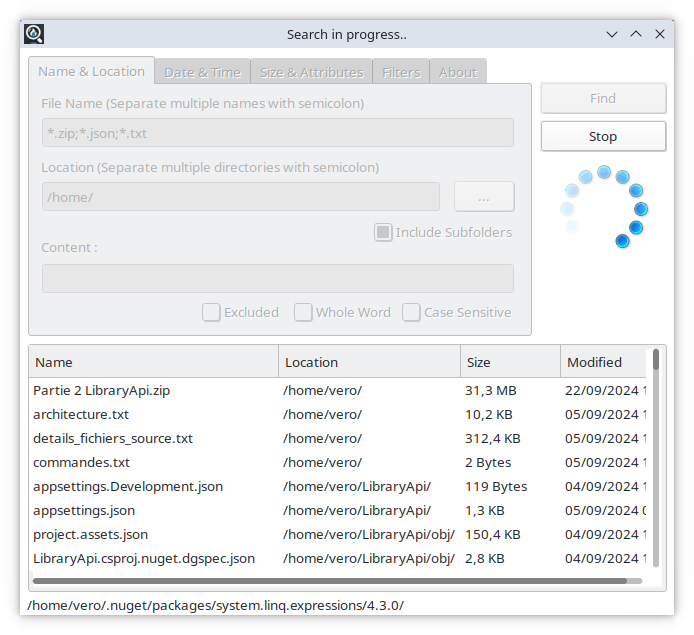
FileFind - Advanced File Search Utility designed to efficiently locate files and directories based on a wide range of criteria, including name patterns, size, attributes, content, and timestamps.
Repo NDXDeveloper/FileFind, read from GitHub 1 h ago. NDXDeveloper has not joined Take My Repo.
Advanced file search utility with comprehensive search options and cross-platform compatibility.
Linux:
filefind_1.1.9_amd64.debfilefind-linux-portable-1.1.9.tar.gzWindows:
FileFind-Setup-System-1.1.9.exeFileFind-Setup-User-1.1.9.exefilefind-windows-portable-1.1.9.zip1. Download the package:
curl -LO https://github.com/NDXDeveloper/FileFind/releases/download/v1.1.9/filefind_1.1.9_amd64.deb
2. Install the package (choose one method):
Method A: Recommended (handles dependencies)
sudo apt install ./filefind_1.1.9_amd64.deb
Method B: Using dpkg
sudo dpkg -i filefind_1.1.9_amd64.deb
# If you have dependency errors, run this:
sudo apt-get install -f1. Download and extract:
curl -LO https://github.com/NDXDeveloper/FileFind/releases/download/v1.1.9/filefind-linux-portable-1.1.9.tar.gz tar -xzf filefind-linux-portable-1.1.9.tar.gz
2. Run the application:
cd filefind-linux-portable
./run.shSystem Installer (Recommended for Admins):
FileFind-Setup-System-1.1.9.exeUser Installer (For Standard Users):
FileFind-Setup-User-1.1.9.exePortable:
filefind-windows-portable-1.1.9.zipNew in this release:
All files are signed with SHA256 checksums available in checksums.txt.
Full Changelog: v1.1.8...v1.1.9
Advanced file search utility with comprehensive search options and cross-platform compatibility.
filefind_1.1.7_amd64.debfilefind-linux-portable-1.1.7.tar.gzFileFind-Setup-1.1.7.exefilefind-windows-portable-1.1.7.zip1. Download the package:
curl -LO https://github.com/NDXDeveloper/FileFind/releases/download/v1.1.7/filefind_1.1.7_amd64.deb
2. Install the package (choose one method):
Method A: Recommended (handles dependencies)
sudo apt install ./filefind_1.1.7_amd64.deb
Method B: Using dpkg
sudo dpkg -i filefind_1.1.7_amd64.deb
# If you have dependency errors, run this:
sudo apt-get install -f1. Download and extract:
curl -LO https://github.com/NDXDeveloper/FileFind/releases/download/v1.1.7/filefind-linux-portable-1.1.7.tar.gz tar -xzf filefind-linux-portable-1.1.7.tar.gz
2. Run the application:
cd filefind-linux-portable
./run.shFileFind-Setup-1.1.7.exefilefind-windows-portable-1.1.7.zipAll files are signed with SHA256 checksums available in checksums.txt.
Full Changelog: v1.1.6...v1.1.7
Advanced file search utility with comprehensive search options and cross-platform compatibility.
filefind_1.1.6_amd64.debfilefind-linux-portable-1.1.6.tar.gzFileFind-Setup-1.1.6.exefilefind-windows-portable-1.1.6.zip1. Download the package:
curl -LO https://github.com/NDXDeveloper/FileFind/releases/download/v1.1.6/filefind_1.1.6_amd64.deb
2. Install the package (choose one method):
Method A: Recommended (handles dependencies)
sudo apt install ./filefind_1.1.6_amd64.deb
Method B: Using dpkg
sudo dpkg -i filefind_1.1.6_amd64.deb
# If you have dependency errors, run this:
sudo apt-get install -f1. Download and extract:
curl -LO https://github.com/NDXDeveloper/FileFind/releases/download/v1.1.6/filefind-linux-portable-1.1.6.tar.gz tar -xzf filefind-linux-portable-1.1.6.tar.gz
2. Run the application:
cd filefind-linux-portable
./run.shFileFind-Setup-1.1.6.exefilefind-windows-portable-1.1.6.zipAll files are signed with SHA256 checksums available in checksums.txt.
Full Changelog: v1.1.5...v1.1.6
Advanced file search utility with comprehensive search options and cross-platform compatibility.
filefind_1.1.4_amd64.debfilefind-linux-portable-1.1.4.tar.gzFileFind-Setup-1.1.4.exefilefind-windows-portable-1.1.4.zip1. Download the package:
curl -LO [https://github.com/$](https://github.com/$){{ github.repository }}/releases/download/v1.1.4/filefind_1.1.4_amd64.deb2. Install the package (choose one method):
Method A: Recommended (handles dependencies)
sudo apt install ./filefind_1.1.4_amd64.deb
Method B: Using dpkg
sudo dpkg -i filefind_1.1.4_amd64.deb
# If you have dependency errors, run this:
sudo apt-get install -f1. Download and extract:
curl -LO [https://github.com/$](https://github.com/$){{ github.repository }}/releases/download/v1.1.4/filefind-linux-portable-1.1.4.tar.gz
tar -xzf filefind-linux-portable-1.1.4.tar.gz2. Run the application:
cd filefind-linux-portable
./run.shFileFind-Setup-1.1.4.exe.filefind-windows-portable-1.1.4.zip.All files are signed with SHA256 checksums available in checksums.txt.
Advanced file search utility with comprehensive search options and cross-platform compatibility.
Linux:
filefind_*_amd64.deb - Debian/Ubuntu packagefilefind-linux-portable-*.tar.gz - Portable archiveWindows:
FileFind-Setup-*.exe - Windows installerfilefind-windows-portable-*.zip - Portable archiveLinux (DEB):
sudo dpkg -i filefind_*_amd64.deb sudo apt-get install -f # Fix dependencies if needed
Linux (Portable):
tar -xzf filefind-linux-portable-*.tar.gz cd filefind-linux-portable ./run.sh
Windows:
All files are signed with SHA256 checksums available in checksums.txt.
For more information, see the Installation Guide.
Full Changelog: v1.1.2...v1.1.3
FileFind is an intuitive application for locating files on your system. This release includes:
Download the .exe file below and install it .
Download the .deb file below and install it using:
sudo dpkg -i filefind_amd64.deb sudo apt-get install -f