ECC
The agent harness performance optimization system. Skills, instincts, memory, security, and research-first development for Claude Code, Codex, Opencode, Cursor and beyond.
- 310k
- JavaScript
- MIT
- 1 d ago
Scaffold autonomous multi-agent AI workspaces in one command. 12 providers: Claude, Gemini, Codex, Qwen, Cursor, Windsurf, Copilot, Cline, Aider, Continue, Roo, Nessy. Hooks, roles, memory.
Repo Neftedollar/multiagent-template, read from GitHub 2 d ago. Neftedollar has not joined Take My Repo.
Neftedollar/multiagent-template is a public repo on GitHub by Neftedollar. Scaffold autonomous multi-agent AI workspaces in one command. 12 providers: Claude, Gemini, Codex, Qwen, Cursor, Windsurf, Copilot, Cline, Aider, Continue, Roo, Nessy. Hooks, roles, memory. It declares the MIT license on GitHub. It is written mainly in C#, has 6 stars and last changed on 2026-08-03. Nobody has reviewed it on Take My Repo yet, which says nothing about its quality. Read from GitHub on 2026-11-22.
The agent harness performance optimization system. Skills, instincts, memory, security, and research-first development for Claude Code, Codex, Opencode, Cursor and beyond.
Autonomous multi-agent code generation and PR automation for 13 AI coding assistants. Scaffold a structured workspace where specialized agents (orchestrator, architect, developer, reviewer, DevOps, designer) operate in a gated pipeline (PLAN → BUILD → TEST → VERIFY → SHIP) to drive software from backlog to merged PR autonomously — without context collapse, without code review bottlenecks, without hand-holding. You set direction; the agents handle execution.
Tags: AI agent orchestration · multi-agent AI · autonomous code generation · Claude Code · AI workflow automation · code review pipeline · agent routing · multi-LLM support · Claude Sonnet · OpenAI Codex · Gemini CLI
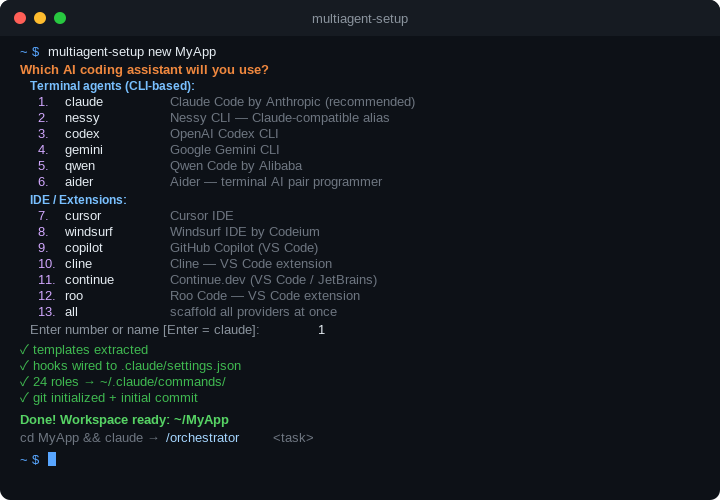
Which command do I need?
| Situation | Command |
|---|---|
| Starting a new project | multiagent-setup new <name> |
| Adding to an existing git repo | multiagent-setup init . |
macOS — Homebrew (no .NET required):
brew install Neftedollar/multiagent-template/multiagent-setup
multiagent-setup new MyProject          # new workspace
multiagent-setup init .                 # add to existing repo
One-liner bootstrap (installs all deps including Homebrew/winget, agent CLI, and creates the workspace):
# macOS / Linux
curl -fsSL https://raw.githubusercontent.com/Neftedollar/multiagent-template/main/bootstrap.sh | bash -s -- MyProject
curl -fsSL https://raw.githubusercontent.com/Neftedollar/multiagent-template/main/bootstrap.sh | bash -s -- MyProject --provider gemini

# Windows (PowerShell)
irm https://raw.githubusercontent.com/Neftedollar/multiagent-template/main/bootstrap.ps1 -OutFile bootstrap.ps1
.\bootstrap.ps1 MyProject
.\bootstrap.ps1 MyProject --provider codex
NuGet (.NET 10+ required):
dotnet tool install -g multiagent-setup
multiagent-setup new MyProject                       # Claude (default)
multiagent-setup new MyProject --provider nessy      # Nessy CLI (Claude alias)
multiagent-setup new MyProject --provider codex      # OpenAI Codex
multiagent-setup new MyProject --provider qwen       # Qwen Code
multiagent-setup new MyProject --provider cursor     # Cursor IDE
multiagent-setup new MyProject --provider windsurf   # Windsurf IDE
multiagent-setup new MyProject --provider copilot    # GitHub Copilot
multiagent-setup new MyProject --provider gemini     # Google Gemini CLI
multiagent-setup new MyProject --provider cline      # Cline (VS Code)
multiagent-setup new MyProject --provider aider      # Aider AI pair programmer
multiagent-setup new MyProject --provider continue   # Continue.dev (VS Code / JetBrains)
multiagent-setup new MyProject --provider roo        # Roo Code (VS Code)
multiagent-setup new MyProject --provider kiro       # Amazon Kiro (VS Code)
multiagent-setup new MyProject --provider all        # all providers at once

# Choose a workspace template (saas, oss, internal, or default)
multiagent-setup new MyProject --template saas       # SaaS product (user-impact gates, feature flags, SLO review)
multiagent-setup new MyProject --template oss        # Open source (CHANGELOG, semver, backward-compat gates)
multiagent-setup new MyProject --template internal   # Internal tools (lighter pipeline, no external gates)

# Add workspace files to an existing git repo (does not touch your code)
multiagent-setup init .                              # current directory
multiagent-setup init ./my-repo                      # specific directory
multiagent-setup init . --template saas              # with template

# Add a provider to an existing workspace (no need to recreate)
multiagent-setup add-provider cursor
multiagent-setup add-provider gemini --force   # overwrite existing files
multiagent-setup add-provider all              # add all providers at once

# Manage providers
multiagent-setup list-providers               # show installed vs. available providers
multiagent-setup remove-provider cursor       # cleanly remove a provider and its files

# Update an existing workspace to the latest templates
multiagent-setup update          # skip already-customised files
multiagent-setup update --force  # overwrite everything (CLAUDE.md preserved)
Then start working:
cd MyProject
claude          # or: nessy / codex / qwen-code / gemini (terminal agents)
                # or open in Cursor / Windsurf / VS Code (IDE agents)
/orchestrator Implement user authentication with JWT
What happens next:
docs/process.md and selects roles dynamicallyAPPROVED / NEEDS WORK?Interactive mode: Claude asks for gate approval at each step.
Autonomous mode (claude -p): runs fully headless, escalates blockers to GitHub Issues.
What you get in 5 minutes:
PLAN → BUILD → TEST → VERIFY → SHIP autonomously~/.claude/commands/ — orchestrator, architect, developer, reviewer, DevOps, designer, and moreThe problem: Asking a single AI agent to be architect, developer, reviewer, and DevOps all at once leads to context collapse, no accountability, and inconsistent quality.
The solution: A structured workspace where each agent plays a defined role in a gated pipeline:
PLAN → BUILD → TEST → VERIFY → SHIP
Each step has an approval gate. Failures retry (3×) → helper role (2×) → human escalation. The human only sees escalations, not every step.
| Scenario | multiagent-template | Single Claude Code | Standalone Aider |
|---|---|---|---|
| Pair-programming a single file | — | ✅ | ✅ |
| Full feature from spec to merged PR | ✅ | Struggles | Struggles |
| Team of specialized roles | ✅ | ❌ | ❌ |
| Autonomous overnight backlog drain | ✅ | Limited | ❌ |
| Works inside your existing IDE | ✅ (via provider flags) | ✅ | ✅ |
| Any AI provider (Claude, Gemini, Codex…) | ✅ 13 providers | Claude only | Any, but no pipeline |
| Provider | Binary / Tool | Best for | Notes |
|---|---|---|---|
| claude | claude |
Terminal-first, most capable | Claude Code by Anthropic — default |
| nessy | nessy |
Claude users with a different alias | Nessy CLI — Claude-compatible |
| codex | codex |
OpenAI API key holders | OpenAI Codex CLI — creates AGENTS.md |
| qwen | qwen-code |
Open-source model users | Qwen Code — creates QWEN.md |
| gemini | gemini |
Google API key holders | Gemini CLI — creates GEMINI.md |
| cursor | Cursor IDE | IDE-first workflows | Rules in .cursor/rules/ (MDC format) |
| windsurf | Windsurf IDE | IDE-first + Codeium users | Rules in .windsurf/rules/ (Wave 8+) |
| copilot | GitHub Copilot | VS Code + GitHub users | Reads .github/copilot-instructions.md |
| cline | Cline | VS Code extension users | Creates .clinerules in project root |
| aider | Aider | Terminal pair programming | Creates .aider.conf.yml — auto-reads CLAUDE.md |
| continue | Continue.dev | VS Code + JetBrains users | .continue/config.yaml with /orchestrator slash command |
| roo | Roo Code | VS Code extension users | Rules in .roo/rules/ — auto-loaded per project |
| kiro | Amazon Kiro | AWS + VS Code users | Steering docs in .kiro/steering/ — auto-loaded by Kiro |
Use --provider all to scaffold all providers (claude + nessy + codex + qwen + cursor + windsurf + copilot + gemini + cline + aider + continue + roo + kiro).
One human (CEO) gives tasks. The Orchestrator agent breaks them into steps, picks the right specialist role, runs the pipeline, and delivers a PR. Human escalation is required only for: public content, breaking API changes, infra decisions with cost impact, or 5+ consecutive failures.
| Type | Steps | When |
|---|---|---|
feature |
PLAN → BUILD → TEST → VERIFY → SHIP | New functionality |
bugfix |
BUILD → TEST → VERIFY → SHIP | Skip planning |
infra |
PLAN → BUILD → VERIFY → SHIP | No test step |
content |
PLAN → BUILD → VERIFY(CEO) | Docs / marketing |
spike |
PLAN | Research only |
| Mode | How to trigger | Description |
|---|---|---|
| CEO Mode | /orchestrator <task> |
Human gives task, orchestrator executes |
| Single Expert | /<role> <question> |
Direct expert call, no pipeline |
| Autonomous | claude -p "/orchestrator ..." |
Orchestrator self-selects tasks from backlog |
After multiagent-setup new MyProject --provider cursor (or any IDE provider):
Open the workspace in your IDE — open the MyProject/ directory (not a subdirectory)
Invoke the orchestrator — use your IDE's AI chat panel and type /orchestrator <task>:
Cmd+K or Cmd+L chat panel → /orchestrator Implement user authentication/orchestrator ...@workspace /orchestrator .../orchestrator .../orchestrator ...Slash commands are pre-loaded — .cursor/rules/orchestrator.mdc (and equivalent for each provider) is scaffolded with alwaysApply: true, so the orchestrator role is active automatically. All 20+ specialist roles are in .claude/commands/ and invokable as slash commands.
Hooks require the CLI on PATH — safety hooks (block-dangerous, auto-lint, etc.) are compiled into the multiagent-setup binary. IDE agents don't run hooks unless the binary is on PATH and the IDE inherits the shell environment. Terminal providers (Claude, Codex, Gemini, etc.) get hooks automatically via .claude/settings.json.
The pipeline is the same — PLAN → BUILD → TEST → VERIFY → SHIP works identically whether you're using a terminal agent or an IDE agent. Gate approvals appear as responses in the chat panel.
To run the orchestrator fully headlessly (no human in the loop):
1. Create a GitHub Project
Go to your GitHub repo → Projects → New project. Use the "Board" template with columns: Backlog, In Progress, Done. Link the project to your repository.
2. Add issues to Backlog
Write issues as tasks for the orchestrator. Good format:
Title: Implement user authentication with JWT
Body:
- Users can sign up with email/password
- JWT tokens expire in 7 days
- Refresh token flow included
- Acceptance: all auth endpoints have integration tests
3. Trigger autonomously
# One-shot: pick one task from backlog and implement it
claude -p "/orchestrator Pick the highest-priority task from the GitHub Project backlog and implement it."

# Or use the GitHub Actions CI workflow (label an issue with 'orchestrator')
# The scaffolded .github/workflows/orchestrator.yml triggers automatically
Neftedollar/multiagent-template is a public repo on GitHub by Neftedollar. Scaffold autonomous multi-agent AI workspaces in one command. 12 providers: Claude, Gemini, Codex, Qwen, Cursor, Windsurf, Copilot, Cline, Aider, Continue, Roo, Nessy. Hooks, roles, memory.
It declares the MIT license on GitHub.
Its maker has not tagged a system, so it is unknown here. Its README says what it needs.
Turn any codebase, with its docs, SQL schemas, configs, and PDFs, into a queryable knowledge graph. A /graphify skill for Claude Code, Cursor, Codex, and Gemini CLI: local deterministic AST parsing, every edge explained, no vector store.
FULL Augment Code, Claude Code, Cluely, CodeBuddy, Comet, Cursor, Devin AI, Junie, Kiro, Leap.new, Lovable, Manus, NotionAI, Orchids.app, Perplexity, Poke, Qoder, Replit, Same.dev, Trae, Traycer AI, VSCode Agent, Warp.dev, Windsurf, Xcode, Z.ai Code, Dia & v0. (And other Open Sourced) System Prompts, Internal Tools & AI Models
An open-source long-horizon SuperAgent harness that researches, codes, and creates. With the help of sandboxes, memories, tools, skill, subagents and message gateway, it handles different levels of tasks that could take minutes to hours.
Reverse engineer anything with agents, from app behavior down to native binaries.
Makes your AI agent think like the laziest senior dev in the room. The best code is the code you never wrote.
Open "Take it" on its page: Take My Repo writes an install plan for your machine and hands it to your AI agent (Claude Code, Codex or Cursor), which asks you before each step. Take My Repo has not tested it on any machine.
Its last change on GitHub was on 2026-08-03. Take My Repo does not judge from that whether it is maintained.
Nobody has reviewed it on Take My Repo yet, which says nothing about its quality.
Take My Repo cannot say: it does not audit code and has not run multiagent-template. What is known comes from GitHub. It declares the MIT license on GitHub. Its last change was on 2026-08-03. It has 6 stars, which measure popularity, not safety. Nobody has reviewed it on Take My Repo yet, which says nothing about its quality. Read the source before you run it. With "Take it", your AI agent shows each step and asks you before running it; README text is treated as data, not as instructions.