quickmotion
Motion for QML — Material 3 Expressive, Apple and GNOME behind one set of roles. Genie, edge lights, colour cycles. Quickshell-ready, Quickshell-free.
- 1
- MIT
- 4 mo ago
Repo Neftedollar/quickmotion, read from GitHub 2 d ago. Neftedollar has not joined Take My Repo.
In short
Neftedollar/quickmotion is a public repo on GitHub by Neftedollar. Motion for QML — Material 3 Expressive, Apple and GNOME behind one set of roles. Genie, edge lights, colour cycles. Quickshell-ready, Quickshell-free. It declares the MIT license on GitHub. It is written mainly in QML, has 1 stars and last changed on 2026-07-31. Nobody has reviewed it on Take My Repo yet, which says nothing about its quality. Read from GitHub on 2026-11-22.
QuickMotion
Material 3 Expressive motion for QML, as a drop-in module. Three motion languages, a set of roles instead of loose curves, and the effects that need a shader.
A curve and its duration are one value, not two knobs. Spatial curves overshoot and need room to settle; effect curves do not, and look sluggish given that room. Picking each independently is how motion ends up feeling wrong in a way nobody can point at — and it is what happens by default, because QML makes you write them separately every time.
import QuickMotion

Behavior on scale { Anim { role: Motion.Reveal } }
Behavior on color { ColourAnim {} }
- Qt 6.6 or newer (
MotionShapeusesShape.CurveRenderer). The shipped.qsbshaders are baked for Qt 6.8 and above; on anything older,qt6-shadertoolsis required, not optional, and the installer will rebuild them. - Zero dependencies beyond
QtQuick— no shell, no config, no palette. Nothing here imports Quickshell, and everything includingGenieruns under Qt's ownqmlruntime.MotionShapeadditionally needsQtQuick.Shapes, which ships in the same package. - Roles are named for what is happening, not for which curve is used, so the call site survives the specification changing its numbers.
Motion.scale = 0disables animation outright, which is what accessibility settings and remote sessions need.
Install
git clone https://github.com/Neftedollar/quickmotion
cd quickmotion
sudo ./install.sh
Goes into Qt's QML import path, so import QuickMotion just works —
including from Quickshell configs, which read that path like any Qt
program.
Without root, into your home instead:
./install.sh --user
Qt does not search the user path on its own, so that one prints the single
line you need to add to your environment. DESTDIR, PREFIX and QMLDIR
are honoured for packaging, and packaging/PKGBUILD builds an Arch package.
Shaders are committed already compiled, so qt6-shadertools is optional.
When it is present the installer rebuilds them against your own Qt rather
than making you inherit whichever version they were baked with.
Quickstart
Drop it into any Quickshell config — a bar item that acknowledges a click, grows with its content and slides in from the top:
import QtQuick
import QuickMotion

Pressable {
    Reveal {
        open: expanded
        Text { text: "now with a settle" }
    }

    Behavior on x { Anim { role: Motion.Reveal } }
    Behavior on color { ColourAnim {} }
}
Nothing needs configuring first. Motion is a singleton with defaults, and
every component works out of the box; the rest of this file is about when to
reach for which.
Profiles
Three motion languages, one set of roles:
Motion.profile = Motion.Adwaita
| character | Reveal | |
|---|---|---|
Motion.Material |
overshoots, holds, settles — announces itself | 500ms |
Motion.Cupertino |
spring-driven, one soft bounce, tight damping | 550ms |
Motion.Adwaita |
critically damped, no overshoot anywhere, quiet | 250ms |
They differ in kind, not in degree. Adwaita is half Material's duration and never overshoots, because libadwaita treats animation as feedback rather than as expression. Cupertino is slower than Material but softer, with the single overshoot a spring gives rather than the two-beat arrival Material asks for.
Approximations, and honestly so: Cupertino and Adwaita are both spring-based
at source, and a cubic bezier cannot express more than one oscillation. For
a single soft bounce it is indistinguishable; for anything springier, Qt's
SpringAnimation is the right tool instead.
Motion.curveIn(profile, role) and Motion.durationIn(profile, role) query
a profile without switching the active one — assigning to profile inside
a binding to compare them is a loop.
Roles
| Role | For |
|---|---|
Motion.Press |
a control acknowledging a touch |
Motion.Release |
the same control letting go |
Motion.Reveal |
something arriving on screen |
Motion.Dismiss |
something leaving |
Motion.Resize |
a container following its content |
Motion.Emphasis |
drawing attention deliberately |
Motion.Fade |
opacity only |
Motion.Tint |
colour only |
Press is deliberately quicker than release. Acknowledging a touch has to feel instant; letting go should settle. Symmetric timing reads as lag on the way in and haste on the way out.
Motion.curve.* and Motion.dur.* hold Material's values and do not
follow the active profile — Cupertino's and Adwaita's live at
Motion.cupertino.* and Motion.adwaita.*, and their durations are
reachable only through durationIn(). Reach for a role first; these are
for the cases no role covers, and pairing one of them with a
profile-aware duration is the exact mistake the roles exist to prevent.
AnimatedRow
A horizontal row whose items animate in, out, and out of each other's way.
This exists because Repeater cannot do it. A Repeater destroys its
delegate the instant the model shrinks, so a removed item has nothing left
to animate and simply blinks out — however carefully its entry was
animated. ListView keeps the delegate alive for the length of its
remove transition, which is the whole trick.
AnimatedRow {
    model: items       // must be a real model, see below
    itemWidth: 9
    gap: 7
    travel: 6
    delegate: Rectangle { width: 9; height: 9; radius: 4.5 }
}
Entry is two beats, not one: the item arrives half again its resting size,
holds, and settles. A single beat — appear at final size and stop — is what
makes an otherwise correct animation feel flat, and no amount of curve
tuning fixes it, because the missing thing is the pause between two events
rather than the shape of one. arriveScale: 1 restores the single beat.
Two things will catch you, both silent:
The model must emit insert and remove signals. A plain integer model
lays out correctly and updates on every change, so it looks right — but
QML rebuilds the view rather than reporting insertions, the transitions
never run, and items appear and vanish instantly. There is no warning
anywhere. Use a ListModel.
itemWidth is needed whenever items are uniform. A ListView only
builds delegates inside its viewport, so binding width to contentWidth
closes a loop: no width, no delegates, no content, no width, nothing
drawn. Given itemWidth the row computes its width from the count instead.
For the same reason the row's width follows the count instantly as items arrive, and animates only as they leave. A viewport still animating open does not contain the item just appended, so the add transition is skipped for it and the item snaps into place while everything around it moves.
Composing
One component covers entry and exit, and the effects stack:
Appear {
    target: card
    shown: expanded     // bind it; nothing else to call
    scale: 0.96
    slide: 16
    from: Appear.BottomEdge
}
Everything past the fade is off until given a value, so a plain fade stays one line and a full entrance stays readable. The effects run together on one curve, which is what makes a combination read as a single movement rather than three overlapping ones.
Entry and exit take different roles by default. Something arriving is worth
watching; something leaving should get out of the way. Set exitRole to
enterRole if you disagree.
Genie
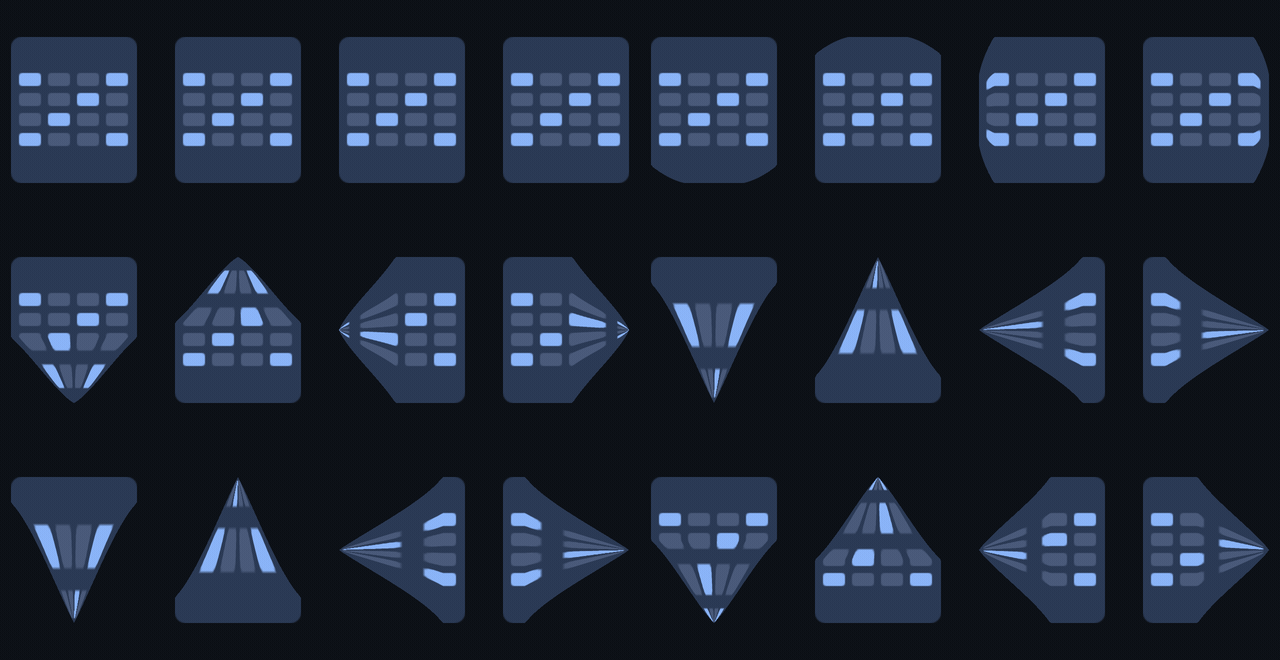
The macOS minimise, where a window pours into a point on the dock.
It is worth saying plainly, because it is the usual misconception: this is
not a sequence of animations. There is no shrink, then a bend, then a
slide. One number goes from 0 to 1 and a vertex shader remaps the geometry
nonlinearly — everything that looks like choreography falls out of the
remapping. Nothing here can be built out of NumberAnimations, which is
why this is the one component that ships a shader.
Genie {
    anchors.fill: windowView
    sourceItem: windowView
    edge: Genie.BottomEdge
    targetX: dockIcon.x + dockIcon.width / 2
    targetY: dock.y
    minimized: collapsed
}
edge is not decoration. It names the side that reaches the target first,
and the funnel is built along that axis: the front sweeps in from that edge
while the two perpendicular sides squeeze together. Aim at a dock on the
left and the surface narrows vertically, not horizontally. Keeping a
vertical squeeze and merely moving the endpoint sideways gives something
that slides rather than pours, which is the tell.
neckWidth is how much of the surface sits inside the funnel at once —
small for a tight spout that whips through, large for a lazy stretch closer
to a fold. Below about 0.15 the mesh is too coarse to bend smoothly and the
neck goes faceted.
Shaders ship compiled and are rebuilt at install time when qsb is
present. The committed blobs are baked by Qt 6.11 and a .qsb is refused
by any Qt older than the one that baked it — so on Qt below 6.8 the
rebuild is what makes them load at all, and without it Genie, EdgeLight
and Ripple draw nothing.
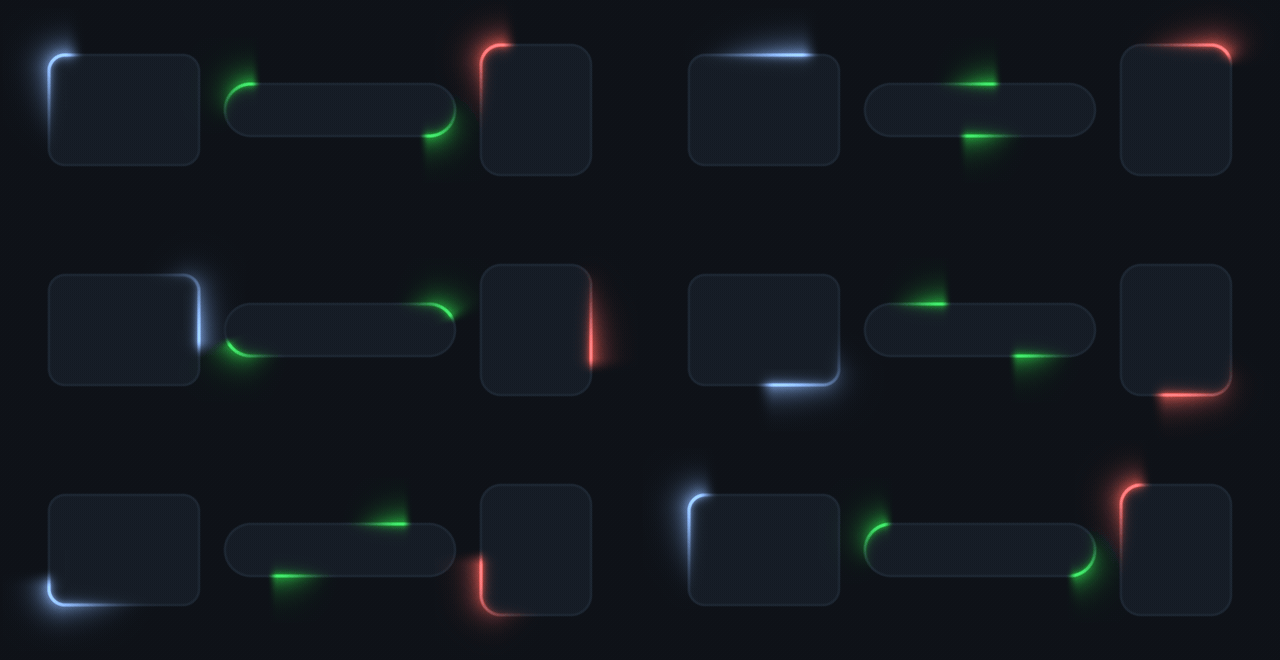
Light along an edge
ColourCycle { id: hue }

Rectangle { id: card; radius: 20 }

EdgeLight {
    anchors.fill: card
    rounding: card.radius
    lightColour: hue.colour
    trackColour: "#212b36"    // the outline between passes
}
The hard part is the travel, not the glow. Sweeping an angle around the
centre is the obvious approach and it is wrong on anything but a square:
equal angles cover unequal distance, so the light races along the short
sides and crawls along the long ones — unmissable on a bar. EdgeLight
parameterises the outline by arc length instead, four straight runs and
four quarter arcs laid end to end, so the speed is the same the whole way
round whatever the proportions.
It draws only the outline and goes over what it traces, so give it the same
geometry and the same corner radius. count puts several lights evenly
around the lap and tail sets their length as a fraction of the gap
between them, so they stay proportionate as the count changes.
count repeats one colour — there is a single colour in the shader.
Several colours means several lights stacked and pulled apart by phase:
EdgeLight { anchors.fill: card; rounding: card.radius; lightColour: "#8ab4f8" }
EdgeLight { anchors.fill: card; rounding: card.radius; lightColour: "#ff6159"; phase: 1 / 3 }
EdgeLight { anchors.fill: card; rounding: card.radius; lightColour: "#28c941"; phase: 2 / 3 }
Stacking rather than a list of colours per light: each then gets its own tail, glow and thickness too, and where they overlap the colours mix instead of one winning.
ColourCycle produces a colour and nothing else — no rectangle, no
gradient, no opinion about what is painted. With colours empty it walks
the hue circle; given a list it walks that, blending each into the next and
wrapping from the last back to the first, so a three-colour list is a loop
rather than a three-step sequence that snaps at the end. The hue circle is
walked in HSV, which is not perceptually even: pass colours when the
exact hues matter.
Reduced motion
Motion.scale multiplies every duration, and 0 disables animation
outright. It is left for the caller to set rather than detected here,
because reading a desktop setting means running a process or talking to a
portal, and this library depends on nothing but QtQuick — which is what
lets it be dropped into anything.
// GNOME
Motion.scale = animationsEnabled ? 1 : 0
Components
Anim, ColourAnim |
animations that take a role instead of a curve and a duration |
AnimatedRow |
a row whose items animate in, out, and out of each other's way |
AnimatedStack |
content replacing content, overlapping rather than cutting |
Shake |
refusal feedback |
Blink |
a steady pulse: a caret, a recording dot |
Spin |
continuous rotation for a busy indicator |
Pressable |
a control that acknowledges a touch and settles when released |
Reveal |
a container that grows and shrinks with its content |
SlideIn |
a panel arriving from an edge |
Stagger |
delays for cascading entries |
MotionShape |
a drawn shape, optionally resolving to a circle |
Appear |
entry and exit composed from fade, scale, slide and spin |
NumberAnim |
Anim under its unambiguous name |
Genie |
a surface poured into a point, the macOS way |
Ripple |
a press spreading from where it landed, masked to the shape |
FadeThrough |
swapping unrelated content without ever compositing both |
SharedAxis |
swapping related content, where the direction means something |
ColourCycle |
a colour that keeps moving: a rainbow, or a lap round a palette |
EdgeLight |
light travelling along an edge |
Edge enums are spelled TopEdge, BottomEdge, LeftEdge, RightEdge
rather than the obvious four names. Item already defines Top, Bottom,
Left and Right as transform origins, and a base type's enum shadows one
declared in a QML component — Appear.Bottom would silently resolve to 7
instead of the declared value. It stays self-consistent as long as both
sides of a comparison spell it the same way, so it fails only for a caller
who passes the literal the declaration promised.
Shake defaults to animating the anchor offset rather than x, because an
item centred with anchors ignores x entirely — animating it there does
nothing at all, silently.
SlideIn uses different curves entering and leaving. Something arriving is
worth watching and decelerates into place; something leaving should get out
of the way. One curve for both makes dismissal feel reluctant.
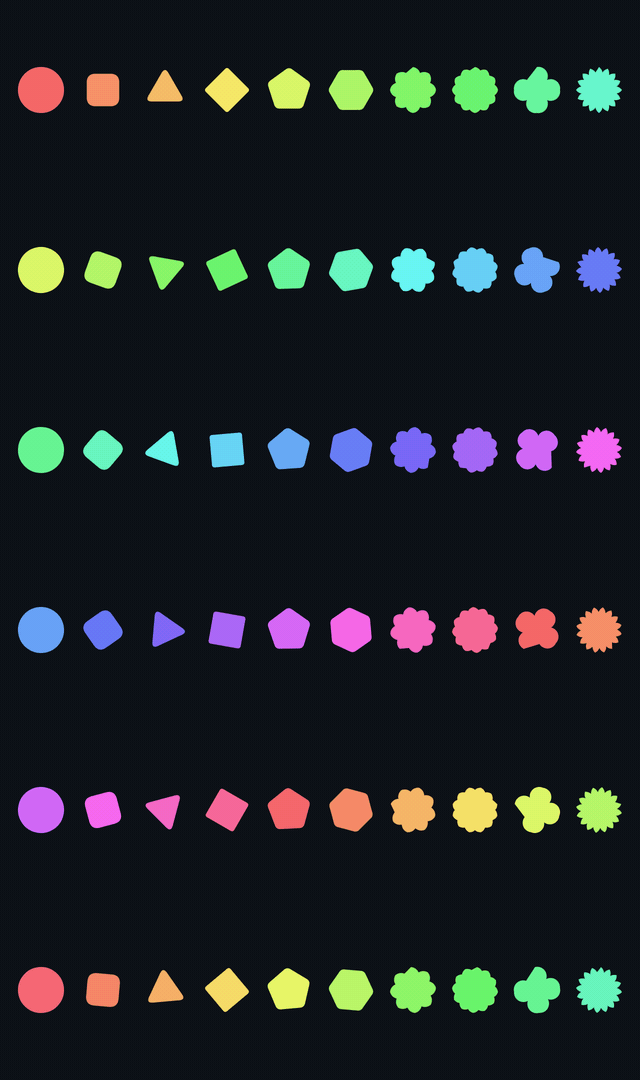
MotionShape draws ten shapes from two formulas — a rounded polygon and a
scalloped circle — so adding another is a line rather than a file. With
settlesToCircle it starts as its shape and becomes a dot shortly after.
The swap is instantaneous on purpose: masked by whatever size change is
running it reads as the shape resolving, while morphing between paths of
different vertex counts costs a great deal and looks worse.
FadeThrough is not a crossfade, and that is the point: a crossfade shows
a blend of both for half its length, legible as neither. It clears the old
out first and only then brings the new in. SharedAxis is for content that
is a step forward or back in one flow, where reversing the direction is
what tells someone the Back they pressed was heard.
Ripple masks itself to a rounded rectangle rather than clipping. Qt's
clipping is rectangular whatever the shape underneath, so a ripple in a
rounded control squares its corners off on the frame the wave reaches them.
Blink and Spin are loops, not transitions, and are timed differently on
purpose. A transition's duration is how long its curve needs to settle, so
the two travel together; a loop's duration is a rhythm, chosen by how often
it should read. Decoupling them is safe only because effect curves do not
overshoot — a spatial curve stretched over a rhythm would sit visibly
overshot at both ends of every cycle.
Spin ignores Motion.scale, deliberately. A spinner is the only thing
saying the work is still running, and reduced motion means "no transitions",
not "no progress indication". A scale of 0 would in any case not stop the
spinner: a zero-duration animation looping forever spins the event loop
instead, at whatever rate the CPU allows.
AnimatedRow takes a jitter from 0 to 1: each item arrives a little
larger or smaller, a beat sooner or later. Identical items animating
identically read as stamped out. The variation is derived from the index
rather than random, so a rebuilt item does not jump to a different one
mid-animation.
Demo
Every animation in this file was recorded from these, frame by frame rather
than off the screen — tools/record.sh drives each scene as a function of
one parameter and grabs a frame per step, so the loops close cleanly.
QML_IMPORT_PATH=. qs -p demo/gallery.qml   # everything at once
QML_IMPORT_PATH=. qs -p demo/dots.qml      # just the row
QML_IMPORT_PATH=. qs -p demo/genie.qml     # four docks, four directions
QML_IMPORT_PATH=. qs -p demo/colour.qml    # edge lights and colour cycles
A row that fills and empties itself is the only way to actually see an exit animation.
Licence
MIT. See LICENSE.
Questions
What is quickmotion?
Neftedollar/quickmotion is a public repo on GitHub by Neftedollar. Motion for QML — Material 3 Expressive, Apple and GNOME behind one set of roles. Genie, edge lights, colour cycles. Quickshell-ready, Quickshell-free.
Is quickmotion open source?
It declares the MIT license on GitHub.
Does quickmotion run on macOS, Windows or Linux?
Its maker tagged it for macOS. That is declared by the maker; Take My Repo has not tested it.
How do I install quickmotion?
Open "Take it" on its page: Take My Repo writes an install plan for your machine and hands it to your AI agent (Claude Code, Codex or Cursor), which asks you before each step. Take My Repo has not tested it on any machine.
Is quickmotion still maintained?
Its last change on GitHub was on 2026-07-31. GitHub counts 0 open issues and pull requests. Take My Repo does not judge from that whether it is maintained.
What do people who ran quickmotion say?
Nobody has reviewed it on Take My Repo yet, which says nothing about its quality.