
NeoApps.AI-CodeGenerator
NeoApps.AI enables businesses to build AI workers, automate workflows, and generate production-ready applications using natural language. Connect company knowledge, integrations, and business processes into a unified platform where intelligence, automation, and software work together to transform expertise into scalable digital products.
- 69
- BSD-3-Clause
- 1 d ago
Repo Neopric-Inc/NeoApps.AI-CodeGenerator, read from GitHub 19 h ago. Neopric-Inc has not joined Take My Repo.
In short
Neopric-Inc/NeoApps.AI-CodeGenerator is a public repo on GitHub by Neopric-Inc. NeoApps.AI enables businesses to build AI workers, automate workflows, and generate production-ready applications using natural language. Connect company knowledge, integrations, and business processes into a unified platform where intelligence, automation, and software work together to transform expertise into scalable digital products. It declares the BSD-3-Clause license on GitHub. It is written mainly in C#, has 69 stars and last changed on 2026-11-23. Nobody has reviewed it on Take My Repo yet, which says nothing about its quality. Read from GitHub on 2026-11-24.
Similar repos


NeoApps.AI Code Generator
Describe an app, or hand over a MySQL schema, and get a working app: a .NET 10 Web API (CRUD, relational and reporting endpoints, JWT auth, role-based permissions, Swagger) plus a React admin UI and an optional Claude-powered AI assistant, running locally in Docker.
Use it three ways:
| You are | Use |
|---|---|
| Anyone with a Claude account | Ask Claude: nothing to install |
| A developer | neoapps command line |
| A coding agent (Claude Code, Claude Desktop, Cursor, any MCP client) | MCP server |
What you get
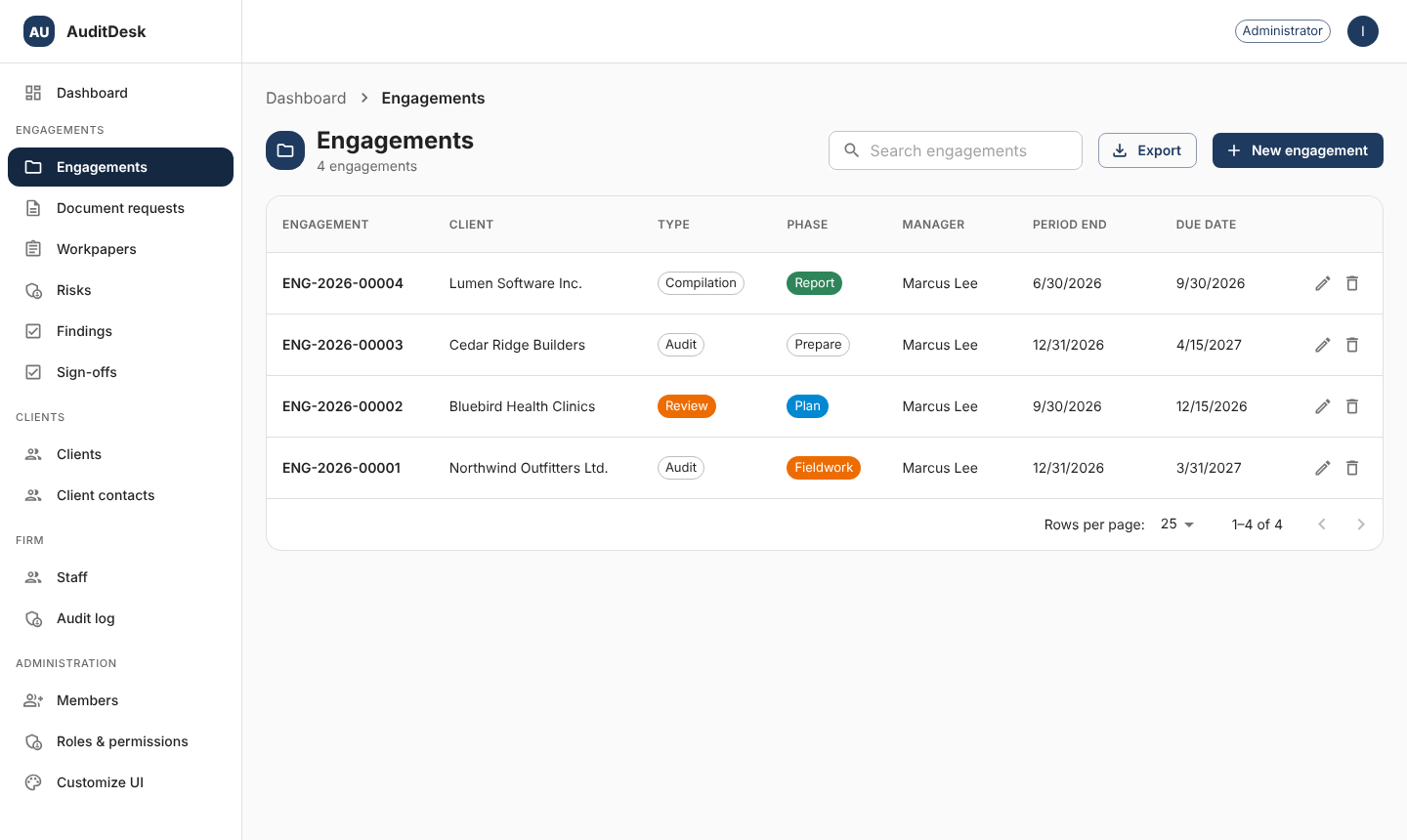
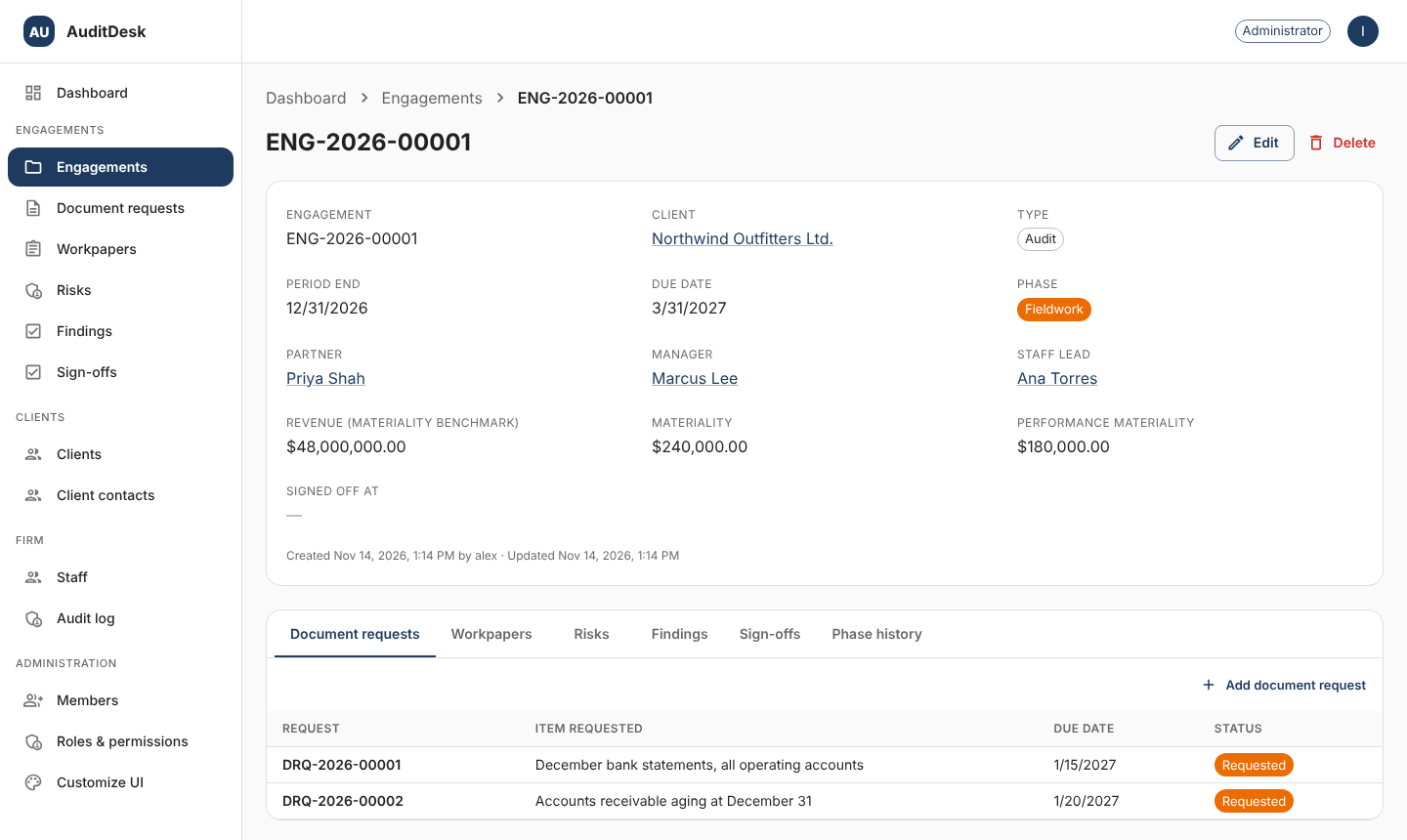
AuditDesk (samples/auditdesk), generated from one schema and one UI config, sample data only:
| Dashboard | List with search and export |
|---|---|
|
 |
| Record with related tabs | Roles and permissions |
 |
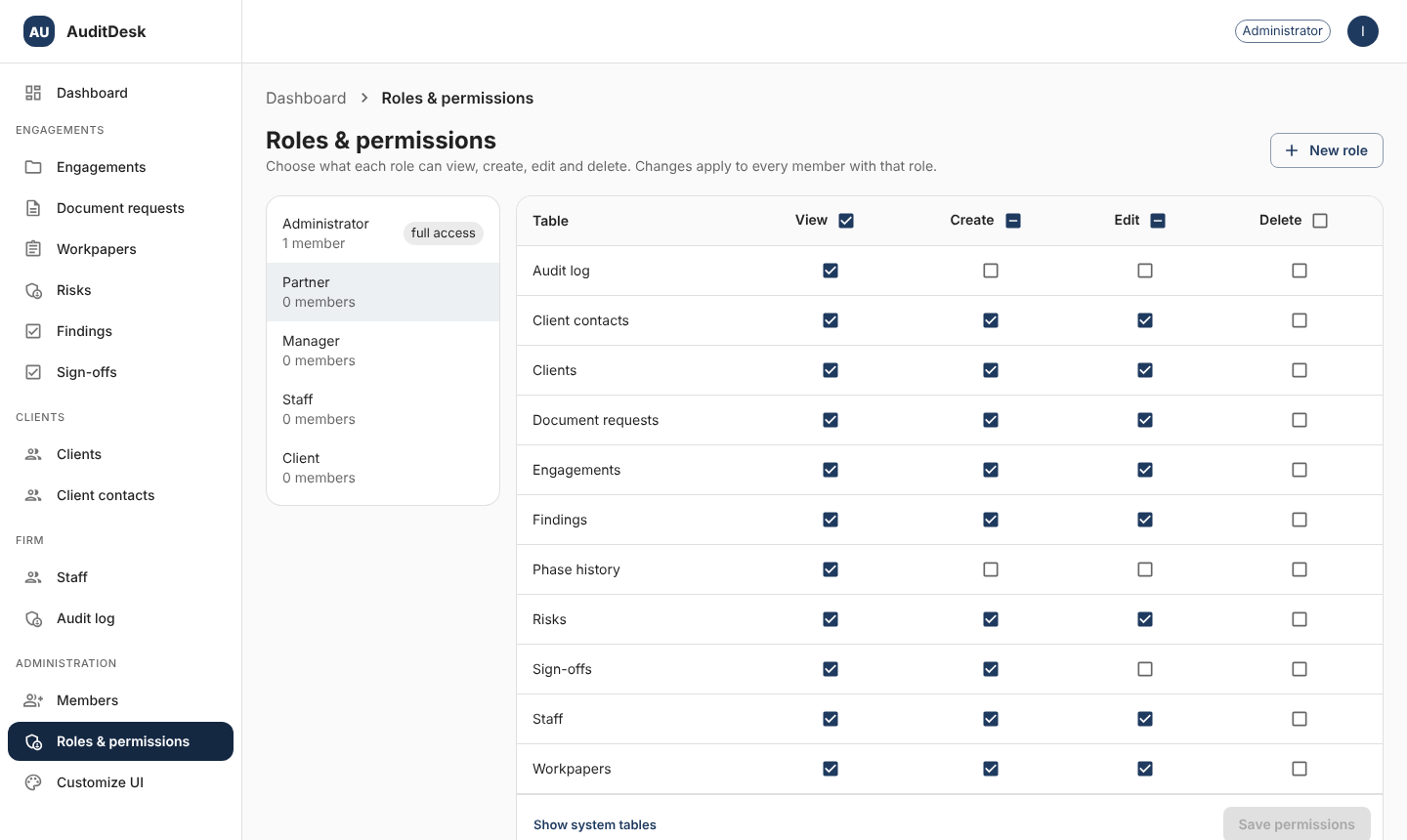 |
Install
curl -fsSL https://raw.githubusercontent.com/Neopric-Inc/NeoApps.AI-CodeGenerator/main/install.sh | bash
The installer:
- checks for git, the .NET 10 SDK (macOS:
brew install --cask dotnet-sdk) and Docker Desktop, - downloads the generator to
~/.neoapps, - builds it and puts the
neoappscommand on your PATH (~/.local/bin), - connects the MCP server to Claude Code and Claude Desktop if they're installed, and prints the config for other MCP clients.
Re-run it to update. Updates are fast-forward only: if you've changed or committed anything in ~/.neoapps, it leaves your work alone and tells you.
| Option | Default | Purpose |
|---|---|---|
--dir <path> / NEOAPPS_DIR |
~/.neoapps |
Where the generator lives |
--bin <path> / NEOAPPS_BIN |
~/.local/bin |
Where the neoapps command goes |
--ref <branch> / NEOAPPS_REF |
main |
Branch or tag to install |
--no-mcp |
Don't register with Claude | |
--no-update |
Don't pull an existing install | |
--infra |
Also start the shared MySQL/Redis/RabbitMQ containers now |
Pass options through curl with | bash -s -- --no-mcp. Already cloned the repo? Run ./scripts/setup.sh inside it: same steps, using your clone. Windows: run it in WSL.
You don't need a local MySQL, Redis, RabbitMQ, Node or Python: the shared services run from deploy/docker-compose.infra.yml.
Ask Claude (nothing to install)
Open a new chat in Claude or a Claude Code session, name this repo in your first message, and describe the app in plain words:
Use the GitHub repo Neopric-Inc/NeoApps.AI-CodeGenerator to build me an app for a dental clinic: patients, appointments, dentists, treatments and invoices. The front desk books appointments, dentists edit treatments, and the owner sees everything. Add an assistant that answers questions from our uploaded clinic policies.
Claude attaches the repo and follows its instructions. It designs the database, screens and roles (plus the AI assistant if you ask for one), generates and builds the app, tests it, and replies with the login.
Tips for a good result:
- What it tracks: name the main things and how they relate (a patient has many appointments…).
- Who does what: say who uses it and what each kind of user may do; these become roles and permissions.
- AI: say if you want questions answered from documents, questions about your data, or AI that creates records from a document.
- Changes: after it's built, just ask ("make status a dropdown", "let the front desk edit invoices"). Admins can also adjust screens in the app under Admin → Customize UI.
Not sure exactly what you need yet? Say so:
Use the GitHub repo Neopric-Inc/NeoApps.AI-CodeGenerator. I want an app to split shared expenses with roommates and friends, like Splitwise. Help me work out the requirements first and show me a preview before you build it.
Claude asks a few short rounds of questions and keeps a plain-language requirements doc. Before generating anything it shows a one-page preview of the plan: a diagram of the data, every screen's list and form, who can do what, the AI features, and any issues. Each new preview starts with what changed since the last version. When you're happy, Claude builds it.
An app built in Claude's cloud sandbox can't be opened from your browser. To run it on your own computer, install and use the CLI or a local agent.
Command line
neoapps new TodoApp --schema ~/.neoapps/samples/todo-app/todo-app.sql --deploy   # generate + run in Docker
neoapps preview MyApp --schema my.sql --ui my.ui.json                   # visual plan + checks before generating
neoapps help                                                            # all commands
The app opens at http://localhost:3100 and Swagger at http://localhost:5100/swagger. The command prints the admin login. Each new app gets the next free ports.
| Command | What it does |
|---|---|
new <App> --schema f.sql [--ui f.json] [--deploy] |
Database + .NET 10 API + React UI (--template dnd for the drag-and-drop designer, --no-frontend, --keep-db, --consumer) |
preview <App> [--schema] [--ui] [--save] |
Writes workspace/<App>/preview.html: data model, screens, roles, AI, issues, changes since the last saved version |
evolve <App> [--name "…"] [--plan] |
Applies a requirements change to a running app, keeping its data (migrations) |
migrate <App> [status|up|baseline|down:<v>] |
Runs the app's migrations |
ui <App> [--set changes.json] |
Shows the UI config, or merges changes and regenerates the UI |
frontend <App> · deploy <App> |
Regenerates the UI · builds and runs the app in Docker |
test <App> |
Data-rule tests (tenant isolation, row scopes, append-only tables, lifecycles) against the running API |
status · logs · stop <App> · list |
Inspect, stop or list apps |
doctor · guidelines · infra [down] |
Check .NET/Docker · schema rules · start/stop shared services |
App names are PascalCase (TodoApp); the name becomes the C# namespace. Schema and UI paths are relative to your current folder.
No Docker (Claude Code cloud sessions, CI): run sudo ./scripts/sandbox-deps.sh once, then export NEOAPPS_SKIP_INFRA=true NEOAPPS_MYSQL_PORT=3306 and run neoapps new ... without --deploy. CLAUDE.md shows how to start the generated API and UI by hand.
Coding agents (MCP)
The installer registers the neoapps MCP server with Claude Code and Claude Desktop (restart Desktop afterwards). Check Claude Code with claude mcp list. For Cursor, Windsurf, VS Code or any other MCP client, paste the snippet the installer prints into that client's MCP config:
{ "mcpServers": { "neoapps": {
    "command": "/path/to/dotnet",
    "args": ["/Users/you/.neoapps/src/NeoApps.Mcp/bin/Release/net10.0/neoapps-mcp.dll"],
    "env": { "NEOAPPS_HOME": "/Users/you/.neoapps", "DOTNET_ROOT": "/path/to/dotnet-dir", "PATH": "/path/to/dotnet-dir:/usr/local/bin:/opt/homebrew/bin:/usr/bin:/bin" } } } }
Use absolute paths. PATH is set because apps launched from the Dock don't inherit your shell's PATH, and the server runs dotnet and docker.
Then ask:
Build me a task tracker with projects, tasks and comments, and run it locally.
The agent reads the schema guidelines, writes the schema and UI config, calls neoapps_create_app and neoapps_deploy_app, and replies with the web URL, Swagger URL and admin login. Agents working inside a clone also get the full workflow from CLAUDE.md and AGENTS.md.
| Tool | What it does |
|---|---|
neoapps_schema_guidelines |
Schema rules and an example schema |
neoapps_check_environment |
Checks for the .NET SDK, Docker, and the shared containers |
neoapps_create_app |
Schema → database + .NET 10 API + React UI (frontendTemplate: app or dnd) |
neoapps_preview_app |
One-page visual plan with issues, before generating |
neoapps_evolve_app / neoapps_migrate_app |
Apply a requirements change keeping the data / migration status, apply, roll back |
neoapps_generate_frontend |
Regenerates the UI |
neoapps_deploy_app |
Builds and runs the app's containers |
neoapps_app_status / neoapps_app_logs / neoapps_stop_app |
Inspect or stop a running app |
neoapps_list_apps / neoapps_list_sample_schemas |
List your apps / sample schemas |
neoapps_start_infrastructure / neoapps_stop_infrastructure |
Start or stop the shared MySQL/Redis/RabbitMQ |
neoapps_ui_config_guide / neoapps_get_ui_config / neoapps_update_ui_config |
Design the UI, roles and AI |
neoapps_job_status |
Polls long-running jobs |
Generation and deployment run as background jobs: a call waits about 40 seconds, then returns a job id the agent polls with neoapps_job_status.
Designing the UI and access
Every generated app gets a schema-driven admin UI: grouped menu, list pages with search and paging, forms with real widgets (selects, checkboxes, currency, dates, related-record pickers), record pages with related tabs, a dashboard, and Admin > Members / Roles / Customize UI.
ui.config.jsonsets labels, widgets, select options, status colours, list columns, form order, menu groups, icons, dashboard cards, theme and roles. Without it, the UI infers all of this from the schema.- CLI:
neoapps new MyApp --schema my.sql --ui my.ui.json,neoapps ui MyApp(show),neoapps ui MyApp --set changes.json(merge and regenerate) - MCP:
neoapps_ui_config_guide,neoapps_get_ui_config,neoapps_update_ui_config, or just ask: "make status a dropdown with these options", "group the menu by …" - In the app: Admin > Customize UI edits and previews it live. The saved copy applies to everyone in that workspace and overrides the file.
- Example:
samples/clinical-research-site.ui.json - Dashboard cards show a row count by default, or a total:
{ "table": "expenses", "label": "Total spent", "sum": "amount", "where": { "status": "open" }, "format": "currency", "currencyCode": "INR" }. Currency fields take"currencyCode"(default USD).
- CLI:
- Data rules. Multi-tenancy, customer portals (customers see only their rows), status lifecycles and approvals, field
validation, automatic numbering (
INV-2026-00001), append-only tables, audit trails, outbox events, SLAs and plan limits are declared inui.config.json(tenancy,rowScopes,lifecycles,validations,numbering,immutable,audit,outbox,jobs,limits
Questions
What is NeoApps.AI-CodeGenerator?
Neopric-Inc/NeoApps.AI-CodeGenerator is a public repo on GitHub by Neopric-Inc. NeoApps.AI enables businesses to build AI workers, automate workflows, and generate production-ready applications using natural language. Connect company knowledge, integrations, and business processes into a unified platform where intelligence, automation, and software work together to transform expertise into scalable digital products.




