Notion-Steam-API-Integration
Notion integration that watches a database for Steam App IDs and fills in game data (name, cover, tags, reviews, price and more) from the Steam API. Run it instantly with npx, or install it globally.
- 17
- GPL-3.0
- 3 wk ago
Repo NikkelM/Notion-Steam-API-Integration, read from GitHub 17 min ago. NikkelM has not joined Take My Repo.
In short
NikkelM/Notion-Steam-API-Integration is a public repo on GitHub by NikkelM. Notion integration that watches a database for Steam App IDs and fills in game data (name, cover, tags, reviews, price and more) from the Steam API. Run it instantly with npx, or install it globally. It declares the GPL-3.0 license on GitHub. It is written mainly in JavaScript, has 17 stars and last changed on 2026-11-01. Nobody has reviewed it on Take My Repo yet, which says nothing about its quality. Read from GitHub on 2026-11-24.
Similar repos

Notion Steam API Integration
Notion integration for automatically updating database entries containing a Steam App ID with data from the Steam API.
Table of contents
Installation
Install it globally from npm to get the notion-steam-api-integration command:
npm install -g notion-steam-api-integration
Or run it on demand without installing, using npx:
npx notion-steam-api-integration
You need Node.js 22.13 or newer.
Notion setup
Create an (internal) Notion integration for your workspace to obtain an integration key. You can follow this guide to learn how to do so.
IMPORTANT: Don't forget to connect the integration to your database, as described in the guide! Otherwise, the integration won't work.
Provide the integration key via the NOTION_INTEGRATION_KEY environment variable (see Security).
Usage
There are three ways to configure and run the integration.
- Command-line flags - the quickest way, using the game properties' defaults. For example:
Addnotion-steam-api-integration --database-id <yourNotionDatabaseId>--save-configto also write the assembled configuration to aconfig.json(or--save-config <path>) for reuse. - The interactive wizard -
notion-steam-api-integration initasks you a few questions and writes aconfig.json. Runningnotion-steam-api-integrationwith no arguments and noconfig.jsonpresent starts this wizard automatically. - A configuration file -
notion-steam-api-integration(ornotion-steam-api-integration run) runs aconfig.jsonfrom the current directory (or pass--config <path>). The wizard can create the file for you, or you can write it by hand following the configuration reference.
Once running, the integration watches the database for entries whose Steam App ID property (the name is configurable) is set, fetches the corresponding data from the Steam API, and fills in the configured properties.
It keeps running and re-checks the database every updateInterval milliseconds, so you can leave it running in the background while you edit the database.
Entries without a Steam App ID set are ignored.
A small local database remembers which entries have already been processed (and caches the Steam refresh token). By default it is stored in an OS-native per-user data directory (Windows %LOCALAPPDATA%, macOS ~/Library/Application Support, Linux $XDG_DATA_HOME or ~/.local/share), under a notion-steam-api-integration/db folder, so it is stable no matter where you run the integration from. Set databasePath in the config (or pass --db-path <path>) to store it somewhere else; the resolved location is printed on startup.
If you change the configuration to include new game properties, run once with --force-reset (or "forceReset": true in the config) to also set the new values for all previously discovered games.
List every command and its flags with:
notion-steam-api-integration --help
notion-steam-api-integration run --help
Command-line flags
Flags let you run the integration without a config.json, using the default set of game properties (fetching tags is enabled only when you pass --steam-account-name).
For finer control over which properties are fetched, use the wizard or a config file.
| Flag | Config key | Description |
|---|---|---|
-c, --config <path> |
- | Path to a config.json. Defaults to ./config.json. |
--database-id <id> |
notionDatabaseId |
Notion database ID. Providing it enables flag-driven mode (no config.json needed). |
--data-source-id <id> |
notionDataSourceId |
Notion data source ID. Only needed for databases with multiple data sources. |
--interval <ms> |
updateInterval |
How often to check the database for changes, in milliseconds (minimum 60000). |
--app-id-property <name> |
steamAppIdProperty |
Name of the Notion property that holds the Steam App ID. Default Steam App ID. |
--steam-account-name <name> |
steamUser.accountName |
Steam account name, enabling tag fetching (password via the STEAM_PASSWORD env var). |
--force-reset |
forceReset |
Reset the local database and refresh every game on start. |
--always-update |
alwaysUpdate |
Also re-update existing entries edited by someone other than the integration. |
--db-path <path> |
databasePath |
Where to store the local database. Default: the OS-native per-user data directory. |
--save-config [path] |
- | Also write the assembled configuration to a file for reuse. Default config.json. |
The Notion integration key (NOTION_INTEGRATION_KEY) and the Steam password (STEAM_PASSWORD) are read from the environment (see Security).
Nested game-property options are only available via the wizard or a config file.
The init command also accepts -o, --output <path> to write the configuration file somewhere other than config.json.
Security
The integration handles two secrets:
- Your Notion integration key is read from the
NOTION_INTEGRATION_KEYenvironment variable, or you are prompted for it interactively when the integration starts. - Your Steam password (only needed to fetch tags on the first login) is read from the
STEAM_PASSWORDenvironment variable, or you are prompted for it interactively.
To avoid being prompted each time, set these as persistent environment variables: on Windows setx NOTION_INTEGRATION_KEY "secret_xxx" (and setx STEAM_PASSWORD "..."), then open a new terminal.
On macOS/Linux add the equivalent export lines to your shell profile.
Configuration
Notion database columns
Before running the integration, create the columns it fills in (or let it tell you: on the first run it checks that every configured column exists and exits with the name of any that are missing).
The names below are the defaults - rename them in your config.json, or disable the properties you do not want.
Print this list any time with notion-steam-api-integration properties.
| Property | Default column name | Notion column type |
|---|---|---|
gameName |
Name | Title (or Text if isPageTitle is false) |
coverImage |
(page cover) | none - sets the page cover image |
gameIcon |
(page icon) | none - sets the page icon |
releaseDate |
Release Date | Date |
reviewScore |
Review Score | Number (Select for the sentiment format, Text for positive/negative) |
tags |
Tags | Multi-select (requires a Steam login) |
gameDescription |
Description | Text |
storePage |
Store Page | URL |
gamePrice |
Price | Number |
steamDeckCompatibility |
Steam Deck Compatibility | Select |
gameDevelopers |
Developers | Multi-select |
gamePublishers |
Publishers | Multi-select |
You also need the column the integration watches for Steam App IDs: Steam App ID (Number). Set steamAppIdProperty to match its name.
Schema validation
The project provides a JSON validation schema for the required configuration file, which makes sure that all required information is provided.
The schema can be found in the config.schema.json file and used within your config.json by adding the following property:
"$schema": "config.schema.json"
NOTE: The script will test your provided config.json against this schema, so make sure your configuration is valid.
Note that only if you want to fetch tag data, Steam requires you to be authenticated with your Steam account.
For this, provide your Steam account name in the steamUser.accountName property of the configuration file and your password via the STEAM_PASSWORD environment variable (see Security).
The integration does not transmit this data over the internet, everything is done locally.
If you have Steam Guard enabled, you will also need to provide the Steam Guard code when running the integration.
Once you have authenticated once, the integration will store a local refresh token for ~200 days before you need to log in again.
You can then set the useRefreshToken property to true, which will make the integration use the stored refresh token to authenticate you to the Steam API without needing your password again.
Properties
The following is a list of all configuration items, their defaults and the values they can take.
Top-level properties
notionIntegrationKey
The secret integration key for your Notion integration (create or find it at https://www.notion.so/my-integrations).
Provide this via the NOTION_INTEGRATION_KEY environment variable (see Security), storing it in the configuration file is no longer allowed, and the integration will refuse to run if it is set.
| Type | Default value | Possible values | Required |
|---|---|---|---|
| environment variable | - | A valid Notion integration key | Yes, via NOTION_INTEGRATION_KEY |
notionDatabaseId
The ID of the database you want to run the integration on. You can find the ID in the URL of your database, e.g. https://www.notion.so/myworkspace/your-database-id.
| Type | Default value | Possible values | Required |
|---|---|---|---|
string |
"" |
A valid Notion database ID | Yes |
notionDataSourceId
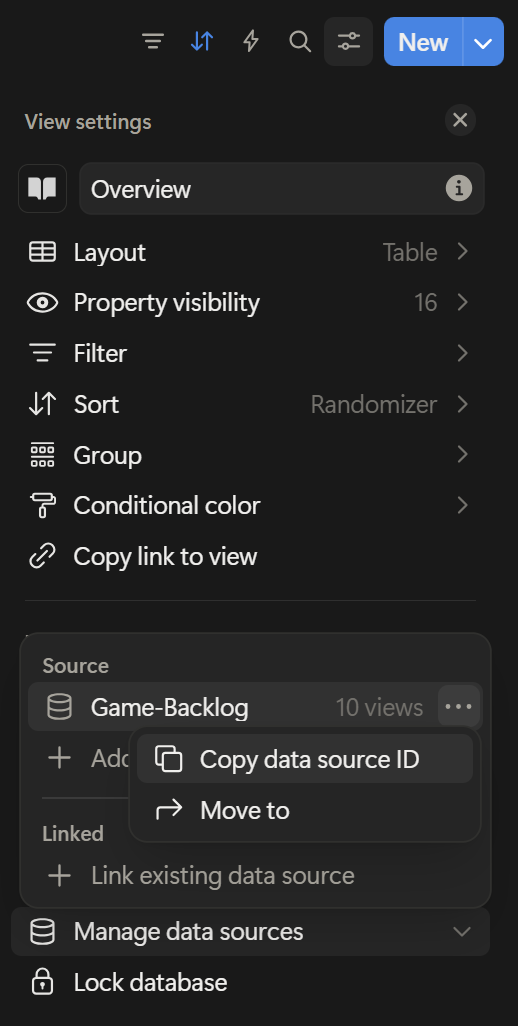
The ID of the data source you want to run the integration on. This is required if you have multiple data sources in your database. You can find the ID under the Manage data sources menu in the database settings. If you only have one data source (which is the default), you can leave this property empty.
| Type | Default value | Possible values | Required |
|---|---|---|---|
string |
"" |
A valid data source ID of one of the data sources in your database | Yes, if you have multiple data sources in your database. |
updateInterval
The interval in which the integration will check for updates to your Notion database. The value is in milliseconds. Must be at least 60000 (1 minute).
| Type | Default value | Possible values | Required |
|---|---|---|---|
integer |
60000 | Integers >= 60000 | Yes |
steamAppIdProperty
The name of the property in your Notion database that contains the Steam App ID of the games.
| Type | Default value | Possible values | Required |
|---|---|---|---|
string |
"Steam App ID" |
Any string | Yes |
forceReset
If true, the integration will reset the local database, fetch all Steam App ID's from the Notion database and refresh all game properties. This may take longer, depending on the size of your Notion database.
| Type | Default value | Possible values | Required |
|---|---|---|---|
boolean |
false |
true or false |
No |
alwaysUpdate
If true, the integration will always update entries in the Notion database that were modified since it last ran, even if the game already exists in the local database. It will only update if another user than the integration has last modified the entry.
| Type | Default value | Possible values | Required |
|---|---|---|---|
boolean |
false |
true or false |
No |
Questions
What is Notion-Steam-API-Integration?
NikkelM/Notion-Steam-API-Integration is a public repo on GitHub by NikkelM. Notion integration that watches a database for Steam App IDs and fills in game data (name, cover, tags, reviews, price and more) from the Steam API. Run it instantly with npx, or install it globally.
Is Notion-Steam-API-Integration open source?
It declares the GPL-3.0 license on GitHub.