nylondiamond.github.io
Website for self
- 0
- 6 y ago
Repo NylonDiamond/nylondiamond.github.io, read from GitHub 10 min ago. NylonDiamond has not joined Take My Repo.
In short
NylonDiamond/nylondiamond.github.io is a public repo on GitHub by NylonDiamond. Website for self. It declares no license on GitHub. Public does not mean open source: without a license, nobody is granted the right to reuse it. It is written mainly in HTML, has 0 stars and last changed on 2020-11-21. Nobody has reviewed it on Take My Repo yet, which says nothing about its quality. Read from GitHub on 2026-11-22.
Yabai Video
A tiling window manager for macOS based on binary space partitioning.
What and Why?
What is Yabai?
The primary function of yabai is tiling window management; automatically modifying your window layout using a binary space partitioning algorithm to allow you to focus on the content of your windows without distractions. Additional features of yabai include focus-follows-mouse, disabling animations for switching spaces, creating spaces past the limit of 16 spaces, and much more.
Why use Yabai?
- less thing to have to think about. Work faster. Just works. It seems kind of dumb the old way after you've done it this way
- lets look at a demo.
- First, no window manager. (resizing boring)
- Now manual window manager like magnet. (snapping side to side and shortcuts)
- Now a automatic tiling window manager line Yabai. (epic*)
What can it do?
Check the man pages
# A short and concise overview of options available.
man yabai
How to Install
To SIP or not to SIP?
Why?
The following features of Yabai require
System Integrity Protectionto be (partially) disabled:- focus/create/destroy space without animation
- move space (and its windows) left, right or to another display
- remove window shadows
- enable window transparency
- control window layers (make windows appear topmost)
- sticky windows (make windows appear on all spaces)
- move window by clicking anywhere in its frame
- toggle picture-in-picture for any given window
- border for focused and inactive windows
What I care about...
- With sip
- Cannot focus a space :
yabai -m space --focus 4 - not non animation space switching
- no limelight built in :(
- no top window (sticky=on)
- Cannot focus a space :
- Without sip
- Everything
Disable SIP (More features, Less Secure)
Disable SIP
How to disable SIP : https://developer.apple.com/documentation/security/disabling_and_enabling_system_integrity_protection
Shutdown Computer
Turn on your Mac and immediately press and hold these two keys: Command (⌘) and R.
Release the keys when you see an Apple logo, spinning globe, or other startup screen.
You might be prompted to enter a password, such as a firmware password or the password of a user who is an administrator of this Mac. Enter the requested password to continue.
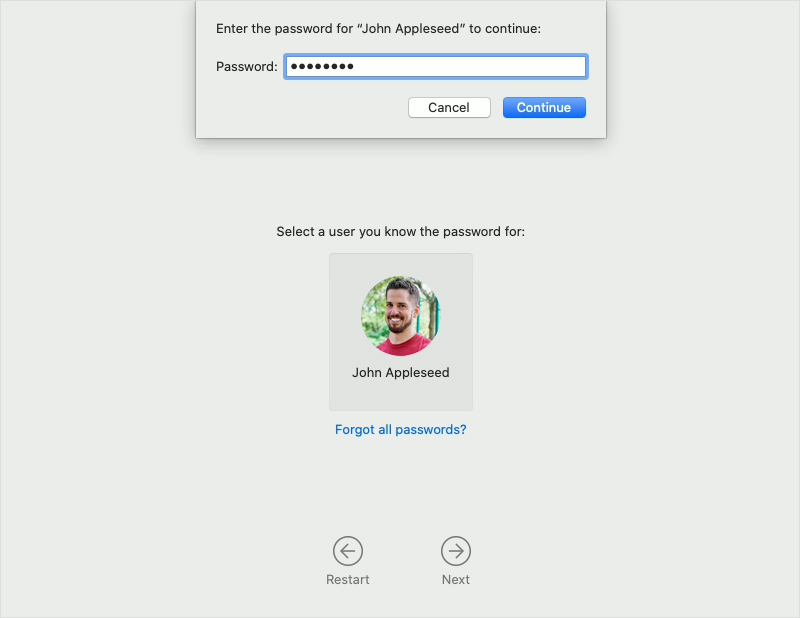
Startup is complete when you see the utilities window:
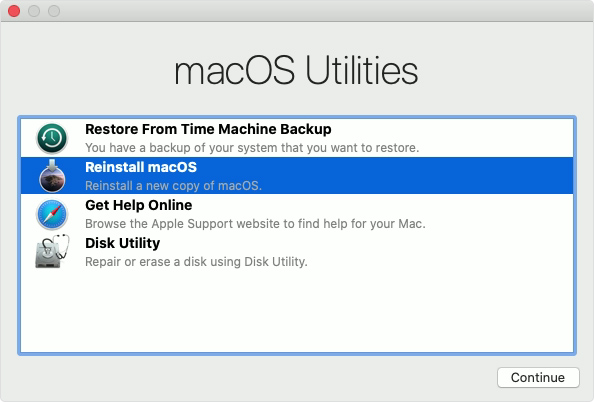
Go to menu bar at the top and go to
Utilities > TerminalType one of the following depending on your OS Version:
# If you're on macOS 11.0.1
# Requires Filesystem Protections and Debugging Restrictions to be disabled (workaround because --without debug does not work)
# (printed warning can be safely ignored)
csrutil disable --with kext --with dtrace --with nvram --with basesystem

# If you're on macOS 10.14 and 10.15
# Requires Filesystem Protections and Debugging Restrictions to be disabled
# (printed warning can be safely ignored)
csrutil enable --without debug --without fs

# If you're on macOS 10.13
# (disables SIP completely)
csrutil disable
Reboot
You can verify that System Integrity Protection is turned off by running
csrutil status, which returnsSystem Integrity Protection status: disabledif it is turned off.
Install Yabai and Other tools with Homebrew
Brew install tools
--------------------------------------
# https://github.com/koekeishiya/yabai
# MacOS window manager
**brew install koekeishiya/formulae/yabai
# Password require
sudo yabai --install-sa
--------------------------------------
# https://github.com/stedolan/jq
# Lightweight and flexible command-line JSON processor
brew install jq
--------------------------------------
# https://github.com/koekeishiya/skhd
# Simple hotkey daemon for macOS
brew install koekeishiya/formulae/skhd
--------------------------------------**
Post Install setup
Create and setup configuration files
You need to create config files and put some stuff in them
Yabai config
Where to put the config file?
# The per-user yabai configuration file must be executable;
# it is just a shell script that's ran before yabai launches.
# It must be placed at one of the following places (in order):

$XDG_CONFIG_HOME/yabai/yabairc
$HOME/.config/yabai/yabairc # < my recommendation
$HOME/.yabairc
How to make the config file?
# create empty configuration file and make it executable
# Link to example config: https://github.com/koekeishiya/yabai/blob/master/examples/yabairc
touch ~/.config/yabai/yabairc
chmod +x ~/.config/yabai/yabairc
Put some stuff in your config file
My Personal Config
#!/usr/bin/env sh
#YABAI STUFF

# bsp or float (default: bsp)
#yabai -m config layout bsp

# Override default layout for space 2 only
#yabai -m config --space 2 layout float

# My custom space names
yabai -m space 1 --label one
yabai -m space 2 --label two
yabai -m space 3 --label three
yabai -m space 4 --label four
yabai -m space 5 --label five
yabai -m space 6 --label six

# float system preferences
yabai -m rule --add app="^System Preferences$" sticky=on layer=above manage=off
yabai -m rule --add app="^Karabiner-Elements$" sticky=on layer=above manage=off
yabai -m rule --add app="^Karabiner-EventViewer$" sticky=on layer=above manage=off
#yabai -m rule --add app="^Carbon Copy Cloner$" sticky=on layer=above manage=off
yabai -m rule --add app="^Finder$" sticky=on layer=above manage=off
yabai -m rule --add app="^Keka$" sticky=on layer=above manage=off
yabai -m rule --add app="^Alfred Preferences$" sticky=on layer=above manage=off
yabai -m rule --add app="^Disk Utility$" sticky=on layer=above manage=off
yabai -m rule --add app="^System Information$" sticky=on layer=above manage=off
yabai -m rule --add app="^Activity Monitor$" sticky=on layer=above manage=off
yabai -m rule --add app="^Path Finder$" manage=off
yabai -m rule --add app="^TeamViewer$" sticky=off layer=above manage=off
yabai -m rule --add app="Fantastical" manage=off
yabai -m rule --add app="^Spotify$" manage=off
yabai -m rule --add app="^iTerm2$" manage=off
yabai -m rule --add app="^Flux$" manage=off
yabai -m rule --add app="^Time Out$" manage=off
yabai -m rule --add app="^perl_client_app$" manage=off
yabai -m rule --add app="^console$" manage=off
yabai -m rule --add app="^Harvest$" manage=off
yabai -m rule --add app="^CiscoSparkHelper$" manage=off
yabai -m rule --add app="^Logi Options$" manage=off
yabai -m rule --add app="^Cisco Webex Start$" manage=off
#yabai -m rule --add app=iTerm space=2

#find ~/Library/Parallels/Applications\ Menus/ -maxdepth 3 -type f | awk -F'/' '{ print $NF; }' | awk '{$1=$1};1' | sort | uniq | tr "\n" "\0" | xargs -0 -I{} yabai -m rule --add app="^{}\$" title=".*" manage=on

# global settings
#yabai -m config focus_follows_mouse          autoraise
#yabai -m config focus_follows_mouse          on
# New window spawns to the right if vertical split, or bottom if horizontal split
yabai -m config window_placement second_child
yabai -m config window_topmost off
#yabai -m config window_shadow float
yabai -m config window_opacity off
yabai -m config window_opacity_duration 0.00
yabai -m config active_window_opacity 1.0
#yabai -m config normal_window_opacity        0.97
#yabai -m config window_border                on | off

## WITH SIP ENABLED
yabai -m config window_border off

## WTIH SIP DISABLED
 #yabai -m config window_border on
 #yabai -m config window_border_width 3
 #yabai -m config active_window_border_color 0xFF40FF00
 #yabai -m config normal_window_border_color 0x00FFFFFF
#yabai -m config insert_feedback_color        0xffd75f5f

yabai -m config auto_balance off
yabai -m config split_ratio 0.50
# # set mouse interaction modifier key (default: fn)
yabai -m config mouse_modifier ctrl
# set modifier + right-click drag to resize window (default: resize)
yabai -m config mouse_action2 resize
# set modifier + left-click drag to resize window (default: move)
yabai -m config mouse_action1 move

# general space settings
#yabai -m config focused_border_skip_floating  1
#yabai -m config --space 3 layout             float

yabai -m config layout bsp
yabai -m config top_padding 2
#yabai -m config bottom_padding 22
yabai -m config bottom_padding 2
#yabai -m config left_padding 40
yabai -m config left_padding 2
#yabai -m config right_padding 10
yabai -m config right_padding 2
yabai -m config window_gap 10

#Limelight addon
killall limelight &>/dev/null
limelight &>/dev/null &

# #Ubersicht widget bar stuff
#yabai -m signal --add event=space_changed \
#action="osascript -e 'tell application \"Übersicht\" to refresh widget id \"nibar-spaces-primary-jsx\"'"
#yabai -m signal --add event=display_changed \
#action="osascript -e 'tell application \"Übersicht\" to refresh widget id \"nibar-spaces-primary-jsx\"'"

#yabai -m signal --add event=space_changed \
#action="osascript -e 'tell application \"Übersicht\" to refresh widget id \"nibar-spaces-secondary-jsx\"'"
#yabai -m signal --add event=display_changed \
#action="osascript -e 'tell application \"Übersicht\" to refresh widget id \"nibar-spaces-secondary-jsx\"'"

# signals
# yabai -m signal --add event=window_destroyed action="yabai -m query --windows --window &> /dev/null || yabai -m window --focus mouse"
#yabai -m signal --add event=space_changed action="yabai -m window --focus $(yabai -m query --windows --window | jq ".id")"
# yabai -m signal --add event=application_terminated action="yabai -m query --windows --window &> /dev/null || yabai -m window --focus mouse"

#testing signals
# yabai -m signal --add event=window_destroyed action="terminal-notifier -message 'window_destroyed'"
# yabai -m signal --add event=application_terminated action="terminal-notifier -message 'application_terminated'"

## If I close the active window, focus on any other visible window.
# yabai -m signal --add event=window_destroyed action="bash /Users/jesseskelton/CustomScripts/SwitchSpaces/window-focus-on-destroy.sh"
# yabai -m signal --add event=space_changed action="export CUR_ACTIVE_APP=\"iTerm2\""

echo "yabai configuration loaded.."

#END
Example Config
Config from here : https://github.com/koekeishiya/yabai/blob/master/examples/yabairc
#!/usr/bin/env sh

# the scripting-addition must be loaded manually if
# you are running yabai on macOS Big Sur. Uncomment
# the following line to have the injection performed
# when the config is executed during startup.
#
# for this to work you must configure sudo such that
# it will be able to run the command without password
#
# see this wiki page for information:
#  - https://github.com/koekeishiya/yabai/wiki/Installing-yabai-(latest-release)
#
# sudo yabai --load-sa
# yabai -m signal --add event=dock_did_restart action="sudo yabai --load-sa"

# global settings
yabai -m config mouse_follows_focus          off
yabai -m config focus_follows_mouse          off
yabai -m config window_placement             second_child
yabai -m config window_topmost               off
yabai -m config window_shadow                on
yabai -m config window_opacity               off
yabai -m config window_opacity_duration      0.0
yabai -m config active_window_opacity        1.0
yabai -m config normal_window_opacity        0.90
yabai -m config window_border                off
yabai -m config window_border_width          6
yabai -m config active_window_border_color   0xff775759
yabai -m config normal_window_border_color   0xff555555
yabai -m config insert_feedback_color        0xffd75f5f
yabai -m config split_ratio                  0.50
yabai -m config auto_balance                 off
yabai -m config mouse_modifier               fn
yabai -m config mouse_action1                move
yabai -m config mouse_action2                resize
yabai -m config mouse_drop_action            swap

# general space settings
yabai -m config layout                       bsp
yabai -m config top_padding                  12
yabai -m config bottom_padding               12
yabai -m config left_padding                 12
yabai -m config right_padding                12
yabai -m config window_gap                   06

echo "yabai configuration loaded.."
skhd config
Where to put the config file?
# The per-user yabai configuration file must be executable;
# it is just a shell script that's ran before limelight launches.
# It can be placed at anywhere you want .. Ex. :

$HOME/.config/skhd/skhdrc
How to make the config file?
# create empty configuration file and make it executable
touch ~/.config/skhd/skhdrc
chmod +x ~/.config/skhd/skhdrc
Put some stuff in your config file
My Personal Config
## HYPER == SHIFT + CMD + ALT + OPTION

## Quickly restart the yabai launch agent
ctrl + alt + cmd - r : launchctl kickstart -k "gui/${UID}/homebrew.mxcl.yabai"

## Close active application
hyper - backspace : $(yabai -m window $(yabai -m query --windows --window | jq -re ".id") --close)

# test a command
# lshift - x : terminal-notifier -message "lshift - x"
# lshift - x : terminal-notifier -message "$(yabai -m query --windows --window | jq -re ".id")"

## open terminal
# hyper - return : /Applications/iTerm.app/Contents/MacOS/iTerm2

## swap window
hyper - y : yabai -m window --swap west
# shift + alt - j : yabai -m window --swap south
# shift + alt - k : yabai -m window --swap north
hyper - 0x21 : yabai -m window --swap east # "[" key

## send window to monitor and follow focus
hyper - u : /Users/jesseskelton/CustomScripts/SwitchSpaces/moveWindowLeftAndFollowFocus.sh
hyper - p : /Users/jesseskelton/CustomScripts/SwitchSpaces/moveWindowRightAndFollowFocus.sh

## focus display
ctrl + cmd - 1 : yabai -m window --display 1 yabai -m display --focus 1
ctrl + cmd - 2 : yabai -m window --display 2 yabai -m display --focus 2
ctrl + cmd - 3 : yabai -m window --display 3 yabai -m display --focus 3

## increase window size
#shift + alt - a : yabai -m window --resize left:-20:0
#shift + alt - s : yabai -m window --resize bottom:0:20
#shift + alt - w : yabai -m window --resize top:0:-20
#shift + alt - d : yabai -m window --resize right:20:0

## decrease window size
#shift + cmd - a : yabai -m window --resize left:20:0
#shift + cmd - s : yabai -m window --resize bottom:0:-20
#shift + cmd - w : yabai -m window --resize top:0:20
#shift + cmd - d : yabai -m window --resize right:-20:0

## rotate tree 90
hyper - r : yabai -m space --rotate 90

## flip the tree vertically
hyper - 4 : yabai -m space --mirror y-axis
# mirror tree y-axis
#alt - y : yabai -m space --mirror y-axis
## mirror tree x-axis
#alt - x : yabai -m space --mirror x-axis

#Move active window to next space on current display
shift + lalt + lcmd + ctrl + ralt - 1 : yabai -m query --spaces --space | jq -re ".index" | xargs -I {} bash -c "if [[ '{}' = '1' ]]; then yabai -m window --space 2; elif [[ '{}' = '2' ]]; then yabai -m window --space 1; fi"
shift + lalt + lcmd + ctrl + ralt - 2 : yabai -m query --spaces --space | jq -re ".index" | xargs -I {} bash -c "if [[ '{}' = '3' ]]; then yabai -m window --space 4; elif [[ '{}' = '4' ]]; then yabai -m window --space 3; fi"
shift + lalt + lcmd + ctrl + ralt - 3 : yabai -m query --spaces --space | jq -re ".index" | xargs -I {} bash -c "if [[ '{}' = '5' ]]; then yabai -m window --space 6; elif [[ '{}' = '6' ]]; then yabai -m window --space 5; fi"

# show next space per display
#hyper - 1 : /Users/jesseskelton/CustomScripts/SwitchSpaces/switchAndFocus.sh 1
#hyper - 2 : /Users/jesseskelton/CustomScripts/SwitchSpaces/switchAndFocus.sh 2
#hyper - 3 : /Users/jesseskelton/CustomScripts/SwitchSpaces/switchAndFocus.sh 3
ctrl + alt + cmd + lshift - 1 : /Users/jesseskelton/CustomScripts/SwitchSpaces/switchAndFocusSIP.sh 1
ctrl + alt + cmd + lshift - 2 : /Users/jesseskelton/CustomScripts/SwitchSpaces/switchAndFocusSIP.sh 2
ctrl + alt + cmd + lshift - 3 : /Users/jesseskelton/CustomScripts/SwitchSpaces/switchAndFocusSIP.sh 3

## toggle window fullscreen zoom
hyper - f : yabai -m window --toggle zoom-fullscreen

# cycle through windows
# cycle backwards
#hyper - i : yabai -m query --spaces | jq -re ".[] | select(.visible == 1).index" | xargs -I{} yabai -m query --windows --space {} | jq -sre "add | sort_by(.display, .frame.x, .frame.y, .id) | nth(index(map(select(.focused == 1))) - 1).id" | xargs -I{} yabai -m window --focus {}
#hyper - i : yabai -m query --spaces | jq -re ".[] | select(.visible == 1).index" | xargs -I{} yabai -m query --windows --space {} | jq -sre "add | sort_by(.display, .frame.x, .frame.y, .id) | nth(index(map(select(.focused == 1))) - 1).id" | xargs -I{} yabai -m window --focus {}

#alt - p : yabai -m window --focus stack.prev || yabai -m window --focus prev || yabai -m window --focus last
#
# go to each window WITHOUT going into a stack
# ctrl + alt + cmd + lshift - i : yabai -m query --spaces | jq -re ".[] | select(.visible == 1).index" | xargs -I{} yabai -m query --windows --space {} | jq -re "[.[] | select((.\"stack-index\" <= 1) and (.app != \"Hammerspoon\"))]" | jq -sre "add | sort_by(.display, .frame.x, .frame.y, .id) | nth(index(map(select(.focused == 1))) - 1).id" | xargs -I{} yabai -m window --focus {}
ctrl + alt + cmd + lshift - i : yabai -m query --spaces | jq -re ".[] | select(.visible == 1).index" | xargs -I{} yabai -m query --windows --space {} | jq -re "[.[] | select(.app != \"Hammerspoon\")]" | jq -sre "add | sort_by(.display, .frame.x, .frame.y, .id) | nth(index(map(select(.focused == 1))) - 1).id" | xargs -I{} yabai -m window --focus {}

# ctrl + alt + cmd + rshift - i : yabai -m window --focus stack.prev || yabai -m window --focus stack.last

#hyper - 0x29 : yabai -m query --spaces \
#hyper - o : yabai -m query --spaces | jq -re ".[] | select(.visible == 1).index" | xargs -I{} yabai -m query --windows --space {} | jq -sre "add | sort_by(.display, .frame.x, .frame.y, .id) | reverse | nth(index(map(select(.focused == 1))) - 1).id" | xargs -I{} yabai -m window --focus {}

#alt - n : yabai -m window --focus stack.next || yabai -m window --focus next || yabai -m window --focus first

# go to each window WITHOUT going into a stack
# ctrl + alt + cmd + lshift - o : yabai -m query --spaces | jq -re ".[] | select(.visible == 1).index" | xargs -I{} yabai -m query --windows --space {} | jq -re "[.[] | select((.\"stack-index\" <= 1) and (.app != \"Hammerspoon\"))]" | jq -sre "add | sort_by(.display, .frame.x, .frame.y, .id) | reverse | nth(index(map(select(.focused == 1))) - 1).id" | xargs -I{} yabai -m window --focus {}
ctrl + alt + cmd + lshift - o : yabai -m query --spaces | jq -re ".[] | select(.visible == 1).index" | xargs -I{} yabai -m query --windows --space {} | jq -re "[.[] | select(.app != \"Hammerspoon\")]" | jq -sre "add | sort_by(.display, .frame.x, .frame.y, .id) | reverse | nth(index(map(select(.focused == 1))) - 1).id" | xargs -I{} yabai -m window --focus {}

# Toggle foucus on a stack
ctrl + alt + cmd + lshift - return : yabai -m window --focus stack.next || yabai -m window --focus stack.first

#create a stack
# ctrl + alt + cmd + rshift - 1 : yabai -m query --windows --window | jq -re "." | xargs -I{} yabai -m window 1 --stack {}
# stack next window onto current window
ctrl + alt + cmd + lshift - 0x43 :  window=$(yabai -m query --windows --window | jq -r '.id') && yabai -m window east --stack $window || (yabai -m window $window --toggle float && yabai -m window $window --toggle float)

################################################################
############################# UNUSED ###########################
################################################################

## float / unfloat window and center on screen
#alt - t : yabai -m window --toggle float;\
#yabai -m window --grid 4:4:1:1:2:2 ## toggle sticky alt - s : yabai -m window --toggle sticky ## toggle sticky, float and resize to picture-in-picture size alt - p : yabai -m window --toggle sticky;\ yabai -m window --grid 5:5:4:0:1:1 ## change layout of desktop ctrl + alt - a : yabai -m space --layout bsp ctrl + alt - d : yabai -m space --layout float

## toggle window split type
#alt - e : yabai -m window --toggle split

## toggle window border
#shift + alt - b : yabai -m window --toggle border

## create desktop, move window and follow focus
#shift + cmd - n : yabai -m space --create && \
#index="$(yabai -m query --spaces --display | jq 'map(select(."native-fullscreen" == 0))[-1].index')" && \
#yabai -m window --space "${index}" && \
#yabai -m space --focus "${index}"

## create desktop and follow focus
#shift + alt - n : yabai -m space --create && \
#index="$(yabai -m query --spaces --display | jq 'map(select(."native-fullscreen" == 0))[-1].index')" && \
#yabai -m space --focus "${index}"

## destroy desktop
#cmd + alt - w : yabai -m space --destroy

## fast focus desktop
#cmd + alt - x : yabai -m space --focus last
#cmd + alt - z : yabai -m space --focus prev
#cmd + alt - c : yabai -m space --focus next
#cmd + alt - 1 : yabai -m space --focus 1
#cmd + alt - 2 : yabai -m space --focus 2
#cmd + alt - 3 : yabai -m space --focus 3
#cmd + alt - 4 : yabai -m space --focus 4
#cmd + alt - 5 : yabai -m space --focus 5
#cmd + alt - 6 : yabai -m space --focus 6
#cmd + alt - 7 : yabai -m space --focus 7
#cmd + alt - 8 : yabai -m space --focus 8
#cmd + alt - 9 : yabai -m space --focus 9
#cmd + alt - 0 : yabai -m space --focus 10

## send window to desktop and follow focus
#shift + cmd - x : yabai -m window --space last; yabai -m space --focus last
#shift + cmd - z : yabai -m window --space prev; yabai -m space --focus prev
#shift + cmd - c : yabai -m window --space next; yabai -m space --focus next
#shift + cmd - 1 : yabai -m window --space  1; yabai -m space --focus 1
#shift + cmd - 2 : yabai -m window --space  2; yabai -m space --focus 2
#shift + cmd - 3 : yabai -m window --space  3; yabai -m space --focus 3
#shift + cmd - 4 : yabai -m window --space  4; yabai -m space --focus 4
#shift + cmd - 5 : yabai -m window --space  5; yabai -m space --focus 5
#shift + cmd - 6 : yabai -m window --space  6; yabai -m space --focus 6
#shift + cmd - 7 : yabai -m window --space  7; yabai -m space --focus 7
#shift + cmd - 8 : yabai -m window --space  8; yabai -m space --focus 8
#shift + cmd - 9 : yabai -m window --space  9; yabai -m space --focus 9
#shift + cmd - 0 : yabai -m window --space 10; yabai -m space --focus 10

## move window
#shift + ctrl - a : yabai -m window --move rel:-20:0
#shift + ctrl - s : yabai -m window --move rel:0:20
#shift + ctrl - w : yabai -m window --move rel:0:-20
#shift + ctrl - d : yabai -m window --move rel:20:0

## Swap window
# hyper - y : yabai -m window --warp west
# shift + cmd - j : yabai -m window --warp south
# shift + cmd - k : yabai -m window --warp north
# hyper - 0x21 : yabai -m window --warp east # "[" key

## focus monitor
#ctrl + alt - x  : yabai -m display --focus last
#ctrl + alt - z  : yabai -m display --focus prev || yabai -m display --focus last
#ctrl + alt - c  : yabai -m display --focus next || yabai -m display --focus first
#ctrl + alt - 1  : yabai -m display --focus 1
#ctrl + alt - 2  : yabai -m display --focus 2
#ctrl + alt - 3  : yabai -m display --focus 3

# Random switch spaces stuff
##hyper - 1 : yabai -m query --spaces | jq -re ".[] | select(.visible == 1).label" | xargs -I {} bash -c "if [[ '{}' = 'one' ]]; then yabai -m space --focus two; elif [[ '{}' = 'two' ]]; then yabai -m space --focus one; fi" | yabai -m query --windows --window | jq -re ".id" | xargs -I {} bash -c "yabai -m window --focus {}";
#hyper - 2 : yabai -m query --spaces | jq -re ".[] | select(.visible == 1).label" | xargs -I {} bash -c "if [[ '{}' = 'three' ]]; then yabai -m space --focus four; elif [[ '{}' = 'four' ]]; then yabai -m space --focus three; fi"
#hyper - 3 : yabai -m query --spaces | jq -re ".[] | select(.visible == 1).label" | xargs -I {} bash -c "if [[ '{}' = 'five' ]]; then yabai -m space --focus six; elif [[ '{}' = 'six' ]]; then yabai -m space --focus five; fi"

#similar to above
#hyper - 3 : yabai -m query --spaces | jq -re ".[] | select(.visible == 1).label" | xargs -I {} bash -c "if [[ '{}' = 'five' ]]; then skhd -k 'ctrl + alt + cmd - 6'; elif [[ '{}' = 'six' ]]; then skhd -k 'ctrl + alt + cmd - 5'; fi;"
#hyper - 2 : yabai -m query --spaces | jq -re ".[] | select(.visible == 1).label" | xargs -I {} bash -c "if [[ '{}' = 'three' ]]; then skhd -k 'ctrl + alt + cmd - 4'; elif [[ '{}' = 'four' ]]; then skhd -k 'ctrl + alt + cmd - 3'; fi;"
#hyper - 1 : yabai -m query --spaces | jq -re ".[] | select(.visible == 1).label" | xargs -I {} bash -c "if [[ '{}' = 'one' ]]; then skhd -k 'ctrl + alt + cmd - 2'; elif [[ '{}' = 'two' ]]; then skhd -k 'ctrl + alt + cmd - 1'; fi;"

#Swtich spaces without system integrtiy disabled
#hyper - 1 : ./Users/jesseskelton/CustomScripts/SwitchSpaces/switch-spaces-1-2.sh
#hyper - 2 : ./Users/jesseskelton/CustomScripts/SwitchSpaces/switch-spaces-3-4.sh
#hyper - 3 : ./Users/jesseskelton/CustomScripts/SwitchSpaces/switch-spaces-5-6.sh

#Swtich spaces without system integrtiy disabled
# hyper - 3 : ./Users/jesseskelton/CustomScripts/SwitchSpaces/switchAndFocus.sh 3
# hyper - 2 : ./Users/jesseskelton/CustomScripts/SwitchSpaces/switchAndFocus.sh 2
# hyper - 1 : ./Users/jesseskelton/CustomScripts/SwitchSpaces/switchAndFocus.sh 1

# ## focus window
# alt - h : yabai -m window --focus west
# alt - j : yabai -m window --focus south
# alt - k : yabai -m window --focus north
# alt - l : yabai -m window --focus east

## set insertion point in focused container
# ctrl + alt - h : yabai -m window --insert west
#ctrl + alt - j : yabai -m window --insert south
#ctrl + alt - k : yabai -m window --insert north
#ctrl + alt - l : yabai -m window --insert east

#ctrl + alt - h : yabai -m window --insert west
#ctrl + alt - j : yabai -m window --insert south
#ctrl + alt - k : yabai -m window --insert north
#ctrl + alt - l : yabai -m window --insert east

## send window to monitor and follow focus
#ctrl + cmd - x  : yabai -m window --display last; yabai -m display --focus last
#hyper - u : $(yabai -m window --display prev yabai -m display --focus prev) || $(yabai -m window --display last yabai -m display --focus last)

## send window to monitor and follow focus
#hyper - u : $(yabai -m window --display prev) || $(yabai -m window --display last)
#hyper - p : $(yabai -m window --display next yabai -m display --focus next) || $(yabai -m window --display first yabai -m display --focus first)
#hyper - p : $(yabai -m window --display next) || $(yabai -m window --display first)

## move window to different monitor
#ctrl + cmd + alt - l : yabai -m window --display next; yabai -m window --focus next || yabai -m window --display first; yabai -m window --display next || yabai -m config --display first
#ctrl + cmd + alt - h : yabai -m window --display next || yabai -m window --display first; yabai -m window --display next || yabai -m config --display first

## toggle desktop offset
#alt - a : yabai -m space --toggle padding; yabai -m space --toggle gap

## toggle window parent zoom
#alt - d : yabai -m window --toggle zoom-parent

#hyper - h : yabai -m query --spaces \
#| jq -re ".[] | select(.visible == 1).index" \
#| xargs -I{} yabai -m query --windows --space {} \
#| jq -sre "add | sort_by(.display, .frame.x, .frame.y, .id) | nth(index(map(select(.focused == 1))) - 1).id" \
#| xargs -I{} yabai -m window --focus {}

#hyper - o : yabai -m query --spaces \
#| jq -re ".[] | select(.visible == 1).index" \
#| xargs -I{} yabai -m query --windows --space {} \
#| jq -sre "add | sort_by(.display, .frame.x, .frame.y, .id) | reverse | nth(index(map(select(.focused == 1))) - 1).display" \
#| xargs -I{} yabai -m window --display {}

#########################################################################
#########################################################################
#########################################################################

#END
Example Config
Config from here : https://github.com/koekeishiya/yabai/blob/master/examples/skhdrc
# ################################################################ #
# THE FOLLOWING IS AN EXPLANATION OF THE GRAMMAR THAT SKHD PARSES. #
# FOR SIMPLE EXAMPLE MAPPINGS LOOK FURTHER DOWN THIS FILE..        #
# ################################################################ #

# A list of all built-in modifier and literal keywords can
# be found at https://github.com/koekeishiya/skhd/issues/1
#
# A hotkey is written according to the following rules:
#
#   hotkey       = <mode> '<' <action> | <action>
#
#   mode         = 'name of mode' | <mode> ',' <mode>
#
#   action       = <keysym> '[' <proc_map_lst> ']' | <keysym> '->' '[' <proc_map_lst> ']'
#                  <keysym> ':' <command>          | <keysym> '->' ':' <command>
#                  <keysym> ';' <mode>             | <keysym> '->' ';' <mode>
#
#   keysym       = <mod> '-' <key> | <key>
#
#   mod          = 'modifier keyword' | <mod> '+' <mod>
#
#   key          = <literal> | <keycode>
#
#   literal      = 'single letter or built-in keyword'
#
#   keycode      = 'apple keyboard kVK_<Key> values (0x3C)'
#
#   proc_map_lst = * <proc_map>
#
#   proc_map     = <string> ':' <command> | <string>     '~' |
#                  '*'      ':' <command> | '*'          '~'
#
#   string       = '"' 'sequence of characters' '"'
#
#   command      = command is executed through '$SHELL -c' and
#                  follows valid shell syntax. if the $SHELL environment
#                  variable is not set, it will default to '/bin/bash'.
#                  when bash is used, the ';' delimeter can be specified
#                  to chain commands.
#
#                  to allow a command to extend into multiple lines,
#                  prepend '\' at the end of the previous line.
#
#                  an EOL character signifies the end of the bind.
#
#   ->           = keypress is not consumed by skhd
#
#   *            = matches every application not specified in <proc_map_lst>
#
#   ~            = application is unbound and keypress is forwarded per usual, when specified in a <proc_map>
#
# A mode is declared according to the following rules:
#
#   mode_decl = '::' <name> '@' ':' <command> | '::' <name> ':' <command> |
#               '::' <name> '@'               | '::' <name>
#
#   name      = desired name for this mode,
#
#   @         = capture keypresses regardless of being bound to an action
#
#   command   = command is executed through '$SHELL -c' and
#               follows valid shell syntax. if the $SHELL environment
#               variable is not set, it will default to '/bin/bash'.
#               when bash is used, the ';' delimeter can be specified
#               to chain commands.
#
#               to allow a command to extend into multiple lines,
#               prepend '\' at the end of the previous line.
#
#               an EOL character signifies the end of the bind.

# ############################################################### #
# THE FOLLOWING SECTION CONTAIN SIMPLE MAPPINGS DEMONSTRATING HOW #
# TO INTERACT WITH THE YABAI WM. THESE ARE SUPPOSED TO BE USED AS #
# A REFERENCE ONLY, WHEN MAKING YOUR OWN CONFIGURATION..          #
# ############################################################### #

# focus window
# alt - h : yabai -m window --focus west

# swap managed window
# shift + alt - h : yabai -m window --swap north

# move managed window
# shift + cmd - h : yabai -m window --warp east

# balance size of windows
# shift + alt - 0 : yabai -m space --balance

# make floating window fill screen
# shift + alt - up     : yabai -m window --grid 1:1:0:0:1:1

# make floating window fill left-half of screen
# shift + alt - left   : yabai -m window --grid 1:2:0:0:1:1

# create desktop, move window and follow focus - uses jq for parsing json (brew install jq)
# shift + cmd - n : yabai -m space --create && \
#                   index="$(yabai -m query --spaces --display | jq 'map(select(."native-fullscreen" == 0))[-1].index')" && \
#                   yabai -m window --space "${index}" && \
#                   yabai -m space --focus "${index}"

# fast focus desktop
# cmd + alt - x : yabai -m space --focus recent
# cmd + alt - 1 : yabai -m space --focus 1

# send window to desktop and follow focus
# shift + cmd - z : yabai -m window --space next; yabai -m space --focus next
# shift + cmd - 2 : yabai -m window --space  2; yabai -m space --focus 2

# focus monitor
# ctrl + alt - z  : yabai -m display --focus prev
# ctrl + alt - 3  : yabai -m display --focus 3

# send window to monitor and follow focus
# ctrl + cmd - c  : yabai -m window --display next; yabai -m display --focus next
# ctrl + cmd - 1  : yabai -m window --display 1; yabai -m display --focus 1

# move floating window
# shift + ctrl - a : yabai -m window --move rel:-20:0
# shift + ctrl - s : yabai -m window --move rel:0:20

# increase window size
# shift + alt - a : yabai -m window --resize left:-20:0
# shift + alt - w : yabai -m window --resize top:0:-20

# decrease window size
# shift + cmd - s : yabai -m window --resize bottom:0:-20
# shift + cmd - w : yabai -m window --resize top:0:20

# set insertion point in focused container
# ctrl + alt - h : yabai -m window --insert west

# toggle window zoom
# alt - d : yabai -m window --toggle zoom-parent
# alt - f : yabai -m window --toggle zoom-fullscreen

# toggle window split type
# alt - e : yabai -m window --toggle split

# float / unfloat window and center on screen
# alt - t : yabai -m window --toggle float;\
#           yabai -m window --grid 4:4:1:1:2:2

# toggle sticky(+float), topmost, picture-in-picture
# alt - p : yabai -m window --toggle sticky;\
#           yabai -m window --toggle topmost;\
#           yabai -m window --toggle pip
- All of the configuration options can be changed at runtime as well.
Additional Mac System Settings
Mission Control Settings for Yabai
Navigate to :
System Preferences > Mission Control- In the Mission Control preferences pane in System Preferences, the setting "Displays have separate Spaces" must be
enabled. - In the Mission Control preferences pane in System Preferences, the setting "Automatically rearrange Spaces based on most recent use" should be
disabledfor commands that rely on the ordering of spaces to work reliably.
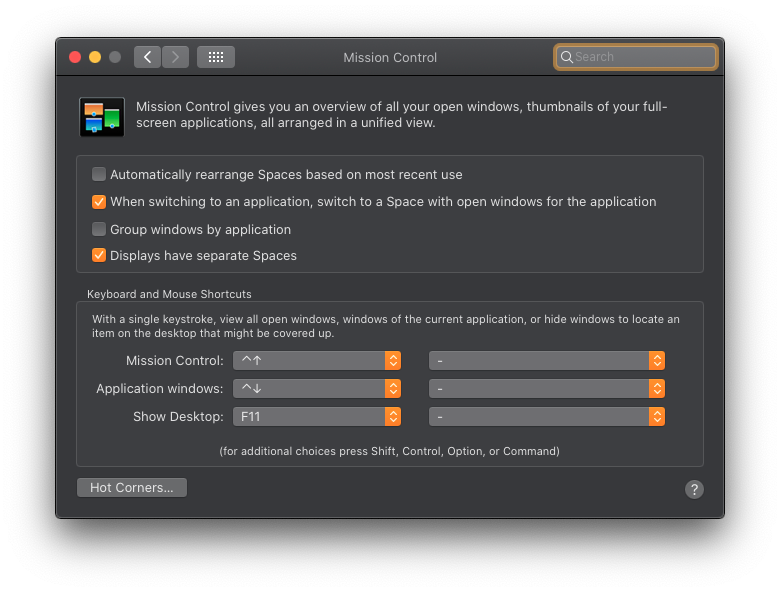
- In the Mission Control preferences pane in System Preferences, the setting "Displays have separate Spaces" must be
Start everything!
**--------------------------------------
# Will automatically start Yabai when computer starts
brew services start yabai
# Will automatically start skhd when computer starts
brew services start skhd
--------------------------------------

# You may need to** run 'killall Dock' to load the scripting addition.
killall Dock
Enjoy

~OR~
Keep SIP Enabled (Less features, More Secure)
Install Yabai and Other tools with Homebrew
Brew install tools
--------------------------------------
# https://github.com/koekeishiya/yabai
# MacOS window manager
**brew install koekeishiya/formulae/yabai
--------------------------------------
# https://github.com/stedolan/jq
# Lightweight and flexible command-line JSON processor
brew install jq
--------------------------------------
# https://github.com/koekeishiya/skhd
# Simple hotkey daemon for macOS
brew install koekeishiya/formulae/skhd
--------------------------------------**
Install Limelight (Color border) (Optional) https://github.com/koekeishiya/limelight
Port of the old border system that used to be implemented in yabai v2.4.3.
Build it
- Clone/Download Repo
- make it (Requires xcode command line tools)
- link it
# simply clone repo and run make
 make

# symlink binary to somewhere in your path (does not need to be re-created after a rebuild)
# replace the second argument below with some directory in your path
 ln -s /path/to/bin/limelight /usr/local/bin/limelight
# add the following to the end of your yabairc to have it launch automatically when yabai starts. # make sure the limelight binary is added somewhere in your $PATH # kill any existing limelight process if one exists, before we launch a new one killall limelight &> /dev/null limelight &> /dev/null &
Post Install setup
Create and setup configuration files
You need to create config files and put some stuff in them
Yabai config
Where to put the config file?
# The per-user yabai configuration file must be executable;
# it is just a shell script that's ran before yabai launches.
# It must be placed at one of the following places (in order):

$XDG_CONFIG_HOME/yabai/yabairc
$HOME/.config/yabai/yabairc # < my recommendation
$HOME/.yabairc
How to make the config file?
# create empty configuration file and make it executable
# Link to example config: https://github.com/koekeishiya/yabai/blob/master/examples/yabairc
touch ~/.config/yabai/yabairc
chmod +x ~/.config/yabai/yabairc
Put some stuff in your config file
My Personal Config
#!/usr/bin/env sh
#YABAI STUFF

# bsp or float (default: bsp)
#yabai -m config layout bsp

# Override default layout for space 2 only
#yabai -m config --space 2 layout float

# My custom space names
yabai -m space 1 --label one
yabai -m space 2 --label two
yabai -m space 3 --label three
yabai -m space 4 --label four
yabai -m space 5 --label five
yabai -m space 6 --label six

# float system preferences
yabai -m rule --add app="^System Preferences$" sticky=on layer=above manage=off
yabai -m rule --add app="^Karabiner-Elements$" sticky=on layer=above manage=off
yabai -m rule --add app="^Karabiner-EventViewer$" sticky=on layer=above manage=off
#yabai -m rule --add app="^Carbon Copy Cloner$" sticky=on layer=above manage=off
yabai -m rule --add app="^Finder$" sticky=on layer=above manage=off
yabai -m rule --add app="^Keka$" sticky=on layer=above manage=off
yabai -m rule --add app="^Alfred Preferences$" sticky=on layer=above manage=off
yabai -m rule --add app="^Disk Utility$" sticky=on layer=above manage=off
yabai -m rule --add app="^System Information$" sticky=on layer=above manage=off
yabai -m rule --add app="^Activity Monitor$" sticky=on layer=above manage=off
yabai -m rule --add app="^Path Finder$" manage=off
yabai -m rule --add app="^TeamViewer$" sticky=off layer=above manage=off
yabai -m rule --add app="Fantastical" manage=off
yabai -m rule --add app="^Spotify$" manage=off
yabai -m rule --add app="^iTerm2$" manage=off
yabai -m rule --add app="^Flux$" manage=off
yabai -m rule --add app="^Time Out$" manage=off
yabai -m rule --add app="^perl_client_app$" manage=off
yabai -m rule --add app="^console$" manage=off
yabai -m rule --add app="^Harvest$" manage=off
yabai -m rule --add app="^CiscoSparkHelper$" manage=off
yabai -m rule --add app="^Logi Options$" manage=off
yabai -m rule --add app="^Cisco Webex Start$" manage=off
#yabai -m rule --add app=iTerm space=2

#find ~/Library/Parallels/Applications\ Menus/ -maxdepth 3 -type f | awk -F'/' '{ print $NF; }' | awk '{$1=$1};1' | sort | uniq | tr "\n" "\0" | xargs -0 -I{} yabai -m rule --add app="^{}\$" title=".*" manage=on

# global settings
#yabai -m config focus_follows_mouse          autoraise
#yabai -m config focus_follows_mouse          on
# New window spawns to the right if vertical split, or bottom if horizontal split
yabai -m config window_placement second_child
yabai -m config window_topmost off
#yabai -m config window_shadow float
yabai -m config window_opacity off
yabai -m config window_opacity_duration 0.00
yabai -m config active_window_opacity 1.0
#yabai -m config normal_window_opacity        0.97
#yabai -m config window_border                on | off

## WITH SIP ENABLED
yabai -m config window_border off

## WTIH SIP DISABLED
 #yabai -m config window_border on
 #yabai -m config window_border_width 3
 #yabai -m config active_window_border_color 0xFF40FF00
 #yabai -m config normal_window_border_color 0x00FFFFFF
#yabai -m config insert_feedback_color        0xffd75f5f

yabai -m config auto_balance off
yabai -m config split_ratio 0.50
# # set mouse interaction modifier key (default: fn)
yabai -m config mouse_modifier ctrl
# set modifier + right-click drag to resize window (default: resize)
yabai -m config mouse_action2 resize
# set modifier + left-click drag to resize window (default: move)
yabai -m config mouse_action1 move

# general space settings
#yabai -m config focused_border_skip_floating  1
#yabai -m config --space 3 layout             float

yabai -m config layout bsp
yabai -m config top_padding 2
#yabai -m config bottom_padding 22
yabai -m config bottom_padding 2
#yabai -m config left_padding 40
yabai -m config left_padding 2
#yabai -m config right_padding 10
yabai -m config right_padding 2
yabai -m config window_gap 10

#Limelight addon
killall limelight &>/dev/null
limelight &>/dev/null &

# #Ubersicht widget bar stuff
#yabai -m signal --add event=space_changed \
#action="osascript -e 'tell application \"Übersicht\" to refresh widget id \"nibar-spaces-primary-jsx\"'"
#yabai -m signal --add event=display_changed \
#action="osascript -e 'tell application \"Übersicht\" to refresh widget id \"nibar-spaces-primary-jsx\"'"

#yabai -m signal --add event=space_changed \
#action="osascript -e 'tell application \"Übersicht\" to refresh widget id \"nibar-spaces-secondary-jsx\"'"
#yabai -m signal --add event=display_changed \
#action="osascript -e 'tell application \"Übersicht\" to refresh widget id \"nibar-spaces-secondary-jsx\"'"

# signals
# yabai -m signal --add event=window_destroyed action="yabai -m query --windows --window &> /dev/null || yabai -m window --focus mouse"
#yabai -m signal --add event=space_changed action="yabai -m window --focus $(yabai -m query --windows --window | jq ".id")"
# yabai -m signal --add event=application_terminated action="yabai -m query --windows --window &> /dev/null || yabai -m window --focus mouse"

#testing signals
# yabai -m signal --add event=window_destroyed action="terminal-notifier -message 'window_destroyed'"
# yabai -m signal --add event=application_terminated action="terminal-notifier -message 'application_terminated'"

## If I close the active window, focus on any other visible window.
# yabai -m signal --add event=window_destroyed action="bash /Users/jesseskelton/CustomScripts/SwitchSpaces/window-focus-on-destroy.sh"
# yabai -m signal --add event=space_changed action="export CUR_ACTIVE_APP=\"iTerm2\""

echo "yabai configuration loaded.."

#END
Example Config
Config from here : https://github.com/koekeishiya/yabai/blob/master/examples/yabairc
#!/usr/bin/env sh

# the scripting-addition must be loaded manually if
# you are running yabai on macOS Big Sur. Uncomment
# the following line to have the injection performed
# when the config is executed during startup.
#
# for this to work you must configure sudo such that
# it will be able to run the command without password
#
# see this wiki page for information:
#  - https://github.com/koekeishiya/yabai/wiki/Installing-yabai-(latest-release)
#
# sudo yabai --load-sa
# yabai -m signal --add event=dock_did_restart action="sudo yabai --load-sa"

# global settings
yabai -m config mouse_follows_focus          off
yabai -m config focus_follows_mouse          off
yabai -m config window_placement             second_child
yabai -m config window_topmost               off
yabai -m config window_shadow                on
yabai -m config window_opacity               off
yabai -m config window_opacity_duration      0.0
yabai -m config active_window_opacity        1.0
yabai -m config normal_window_opacity        0.90
yabai -m config window_border                off
yabai -m config window_border_width          6
yabai -m config active_window_border_color   0xff775759
yabai -m config normal_window_border_color   0xff555555
yabai -m config insert_feedback_color        0xffd75f5f
yabai -m config split_ratio                  0.50
yabai -m config auto_balance                 off
yabai -m config mouse_modifier               fn
yabai -m config mouse_action1                move
yabai -m config mouse_action2                resize
yabai -m config mouse_drop_action            swap

# general space settings
yabai -m config layout                       bsp
yabai -m config top_padding                  12
yabai -m config bottom_padding               12
yabai -m config left_padding                 12
yabai -m config right_padding                12
yabai -m config window_gap                   06

echo "yabai configuration loaded.."
skhd config
Where to put the config file?
# The per-user yabai configuration file must be executable;
# it is just a shell script that's ran before limelight launches.
# It can be placed at anywhere you want .. Ex. :

$HOME/.config/skhd/skhdrc
How to make the config file?
# create empty configuration file and make it executable
touch ~/.config/skhd/skhdrc
chmod +x ~/.config/skhd/skhdrc
Put some stuff in your config file
My Personal Config
## HYPER == SHIFT + CMD + ALT + OPTION

## Quickly restart the yabai launch agent
ctrl + alt + cmd - r : launchctl kickstart -k "gui/${UID}/homebrew.mxcl.yabai"

## Close active application
hyper - backspace : $(yabai -m window $(yabai -m query --windows --window | jq -re ".id") --close)

# test a command
# lshift - x : terminal-notifier -message "lshift - x"
# lshift - x : terminal-notifier -message "$(yabai -m query --windows --window | jq -re ".id")"

## open terminal
# hyper - return : /Applications/iTerm.app/Contents/MacOS/iTerm2

## swap window
hyper - y : yabai -m window --swap west
# shift + alt - j : yabai -m window --swap south
# shift + alt - k : yabai -m window --swap north
hyper - 0x21 : yabai -m window --swap east # "[" key

## send window to monitor and follow focus
hyper - u : /Users/jesseskelton/CustomScripts/SwitchSpaces/moveWindowLeftAndFollowFocus.sh
hyper - p : /Users/jesseskelton/CustomScripts/SwitchSpaces/moveWindowRightAndFollowFocus.sh

## focus display
ctrl + cmd - 1 : yabai -m window --display 1 yabai -m display --focus 1
ctrl + cmd - 2 : yabai -m window --display 2 yabai -m display --focus 2
ctrl + cmd - 3 : yabai -m window --display 3 yabai -m display --focus 3

## increase window size
#shift + alt - a : yabai -m window --resize left:-20:0
#shift + alt - s : yabai -m window --resize bottom:0:20
#shift + alt - w : yabai -m window --resize top:0:-20
#shift + alt - d : yabai -m window --resize right:20:0

## decrease window size
#shift + cmd - a : yabai -m window --resize left:20:0
#shift + cmd - s : yabai -m window --resize bottom:0:-20
#shift + cmd - w : yabai -m window --resize top:0:20
#shift + cmd - d : yabai -m window --resize right:-20:0

## rotate tree 90
hyper - r : yabai -m space --rotate 90

## flip the tree vertically
hyper - 4 : yabai -m space --mirror y-axis
# mirror tree y-axis
#alt - y : yabai -m space --mirror y-axis
## mirror tree x-axis
#alt - x : yabai -m space --mirror x-axis

#Move active window to next space on current display
shift + lalt + lcmd + ctrl + ralt - 1 : yabai -m query --spaces --space | jq -re ".index" | xargs -I {} bash -c "if [[ '{}' = '1' ]]; then yabai -m window --space 2; elif [[ '{}' = '2' ]]; then yabai -m window --space 1; fi"
shift + lalt + lcmd + ctrl + ralt - 2 : yabai -m query --spaces --space | jq -re ".index" | xargs -I {} bash -c "if [[ '{}' = '3' ]]; then yabai -m window --space 4; elif [[ '{}' = '4' ]]; then yabai -m window --space 3; fi"
shift + lalt + lcmd + ctrl + ralt - 3 : yabai -m query --spaces --space | jq -re ".index" | xargs -I {} bash -c "if [[ '{}' = '5' ]]; then yabai -m window --space 6; elif [[ '{}' = '6' ]]; then yabai -m window --space 5; fi"

# show next space per display
#hyper - 1 : /Users/jesseskelton/CustomScripts/SwitchSpaces/switchAndFocus.sh 1
#hyper - 2 : /Users/jesseskelton/CustomScripts/SwitchSpaces/switchAndFocus.sh 2
#hyper - 3 : /Users/jesseskelton/CustomScripts/SwitchSpaces/switchAndFocus.sh 3
ctrl + alt + cmd + lshift - 1 : /Users/jesseskelton/CustomScripts/SwitchSpaces/switchAndFocusSIP.sh 1
ctrl + alt + cmd + lshift - 2 : /Users/jesseskelton/CustomScripts/SwitchSpaces/switchAndFocusSIP.sh 2
ctrl + alt + cmd + lshift - 3 : /Users/jesseskelton/CustomScripts/SwitchSpaces/switchAndFocusSIP.sh 3

## toggle window fullscreen zoom
hyper - f : yabai -m window --toggle zoom-fullscreen

# cycle through windows
# cycle backwards
#hyper - i : yabai -m query --spaces | jq -re ".[] | select(.visible == 1).index" | xargs -I{} yabai -m query --windows --space {} | jq -sre "add | sort_by(.display, .frame.x, .frame.y, .id) | nth(index(map(select(.focused == 1))) - 1).id" | xargs -I{} yabai -m window --focus {}
#hyper - i : yabai -m query --spaces | jq -re ".[] | select(.visible == 1).index" | xargs -I{} yabai -m query --windows --space {} | jq -sre "add | sort_by(.display, .frame.x, .frame.y, .id) | nth(index(map(select(.focused == 1))) - 1).id" | xargs -I{} yabai -m window --focus {}

#alt - p : yabai -m window --focus stack.prev || yabai -m window --focus prev || yabai -m window --focus last
#
# go to each window WITHOUT going into a stack
# ctrl + alt + cmd + lshift - i : yabai -m query --spaces | jq -re ".[] | select(.visible == 1).index" | xargs -I{} yabai -m query --windows --space {} | jq -re "[.[] | select((.\"stack-index\" <= 1) and (.app != \"Hammerspoon\"))]" | jq -sre "add | sort_by(.display, .frame.x, .frame.y, .id) | nth(index(map(select(.focused == 1))) - 1).id" | xargs -I{} yabai -m window --focus {}
ctrl + alt + cmd + lshift - i : yabai -m query --spaces | jq -re ".[] | select(.visible == 1).index" | xargs -I{} yabai -m query --windows --space {} | jq -re "[.[] | select(.app != \"Hammerspoon\")]" | jq -sre "add | sort_by(.display, .frame.x, .frame.y, .id) | nth(index(map(select(.focused == 1))) - 1).id" | xargs -I{} yabai -m window --focus {}

# ctrl + alt + cmd + rshift - i : yabai -m window --focus stack.prev || yabai -m window --focus stack.last

#hyper - 0x29 : yabai -m query --spaces \
#hyper - o : yabai -m query --spaces | jq -re ".[] | select(.visible == 1).index" | xargs -I{} yabai -m query --windows --space {} | jq -sre "add | sort_by(.display, .frame.x, .frame.y, .id) | reverse | nth(index(map(select(.focused == 1))) - 1).id" | xargs -I{} yabai -m window --focus {}

#alt - n : yabai -m window --focus stack.next || yabai -m window --focus next || yabai -m window --focus first

# go to each window WITHOUT going into a stack
# ctrl + alt + cmd + lshift - o : yabai -m query --spaces | jq -re ".[] | select(.visible == 1).index" | xargs -I{} yabai -m query --windows --space {} | jq -re "[.[] | select((.\"stack-index\" <= 1) and (.app != \"Hammerspoon\"))]" | jq -sre "add | sort_by(.display, .frame.x, .frame.y, .id) | reverse | nth(index(map(select(.focused == 1))) - 1).id" | xargs -I{} yabai -m window --focus {}
ctrl + alt + cmd + lshift - o : yabai -m query --spaces | jq -re ".[] | select(.visible == 1).index" | xargs -I{} yabai -m query --windows --space {} | jq -re "[.[] | select(.app != \"Hammerspoon\")]" | jq -sre "add | sort_by(.display, .frame.x, .frame.y, .id) | reverse | nth(index(map(select(.focused == 1))) - 1).id" | xargs -I{} yabai -m window --focus {}

# Toggle foucus on a stack
ctrl + alt + cmd + lshift - return : yabai -m window --focus stack.next || yabai -m window --focus stack.first

#create a stack
# ctrl + alt + cmd + rshift - 1 : yabai -m query --windows --window | jq -re "." | xargs -I{} yabai -m window 1 --stack {}
# stack next window onto current window
ctrl + alt + cmd + lshift - 0x43 :  window=$(yabai -m query --windows --window | jq -r '.id') && yabai -m window east --stack $window || (yabai -m window
Questions
What is nylondiamond.github.io?
NylonDiamond/nylondiamond.github.io is a public repo on GitHub by NylonDiamond. Website for self.
Is nylondiamond.github.io open source?
It declares no license on GitHub. Public does not mean open source: without a license, nobody is granted the right to reuse it.
Does nylondiamond.github.io run on macOS, Windows or Linux?
Its maker has not tagged a system, so it is unknown here. Its README says what it needs.
How do I install nylondiamond.github.io?
Open "Take it" on its page: Take My Repo writes an install plan for your machine and hands it to your AI agent (Claude Code, Codex or Cursor), which asks you before each step. Take My Repo has not tested it on any machine.
Is nylondiamond.github.io still maintained?
Its last change on GitHub was on 2020-11-21. Take My Repo does not judge from that whether it is maintained.
What do people who ran nylondiamond.github.io say?
Nobody has reviewed it on Take My Repo yet, which says nothing about its quality.