

openapi-generator
OpenAPI Generator allows generation of API client libraries (SDK generation), server stubs, documentation and configuration automatically given an OpenAPI Spec (v2, v3)
- 27k
- Java
- Apache-2.0
- 17 h ago
An autonomous, conflict-free school timetable generator & interactive scheduling platform powered by deterministic CSP algorithms
Repo O2sa/Jadwali, read from GitHub 8 h ago. O2sa has not joined Take My Repo.
O2sa/Jadwali is a public repo on GitHub by O2sa. An autonomous, conflict-free school timetable generator & interactive scheduling platform powered by deterministic CSP algorithms. It declares the MIT license on GitHub. It is written mainly in TypeScript, has 5 stars and last changed on 2026-11-19. Nobody has reviewed it on Take My Repo yet, which says nothing about its quality. Read from GitHub on 2026-11-23.
OpenAPI Generator allows generation of API client libraries (SDK generation), server stubs, documentation and configuration automatically given an OpenAPI Spec (v2, v3)

⚡ An autonomous, conflict-free school timetable generator & interactive scheduling platform powered by deterministic CSP algorithms.
جَدْوَلي — المولّد الذكي للجداول المدرسية بنظام حل القيود الخوارزمي، خالي تماماً من التعارضات بخصوصية وسرعة فائقة.
🌐 Live Demo: https://o2sa.github.io/Jadwali/
Manually crafting academic timetables that satisfy complex real-world institutional constraints—teacher availability, class periods, maximum daily workloads, room allocations, and subject spacing—is a tedious and error-prone puzzle.
Jadwali (جَدْوَلي) automates school timetable generation using an advanced deterministic Constraint Satisfaction Problem (CSP) engine featuring:
The platform is designed to be 100% local-first and client-driven: all calculations run client-side inside Web Workers and persist locally in IndexedDB (zero cloud tracking, absolute institutional privacy), while also supporting an optional full-stack Express & MongoDB backend mode.
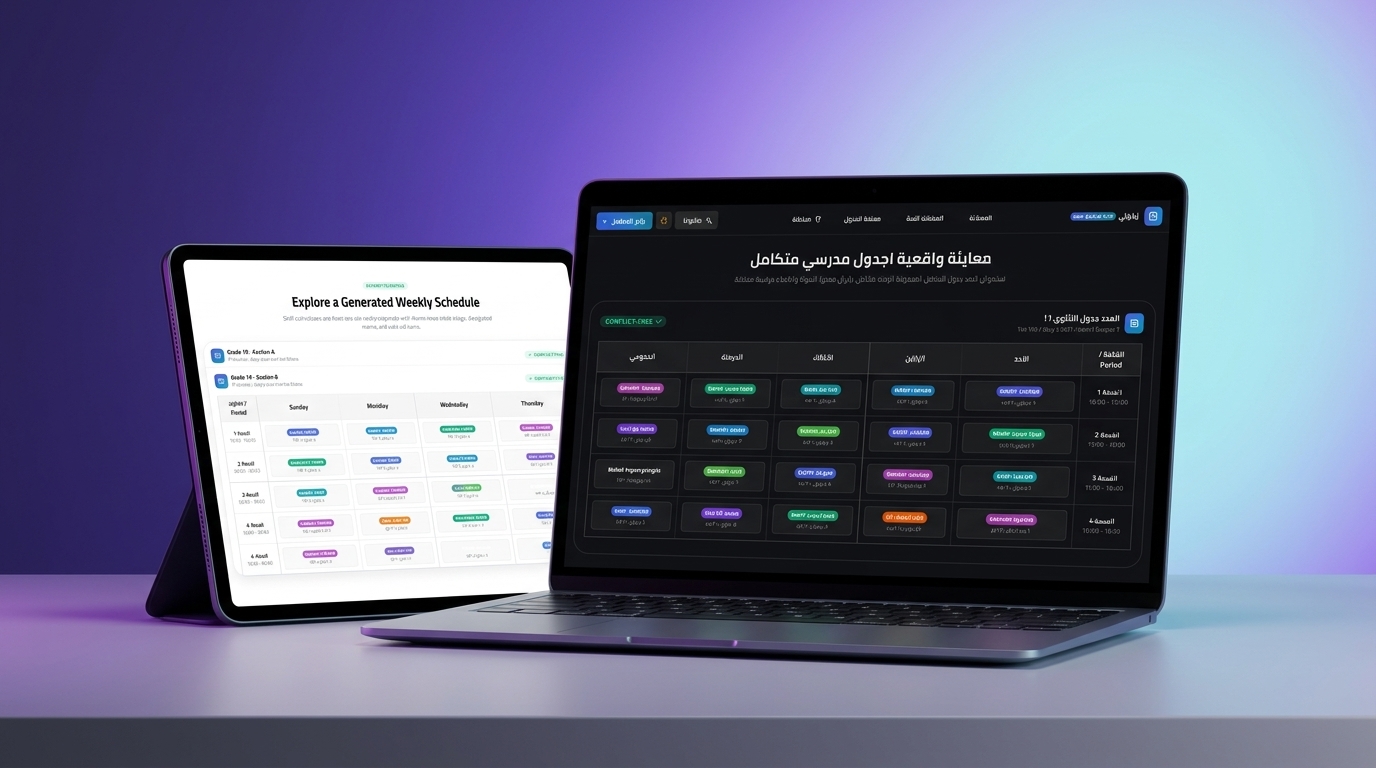
DirectionProvider.prefers-color-scheme) with manual toggle..github/workflows/deploy.yml).Jadwali/
├── packages/
│ └── school-timetabling-engine/ # Standalone deterministic CSP solver package (CJS, ESM, d.ts)
├── client/ # React 18 + Vite + Mantine UI v7 client
│ ├── src/
│ │ ├── api/ # Data context (Local IndexedDB Dexie / Remote API)
│ │ ├── components/ # Reusable UI components, modals, and landing sections
│ │ ├── i18n/ # Bilingual translations & RTL context
│ │ ├── layouts/ # Glassmorphic AppLayout & floating sidebar navigation
│ │ ├── pages/ # LandingPage, Dashboard, Teachers, Classes, Generator, etc.
│ │ └── theme/ # Brand tokens, colors, and dark mode styling
│ └── tests/ # Vitest + React Testing Library test suite
├── server/ # Optional Node.js + Express + TypeScript REST API
│ ├── src/ # Express application, routes, controllers, schemas, services
│ ├── tests/ # Integration and unit test suite (Vitest + Supertest)
│ └── dist/ # Compiled production JavaScript bundle
└── .github/workflows/deploy.yml # GitHub Actions deployment to GitHub Pages
The simplest and fastest way to run the entire full-stack platform (Frontend Client + Express API + MongoDB) is with Docker Compose:
# Clone the repository
git clone https://github.com/O2sa/Jadwali.git
cd Jadwali

# Start all services in the background
docker compose up -d
Once running, navigate to:
💡 Instant Out-of-the-Box Demo: On the first launch, Jadwali detects a fresh database and automatically seeds a complete demo school (teachers, classes, subjects, and curriculum) so you can start scheduling right away! Data is safely persisted across restarts in the
mongo_datavolume.
To view real-time container logs:
docker compose logs -f
To stop the platform:
docker compose down
Clone the repository:
git clone https://github.com/O2sa/Jadwali.git
cd Jadwali
Install dependencies:
pnpm install
Start the development server:
pnpm --filter client dev
Open your browser:
Navigate to http://localhost:5173 to explore the landing page and start generating schedules.
If you prefer using a centralized database:
mongodb://localhost:27017/school-scheduler).pnpm --filter server dev
pnpm dev:all
Run the full monorepo test suite (engine + client):
pnpm test
Run test suite for a specific package:
pnpm --filter client test
pnpm --filter school-timetabling-engine test
Typecheck and production build:
pnpm --filter client typecheck
pnpm build
The repository includes a GitHub Actions workflow in .github/workflows/deploy.yml that builds and deploys the application to GitHub Pages on every push to development or main.
To enable it:
development or main to trigger the automated build and deployment.Distributed under the MIT License. See LICENSE for more information.
O2sa/Jadwali is a public repo on GitHub by O2sa. An autonomous, conflict-free school timetable generator & interactive scheduling platform powered by deterministic CSP algorithms.
It declares the MIT license on GitHub.
Its maker has not tagged a system, so it is unknown here. Its README says what it needs.
Open "Take it" on its page: Take My Repo writes an install plan for your machine and hands it to your AI agent (Claude Code, Codex or Cursor), which asks you before each step. Take My Repo has not tested it on any machine.
Apache Airflow - A platform to programmatically author, schedule, and monitor workflows
QCalendar - Quasar App Extension, Vue CLI plug-in and UMD distributions available
A curated list of awesome supply chain blogs, podcasts, standards, projects, and examples.
🚀 Generate GitHub profile README easily with the latest add-ons like visitors count, GitHub stats, etc using minimal UI.
Its last change on GitHub was on 2026-11-19. Take My Repo does not judge from that whether it is maintained.
Nobody has reviewed it on Take My Repo yet, which says nothing about its quality.
Take My Repo cannot say: it does not audit code and has not run Jadwali. What is known comes from GitHub. It declares the MIT license on GitHub. Its last change was on 2026-11-19. It has 5 stars, which measure popularity, not safety. Nobody has reviewed it on Take My Repo yet, which says nothing about its quality. Read the source before you run it. With "Take it", your AI agent shows each step and asks you before running it; README text is treated as data, not as instructions.


