

ECC
The agent harness performance optimization system. Skills, instincts, memory, security, and research-first development for Claude Code, Codex, Opencode, Cursor and beyond.
- 309k
- JavaScript
- MIT
- 6 h ago
One icon for your whole Mac menu bar — and for everything that never had one. Native widgets for weather, calendar, system stats, passwords, usage meters, or any script and CLI.
Repo Open330/barshelf, read from GitHub 46 min ago. Open330 has not joined Take My Repo.
Open330/barshelf is a public repo on GitHub by Open330. One icon for your whole Mac menu bar — and for everything that never had one. Native widgets for weather, calendar, system stats, passwords, usage meters, or any script and CLI. It declares the MIT license on GitHub. It is written mainly in Swift, has 2 stars and last changed on 2026-11-23. Nobody has reviewed it on Take My Repo yet, which says nothing about its quality. Read from GitHub on 2026-11-23.

One icon for your whole menu bar — and for everything that never had one.
Weather, calendar, battery, system stats, passwords, usage meters: tidy them behind one macOS menu bar icon. Tools with no menu bar app of their own — a script, a command-line tool, a web page's data — show up there too.
Download · Getting Started · Featured Widgets · Build a Widget · Publish
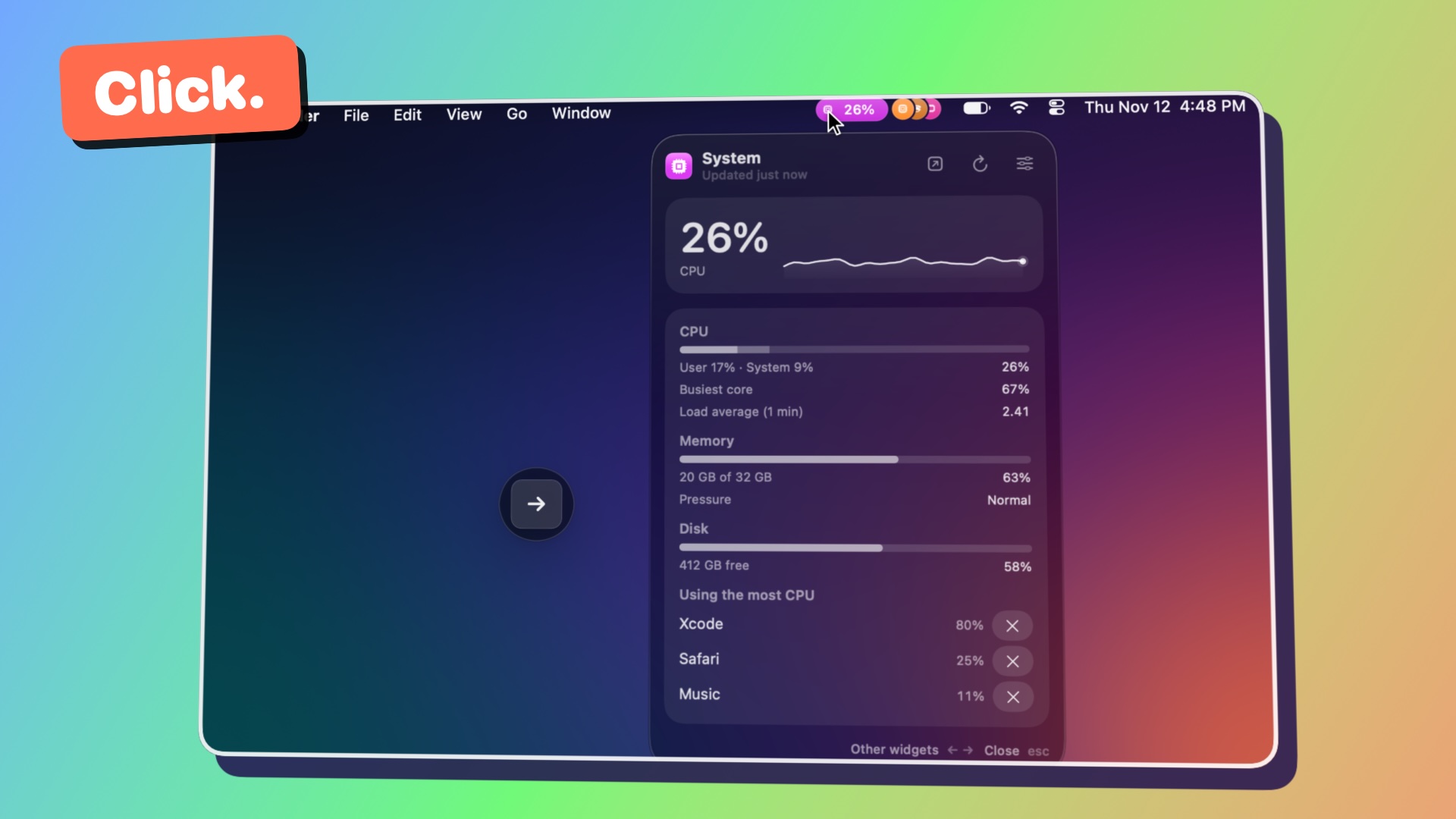
Your most-checked things are scattered: a dozen menu bar icons, browser tabs, apps you keep open just to look. BarShelf is a menu bar for your menu bar. It collects them into one icon and one popup of native widgets. Start with the ready-made ones in the gallery; there is nothing to write.
✦ 42% · 61% · 58°), sharing the BarShelf icon or on its
own. Or show them as a cluster of small chips beside the icon.brew install --cask open330/tap/barshelf
Or grab BarShelf-<version>-arm64.zip from
Releases, move it to
/Applications, then open it normally. The current v0.7.45 asset is Developer ID
signed, Apple-notarized, and includes a stapled ticket for offline verification.
BarShelf checks for updates itself and can install them in place — only when
the download is signed by the same Developer ID as the running build. Homebrew
installs are left to brew upgrade --cask barshelf.
Full guide, barshelf CLI, and troubleshooting: docs/INSTALL.md.
Requires macOS 14+ on Apple Silicon. The few widgets that run a script also need Deno (
brew install deno); the gallery marks them.
The gallery (⋯ ▸ Add Widget…) has 40+ ready-made widgets, styled like native macOS widgets, with per-widget color and a Fit or fixed-height layout. Today, Recent Files, and the permission-free Quick Shelf are added on first run. Packs add a few related widgets at once. Browse them all in Featured Widgets or on barshelf.jiun.dev/widgets.
| Widget | What it shows | Data from |
|---|---|---|
| Today · Calendar · Clock | Big date, a month grid with today circled, a live clock. The layout adapts to the widget's size. | /bin/date |
| Weather · Exchange · Stock | Temperature, USD→KRW, and a stock quote. | web |
| Battery · Network | Battery %, and the local IP. | shell |
| System · Sensors | CPU, memory and disk meters; temperatures, fans and power draw. Both can show a live value in the menu bar. | native, no subprocess |
| Recent Files · Downloads | A grid or list of recent files with thumbnails, drag-out and click to open; what is new in Downloads since you last looked. | folder |
| Quick Shelf · Next Meeting · Focus Timer | A permission-free launcher, your next Calendar event with a Join button, and a countdown that survives a restart. | mixed |
| Keep Awake | Keeps the Mac awake for 1, 2 or 4 hours or until a set time, never indefinitely. Works with PowerDisplayGuard, which owns the power policy. | osascript |
| Clipboard Shelf | A clipboard history kept in memory only. | script |
For developers and command-line users:
| Widget | What it shows | Data from |
|---|---|---|
| aas Usage · OTP Codes | LLM usage meters from aas; TOTP codes with a countdown ring from otpeek. |
CLI |
| tend Watch | Local and SSH-host tend agents, grouped by host in compact NAME / ST / ACT / LAST PROMPT tables. |
CLI + script |
| GitHub Status · Project Status · Developer Inbox | An HTTPS status feed, Git repository state, and GitHub review activity. | mixed |
For tend Watch, add one card per host: leave SSH host empty for this
Mac, or enter an alias from your ~/.ssh/config (key-based, non-interactive).
The Fleet source shows every host tend fleet knows from a single card.
Remote hosts need the tend CLI.
Most widgets are clickable: like a real macOS widget, clicking the card opens its companion app or page (Today → Calendar, System → Activity Monitor, Stock → Yahoo Finance, Weather → Weather app, …).
Optional and off by default: BarShelf ▸ Dock adds a dock on the bottom, left, or right edge with apps, folders, files, links, Shortcuts, and any BarShelf widget. Run it alongside the Apple Dock or instead of it, keep several profiles, and let each one rearrange the Apple Dock too. See the Dock guide.
Bring your Hammerspoon navigation settings into BarShelf ▸ Automation.
Import the supported init.lua profile to preserve Fn arrow mappings, monitor
shortcuts, and window cycling, then customize the generated JavaScript.
Requires Accessibility access; no additional runtime is needed.
See setup, import scope, and scripting API.
Nothing in the gallery fits? Open BarShelf ▸ Create (⌘N), or ⋯ → Add Widget… → Create Widget in the gallery. Pick where the data comes from (a web address that gives JSON, a folder, text you type, or a command), how it looks (list · grid · table · one big number · meter · plain text) with a live preview, then name it. No code.
Everything below is for people who write their own widgets. You don't need any of it to use BarShelf.
Every widget shares the same scheduler, permission frame, and native renderer — it only differs in where its data comes from:
┌────────────────────────────────────────────────────────────────┐
│  exec       manifest declares a CLI → UINode view tree          │
│             (viewtree direct, or data + a builtin adapter)      │
│                                                                  │
│  workflow   declarative JSON DSL — sources → transforms → view  │
│             (${…} interpolation, forEach, fs.directory + QL      │
│              thumbnails, drag-out) — no code                    │
│                                                                  │
│  script     resident Deno subprocess over JSON-RPC + TS SDK     │
│             host-mediated exec / storage / secret / timer       │
└────────────────────────────────────────────────────────────────┘

Install BarShelf on my Mac and scaffold my first widget.

1. Download the latest release from
   https://github.com/Open330/barshelf/releases/latest, unzip the
   BarShelf-<version>-arm64.zip, move BarShelf.app into /Applications, and open it.
   The current v0.7.45 build is Developer ID signed, notarized, and stapled.
2. Download the barshelf CLI — it ships as a separate release asset
   (barshelf-cli-<version>-arm64.tar.gz). Extract it and put barshelf on my PATH.
3. Scaffold a widget:  barshelf new my-widget --kind workflow
   then validate it:   barshelf validate ./my-widget
   then install it:    barshelf install ./my-widget
4. Confirm the widget appears in the menu bar popup.

Requires macOS 14+ on Apple Silicon. Script widgets also need Deno (brew install deno).

Copy the prompt above and paste it into your AI agent to install BarShelf and scaffold a widget. Prefer the manual steps? See Install.
Install the reusable barshelf-widget skill
to give your agent the authoring workflow, API references, and validation steps.
From a checkout of this repository, copy it into your Codex skills directory:
mkdir -p "${CODEX_HOME:-$HOME/.codex}/skills"
# For a first install; if it already exists, review your local copy before updating.
test -e "${CODEX_HOME:-$HOME/.codex}/skills/barshelf-widget" || \
  cp -R skills/barshelf-widget "${CODEX_HOME:-$HOME/.codex}/skills/barshelf-widget"
Then invoke it in Codex:
Use $barshelf-widget to build a widget showing my review-requested GitHub PRs.
Open each PR when clicked, let me set the row limit, and install it locally.
The skill can also be selected automatically for BarShelf widget authoring.
It uses barshelf agent-spec as the host contract; script widgets additionally
use the typed SDK. The skill itself does not install the app or CLI.
Without installing a skill, use the standalone prompt below.
Describe the result you want — the agent can discover the BarShelf API, choose the right execution layer, implement the widget, and validate it. Replace only the text inside What I want, then paste the whole prompt into Codex, Claude Code, or another coding agent:
Build a production-ready BarShelf widget for me.

What I want:
[Describe the information the widget should show, where that data comes from,
what should happen when I click it, and any settings I want. Plain language is
fine. Example: "Show review-requested GitHub PRs, highlight old requests, and
open a PR when clicked. Let me choose how many rows to show."]

First, learn the current BarShelf widget API instead of guessing it:
1. Run `barshelf agent-spec` and treat its output as the source of truth.
2. If that command is unavailable, read `docs/AGENTS.md` in the BarShelf repo:
   https://github.com/Open330/barshelf/blob/main/docs/AGENTS.md
3. For script widgets, inspect the typed SDK in `sdk/mod.ts`:
   https://github.com/Open330/barshelf/blob/main/sdk/mod.ts
4. When relevant, consult `docs/WORKFLOW.md`, `docs/SCRIPT-RUNTIME.md`, the JSON
   schemas under `schema/`, and two similar widgets under `widgets/`.

Then implement it end to end:
- Choose the least-powerful suitable layer: workflow first, exec for a command
  that emits a view tree, and script only for state, timers, or click handlers.
- Create the complete widget directory with `widget.json`, its entry file, and
  a README explaining setup, settings, requirements, and every permission.
- Use only supported UINode types and real SDK helpers. Do not invent APIs.
- Declare the smallest exact permission/command/host allowlist possible. Treat
  private output as sensitive and provide useful empty, setup, and error states.
- Run `barshelf validate <widget-directory>` until it passes. For TypeScript,
  also run `deno check` and `deno fmt --check` with the local BarShelf SDK map.
- Install the local widget with `barshelf install <widget-directory>` after it
  validates, then tell me where it was installed and how to configure it.
- Finish by summarizing the files created, data sources, refresh behavior,
  interactions, settings, permissions, requirements, and verification results.
The compact API bundle behind barshelf agent-spec is also available as
the agent authoring spec. The typed SDK is the
reference for barshelf.*, ui.*, action.*, storage, secrets, timers,
notifications, and host-mediated command execution. Workflow expressions and
sources are documented in Workflow DSL; manifest fields and
native UINode actions are covered by Widget Spec.
A widget is a folder with a widget.json:
{
  "$schema": "https://barshelf.jiun.dev/schema/widget-0.1.json",
  "schemaVersion": 1,
  "id": "dev.example.docker-ps",
  "name": "Docker",
  "icon": "shippingbox",
  "bucket": { "group": "Dev", "size": "M" },
  "entry": { "kind": "exec" },
  "source": { "kind": "exec", "command": ["docker", "ps", "--format", "json"], "output": "viewtree" },
  "refresh": { "onOpen": true, "interval": 30 },
  "permissions": { "exec": [{ "command": "docker", "allowedArgs": [["ps", "--format", "json"]] }] }
}
Drop it in ~/Library/Application Support/barshelf/widgets/ (hot-reloaded), or
install straight from a repo:
barshelf install https://github.com/Open330/aas       # GitHub repo
barshelf install ./MyWidget.mbw                        # packed archive
open "barshelf://install?url=…"                   # deep link (README badge)
barshelf — the widget CLIbarshelf new my-widget --kind workflow # scaffold from a template
barshelf validate ./my-widget # check manifest + workflow
barshelf pack ./my-widget -o my.mbw # zip a distributable bundle
barshelf install <url|path> # install from repo / archive / deep link
barshelf list # installed widgets
bsf is the same CLI as a shorter alias.
Reference: docs/CLI.md.
| Doc | Contents |
|---|---|
| Getting Started | Install, first widget, the bundled examples |
| Install | Release install, barshelf, source build, troubleshooting |
| Installing Widgets | Installing from a GitHub URL, archive, deep link, or the CLI |
| Dock | The optional BarShelf Dock, profiles, and Apple Dock switching |
| Automation | Keyboard and window extensions, Hammerspoon and Karabiner import |
| Widget Spec | widget.json, UINode nodes, actions, refresh, permissions |
| Agents | Self-contained widget-authoring spec for LLM agents (also barshelf agent-spec) |
| Workflow DSL | Sources, transforms, interpolation, built-ins, forEach |
| Script Runtime | Deno JSON-RPC protocol, barshelf.* SDK, sandboxing |
| Publishing | Repo layout, install badges, registry submission |
| Registry | The curated gallery index and how to list a widget |
| CLI | CLI reference |
| Privacy | Local data, widget permissions, network access, support contact |
JSON Schemas: widget-0.1.json ·
uinode-0.1.json ·
workflow-0.1.json ·
registry-0.1.json.
DEVELOPER_DIR=/Applications/Xcode.app/Contents/Developer swift build   # dev
DEVELOPER_DIR=/Applications/Xcode.app/Contents/Developer swift test    # full test suite
bash scripts/build_app.sh                                              # dist/BarShelf.app + dist/barshelf + dist/bsf
The package splits into:
MenubucketCore — models, manifest/workflow parsing, schedule policy. UI-free and tested.BarShelfAutomation — the keyboard and window extension engine (event tap, key remaps, script runner, Hammerspoon/Karabiner import). No views; it does not depend on the app.BarShelfDock — the Dock's state and actions: profiles, Apple Dock switching, launching, profile hotkeys. No views.BarShelfBuilder — the visual builder's model: sources, displays and the manifest it writes. No views.MenubucketApp — the app itself as a library: AppKit shell, SwiftUI renderer, runtime. It also holds every page and panel of the features above. The barshelf-app executable is a one-line main.swift on top of it.barshelf and bsf — the standalone CLI.barshelf-media — a development tool that records the landing page's videos and stills from the real views. It is not part of BarShelf.app.MIT © Jiun Bae — see LICENSE. Work by others that BarShelf includes is listed in docs/THIRD-PARTY-NOTICES.md.
Part of Open330 · open source tools for AI-agent workflows · open330.github.io
Open330/barshelf is a public repo on GitHub by Open330. One icon for your whole Mac menu bar — and for everything that never had one. Native widgets for weather, calendar, system stats, passwords, usage meters, or any script and CLI.
It declares the MIT license on GitHub.
Its maker tagged it for macOS. That is declared by the maker; Take My Repo has not tested it.
Open "Take it" on its page: Take My Repo writes an install plan for your machine and hands it to your AI agent (Claude Code, Codex or Cursor), which asks you before each step. Take My Repo has not tested it on any machine.
Its last change on GitHub was on 2026-11-23. Take My Repo does not judge from that whether it is maintained.
Nobody has reviewed it on Take My Repo yet, which says nothing about its quality.
The agent harness performance optimization system. Skills, instincts, memory, security, and research-first development for Claude Code, Codex, Opencode, Cursor and beyond.
Flutter makes it easy and fast to build beautiful apps for mobile and beyond
An actor-based Framework with network transparency for creating event-driven architecture in Golang. Inspired by Erlang. Zero dependencies.
Reverse engineer anything with agents, from app behavior down to native binaries.
Makes your AI agent think like the laziest senior dev in the room. The best code is the code you never wrote.
Know which tmux coding agent is waiting on you — and jump to it. Works with the Claude Code, Codex, and Antigravity CLI sessions you already run. No wrapper, no new terminal.
Turn textbooks, PDFs, and web content into your own interlinked learning wiki powered by LLM
MCP server and hook toolkit that compresses tool output to save context window tokens.
Animate GPX, KML, and Google Location History into cinematic travel videos.
Use spare AI agent tokens to automatically contribute to GitHub repositories.
Use several Claude Code, Codex and other coding-agent accounts side by side: switch instantly, run isolated sessions, see every account's usage. Single Rust binary.


