browser-use
Open-source Python library for AI browser agents, plus Browser Use Cloud: stealth browsers and a hosted agent API.
- 122k
- Python
- MIT
- 1 d ago
Now part of OpenAdapt: https://github.com/OpenAdaptAI/OpenAdapt (packages/flow)
Repo OpenAdaptAI/openadapt-flow, read from GitHub 1 min ago. OpenAdaptAI has not joined Take My Repo.
OpenAdaptAI/openadapt-flow is a public repo on GitHub by OpenAdaptAI. Now part of OpenAdapt: https://github.com/OpenAdaptAI/OpenAdapt (packages/flow). It declares the MIT license on GitHub. It is written mainly in Python, has 10 stars and last changed on 2026-11-07. It is archived: its maker no longer maintains it. Nobody has reviewed it on Take My Repo yet, which says nothing about its quality. Read from GitHub on 2026-11-23.
Now part of OpenAdapt. This code lives in
packages/flowin the OpenAdapt repository. This repository is archived; open issues and pull requests there.
This repository is frozen. openadapt-flow is now developed and released from the OpenAdapt monorepo in
packages/flow. openadapt-flow 2.2.0 and later ship from there. Open issues and pull requests in OpenAdaptAI/OpenAdapt. What it can do today: CAPABILITIES.md.
A person or an agent shows openadapt-flow a task in a web or desktop app. It compiles the task into a program that runs on your own machine and repeats the same steps with new details. A healthy run makes no AI model calls. It's built for data entry that repeats every week and has to be right, such as claims, referrals, eligibility checks, and invoice posting.
pip install 'openadapt-flow[browser]'
openadapt-flow record --backend web --url https://your-test-app.example --out rec   # 1. record
openadapt-flow compile rec --out bundle --name my-task                               # 2. compile
openadapt-flow replay bundle --url https://your-test-app.example                     # 3. run
replay is a rehearsal that doesn't read the record back. A production run
(openadapt-flow run) also checks each save; see
Try it on your app.
Two checks guard the writes. Before a click on a record, the run compares the text around the target, such as the patient name in that row, with the recording, and stops if it differs. After a save, a production run reads the record back through a second channel, such as an API, a read-only SQL query, or a report export. It reports success only when the record matches what it entered.
It drives web apps through Playwright; Windows, macOS, and Linux apps through their accessibility APIs; and Citrix or remote desktops through screen pixels. Agents can call a compiled workflow as one tool over MCP; see Give your agent a program, not a mouse.
Docs · Try it in your browser · Website · Discussions
pip install 'openadapt-flow[browser]'
openadapt-flow demo
The demo runs one recorded task twice against a fake clinic app on your
computer. The first run uses an honest app. The second uses an app that shows
"Encounter saved" and then drops the note. When both runs finish, the demo
opens a page with the two results side by side. The first run can take a few
minutes while Playwright downloads Chromium. With the
OpenAdapt launcher installed,
openadapt flow demo runs the same command.

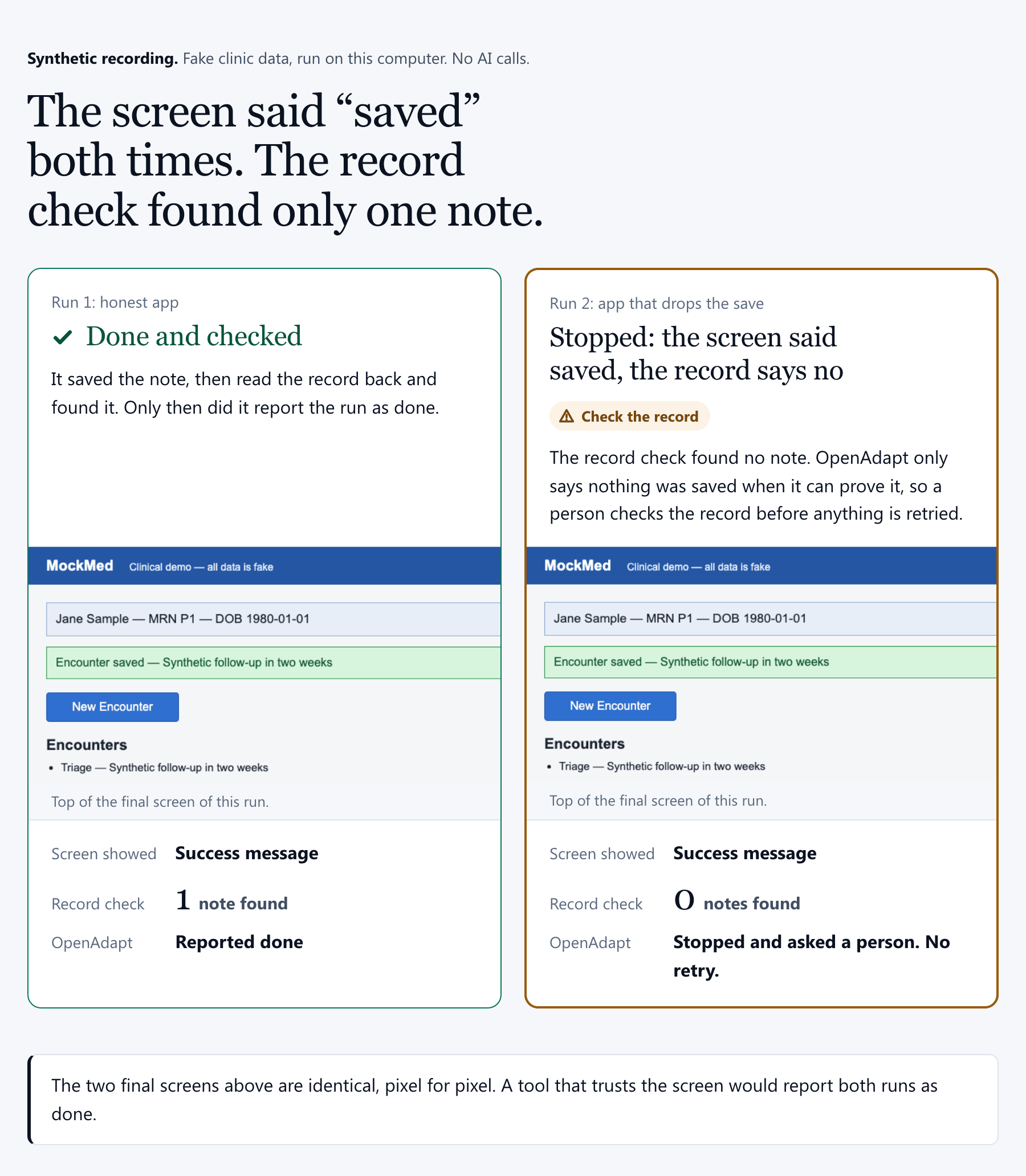
Synthetic recording. A screenshot of the page that openadapt-flow demo
wrote on 2026-10-09 against the bundled fake clinic app; regenerate it with
scripts/make_demo_proof_image.py.
| Run 1: honest app | Run 2: app drops the note | |
|---|---|---|
| The screen said | Encounter saved | Encounter saved |
| The record check found | 1 note | 0 notes |
| openadapt-flow | Done and checked | Stopped and asked a person to check the record, with no retry |
The two final screens are identical, pixel for pixel. Only the record check
tells the runs apart. To watch each stage in the terminal instead, run
openadapt-flow tutorial, then openadapt-flow tutorial --break-it;
docs/TUTORIAL.md shows the output.
| Playwright codegen | Model-driven agent (browser-use, computer use) | openadapt-flow | |
|---|---|---|---|
| Authoring | Record in a browser, then edit and maintain the generated script | Write the task in plain language | Record the task, then declare what each write changes and how to read it back |
| Surfaces | Browsers | Browser or desktop, depending on the agent | Browsers; Windows, macOS, and Linux apps; RDP; Citrix by pixels |
| Model calls per run | None | One for each step | None on a healthy run |
| Median time per run, bundled clinic app | Not measured | 37.5 s | 4.9 s |
| Model cost per run, bundled clinic app | $0 | About $0.27 | $0 |
| When the UI changes | Locators use role, text, or test id, so style and layout changes don't affect them. A renamed label or a removed element makes the step time out, and you edit the script. | The model reads the screen again on every run. In our one dark-theme trial it finished in 87.4 s using 23 of its 25 allowed actions; an earlier trial ran out of actions. | Each step falls back from the recorded element to image, text, and position matching, logs a proposed repair, and stops when nothing matches. In the same dark-theme trial it finished in 9.7 s with 8 repairs. Tested changes |
| Checks the saved record | Only if you write that check; generated assertions check the page | The model judges success from the screen unless you add a check | Yes, in a production run: reads the record back through a second channel and stops on a mismatch |
The time and cost rows come from one matched comparison on MockMed, the
bundled fake clinic app: 100 compiled runs and 20 agent runs, all scored by the
same OCR check of the final screen
(method). The agent was claude-sonnet-5 with the
computer-use tool, driving the same browser through screenshots, and cost is
model API usage at list price. That comparison ran on 2026-07-08
with Flow 0.1.0. The Playwright column describes Playwright's documented
behavior: we haven't timed a codegen script on the same task or run one
through our UI-change fixtures.
A newer test on a local OpenEMR copy (14 and 15 Oct 2026, synthetic referrals) compared compiled replay with a Claude Sonnet agent over 62 timed warm runs each. Replay took 29.7 s median from sign-in to saved record, the agent 36.5 s, so replay was about 19% faster, with no model calls against the agent's median of about $0.08 per run. A separate database read-back matched 12 of 12 fields on each correct save; engine certification was off, so the engine labeled these runs finished, not checked. Method: openadapt.ai/compare/computer-use-agents. A side-by-side comparison with UiPath, Power Automate, and browser agents is at openadapt.ai/compare.
Each recorded step keeps several kinds of evidence for its target: the DOM
element or accessibility node where the surface has one, an image crop, the
label text, and the target's position relative to nearby landmarks. At replay
the run tries them in that order and uses the first match. A step that
resolves through a fallback is logged as a proposed repair under the run's
heals/ folder. --save-healed-to writes a repaired copy of the bundle for
review; Flow never swaps it in by itself. When nothing matches, the run stops
instead of clicking something plausible. If an irreversible step, such as a
final submit, can only be found by position, the run refuses to click. On a
step with an identity check, the target goes through that check before the
click, however it was found.
These are the changes the tests cover, on MockMed or a synthetic test page. Except where a row says otherwise, the tests switch off the element locator, to test the fallbacks that pixel-only surfaces such as Citrix depend on.
| Change | What happened | Evidence |
|---|---|---|
| Dark theme | Finished. No step matched its recorded image, so each was found another way and logged as a repair. The repaired copy then replayed on image matches alone. | test_record_compile_replay.py |
| Two buttons moved | Finished. The moved buttons were found by a whole-screen image or text search and repaired. | Same file |
| Labels renamed (Save to Submit, Open to View) | The renamed buttons were found by position or approximate text, and the repairs recorded the new labels. Flow classes a save as irreversible and refuses an irreversible step it can find only by position, so this run finished only with the save marked reversible. | Same file |
| A pop-up blocks the screen after Save | The expected screen after the save didn't appear, so the run stopped at the save step and named the check that failed. | Same file |
| A look-alike row above the target, or the target row removed | Stopped before the click: the row showed a different patient name. | test_perturbation.py |
| Targets moved, relabeled, and re-themed, with their DOM ids unchanged (element locator on) | The element locator found 15 of 15. Image, text, and position matching alone found 0 of 15. | benchmark/structural_action/ |
| Browser zoom, display scaling, font size, or font family changed | Zoom, scaling, and font-size changes stopped the run at the first step. In a 21-point sweep there were no wrong actions and no crashes; only the recorded settings and two serif font swaps finished, and a monospace font stopped at the identity check. With the element locator on, four of these changes produced no wrong writes. | benchmark/cosmetic_drift/, test_structural_action.py |

Left: the UI the task was recorded on. Right: a dark theme the recording never
saw. Neither run makes a model call. The run artifacts are in
docs/showcase/, and the order of fallbacks is in
docs/RESOLUTION_LADDER.md.
Record the task against a test copy of your web app, compile it, and replay
it. An agent can drive the recording through the authoring tools in a
browser, in macOS, Linux, and native Windows apps, and over RDP or Citrix. On
Windows the agent's input goes through the same synthetic-input path that
replay uses. RDP and Citrix are screen-only: the agent works from the client
window's pixels and keys, as a person would. The recording says whether an
agent or a person did each step, and a person accepts the result. With
several recordings of the same task, induce finds which values
change, which steps repeat and which are optional, or refuses if they
disagree.
pip install 'openadapt-flow[browser]'
openadapt-flow record --backend web --url https://your-test-app.example --out rec
openadapt-flow compile rec --out bundle --name my-task
openadapt-flow lint bundle
openadapt-flow replay bundle --url https://your-test-app.example
The same path from Python:
from openadapt_flow import api

url = "https://your-test-app.example"
rec = api.record(url, out="rec")  # do the task, then close the browser
bundle = api.compile(rec, out="bundle", name="my-task", accept_params=["note"])
report = api.replay(bundle, url, params={"note": "Follow-up in 2 weeks"})
print(report.transaction_outcome)  # COMPLETED_UNVERIFIED: a rehearsal
accept_params names the field-label proposals to turn into parameters (see
bundle/param_proposals.json); unlisted ones stay recorded constants.
Python 3.10 through 3.12 is supported. On Windows cmd.exe, use double
quotes: pip install "openadapt-flow[browser]".
lint lists what the bundle doesn't cover yet, such as a write with no record
check. It exits 1 only for an error; a fresh recording usually has a few
warnings. replay is a rehearsal: it runs the steps but doesn't read the
record back. It ends COMPLETED_UNVERIFIED (finished, not checked) and exits
0, so exit 0 from replay doesn't mean the save was confirmed.
To have OpenAdapt set up a workflow with your team, start at openadapt.ai.
A production run reports success only after it reads back every write it declared. Each workflow needs two things:
openadapt-flow scaffold-verifier rec drafts one from the recording's write steps. The
draft checks nothing until a person edits it.ui_readback,
a weaker check). You configure it once in deploy.yaml, and nothing
changes in the app. See docs/EFFECT_KIT.md.Reading the screen the run just used doesn't count, because an app can show "Saved" and drop the write, as the demo shows. Without a second read, Flow can still rehearse the workflow, but a production run can't report a checked save: it stops, or it hands the result to a person.
openadapt-flow certify bundle --config deploy.yaml
openadapt-flow run bundle --profile standard --config deploy.yaml
certify checks the bundle against a policy. clinical-write is the strict
built-in policy, and permissive is a smoke check. A new recording usually
fails clinical-write until its contracts are complete; lint lists the
gaps. run --profile standard checks the policy again, replays, and reads the
record back.
| Command | Exit 0 | Exit 1 | Exit 2 |
|---|---|---|---|
demo |
Run 1 was done and checked, and run 2 stopped | The pair didn't show that difference | The demo couldn't start, a stage lacked evidence, or a usage error |
replay |
The steps finished, not checked | The run didn't finish, or an input couldn't be used | Refused before acting (for example, a program recorded on another surface), or a usage error |
run --profile standard |
VERIFIED: done and checked |
Any other ending | Refused before acting, or a usage error |
certify |
Passes the policy | No policy given, or it couldn't load | Fails the policy, or a usage error |
lint |
No error gap (with --strict, no warnings either) |
A gap at the threshold | Usage error |
For anything a script acts on, read transaction_outcome in report.json.
Only VERIFIED is a checked save, and only HALTED_BEFORE_EFFECT,
REJECTED_POLICY, CANCELED, and FAILED_PLATFORM prove nothing was
written. RECONCILIATION_REQUIRED means a person checks the record before
anything is retried.
Install the extras for the surface that records and replays the workflow:
| Surface | Install |
|---|---|
| Browser | pip install 'openadapt-flow[browser]' |
| Native Windows | pip install "openadapt-flow[capture,windows]" |
| Native macOS | pip install 'openadapt-flow[capture,macos]' |
| Native Linux | pip install 'openadapt-flow[capture,linux]', plus the AT-SPI packages in docs/desktop/LINUX_NATIVE.md |
| Network RDP | Install openadapt-flow[capture] in the recorded session and openadapt-flow[rdp] on the runner |
| Local RDP or Citrix client window | On macOS: pip install 'openadapt-flow[capture,macos]'. On Windows: pip install "openadapt-flow[capture,windows]" |
docs/SURFACES.md has the record and replay commands for each surface, and docs/PRODUCT_STATUS.md lists the evidence for each one. A bundle is bound to the surface it was recorded on.
One bundle drives one surface: one browser tab, one desktop app, or one
remote desktop session. For a task that crosses surfaces, record one bundle
per surface and chain them with openadapt-flow compose. Each child starts
only after the one before it ends with a checked save, unless you allow a
specific stop with --allow-halt.
Instead of sending screenshots to a model and clicking, your agent calls a compiled workflow as one tool and gets back an outcome. The openadapt-agent package serves bundles to an MCP client over stdio and writes Agent Skills:
pip install openadapt-agent
openadapt-agent serve --mode production --bundles ./bundles
openadapt-agent emit-skill ./bundle --out ~/.claude/skills
Leave out --mode production to let the client list workflows without
starting them. For a networked service with signed results, use serve-execute:
pip install 'openadapt-flow[execute]'
openadapt-flow serve-execute --port 8787 --seed-mockmed
This starts a local HTTP server on loopback. It speaks MCP at POST /mcp,
with tools to start a run (create_execution), poll it (get_execution), and
fetch its signed result (get_execution_receipt). The same operations are
available as plain HTTP under /v1/executions, and requests carry the bearer
token the server generates on first start. The server runs only bundles
registered in its data directory, each pinned by its digest, and runs them
under the standard profile, so the result says whether the record check
passed. --seed-mockmed registers two simulated MockMed workflows, an honest
app and one that drops the save, which return results without opening a
browser.
openadapt-flow emit-mcp bundle --out server.py writes a standalone MCP
server for one bundle. It replays without the record check.
examples/claude-code-demo records one form fill
in a small expenses app backed by SQLite, compiles it, and serves it to Claude
Code over MCP with
openadapt-agent. Claude Code
passes a description and an amount. OpenAdapt fills in the form with no model
calls, then reads the expenses table itself. The tool returns success only
when exactly one new row with those values is there. If the app shows "Expense
saved." without writing the row, the tool returns halt.

examples/claude-code-demo/demo.sh   # install, start the app, record, compile
cd examples/claude-code-demo
claude --mcp-config mcp.json        # then ask: Add an 18.75 expense for parking
Recording, compiling, replaying, and production runs all happen on your machine. A healthy run makes no model calls, and model-assisted target finding is off unless you turn it on in the CLI or deployment config. That isn't the same as no network: the app you drive and the record check still talk to their own services.
For regulated data, the privacy extra scrubs PHI from the shareable report
and the console logs:
pip install 'openadapt-flow[privacy]' && python -m spacy download en_core_web_sm
export OPENADAPT_FLOW_SCRUB=on
The bundle and report.json keep literal identifiers, because the identity
check and the audit trail need them (docs/PRIVACY.md). With
OPENADAPT_BUNDLE_KEY set, openadapt-flow seal ./bundle --out ./bundle-sealed
encrypts workflow.json and the image crops with AES-256-GCM. Other bundle
files aren't encrypted, so treat every source bundle as PHI
(docs/phi_at_rest.md).
OpenAdapt Cloud at app.openadapt.ai is an optional hosted control plane for
browser workflows. Desktop and Citrix runs are self-hosted
(docs/HOSTED.md).
EFFECT_E2E.md).The full list, capability by capability: docs/LIMITS.md.
for-each over a worklist, induce from several recordings,
durable checkpoint and resume, and Agent Skill output.serve-reward scores a
model's training episode by reading the record after it ends.git clone https://github.com/OpenAdaptAI/openadapt-flow && cd openadapt-flow pip install -e '.[dev]' python -m playwright install chromium # optional browser pre-provisioning pytest -q
On Linux, Flow checks the Chromium host libraries before an automatic browser download. A minimal host may need a one-time system-library install. Flow stops before the download and prints a command for the exact Python environment that runs it.
Contributions are welcome; see CONTRIBUTING.md, which also suggests first contributions.
The demo GIF is generated from real run artifacts by
scripts/make_demo_gif.py. The proof image at the top of this page comes from
a real openadapt-flow demo run through scripts/make_demo_proof_image.py.
OpenAdapt-authored package code is licensed under the MIT License.
The openIMIS and OpenEMR reference environments fetch their third-party
configuration (AGPL-3.0-only and GPL-3.0) from upstream at run time,
pinned by commit and SHA-256. None of it is stored in this repository; see the
third-party notice.
Published PyPI wheels and source distributions exclude the openIMIS benchmark surface and stay within the declared MIT package boundary.
OpenAdaptAI/openadapt-flow is a public repo on GitHub by OpenAdaptAI. Now part of OpenAdapt: https://github.com/OpenAdaptAI/OpenAdapt (packages/flow).
It declares the MIT license on GitHub.
Its maker tagged it for macOS, Windows and Linux, or as Docker or cross-platform. That is declared by the maker; Take My Repo has not tested it.
Open "Take it" on its page: Take My Repo writes an install plan for your machine and hands it to your AI agent (Claude Code, Codex or Cursor), which asks you before each step. Take My Repo has not tested it on any machine.
No. It is archived on GitHub: its maker no longer maintains it.
Nobody has reviewed it on Take My Repo yet, which says nothing about its quality.
Open-source Python library for AI browser agents, plus Browser Use Cloud: stealth browsers and a hosted agent API.
The global orchestration solution to manage and backup XCP-ng and XenServer.
Stop renting your intelligence. Own it with AnythingLLM. Everything you need for a powerful local-first agent experience
For EHRs, payer portals, and any app your team clicks through. A person or an agent shows the task; OpenAdapt turns it into a local program that repeats the steps with no model calls, checks each save, and stops when something doesn't match.
Labs: a perceive-plan-act computer-use experiment. Not the OpenAdapt product. The product is openadapt-flow: a compiled program that halts unless an independent check passes.
Now part of OpenAdapt: https://github.com/OpenAdaptAI/OpenAdapt (packages/capture)
Now part of OpenAdapt: https://github.com/OpenAdaptAI/OpenAdapt (packages/desktop)
A simple library to document Pydantic models for structured LLM outputs using standard Python docstrings.
Research: training and inference for vision-language GUI-action models. Not needed to run OpenAdapt.