
microsnander
Modified version of Serial Nor/nAND/Eeprom programmeR
- 14
- GPL-2.0
- 1 d ago
Repo OpenIPC/microsnander, read from GitHub 1 h ago. OpenIPC has not joined Take My Repo.
In short
OpenIPC/microsnander is a public repo on GitHub by OpenIPC. Modified version of Serial Nor/nAND/Eeprom programmeR. It declares the GPL-2.0 license on GitHub. It is written mainly in C, has 14 stars and last changed on 2026-11-21. Nobody has reviewed it on Take My Repo yet, which says nothing about its quality. Read from GitHub on 2026-11-22.

MicroSNANDer
MicroSNANDer is a programmer for SPI NOR and SPI NAND flash chips with the cheap CH341A, CH347 and EZP USB programmers, six models in all: a command-line tool for Linux with a web page built in, and an app for Android phones and TV boxes. It reads, writes, erases, verifies and compares the flash of cameras, routers and other boards, removes the write protection of SPI NOR chips, keeps the factory bad blocks of SPI NAND chips, and knows 441 SPI NOR and 170 SPI NAND chips; a SPI NOR chip that is not on the list is found by its own SFDP table. Each release file is about 240–290 KB.
It is a stripped-down, extended, deeply modified and optimized version of
SNANDer 1.7.4 by McMCC: Linux and Android only, SPI NOR
and SPI NAND only (no EEPROM chips), with the -u (unprotect) command and the
flash chips found on OpenIPC hardware added. The release binaries are static and
have no dependencies, so the same file runs on a PC or right on an ARM camera
with the programmer plugged into its USB port, and the Android app needs no root.
Changes: CHANGELOG.md.
Quick start
# 1. Download the static binary (arm: microsnander-linux-arm, MIPS: microsnander-linux-mips or -mipsel)
curl -fLo microsnander https://github.com/OpenIPC/microsnander/releases/latest/download/microsnander-linux-x86_64
chmod +x microsnander

# 2. Plug in the programmer with the chip, detect it
sudo ./microsnander -i

# 3. Back up the whole chip, then write a new image and verify it
sudo ./microsnander -r backup.bin
sudo ./microsnander -w firmware.bin -v
Contents
- Quick start
- Why MicroSNANDer
- Requirements
- Programmers compared
- Releases and permanent links
- Usage
- Examples
- Web mode
- Android app
- SigmaStar ISP
- Supported chips
- Chip voltage
- Chips with uncertain data
- Build
- Credits
- License
- Support
Why MicroSNANDer
On a desktop, with a programmer and a chip at hand, other programs do the job well, many of them with a graphical interface. MicroSNANDer is made for the places they do not reach:
- One small file. A release file of about 240–290 KB holds everything: SPI NOR and SPI NAND, the chip list, the drivers of all six programmers (CH341A, CH347T, CH347F, EZP2019, EZP2019+, EZP2023) and the web page.
- Nothing to install. No kernel driver for the programmer, no libc and no libusb on the system: the Linux binaries are static and reach the programmer through the USB support of the kernel.
- Runs on the device at hand. A Linux board with a USB host port is enough, x86_64, 32-bit ARM or MIPS: repairing a device, a working one of the same kind can flash the chip of the broken one, with no PC nearby.
- No desoldering. With a clip on the chip, the flash of a board is read and written in place.
- Help from a distance. With web mode the person at the bench connects the programmer, and a specialist elsewhere sees the progress and runs the operations from a browser. It is the same file, so it works on a board with no screen.
- A phone is a programmer. The Android app works with all of them on a phone or a TV box, Android 5.0 and later, without root.
- Careful with the chip. The factory bad blocks of a SPI NAND are kept, a chip over 16 MB is
never left in its 4-byte address mode, Ctrl+C stops between steps, and
-vchecks a write, an erase or a read (read twice) before you rely on it.
Windows and macOS are not supported and will not be, but you can still work from them: plug the programmer into another device that runs microsnander (a router, a computer, a camera, a TV box on Linux) and open its web page or log in to it over SSH. If that does not suit you, or for EEPROM chips, which MicroSNANDer does not handle, use a native program.
Requirements
-
A USB programmer with a socket or a clip for the chip:
- CH341A (USB ID
1a86:5512) in SPI mode (the jumper on the programmer board). The data lines of the common black CH341A board are at 5 V: use a 3.3 V modified board or a level adapter for 3.3 V chips, and a 1.8 V adapter for 1.8 V chips. - CH347T (
1a86:55db) in mode 1 (UART + SPI + I2C, set by its mode switch or jumpers) or CH347F (1a86:55de). Much faster than the CH341A (a 16 MB chip reads in about 7 s); the SPI clock is 30 MHz,-Schanges it. - EZP2019, EZP2019+ or EZP2023 (USB
1fc8:310b,1fc8:310cor1fc8:310d), for SPI NOR chips up to 16 MB. These programmers run the SPI bus in their own firmware and take only whole operations, so with them:-r,-wand-vwork as with the others (a 16 MB chip reads in about 2 min 15 s);-eerases only the whole chip: give it without-aand-l, erasing a part is refused;-wwrites only to an erased range: it reads the range first and refuses to write over data;- the status registers can be neither read nor written: no
-u, and the detection does not show them; - no SPI NAND, and none will come: their firmware works with SPI NOR only (it reads even the chip ID as a NOR chip, so a SPI NAND answers with a shifted ID), and the maker lists only SPI NOR and EEPROM chips for them. Use the CH341A or the CH347 for SPI NAND.
With one programmer connected microsnander uses it; with several, choose one with
-P ch341a,-P ch347or-P ezp. A kernel driver that has taken the programmer (for examplespi-ch341) is detached for the run and attached back after it. - CH341A (USB ID
-
Linux on x86_64, 32-bit ARM (ARMv5TE and later) or MIPS (MIPS32r2, both byte orders, with or without an FPU: routers). The release binaries are static (musl), without libusb: microsnander talks to the programmers through the Linux usbfs (
/dev/bus/usb) itself. Nothing to install: no kernel driver for the programmer is needed, only USB host support in the kernel and the device nodes in/dev/bus/usb. -
Access to the USB device: run as root, or allow it to a group with a udev rule (then replug the programmer):
sudo tee /etc/udev/rules.d/60-microsnander.rules <<'EOF'
SUBSYSTEM=="usb", ATTR{idVendor}=="1a86", ATTR{idProduct}=="5512", MODE="0660", GROUP="plugdev"
SUBSYSTEM=="usb", ATTR{idVendor}=="1a86", ATTR{idProduct}=="55db", MODE="0660", GROUP="plugdev"
SUBSYSTEM=="usb", ATTR{idVendor}=="1a86", ATTR{idProduct}=="55de", MODE="0660", GROUP="plugdev"
SUBSYSTEM=="usb", ATTR{idVendor}=="1fc8", ATTR{idProduct}=="310b", MODE="0660", GROUP="plugdev"
SUBSYSTEM=="usb", ATTR{idVendor}=="1fc8", ATTR{idProduct}=="310c", MODE="0660", GROUP="plugdev"
SUBSYSTEM=="usb", ATTR{idVendor}=="1fc8", ATTR{idProduct}=="310d", MODE="0660", GROUP="plugdev"
EOF
sudo usermod -aG plugdev "$USER"
sudo udevadm control --reload-rules && sudo udevadm trigger
Programmers compared
Measured with microsnander 1.14.1 on Linux, with the same chip in each programmer (Winbond
W25Q128, 16 MB): the time of the whole command, from the start to Status: OK. Before a
write, the EZP programmers read the range to check that it is erased.
| CH341A | CH347T / CH347F | EZP2019 / EZP2019+ / EZP2023 | |
|---|---|---|---|
| USB ID | 1a86:5512 |
1a86:55db, 1a86:55de |
1fc8:310b, 310c, 310d |
| SPI clock | fixed | 1.875–60 MHz (-S), 30 MHz by default |
set by its firmware |
| SPI NOR | yes | yes | up to 16 MB |
| SPI NAND | yes | yes | no |
| Erase a part of the chip | yes | yes | no, the whole chip only |
Unprotect (-u), status registers |
yes | yes | no |
| Chip erase, 16 MB | 48 s | 33 s | 37 s |
| Read 16 MB | 136 s | 7.2 s (5.2 s at 60 MHz) | 136 s |
| Write 16 MB | 256 s | 152 s | 275 s (of them 136 s: the erased check) |
Since 1.36.0 a CH347T with firmware 0341 or newer, and a CH347F, take the chip select inside the data frames: a write enable or a page program is one USB round trip instead of two transfers, and writes are about 30 % faster. On a W25Q128BV, 16 MB of random data writes in 170 s instead of 240 s. The firmware version is printed at the start.
Releases and permanent links
There is one release, latest.
CI rebuilds it from every push to main once all builds pass; its title carries the
version (Microsnander X.Y.Z), and no versioned releases are kept. The file names
have no version, so these links always give the newest build:
| File | For |
|---|---|
microsnander-linux-x86_64 |
PCs and servers |
microsnander-linux-arm |
32-bit ARM: cameras, Raspberry Pi and other boards (soft-float, runs with or without an FPU) |
microsnander-linux-mipsel |
Little-endian MIPS (MIPS32r2, soft-float): MediaTek routers, Ingenic cameras |
microsnander-linux-mips |
Big-endian MIPS (MIPS32r2, soft-float): Atheros and Qualcomm routers |
microsnander-android.apk |
Android 5.0 and later: phones and TV boxes with a USB host port, no root |
Release page: https://github.com/OpenIPC/microsnander/releases/latest
Usage
microsnander [options]

 -h             display this message
 -d             disable internal ECC (use read and write page size + OOB size)
 -I             ECC ignore errors (for read test only)
 -k             skip BAD pages (SPI NAND): use the next page instead; blocks
                with a factory bad mark are skipped whole
 -b             list the blocks with a factory bad mark (SPI NAND; -a, -l: a range);
                an erase leaves such blocks as they are
 -L             print list support chips
 -i             read the chip ID info; of an SPI NOR chip also its protection, and
                the unique ID of a Winbond W25Q
 -e             erase chip (full or use with -a [-l]); -ee: SPI NAND, the blocks with a
                factory bad mark too (the mark goes for good)
 -l <bytes>     manually set length
 -a <address>   manually set address
 -w <filename>  write chip with data from filename
 -r <filename>  read chip and save data to filename
 -O <filename>  read the three security registers of a Winbond W25Q into filename
 -u             unprotect chip; -uu: also clear QE (quad enable), a chip of a
                board that boots in quad mode may then not boot
 -t             self-test: protection, then erase, write and read back one block
                (the first; -a for another) and put its data back
 -v             verify after write on chip; after -e: check that the range reads
                0xFF; after -r: read again, and save only if both reads are the same
 -c <filename>  compare the chip with the file, nothing written (from -a, as long as
                the file or -l)
 -P <name>      programmer: ch341a, ch347, ezp, auto (default: the one connected)
 -S <speed>     SPI clock of the CH347: 60M, 30M (default), 15M, 7.5M, 3.75M, 1.875M,
                937.5K, 468.75K;
                with -m sigmastar the I2C clock: 20K, 100K (default), 400K, 750K
 -m sigmastar   the flash of a SigmaStar board through the ISP of its SoC: the SoC's UART
                (TX to SDA, RX to SCL, GND) on the I2C of the CH341A or the CH347
 -q             list the addresses that answer on the I2C of the programmer (alone, or
                before the operation: -m sigmastar -i -q)
 -W [addr:]port web mode: a page with Detect, Read, Erase, Write, Registers
 -K <password>  web mode: ask for this password (any user name); without -K the
                MICROSNANDER_WEB_PASSWORD environment variable, empty: no password
 -o <dir>       web mode: where Read saves the dumps (default: the current one)
One operation per run: -i, -e, -r, -w, -c, -O, -u, -t or -b. Without -a and -l the
operation covers the whole chip. Addresses and lengths are decimal or hex with
0x. Erase works on whole blocks: the address and the length must be multiples of the
erase block. For an SPI NOR chip whose SFDP table lists 4 KB and 32 KB erase commands
(most chips made in the last fifteen years) that block is 4 KB: a range is erased with
64 KB commands where it covers whole sectors and with 32 KB and 4 KB ones at its ends, and
detection prints the blocks found. Without such a table it is the sector of the chip
table, usually 64 KB. -e -v reads the erased range back and checks that every byte is
0xFF (SPI NOR and the EZP programmers).
-i of an SPI NOR chip (through the CH341A or the CH347) also says what of it is
read-only. For a Winbond W25Q of 1 MB and more that is the address range from the tables of
its datasheet (block protect bits, TB, SEC and CMP); for the other chips it says whether a
protect bit is set, as their ranges differ from maker to maker and between chip
generations. A W25Q also shows its 64-bit unique ID. -O saves the three 256-byte
security registers of a W25Q (of each die of a W25M) into a file; they are only read,
never written or locked.
-r, -w and -v go through the chip in parts of about 64 KB, so a board with little memory
reads and writes a chip of any size; the file still has to fit its disk, next to an earlier
dump of that name, which -r replaces only at the end. The range is held in
memory as one piece with -k, -d, the EZP programmers and a file that is no regular file: on
a small board use -a and -l with them.
-r -v reads the chip a second time and compares it with the first read as it goes; the dump
is saved only when both reads are the same, otherwise nothing is saved and an earlier dump of
that name stays. Two reads that differ point to a loose clip or socket, long wires or a clock
too fast for them: worth it for a chip read on its board, or one that will be written back.
The dump must be a regular file.
-c compares the chip with a file and writes nothing: from -a, as long as the file (or -l,
if that is shorter). It ends with Status: OK or the address of the first difference, as -v.
When -v or -c finds a difference on a CH347 at 30 MHz or more, the message suggests
-S 15M: some CH347T boards lose bits at that clock.
When the chip's ID reads ff ff ff or 00 00 00, no chip answered: the message says what to
check (the clip or socket and pin 1, the power, a SoC that holds the bus).
SPI NAND chips are read and written with their internal ECC by default: the file
holds the data pages only. With -d the ECC is off and every page is read and
written with its OOB (spare) area, for a raw dump. A page with an ECC error the chip
cannot correct is read from the array up to three times: an error that the next read
does not have is no failure, and the page is printed.
With -k a page that fails ECC on read or fails to program is skipped and the
data goes on in the next page, so everything after it shifts by a page; each
skipped page is printed. A write stays inside -a/-l (without -l, up to the
chip end): give -l the size of the partition, and a write that needs more room
than that fails. A read that would need a page past the chip end fails. A page that failed to program is remembered only for -v in the same run:
a later -k read may read it as data, and the dump is shifted from there on.
A SPI NAND comes from the factory with a few bad blocks, each marked by a byte other than 0xFF
at the start of the spare area of its first or second page. An erase would clear the mark for
good, so -e leaves these blocks as they are and prints them. No data goes into a marked block:
without -k a write stops there (data of all 0xFF passes), with -k the whole block is skipped
and the data goes on in the next one, and a -k read skips the same blocks. -ee erases the
marked blocks too, for a mark that is wrong (say, one that came with a raw dump of another
chip): the mark is gone for good, and on a really bad block the erase may fail. -b lists the
marked blocks of the chip, or of -a/-l. The marks are read with the ECC off, two pages per
block: a few seconds for a whole 1 Gbit chip.
-u clears the protection bits and keeps QE (quad enable), which protects nothing. -uu
clears QE as well, SPI NOR on the command line only. QE turns the WP# and HOLD# pins into data
lines, and a board that reads the chip in quad mode may not boot without it. Some chips have
it fixed at the factory: then -uu says that it stays.
Ctrl+C stops an operation at its next step, where the chip is left as after a whole command: out of its 4-byte address mode (chips over 16 MB), with the first die selected (a chip of two stacked dies), so a board boots from it. A second Ctrl+C quits at once.
-t is a quick check of the chip, with nothing to prepare: it reads the protection bits
(SPI NOR: BP, TB, CMP, SRP in the status registers; SPI NAND: the block lock register), then
takes one block — the first by default, where a locked loader usually is, or the one at -a —
keeps its data, erases it, writes a pattern, reads it back and puts the old data back. It ends
with one line: OK (exit 0), PROTECTED (exit 2) or FAILED with the address of the first
wrong byte (exit 1). PROTECTED comes before anything is erased when the protection bits are
set (they stay as they are: -u clears them, then -t again), or when the block takes the
commands and keeps its data with no bit set (the WP# pin, a block lock). If the old data
cannot be put back, it is saved to selftest-<chip>-0x<address>.bin next to it. SPI NAND is
tested on block 0 only, the one every maker guarantees good, and its spare area besides the ECC
is not kept. -t goes without -d, -I and -k. The EZP programmers erase only the whole
chip: with them -t reads the block twice and does not erase it.
Examples
# Chip ID, name and size; for a SPI NOR chip also its protection (a W25Q: its unique ID)
microsnander -i

# Self-test: is the chip protected, does its first block erase, take a write and read back
microsnander -t

# Full backup
microsnander -r full.bin

# Full backup read twice, saved only if both reads are the same (a chip on its board, a clip)
microsnander -r full.bin -v

# 1 MiB from 0x50000 (for example, a kernel partition)
microsnander -r kernel.bin -a 0x50000 -l 0x100000

# Write a full image and verify it
microsnander -w full.bin -v

# Write U-Boot only, to the start of the chip
microsnander -w u-boot.bin -a 0 -v

# Compare the chip with a file, nothing written
microsnander -c full.bin

# Erase 64 KiB at 0x40000, then check that it reads 0xFF
microsnander -e -a 0x40000 -l 0x10000 -v

# Erase 4 KiB at 0x1000 (a SPI NOR chip whose SFDP table lists 4 KB erase)
microsnander -e -a 0x1000 -l 0x1000

# SPI NOR chip that refuses to erase or write: remove the protection first
microsnander -u

# SPI NAND: raw dump with the OOB area, ECC off
microsnander -d -r raw.bin

# SPI NAND: list the blocks with a factory bad mark
microsnander -b

# Winbond W25Q: save its three security registers
microsnander -O security.bin
Web mode
-W [address:]port runs microsnander as a service: a page in the browser, in the style of
the other OpenIPC tools, with Detect, Read, Erase, Write and Registers for the programmer that
is connected. It is for a board with no screen, and for help from a distance: the person at the
bench connects the programmer and the chip, and a specialist elsewhere opens the page, sees the
progress and runs the operations.


microsnander -W 8080                       # every interface, port 8080
microsnander -W 127.0.0.1:8080 -K secret   # this computer only, with a password
microsnander -P ch347 -W 8080 -o /srv/dumps
The page:
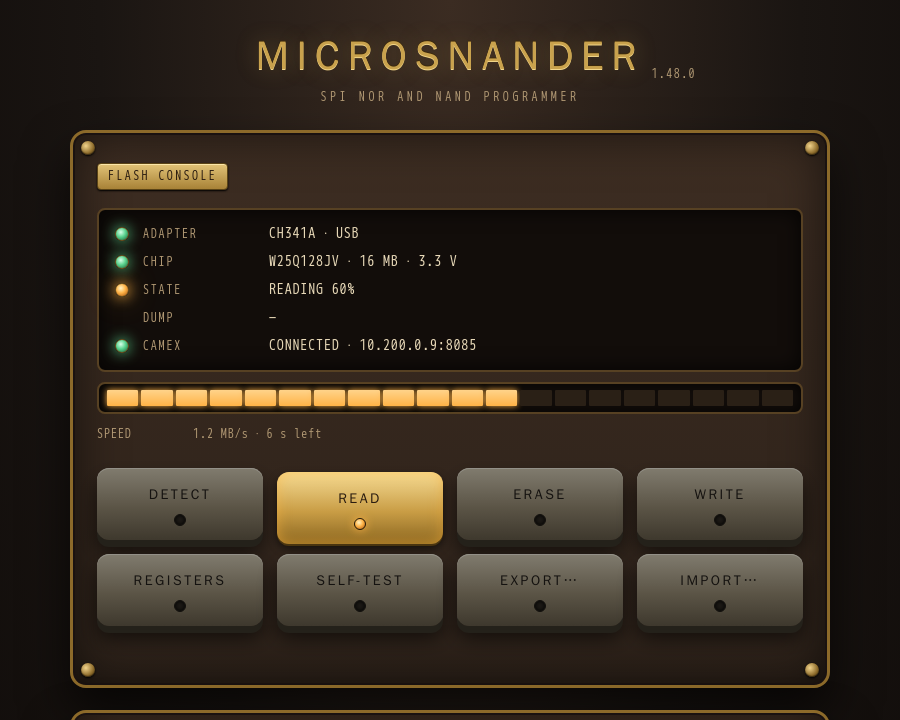
- Board: a row with its own lamp for each part — ADAPTER (the programmer), CHIP (its size and voltage), STATE (Reading, Writing, Verifying, Erasing, Saved, Written, Erased, Failed with the percent, also in the title of the browser tab; No link when the page cannot reach the service), DUMP (a link to the dump shown) and CAMEX (the tunnel of the Android app).
- Bar: 20 segments fill amber, the verify of a write turns the same segments green, an operation with no percentage (Detect, Erase, Registers) runs a light, the end is all green and a failure red on the segment where it stopped. Under it the speed and the time left of a read or a write, the chip's warning and the last message. The tab icon is a lamp in the colour of the state: amber at work, green when done, red on a failure or with no link. With less motion asked for in the system, the bar does not run and nothing blinks.
- Detect: finds the programmer and the chip, and reads the status registers.
- Read: the whole chip into a file in the
-odirectory (the current one by default), which the browser downloads too; the link stays on the page. With-a/-lgiven at the start, Read takes that range. - Erase: the whole chip, after a confirmation.
- Write: the dump shown (the last Read or Import; with none, a file chosen in the browser) is
written from address 0 into an erased chip, after Detect and a question naming the file and the
chip, then read back and compared. Erase first. A file is not kept in memory: it waits in the
-odirectory, so an image of up to 512 MB needs that much free disk space there. - Export…: the dump shown, to this computer.
- Import…: a file from this computer (a loader or a full image) to the
-odirectory asimport-NAME.bin, not written to the chip: it becomes the dump shown, in hex too, and Write writes it. The three newest imports are kept, older ones go. - Registers: a lamp for every bit of status registers 1–3 (bit names as on Winbond-type
chips; amber: a protection bit, green: another bit) and Clear protection, which does
what
-udoes, after Detect and a question naming the chip found: it clears BP, SRP and CMP and keeps QE. SPI NOR through the CH341A or the CH347 only; the EZP programmers cannot read the registers. - Self-test:
-ton the first block (see Usage) — Detect first, then the question naming the chip found; the verdict (OK,PROTECTED,FAILED) and the protection are the message. A block that does not come back is saved in the-odirectory. - Hex view: the last dump, 512 bytes a page: address, bytes and ASCII, 16 bytes a row
(00 and FF dim), Prev and Next, and Go to an address in hex. The page reads only that part of
the file (
Rangeon/dumps/<file>), so a dump of any size opens at once.
File names: flash-YYYYMMDDHHMM-CHIP.bin in the local time of the machine that runs the
service, for example flash-202611031706-W25Q128BV.bin. With -a/-l the range is added:
flash-202611031706-W25Q128BV-0x50000-0x100000.bin. A second read in the same minute does not
replace the first one: it gets -2, -3 and so on.
How it works:
- One programmer is used, chosen as without
-W; with several connected, give-P. - The programmer is opened for each operation and closed after it, so between operations it can be replugged, or used by a normal microsnander run.
- One operation runs at a time; a request while one runs gets
409. The page polls the state twice a second while an operation runs. -Wtakes no operation of its own (-i,-r,-w,-c,-O,-e,-u,-t,-b) and no-q,-m,-v,-S,-d,-Ior-k: the page does the operations, writes whole files from address 0 with ECC on and always verifies.-Kand-ogo with-Wonly.- The service keeps running when a client disconnects; a slow client does not hold the others (up to 16 connections at a time).
Access:
- Without
-Kanyone who reaches the port can erase the chip, and the service says so at the start unless it listens on a 127.x address. With-Kthe browser asks for the password (any user name); an empty one means no password. The password can come from theMICROSNANDER_WEB_PASSWORDenvironment variable instead, off the command line;-Kgoes first. - The page is plain HTTP, so the password crosses the network unencrypted: use a trusted
network, or
-W 127.0.0.1:8080and an SSH tunnel. - Operations need a header that only the page sends, so a page of another site cannot start an
erase or a write. A request has to name this machine by its IP address,
localhostor its host name (no other names: DNS rebinding). - Erase, Write, Self-test and Clear protection go only to the chip the user confirmed: a request
that does not name it gets
400, and another chip in the socket by then is refused. The check is the model and the size, so another chip of the same model passes it. - For help over the internet use an SSH tunnel:
microsnander -W 127.0.0.1:8080 -K secreton the machine with the programmer, so that the port stays closed to the network, thenssh -L 8080:127.0.0.1:8080 user@machineandhttp://127.0.0.1:8080/on the specialist's side. The tunnel is encrypted. A plain forwarded port without it is not: the password and the firmware cross the internet in the clear, and it works by the IP address only, because a domain name (dynamic DNS, a tunnel service) is refused, as above. - Only dumps made by Read are served from the
-odirectory, never links to other files.
As a systemd service (the user in the plugdev group of the udev rule above):
# /etc/systemd/system/microsnander.service
[Unit]
Description=microsnander web mode
After=network.target

[Service]
ExecStart=/usr/local/bin/microsnander -W 8080 -K <password> -o /var/lib/microsnander
User=microsnander
Group=plugdev
StateDirectory=microsnander
Restart=on-failure

[Install]
WantedBy=multi-user.target
Android app
android/ is an app with the same buttons as the web mode — Detect, Read, Erase, Write,
Registers — for a CH341A, CH347 or EZP programmer on the USB host port of a phone or an
Android TV box (Android 5.0 and later, no root; on a TV box it is on the home screen and works
with the remote).


- Plug the programmer in (through an OTG adapter on a phone; on a TV box one of its ports may be a device port only — try the other) and allow the app to use it.
- The board shows a row with a lamp for each part: ADAPTER, CHIP, STATE, WEB (remote access: its address, a lock when the page has a password) and CAMEX (the tunnel, when it is on).
- Read saves
flash-YYYYMMDDHHMM-CHIP.binto Downloads; Export… saves the dump shown anywhere (Save to a file) or sends it to another app (Share to an app). - Import… takes a file into the app without writing it: it becomes the dump shown, in hex too. Write writes the dump shown (the last Read or Import) from address 0 into an erased chip, then verifies it; with no dump it takes a file from the file picker. The file is read in parts, not held in memory. Erase erases the whole chip.
- Start on boot starts remote access after a reboot; Show log shows the log of events under the panel, oldest first, in a window that scrolls (both off at first, kept).
- Registers and Clear protection as in the web mode (SPI NOR through the CH341A or the
CH347), and Self-test (
-ton the first block, after Detect and a question). - A tap on a register lamp flips that bit: Detect, a question with the old and the new value, the write on every die, then the registers read again. WEL, BUSY (WIP) and SUS are the state of the chip, R bits are reserved and LB1–LB3 are one-time locks: those lamps take no tap.
- Hex view of the last dump, as in the web mode: 512 bytes a page, address, bytes and ASCII (00 and FF dim), Prev, Next and Go to an address in hex; the D-pad of a TV box moves through them, and the table scrolls sideways on a narrow screen.
- The app runs the same C code as microsnander (
src/), built with the NDK, on the device the Android USB manager opened (its file descriptor, through the usbfs code, no libusb). The signed APK is in the release:microsnander-android.apkin latest.
Remote access
The app can serve the page of the web mode itself, so an operator anywhere the device is reachable from (its network, a tunnel) drives the programmer from a browser, and the person at the bench only plugs it in. Settings, the section of the app: Allow remote access, the port (8085) and an optional password (any user name in the browser).
- The page listens on every network of the device:
http://ADDRESS:PORT, the addresses are in the WEB row. Without a password it is open to anyone who reaches the port, and the open lock says so: for a trusted network. - When another app holds the port (one of ours, on 8085 too), the page takes the next free one (8086, 8087...): the WEB row shows it and the log says why.
- It runs as a foreground service: with the screen off, after a reboot with Start on boot, and after an update of the app when it was running before.
- Plug the programmer in once and choose the app with Always: from then on Android gives
it to the app on every plug-in and after a reboot, with nobody at the device. After an update
of the app Android takes it back until a replug or a reboot (
adb rebootwill do). - The page and the app share one programmer, one operation at a time: what the operator runs shows on the screen of the device (REMOTE: READ 42%), the buttons there wait for it, and the page shows what is run on the device. Dumps of either side are in the app's dump folder, the page links the last one and shows it in hex.
Through a camex server. With remote access on, Join a camex server in the CAMEX section
of Settings makes the device join a camex server (built
into the app, no other app needed): the server, the client name, UDP or TCP, the server's public
key and the psk, or a camex link with them (https://openipc.github.io/camex/connect/#…, the one
camex's install.sh prints) opened with the app, which fills them. The operator, another client
of the same server, opens the page by the device's address in the tunnel, shown in the CAMEX row.
The client name starts as microsnander- and the last 4 characters of the device's ANDROID_ID
(microsnander-3f2a); the pre-shared key is hidden until Show the key.
The tunnel reconnects by itself and comes back after a reboot. The app gives camex the port the
page listens on (--web-port), so the server's nginx opens the page by the client's name (a
camex server 3.19.0 or later), and the tunnel lets new connections through to that page only.
- Android allows a VPN only after a consent, once: Allow VPN… on the screen, or, on a device
with nobody at it, while it is prepared:
adb shell appops set org.openipc.microsnander ACTIVATE_VPN allow, thenadb shell appops write-settings(Android writes it to the disk only later, and a reboot before that loses it; no root). Android 5.0 has no such operation: confirm the dialog once there. Without the consent the page still works on the local network, and the screen, the notification and the page say what is missing; the app tries again every minute. - Only the tunnel network and the server's routes go through the VPN, never all the traffic.
Build: cd android && gradle assembleDebug with the Android SDK and NDK r27c.
SigmaStar ISP
-m sigmastar reaches the SPI flash of a SigmaStar (MStar) board on its SoC, without
desoldering: through the ISP bridge of the SoC, over I2C. It brings back a board with a broken
bootloader (OpenIPC wiki: SigmaStar unbrick).
- Wires: the UART of the SoC to the I2C of the programmer, TX to SDA, RX to SCL, and GND. The board is powered on its own; when the bridge does not answer, a power cycle of the board helps. The black CH341A board puts 5 V on SDA and SCL unless it is modified for 3.3 V: the UART of the SoC is not made for that.
- The I2C master is that of the CH341A or the CH347 (CH347T in mode 1, CH347F), chosen as always
with
-Por by itself; the EZP programmers have no I2C. -Sis the I2C clock in this mode:20K,100K(default),400K,750K.-qlists the I2C addresses that answer, to check the wiring (the bridge is at0x49, the debug port of the SoC at0x59, which may stay silent until it is unlocked): alone, or before the operation, as-m sigmastar -i -q. A CH347F keeps its pins on I2C afterwards: replug it before working with a chip over SPI.- Everything else works as with a chip in the socket:
-i,-r,-w,-e,-v,-a,-l, SPI NOR and SPI NAND. Not in the web mode or the Android app.
microsnander -m sigmastar -i -q                  # 0x49 must answer, then the flash
microsnander -m sigmastar -r backup.bin          # back it up first
microsnander -m sigmastar -a 0 -l 0x40000 -e     # the loader part, then
microsnander -m sigmastar -w u-boot.bin -v       # a working loader
It is slow: the data goes over I2C, about 20-25 bytes a transaction. A loader of a few hundred KB is minutes; a whole 16 MB chip is much longer.
Supported chips
microsnander -L prints the list: 441 SPI NOR chips (Winbond, Eon, Fudan
Microelectronics FM25Q, GigaDevice, Macronix, Spansion, XMC, XTX, Zbit, Giantec
GM25Q, ISSI, Micron, Boya, Puya and others) and 170 SPI NAND chips (Etron, GigaDevice, Heyang, Foresee, ESMT, Dosilicon, XTX,
Micron, Toshiba/Kioxia, Winbond, Macronix and others).
A SPI NOR chip that is not on the list but has an SFDP table (JESD216; most chips
made since about 2011) is found by it: its size, the sector erase and the 4-byte
mode come from the chip, and it is named SFDP- and its ID. A chip with neither is
reported as not detected; its ID from the output helps to add it. The Winbond W25M512JV, two W25Q256JV dies in one package, is
read, written and erased as one 64 MB chip, and so is the GigaDevice GD25S512MD, two GD25B256D
dies. Its dies answer with the ID of the GD25Q256C (C8 40 19), so at that ID the second die is
looked for: it is there when, selected (C2h), it reports itself as the active die (F8h).
Chip voltage
The programmers work at 3.3 V. The programmer does not measure the voltage, so microsnander takes it from the chip name: 107 SPI NOR chips of the list are 1.8 V parts (GigaDevice GD25L, Macronix MX25U, Winbond W25Q..W, Micron N25Q..A11 and MT25QU, XMC XM25QU and XM25LU, Zbit ZB25LQ, Boya BY25Q..L, ISSI IS25WP and IS25WQ, Eon EN25S, Fudan FM25M, Adesto AT25DL, Microchip SST25WF, Dosilicon DS25M), and so are 45 SPI NAND chips (GigaDevice GD5F..R, Winbond W25N..W, Macronix MX35UF, Micron MT29F..ABB and MT29F..ADB, ESMT F50D, Dosilicon DS35M, Kioxia TC58CY and TH58CY, Etron EM78, XTX XT26Q). Connect them through a 1.8 V adapter: at 3.3 V the reads are not reliable and the chip can be damaged. GigaDevice GD25W, XMC XM25QW, Fudan FM25W, Macronix MX25R and Adesto AT25DF021A take 1.65-3.6 V and work as they are.
After a 1.8 V chip is found, the console prints a warning, the web page lights the CHIP lamp
red and shows the warning, and so does the Android app; /api/state has the voltage (3.3,
1.8, 1.65-3.6) and the warning. A chip that is not on these lists is taken for 3.3 V.
There are no 5 V SPI flash chips. The black CH341A board, though, puts 5 V on the chip lines unless it is modified for 3.3 V, and the program cannot see that: with the CH341A, microsnander reminds about it every time it finds a chip.
Chips with uncertain data
For the SPI NOR and SPI NAND chips below, other sources give different parameters than the
ones MicroSNANDer uses. None of them has been checked on hardware yet, so reading,
writing and especially raw dumps (-d) may behave differently from what is
described here. If you have one of these chips, please report how it works in
GitHub Issues, with the output
of microsnander -i and the full part number from the chip.
| Chip | MicroSNANDer uses | Found elsewhere |
|---|---|---|
| TOSHIBA TC58CVG0S3H, TC58CVG1S3H | OOB 128 bytes | OOB 64 bytes |
| TOSHIBA TC58CVG2S0H, KIOXIA TC58CVG2S0HRAIJ | OOB 256 bytes | OOB 128 bytes |
MICRON MT29F4G01 (ID 2C 36) |
two 2 Gbit dies, page 2 KB, OOB 128 bytes | one die, page 4 KB, OOB 256 bytes |
HEYANG chips with maker ID C9 |
uncorrectable ECC = 10 in status bits 5:4; unlock clears bits 5:3 |
11 in bits 5:4; unlock bits 6:3 |
| DOSILICON DS35Q1GA, DS35Q2GA | uncorrectable ECC = 10 in status bits 5:4 |
010 in bits 6:4 |
| GIGADEVICE GD5F1GM7UE | OOB 128 bytes, dual read | OOB 64 bytes, single read |
| ESMT F50D1G41LB(2M) | OOB 64 bytes | OOB 128 bytes |
| FORESEE F35SQA001G | OOB 64 bytes | OOB 128 bytes |
| FORESEE F35SQA512M | dual read | single read |
| XINCUN XCSP1AAWH-NT | no ECC status check: an uncorrectable page is read without an error | the encoding of its status is unknown |
| UNIM UM19C0HISW | not supported yet | a geometry with the spare area counted into the page and block size |
| ES25P10–ES25P32, ES25M40A–ES25M16A (SPI NOR) | size from the capacity byte of the ID (ES25P10: 1 Mbit) | twice that size |
ISSI 9D 60 1A, 9D 70 1A (SPI NOR) |
IS25LP512M, IS25WP512M, 512 Mbit | named IS25LP256D, IS25WP256D |
| PCT25VF020B–PCT25VF032B, PCT26VF016, PCT26VF032 (SPI NOR) | AAI word program (SST25 type), ULBPR unlock and 4 KB erase (SST26 type); slow on CH341A | listed as ordinary chips with a 256-byte page program |
| PCT25VF010A (SPI NOR) | not supported: no JEDEC READ ID | listed with a JEDEC ID |
The OOB size matters for raw dumps with -d (every page is read with its spare
area); reading and writing with the internal ECC uses only the data area. A raw
write takes whole pages of data + OOB only, so a raw dump of the Toshiba/Kioxia chips
above made before version 1.11.1 (with the old OOB size) is refused: pad each of its
pages with 0xFF to the new OOB size first.
Build
Native build (Debian, Ubuntu): no libraries are needed, the programmers are reached through
the Linux usbfs by src/usbfs.c:
sudo apt-get install build-essential
make -C src
make -C src LIBUSB=1 builds against libusb-1.0 instead (libusb-1.0-0-dev), for comparison.
I2C (24Cxx) and Microwire (93Cxx) EEPROM chips are not supported: microsnander is for
SPI NOR and SPI NAND flash. The EEPROM part of the original SNANDer (-E, -8, -f)
was removed.
The static release binaries are built by ci/build-musl.sh (Docker or any Linux
x86_64 host with curl, make and, for arm and MIPS, qemu-user). It downloads the musl
toolchain and checks it by SHA256:
ci/build-musl.sh x86_64 dist    # dist/microsnander-linux-x86_64
ci/build-musl.sh arm dist       # dist/microsnander-linux-arm
ci/build-musl.sh mipsel dist    # dist/microsnander-linux-mipsel
ci/build-musl.sh mips dist      # dist/microsnander-linux-mips
Credits
MicroSNANDer is based on SNANDer by McMCC (Serial Nor/nAND/Eeprom programmeR), which builds on the CH341A code of flashrom and ch341eeprom. The original copyrights are kept in the source files.
License
GPL-2.0, as the original SNANDer. See LICENSE for the full terms.
Support
- Questions and bug reports: GitHub Issues
- Documentation: openipc.org
Questions
What is microsnander?
OpenIPC/microsnander is a public repo on GitHub by OpenIPC. Modified version of Serial Nor/nAND/Eeprom programmeR.
Is microsnander open source?
It declares the GPL-2.0 license on GitHub.
Does microsnander run on macOS, Windows or Linux?
Its maker tagged it for macOS, Windows and Linux, or as Docker or cross-platform. That is declared by the maker; Take My Repo has not tested it.
How do I install microsnander?
Open "Take it" on its page: Take My Repo writes an install plan for your machine and hands it to your AI agent (Claude Code, Codex or Cursor), which asks you before each step. Take My Repo has not tested it on any machine.
Is microsnander still maintained?
Its last change on GitHub was on 2026-11-21. GitHub counts 0 open issues and pull requests. Take My Repo does not judge from that whether it is maintained.
What do people who ran microsnander say?
Nobody has reviewed it on Take My Repo yet, which says nothing about its quality.