rea
Reverse engineer anything with agents, from app behavior down to native binaries.
- 473k
- TypeScript
- MIT
- 3 h ago
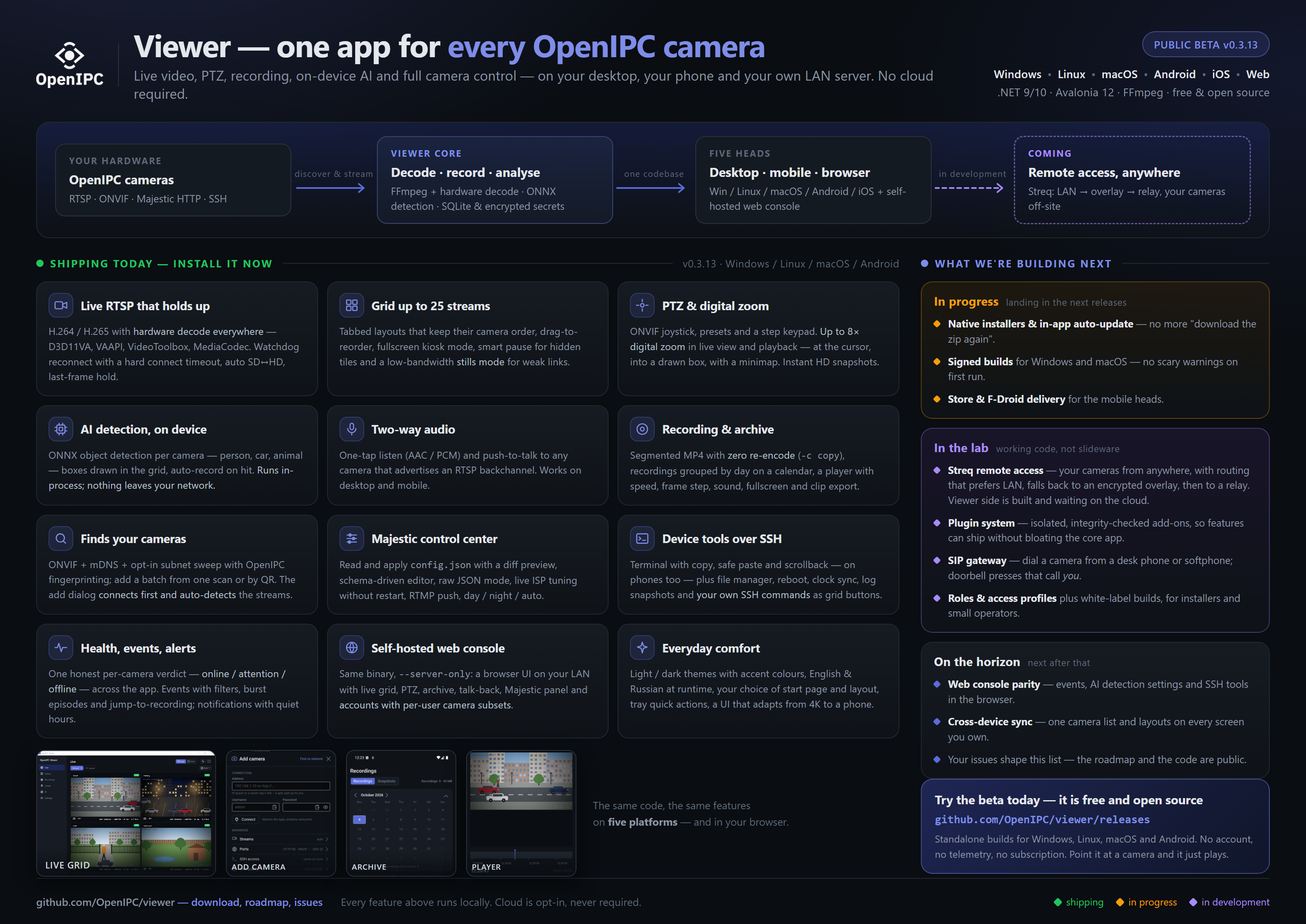
Cross-platform viewer for OpenIPC IP cameras — live RTSP with HW decode, multi-camera grid, on-device AI detection, recording & two-way audio, ONVIF discovery and Majestic config. Windows · Linux · macOS · Android.
Repo OpenIPC/viewer, read from GitHub 1 min ago. OpenIPC has not joined Take My Repo.
OpenIPC/viewer is a public repo on GitHub by OpenIPC. Cross-platform viewer for OpenIPC IP cameras — live RTSP with HW decode, multi-camera grid, on-device AI detection, recording & two-way audio, ONVIF discovery and Majestic config. Windows · Linux · macOS · Android. It declares no license on GitHub. Public does not mean open source: without a license, nobody is granted the right to reuse it. It is written mainly in C#, has 42 stars and last changed on 2026-11-12. Nobody has reviewed it on Take My Repo yet, which says nothing about its quality. Read from GitHub on 2026-11-22.
Cross-platform desktop and mobile viewer for OpenIPC IP cameras. Built with .NET 9 / 10 and Avalonia 12.
Status: beta — releases ship as standalone builds for Windows / Linux / macOS / Android from the releases page. The app tells you when a new release is out and can download it for you; native installers and code signing come later.
See the Roadmap for phase status.

rtsp:// link is split into fields; everything else sits under
collapsible Advanced rows. QR-code add from an image.-c copy. Recordings are
grouped by day with camera / period / motion-only filters and an activity
calendar. The player has 0.5×–8× speed, frame stepping, sound, fullscreen,
clip export, save-frame-to-snapshots and auto-continue into the next
recording, all with keyboard shortcuts.--server-only for a
browser UI to your cameras over the LAN: live grid with saved layouts, PTZ,
network discovery, camera management, config backup, and accounts with
per-user permissions and camera subsets. No cloud. See the
self-hosting guide.
| Library + ONVIF discovery | Add camera |
|---|---|
 |
 |
| Events | Settings |
|---|---|
 |
 |
| Live grid 2×2 | Live grid 3×3 |
|---|---|
 |
 |
Pre-built standalone binaries are attached to each GitHub release. No installer is required for the beta — download, extract, run:
| OS | Asset | Run |
|---|---|---|
| Windows x64 | openipc-viewer-win-x64.zip |
extract, run OpenIPC.Viewer.Desktop.exe (accept the SmartScreen prompt — builds are unsigned for now) |
| Linux x64 | openipc-viewer-linux-x64.tar.gz |
extract, chmod +x, run ./OpenIPC.Viewer.Desktop |
| macOS arm64 | openipc-viewer-osx-arm64.tar.gz |
extract, right-click the app → Open (Gatekeeper blocks unsigned builds on first launch) |
| Android arm64 | org.openipc.viewer-Signed.apk |
sideload on Android 12+ (not on Google Play yet) |
| Android x64 | org.openipc.viewer-x64-Signed.apk |
the same for emulators and x86-64 Android devices — phones want the arm64 one |
Each build is self-contained (bundles the .NET runtime), so there's nothing to install alongside it. When a newer release is published, a strip at the top of the window offers it: Download saves the archive for your platform into Downloads (hash-checked), and you unpack it in place of the old folder — your cameras and settings live in the user data folder, not next to the app. On Android the APK opens in the browser. Turn the check off in Settings → About. Native installers may come in a later release.
sudo apt install libsecret-1-0 libsecret-tools
n7.1 .so) — do not rely on
apt install ffmpeg. The app binds the FFmpeg 7.x ABI (libavcodec.so.61),
but no current Ubuntu LTS packages FFmpeg 7 (24.04 has 6.1 → libavcodec.so.60,
22.04 has 4.4), so a system FFmpeg would fail to load with "FFmpeg native
libraries failed to load for runtime linux-x64". The bundled libs sidestep
the distro version entirely. VAAPI hardware decode still needs
/dev/dri/renderD128 and your user in the render (or video) group.
Credentials use secret-tool against the GNOME/KDE keyring, with an AES-GCM
file fallback if D-Bus is unavailable.brew install ffmpeg@7). The app binds the
FFmpeg 7.x ABI (libavcodec.61), and Homebrew's plain ffmpeg formula is
newer than that, so it won't load. ffmpeg@7 is keg-only; the app finds it
under the Homebrew prefix by itself, no DYLD_LIBRARY_PATH needed.
VideoToolbox HW decode works on any Mac 12+; a stream it can't decode falls
back to software. Credentials live in the Keychain via security.Validation caveat. Linux / macOS / Android / iOS code paths build + link in CI but aren't yet end-to-end tested on real devices for every commit. Feedback is welcome — open an issue with OS version, what you did, and what happened.
The same binary can run headless as a small web server, serving a React single-page UI for your cameras to any browser on your network — live grid with saved layouts, PTZ, network discovery, and accounts with per-user permissions and camera subsets. No cloud, no extra services:
export OPENIPC_WEB_ADMIN_PASSWORD='choose-a-strong-one'
./OpenIPC.Viewer.Desktop --server-only --lan --port 8787
# then open http://<this-machine-ip>:8787 and log in as admin
Localhost-only by default; --lan opts into network exposure. For an HTTPS
domain put it behind a reverse proxy. Full instructions — flags, adding and
finding cameras, users and permissions, ffmpeg, Caddy/nginx + systemd examples —
are in the self-hosting guide (English ·
Русский).
dotnet restore OpenIPC.Viewer.slnx
dotnet build   OpenIPC.Viewer.slnx
dotnet test    OpenIPC.Viewer.slnx --no-build
dotnet run --project src/OpenIPC.Viewer.Desktop
Build runs with TreatWarningsAsErrors=true; any warning fails the build.
The web console's React SPA is built by the same dotnet build (npm ci +
npm run build, then embedded into OpenIPC.Viewer.Web.dll), so Node is a
prerequisite if you want the browser UI (CI builds it with Node 22). Without
Node the build still succeeds and the server runs API-only; pass
-p:BuildWebClient=false to skip it deliberately.
Run the FFmpeg fetch script for your OS once — it downloads the bundled
shared-build (n7.1 ABI) from BtbN/FFmpeg-Builds into runtimes/<rid>/native/:
tools/fetch-ffmpeg.ps1 (Windows → win-x64) or tools/fetch-ffmpeg-linux.sh
(Linux → linux-x64). macOS uses Homebrew's ffmpeg@7 (see
Runtime requirements).
dotnet workload install android
dotnet build src/OpenIPC.Viewer.Android/OpenIPC.Viewer.Android.csproj -c Release
CI cross-compiles FFmpeg n7.1 for android-arm64 via NDK r27c on every
build (cached when version/script unchanged). Recording uses in-process
libavformat + a foreground service (foregroundServiceType=dataSync) and
needs POST_NOTIFICATIONS on Android 13+, prompted on first record.
Credentials use an AES-GCM file keyed off Settings.Secure.AndroidId.
dotnet workload install ios
dotnet build src/OpenIPC.Viewer.iOS/OpenIPC.Viewer.iOS.csproj -c Release    # Mac-only for the link step
iOS recording is foreground-only — Apple doesn't grant 24/7 background
captures to surveillance apps. Credentials use an AES-GCM file keyed off
UIDevice.identifierForVendor. CI builds an unsigned .app/.ipa;
TestFlight signing arrives in the release-polish phase.
src/
  OpenIPC.Viewer.Core/            netstandard2.1 — domain, no IO, no UI, no package deps
  OpenIPC.Viewer.Infrastructure/  net9.0         — SQLite, secrets, decoder factories
  OpenIPC.Viewer.Video/           net9.0         — FFmpeg pipeline (FFmpeg.AutoGen + SkiaSharp)
  OpenIPC.Viewer.Analytics/       net9.0         — ONNX object detection (Microsoft.ML.OnnxRuntime)
  OpenIPC.Viewer.Devices/         net9.0         — ONVIF, Majestic HTTP, SSH, discovery sources
  OpenIPC.Viewer.App/             net9.0         — Avalonia views and viewmodels (cross-platform)
  OpenIPC.Viewer.Composition/     net9.0         — shared DI registrations (used by every head)
  OpenIPC.Viewer.Web/             net9.0         — Kestrel host + REST API for the self-hosted console
  OpenIPC.Viewer.Web.Client/      —              — React + Vite SPA, built and embedded into the Web dll
  OpenIPC.Viewer.Desktop/         net9.0         — Win/Lin/Mac host, classic-window lifetime
  OpenIPC.Viewer.Android/         net10.0-android — Android host (min API 31), foreground-service recording
  OpenIPC.Viewer.iOS/             net10.0-ios     — iOS host (min 16), foreground-only recording
tests/
  OpenIPC.Viewer.Core.Tests/           xUnit
  OpenIPC.Viewer.Devices.Tests/        xUnit — ONVIF, Majestic, discovery
  OpenIPC.Viewer.Infrastructure.Tests/ xUnit — SQLite, migrations, secrets
  OpenIPC.Viewer.Analytics.Tests/      xUnit — detection pre/post-processing
  OpenIPC.Viewer.Web.Tests/            xUnit — API, auth, permissions
  OpenIPC.Viewer.Video.Tests/          xUnit + MediaMTX integration
App references Core only. Infrastructure, Video, Devices and the platform
trio (IFileSystem / ISecretsStore / IHwDecoderFactory) are wired into
each head via OpenIPC.Viewer.Composition.SharedComposition.AddSharedServices().
The video integration test and manual smoke depend on a local RTSP source.
A MediaMTX container synthesises a 1280×720@25 h264 test pattern on demand at
rtsp://localhost:8554/test.
docker compose -f tools/mediamtx/docker-compose.yml up -d
# ... do your testing ...
docker compose -f tools/mediamtx/docker-compose.yml down
The integration test auto-skips itself if the container isn't reachable.
Per-platform AppData root:
| OS | Path |
|---|---|
| Windows | %LOCALAPPDATA%\OpenIPC.Viewer\ |
| Linux | $XDG_DATA_HOME/openipc-viewer/ (default ~/.local/share/openipc-viewer/) |
| macOS | ~/Library/Application Support/OpenIPC.Viewer/ |
| Android | /data/data/org.openipc.viewer/files/ (app-private; uninstall wipes) |
| iOS | ~/Library/Application Support/OpenIPC.Viewer/ (sandbox; Files-app visible via UIFileSharingEnabled) |
Inside the root:
logs/openipc-viewer-{date}.log    rolling daily, 7-day retention
appsettings.json                  optional override over the one shipped with the app
usersettings.json                 settings written by the in-app Settings page
openipc-viewer.db                 SQLite (cameras, recordings metadata, events)
secrets.bin / secrets.salt        encrypted credential fallback (used when no native keystore)
snapshots/{camera}/*.jpg          manual snapshots
recordings/                       MP4 segments (Linux/macOS may override via XDG_VIDEOS_DIR / ~/Movies)
Credentials live in the native keystore when available (Windows DPAPI / macOS Keychain / Linux libsecret); the encrypted-file fallback is used otherwise.
OpenIPC Viewer is free and open source. If it is useful to you, you can support its development on Open Collective.
MIT. Bundled FFmpeg DLLs and self-built FFmpeg .so are LGPL — shipped as
side-by-side shared libs, replaceable by the user.
OpenIPC/viewer is a public repo on GitHub by OpenIPC. Cross-platform viewer for OpenIPC IP cameras — live RTSP with HW decode, multi-camera grid, on-device AI detection, recording & two-way audio, ONVIF discovery and Majestic config. Windows · Linux · macOS · Android.
It declares no license on GitHub. Public does not mean open source: without a license, nobody is granted the right to reuse it.
Its maker tagged it for macOS, Windows and Linux, or as Docker or cross-platform. That is declared by the maker; Take My Repo has not tested it.
Open "Take it" on its page: Take My Repo writes an install plan for your machine and hands it to your AI agent (Claude Code, Codex or Cursor), which asks you before each step. Take My Repo has not tested it on any machine.
Its last change on GitHub was on 2026-11-12. GitHub counts 4 open issues and pull requests. Take My Repo does not judge from that whether it is maintained.
Reverse engineer anything with agents, from app behavior down to native binaries.
Nobody has reviewed it on Take My Repo yet, which says nothing about its quality.
Flutter makes it easy and fast to build beautiful apps for mobile and beyond
f.k.a. Awesome ChatGPT Prompts. Share, discover, and collect prompts from the community. Free and open source — self-host for your organization with complete privacy.
A collection of inspiring lists, manuals, cheatsheets, blogs, hacks, one-liners, cli/web tools and more.
PixelPilot is an Android app packaging multiple pieces together to decode an H264/H265 video feed broadcast by wfb-ng over the air.