DeepCTR
Easy-to-use,Modular and Extendible package of deep-learning based CTR models .
- 8.1k
- Python
- Apache-2.0
- 6 wk ago
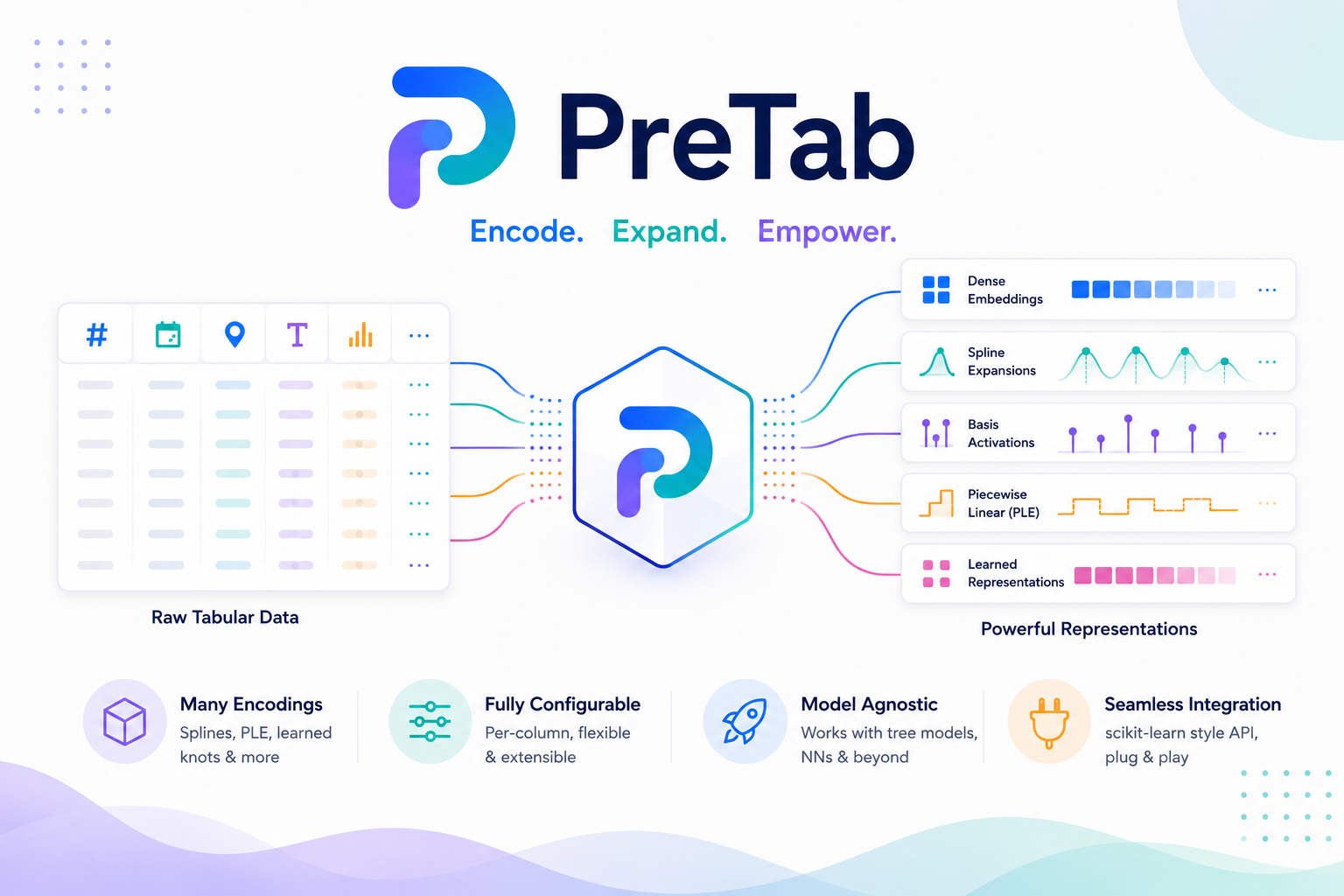
PreTab is a modular, scikit-learn-compatible representation and preprocessing library for tabular data. Its focus is feature representation and expansion: splines, neural basis maps, piecewise-linear encoding, kernel approximations, and language embeddings, each shipped as a standalone transformer that speaks the standard fit / transform.
Repo OpenTabular/PreTab, read from GitHub 1 min ago. OpenTabular has not joined Take My Repo.
OpenTabular/PreTab is a public repo on GitHub by OpenTabular. PreTab is a modular, scikit-learn-compatible representation and preprocessing library for tabular data. Its focus is feature representation and expansion: splines, neural basis maps, piecewise-linear encoding, kernel approximations, and language embeddings, each shipped as a standalone transformer that speaks the standard fit / transform. It declares the MIT license on GitHub. It is written mainly in Python, has 20 stars and last changed on 2026-11-19. Nobody has reviewed it on Take My Repo yet, which says nothing about its quality. Read from GitHub on 2026-11-19.
PreTab is a modular, scikit-learn compatible representation and preprocessing library
for tabular data. A single Preprocessor detects numerical and categorical columns and
turns them into model-ready features. Every strategy it uses (splines, neural basis
expansions, piecewise-linear encoding, binning, kernel approximations, and language
embeddings) is also available as a standalone transformer. Because it speaks the sklearn
API, PreTab drops straight into Pipeline and ColumnTransformer workflows and accepts any
sklearn transformer alongside its own.
Beyond the transformers themselves, every fitted representation is self-describing: it reports per-output-column lineage, guards supervised methods against leakage, serializes to a portable versioned spec, and can be extended with your own representations through a public, discoverable protocol.
fit/transform/fit_transform API that drops
into existing pipelines and works with pandas.DataFrame, polars.DataFrame and
numpy.ndarray inputs.Tip: See how this compares to scikit-learn's own preprocessing transformers for what each one adds where scope overlaps.
import numpy as np
import pandas as pd

from pretab import Preprocessor

df = pd.DataFrame({
    "age": np.random.randint(18, 65, size=100),
    "income": np.random.normal(60_000, 15_000, size=100).astype(int),
    "city": np.random.choice(["Berlin", "Munich", "Hamburg"], size=100),
    "experience": np.random.randint(0, 40, size=100),
})
y = np.random.randn(100)

# Global strategies: PLE for numerics, integer codes for categoricals
preprocessor = Preprocessor(numerical_method="ple", categorical_method="int")

X = preprocessor.fit_transform(df, y)   # single stacked array, one row per sample

print(X.shape)
# (100, 22)
Note: PreTab accepts a
pandas.DataFrame, apolars.DataFrameor anumpy.ndarrayand infers numerical versus categorical columns either way.
Tip: Swap the global methods for a
feature_preprocessingmap, for example{"age": "ple", "income": "rbf", "city": "one-hot"}, and PreTab fits each column with its own strategy in a single pass. See Usage for a full example.
PreTab groups its transformers by representation taxonomy. Each one follows the standard
fit / transform API and is importable from pretab.transformers (the stable, flat public
import); advanced users can also reach them through the namespace shown per table
(pretab.expansion.spline, pretab.expansion.functional, and so on).
| Transformer | Basis | Best for |
|---|---|---|
BSplineTransformer |
B-spline basis | General-purpose smooth nonlinearity |
MSplineTransformer |
Non-negative B-spline basis | Density-like, non-negative bases |
ISplineTransformer |
Monotone integrated spline | Effects that must not reverse |
CubicRegressionSplineTransformer |
Cubic regression spline | GAM-style additive smooth terms |
NaturalCubicSplineTransformer |
Natural cubic spline | Smooth effects with linear tails |
PSplineTransformer |
Penalized B-spline | Smoothness via a difference penalty |
TensorProductSplineTransformer |
Tensor-product spline (multivariate) | Smooth interactions across 2+ features |
ThinPlateSplineTransformer |
Thin-plate spline (multivariate) | Smooth surfaces across 2+ features |
| Transformer | Basis | Best for |
|---|---|---|
RBFExpansionTransformer |
Radial basis functions | Localized, kernel-like features |
ReLUExpansionTransformer |
ReLU basis | Piecewise-linear neural features |
SigmoidExpansionTransformer |
Sigmoid basis | Smooth saturating features |
TanhExpansionTransformer |
Tanh basis | Zero-centered saturating features |
FourierFeatureTransformer |
Sine/cosine basis | Periodic or cyclic numerical effects |
| Transformer | Basis | Best for |
|---|---|---|
RandomFourierFeaturesTransformer |
Random Fourier features (multivariate) | Scalable RBF-kernel approximation |
NystroemFeaturesTransformer |
Nystroem kernel map (multivariate) | Landmark-based kernel approximation |
| Transformer | Method | Best for |
|---|---|---|
PLETransformer |
Piecewise-linear encoding (supervised) | Strong numerical encoding for models |
NumericBinningTransformer |
Uniform/quantile binning, tree-driven | Discretizing numerical columns |
PeriodicEncodingTransformer |
Sine/cosine cyclic encoding | Values that wrap around a known period |
| Transformer | Method | Best for |
|---|---|---|
ContinuousOrdinalTransformer |
Integer (ordinal) encoding | Compact codes for categoricals |
LanguageEmbeddingTransformer |
Pretrained language embeddings | High-cardinality, semantic columns |
Warning:
OneHotFromOrdinalTransformeris deprecated. Usecategorical_method="one-hot"(backed bysklearn.preprocessing.OneHotEncoder) instead.
Note: Inside the
Preprocessoryou select these by short name, for example"ple","rbf","one-hot","pretrained". See Representations for the full catalogue, including exact input/output shapes and per-parameter effects, and the comparison table to filter by capability.
Full documentation: pretab.readthedocs.io
Preprocessor and every transformerBasic installation:
pip install pretab
With optional extras:
pip install "pretab[embeddings]"   # adds sentence-transformers, for the `pretrained` strategy
pip install "pretab[lightgbm]"     # adds lightgbm, for placement_strategy="lightgbm"
pip install "pretab[all]"          # both of the above
Note: The core install has no heavy dependencies. Each extra is opt-in and only needed if you use the corresponding strategy. PreTab requires Python 3.10 to 3.13.
From source:
git clone https://github.com/OpenTabular/PreTab
cd PreTab
poetry installThe Preprocessor is the high-level entry point. Set a global strategy per feature type,
or override individual columns with feature_preprocessing.
from pretab import Preprocessor

# Per-feature configuration overrides the global defaults
preprocessor = Preprocessor(
    feature_preprocessing={
        "age": "ple",
        "income": "rbf",
        "experience": "quantile",
        "city": "one-hot",
    },
    task="regression",
)

X_array = preprocessor.fit_transform(df, y)              # single stacked ndarray
X_dict = preprocessor.transform(df, return_array=False)  # {"num_age": ..., "cat_city": ...}

preprocessor.get_feature_info(verbose=True)              # inspect resolved strategies
get_feature_info(verbose=True) prints the resolved layout so you can confirm every column
at a glance:
feature     kind         pipeline                        dim   cats
-------------------------------------------------------------------
age         numerical    imputer -> minmax -> ple          7      -
income      numerical    imputer -> minmax -> rbf          7      -
experience  numerical    imputer -> minmax -> quantile     1      -
city        categorical  imputer -> onehot -> to_float     3      3
Note:
transformreturns a single stacked array by default, so aPreprocessordrops straight into a plainsklearn.pipeline.Pipeline. Passoutput_structure="blocks"(orreturn_array=Falsefor a single call) for the dict-of-feature-blocks form instead (keys prefixednum_andcat_).
Each transformer works on its own and composes with any sklearn estimator.
import numpy as np

from pretab.transformers import PLETransformer

x = np.random.randn(100, 1)
y = np.random.randn(100, 1)

x_ple = PLETransformer(output_dim=15, task="regression").fit_transform(x, y)
assert x_ple.shape[1] == 15
Important:
PLETransformeris supervised. It uses the targetyduringfitto place its bin edges and raises if you omit it, so always passywhen fitting it directly.
Because every transformer follows the sklearn API, you can drop them into a Pipeline or
ColumnTransformer.
from sklearn.compose import ColumnTransformer
from sklearn.linear_model import Ridge
from sklearn.pipeline import Pipeline

from pretab.transformers import NaturalCubicSplineTransformer, RBFExpansionTransformer

features = ColumnTransformer([
    ("age", NaturalCubicSplineTransformer(output_dim=10), ["age"]),
    ("income", RBFExpansionTransformer(), ["income"]),
])

model = Pipeline([("features", features), ("ridge", Ridge())])
model.fit(df[["age", "income"]], y)
Spline transformers expose their penalty matrix for penalized (smoothing) models.
import numpy as np

from pretab.transformers import NaturalCubicSplineTransformer

x = np.random.randn(100, 1)

spline = NaturalCubicSplineTransformer(output_dim=10)
x_spline = spline.fit_transform(x)
penalty = spline.get_penalty_matrix()   # (output_dim, output_dim) smoothing penalty
preset sets numerical_method, categorical_method, and the output width in one call,
so you can start from a sensible default instead of choosing every parameter by hand.
Preprocessor(preset="standard")   # bspline (regression) / ple (classification), int codes, output_dim=7
Preprocessor(preset="expanded")   # same numerical method, one-hot codes, output_dim=10
Preprocessor(preset="adaptive")   # same numerical method, int codes, adaptive width in [7, 15]
Note: Every preset resolves
numerical_methodfromtask:"bspline"for regression,"ple"for classification. Any parameter you also pass explicitly overrides the preset's value for that parameter.
By default PreTab inspects each column and classifies it as numerical or categorical.
String, object and boolean columns are treated as categorical, low-cardinality integer
columns are categorical, and integer columns with enough distinct values stay numerical.
A boolean column is encoded like any other binary categorical column, with the categories
False and True. Tune the behavior with cat_cutoff and treat_all_integers_as_numerical.
preprocessor = Preprocessor(
    treat_all_integers_as_numerical=False,
    cat_cutoff=0.03,
)
The pretrained strategy encodes categorical values with a sentence-transformer, which
helps with high-cardinality or semantically rich columns.
preprocessor = Preprocessor(
    feature_preprocessing={"job_title": "pretrained"},
)
Note: Install with
pip install "pretab[embeddings]"before using thepretrainedstrategy.
NumericBinningTransformer (selected as "custombin") discretizes a numerical column into
uniformly- or quantile-spaced bins, with ordinal, onehot, or soft output encodings.
preprocessor = Preprocessor(
    numerical_method="custombin",
    output_dim=32,
)
Every fitted Preprocessor can explain itself. get_feature_info summarizes the resolved
per-column pipeline, and get_feature_lineage maps every output column back to its source
feature, representation family, and component.
preprocessor.fit(df, y)
preprocessor.get_feature_info(verbose=True)      # resolved strategies, widths, categories
lineage = preprocessor.get_feature_lineage()     # one record per output column
Tip: Pass
verbose=1(or higher) toPreprocessorfor fit-time logging through the shared"pretab"logger, including a one-line summary of the resolved method(s) per feature kind. See Outputs and inspection for the full level reference.
Methods like PLETransformer place their bins using the target. PreTab warns when a
supervised transformer is fit outside a Pipeline or cross-validation context, and ships a
cross-fitting wrapper that produces out-of-fold training features.
from pretab import CrossFittedTransformer
from pretab.transformers import PLETransformer

x_train = df[["age"]].to_numpy()
y_train = y.ravel()
cf = CrossFittedTransformer(PLETransformer(), n_folds=5, random_state=0)
X_train_features = cf.fit_transform(x_train, y_train)   # out-of-fold, leakage-free
Warning: Fitting a supervised transformer on the same rows you later evaluate on leaks target information into the features.
CrossFittedTransformerremoves that leakage from the training features themselves; inside aPipeline, cross-validation already keeps each fold's fit confined to its training data.
RepresentationSearchCV cross-validates a downstream estimator over a set of candidate
numerical_method values and refits the best one on all the data, keeping every candidate's
scoring honest by fitting a fresh Preprocessor per fold.
import numpy as np
import pandas as pd
from sklearn.linear_model import Ridge

from pretab import RepresentationSearchCV

rng = np.random.default_rng(0)
X = pd.DataFrame({"x": rng.uniform(-3, 3, size=300)})
y = np.sin(X["x"]) + rng.normal(0, 0.1, size=300)

search = RepresentationSearchCV(
    estimator=Ridge(),
    methods=["minmax", "ple", "bspline", "rbf"],
    cv=5,
    random_state=0,
)
search.fit(X, y)
search.best_method_
# 'bspline'
Note: This searches only the single
numerical_methodaxis with one global method for every numerical column, not a per-columnfeature_preprocessingsearch. See Target awareness for the full explanation.
A supported fitted preprocessor serializes to a versioned JSON spec and reports a stable fingerprint for tracking what was fitted. Load specs only from trusted sources and restore them with the same library versions; see the serialization contract.
preprocessor.to_spec("representation.json")
restored = Preprocessor.from_spec("representation.json")

preprocessor.fingerprint_          # stable sha256 hash of the fitted representation
Add your own representation by subclassing BaseRepresentation, then register it so it
behaves like a built-in, selectable via Preprocessor(numerical_method=...).
from pretab import BaseRepresentation, register_representation

class MyRepresentation(BaseRepresentation):
    representation_name = "my_representation"
    feature_kind = "numerical"
    scope = "univariate"
    supervision = "unsupervised"
    # implement fit / transform / _output_sizes

register_representation("my_representation", MyRepresentation)
Tip: See the custom representation tutorial for a complete, runnable example.
PreTab is licensed under the MIT License. See LICENSE for details.
Contributions are welcome, whether you are fixing bugs, adding transformers, or improving the docs. Clone the repository and install it in editable mode as shown in the Installation section above, then see the Contributing Guide and our Code of Conduct.
OpenTabular/PreTab is a public repo on GitHub by OpenTabular. PreTab is a modular, scikit-learn-compatible representation and preprocessing library for tabular data. Its focus is feature representation and expansion: splines, neural basis maps, piecewise-linear encoding, kernel approximations, and language embeddings, each shipped as a standalone transformer that speaks the standard fit / transform.
It declares the MIT license on GitHub.
Its maker has not tagged a system, so it is unknown here. Its README says what it needs.
Open "Take it" on its page: Take My Repo writes an install plan for your machine and hands it to your AI agent (Claude Code, Codex or Cursor), which asks you before each step. Take My Repo has not tested it on any machine.
Its last change on GitHub was on 2026-11-19. Take My Repo does not judge from that whether it is maintained.
Easy-to-use,Modular and Extendible package of deep-learning based CTR models .
Nobody has reviewed it on Take My Repo yet, which says nothing about its quality.
Recommendation Algorithm大规模推荐算法库,包含推荐系统经典及最新算法LR、Wide&Deep、DSSM、TDM、MIND、Word2Vec、Bert4Rec、DeepWalk、SSR、AITM,DSIN,SIGN,IPREC、GRU4Rec、Youtube_dnn、NCF、GNN、FM、FFM、DeepFM、DCN、DIN、DIEN、DLRM、MMOE、PLE、ESMM、ESCMM, MAML、xDeepFM、DeepFEFM、NFM、AFM、RALM、DMR、GateNet、NAML、DIFM、Deep Crossing、PNN、BST、AutoInt、FGCNN、FLEN、Fibinet、ListWise、DeepRec、ENSFM,TiSAS,AutoFIS等,包含经典推荐系统数据集criteo 、movielens等
MLGB is a library that includes many models of CTR Prediction & Recommender System by TensorFlow & PyTorch. 「妙计包」是一个包含50+点击率预估和推荐系统深度模型的、通过TensorFlow和PyTorch撰写的库。
DeepTab is a Python package that simplifies tabular deep learning by providing a suite of models for regression, classification, and distributional regression tasks. It includes models such as Mambular, TabM, FT-Transformer, TabulaRNN, TabTransformer, and tabular ResNets.
Interpretable additive models for tabular data: classical GAMs (with REML smoothness selection, inference, shape constraints & diagnostics) plus neural additive models (NAM, NBM, NodeGAM, GPNAM, SIAN, SPAM, and more) for regression, classification, and distributional regression.