umbrel
An elegant home server OS. Run AI agents, store your files, backup your photos, and do more with over 300 apps in the Umbrel App Store.
- 13k
- TypeScript
- 3 wk ago
Prebuilt binary with Tensorflow Lite enabled. For RaspberryPi / Jetson Nano. Support for custom operations in MediaPipe. XNNPACK, XNNPACK Multi-Threads, FlexDelegate.
Repo PINTO0309/Tensorflow-bin, read from GitHub 1 d ago. PINTO0309 has not joined Take My Repo.
PINTO0309/Tensorflow-bin is a public repo on GitHub by PINTO0309. Prebuilt binary with Tensorflow Lite enabled. For RaspberryPi / Jetson Nano. Support for custom operations in MediaPipe. XNNPACK, XNNPACK Multi-Threads, FlexDelegate. It declares the Apache-2.0 license on GitHub. It is written mainly in Shell, has 506 stars and last changed on 2024-05-07. Nobody has reviewed it on Take My Repo yet, which says nothing about its quality. Read from GitHub on 2026-11-23.
An elegant home server OS. Run AI agents, store your files, backup your photos, and do more with over 300 apps in the Umbrel App Store.
👇Bread n butter utility for component-tied mouse/touch gestures in React and Vanilla Javascript.
Older versions of Wheel files can be obtained from the Previous version download script (GoogleDrive).
Prebuilt binary with Tensorflow Lite enabled. For RaspberryPi. Since the 64-bit OS for RaspberryPi has been officially released, I stopped building Wheel in armhf. If you need Wheel for armhf, please use this. TensorflowLite-bin
Half-precision Inference Doubles On-Device Inference Performance.Python API packages
| Device | OS | Distribution | Architecture | Python ver | Note |
|---|---|---|---|---|---|
| RaspberryPi3/4 | Raspbian/Debian | Stretch | armhf / armv7l | 3.5.3 | 32bit, glibc2.24 |
| RaspberryPi3/4 | Raspbian/Debian | Buster | armhf / armv7l | 3.7.3 / 2.7.16 | 32bit, glibc2.28 |
| RaspberryPi3/4 | RaspberryPiOS/Debian | Buster | aarch64 / armv8 | 3.7.3 | 64bit, glibc2.28 |
| RaspberryPi3/4 | Ubuntu 18.04 | Bionic | aarch64 / armv8 | 3.6.9 | 64bit, glibc2.27 |
| RaspberryPi3/4 | Ubuntu 20.04 | Focal | aarch64 / armv8 | 3.8.2 | 64bit, glibc2.31 |
| RaspberryPi3/4,PiZero | Ubuntu 21.04/Debian/RaspberryPiOS | Hirsute/Bullseye | aarch64 / armv8 | 3.9.x | 64bit, glibc2.33/glibc2.31 |
| RaspberryPi3/4 | Ubuntu 22.04 | Jammy | aarch64 / armv8 | 3.10.x | 64bit, glibc2.35 |
| RaspberryPi4/5,PiZero | Debian/RaspberryPiOS | Bookworm | aarch64 / armv8 | 3.11.x | 64bit, glibc2.36 |
Minimal configuration stand-alone installer for Tensorflow Lite. https://github.com/PINTO0309/TensorflowLite-bin.git
| .whl | 4Threads | Note |
|---|---|---|
| tensorflow-1.15.0-cp35-cp35m-linux_armv7l.whl | ○ | Raspbian/Debian Stretch, glibc 2.24 |
| tensorflow-1.15.0-cp27-cp27mu-linux_armv7l.whl | ○ | Raspbian/Debian Buster, glibc 2.28 |
| tensorflow-1.15.0-cp37-cp37m-linux_armv7l.whl | ○ | Raspbian/Debian Buster, glibc 2.28 |
| tensorflow-1.15.0-cp37-cp37m-linux_aarch64.whl | ○ | Debian Buster, glibc 2.28 |
Python 3.x + Tensorflow v2
*FD = FlexDelegate, **XP = XNNPACK Float16 boost, ***MP = MediaPipe CustomOP, ****NP = Numpy
| .whl | FD | XP | MP | NP | Note |
|---|---|---|---|---|---|
| tensorflow-2.15.0.post1-cp39-none-linux_aarch64.whl | ○ | 1.26 | Ubuntu 21.04 glibc 2.33, Debian Bullseye glibc 2.31 | ||
| tensorflow-2.15.0.post1-cp310-none-linux_aarch64.whl | ○ | 1.26 | Ubuntu 22.04 glibc 2.35 | ||
| tensorflow-2.15.0.post1-cp311-none-linux_aarch64.whl | ○ | 1.26 | Debian Bookworm glibc 2.36 |
The behavior is unconfirmed because I do not have C language implementation skills. Official tutorial on Tensorflow C binding generation
Appx1. C-API build procedure Native build procedure of Tensorflow v2.0.0 C API for RaspberryPi / arm64 devices (armhf / aarch64)
Appx2. C-API Usage
$ wget https://raw.githubusercontent.com/PINTO0309/Tensorflow-bin/main/C-library/2.2.0-armhf/install-buster.sh
$ ./install-buster.sh
| Version | Binary | Note |
|---|---|---|
| v1.15.0 | C-library/1.15.0-armhf/install-buster.sh | Raspbian/Debian Buster, glibc 2.28 |
| v1.15.0 | C-library/1.15.0-aarch64/install-buster.sh | Raspbian/Debian Buster, glibc 2.28 |
| v2.2.0 | C-library/2.2.0-armhf/install-buster.sh | Raspbian/Debian Buster, glibc 2.28 |
| v2.3.0 | C-library/2.3.0-aarch64/install-buster.sh | RaspberryPiOS/Raspbian/Debian Buster, glibc 2.28 |
$ sudo apt-get install -y \
    libhdf5-dev libc-ares-dev libeigen3-dev gcc gfortran \
    libgfortran5 libatlas3-base libatlas-base-dev \
    libopenblas-dev libopenblas-base libblas-dev \
    liblapack-dev cython3 openmpi-bin libopenmpi-dev \
    libatlas-base-dev python3-dev
$ sudo pip3 install pip --upgrade
$ sudo pip3 install keras_applications==1.0.8 --no-deps
$ sudo pip3 install keras_preprocessing==1.1.0 --no-deps
$ sudo pip3 install h5py==2.9.0
$ sudo pip3 install pybind11
$ pip3 install -U --user six wheel mock
$ sudo pip3 uninstall tensorflow
$ wget "https://raw.githubusercontent.com/PINTO0309/Tensorflow-bin/master/previous_versions/download_tensorflow-1.15.0-cp37-cp37m-linux_armv7l.sh"
$ ./download_tensorflow-1.15.0-cp37-cp37m-linux_armv7l.sh
$ sudo pip3 install tensorflow-1.15.0-cp37-cp37m-linux_armv7l.whl
Example of Python 3.x + Tensorflow v2 series
##### Bullseye, Ubuntu22.04
sudo apt update && sudo apt upgrade -y && \
sudo apt install -y \
    libhdf5-dev \
    unzip \
    pkg-config \
    python3-pip \
    cmake \
    make \
    git \
    python-is-python3 \
    wget \
    patchelf && \
pip install -U pip && \
pip install numpy==1.26.2 && \
pip install keras_applications==1.0.8 --no-deps && \
pip install keras_preprocessing==1.1.2 --no-deps && \
pip install h5py==3.6.0 && \
pip install pybind11==2.9.2 && \
pip install packaging && \
pip install protobuf==3.20.3 && \
pip install six wheel mock gdown
##### Bookworm
sudo apt update && sudo apt upgrade -y && \
sudo apt install -y \
    libhdf5-dev \
    unzip \
    pkg-config \
    python3-pip \
    cmake \
    make \
    git \
    python-is-python3 \
    wget \
    patchelf && \
pip install -U pip --break-system-packages && \
pip install numpy==1.26.2 --break-system-packages && \
pip install keras_applications==1.0.8 --no-deps --break-system-packages && \
pip install keras_preprocessing==1.1.2 --no-deps --break-system-packages && \
pip install h5py==3.10.0 --break-system-packages && \
pip install pybind11==2.9.2 --break-system-packages && \
pip install packaging --break-system-packages && \
pip install protobuf==3.20.3 --break-system-packages && \
pip install six wheel mock gdown --break-system-packages
pip uninstall tensorflow

TFVER=2.15.0.post1

PYVER=39
or
PYVER=310
or
PYVER=311

ARCH=`python -c 'import platform; print(platform.machine())'`
echo CPU ARCH: ${ARCH}

pip install \
--no-cache-dir \
https://github.com/PINTO0309/Tensorflow-bin/releases/download/v${TFVER}/tensorflow-${TFVER}-cp${PYVER}-none-linux_${ARCH}.whl
Example of Python 3.x series
$ python -c 'import tensorflow as tf;print(tf.__version__)'
2.15.0.post1
Sample of MultiThread x4
$ cd ~;mkdir test
$ curl https://raw.githubusercontent.com/tensorflow/tensorflow/master/tensorflow/lite/examples/label_image/testdata/grace_hopper.bmp > ~/test/grace_hopper.bmp
$ curl https://storage.googleapis.com/download.tensorflow.org/models/mobilenet_v1_1.0_224_frozen.tgz | tar xzv -C ~/test mobilenet_v1_1.0_224/labels.txt
$ mv ~/test/mobilenet_v1_1.0_224/labels.txt ~/test/
$ curl http://download.tensorflow.org/models/mobilenet_v1_2018_02_22/mobilenet_v1_1.0_224_quant.tgz | tar xzv -C ~/test
$ cp tensorflow/tensorflow/contrib/lite/examples/python/label_image.py ~/test
import argparse
import numpy as np
import time

from PIL import Image

# Tensorflow -v1.12.0
#from tensorflow.contrib.lite.python import interpreter as interpreter_wrapper

# Tensorflow v1.13.0+, v2.x.x
from tensorflow.lite.python import interpreter as interpreter_wrapper

def load_labels(filename):
  my_labels = []
  input_file = open(filename, 'r')
  for l in input_file:
    my_labels.append(l.strip())
  return my_labels
if __name__ == "__main__":
  floating_model = False
  parser = argparse.ArgumentParser()
  parser.add_argument("-i", "--image", default="/tmp/grace_hopper.bmp", \
    help="image to be classified")
  parser.add_argument("-m", "--model_file", \
    default="/tmp/mobilenet_v1_1.0_224_quant.tflite", \
    help=".tflite model to be executed")
  parser.add_argument("-l", "--label_file", default="/tmp/labels.txt", \
    help="name of file containing labels")
  parser.add_argument("--input_mean", default=127.5, help="input_mean")
  parser.add_argument("--input_std", default=127.5, \
    help="input standard deviation")
  parser.add_argument("--num_threads", default=1, help="number of threads")
  args = parser.parse_args()

  ### Tensorflow -v2.2.0
  #interpreter = interpreter_wrapper.Interpreter(model_path=args.model_file)
  ### Tensorflow v2.3.0+
  interpreter = interpreter_wrapper.Interpreter(model_path=args.model_file, num_threads=int(args.num_threads))

  interpreter.allocate_tensors()
  input_details = interpreter.get_input_details()
  output_details = interpreter.get_output_details()
  # check the type of the input tensor
  if input_details[0]['dtype'] == np.float32:
    floating_model = True
  # NxHxWxC, H:1, W:2
  height = input_details[0]['shape'][1]
  width = input_details[0]['shape'][2]
  img = Image.open(args.image)
  img = img.resize((width, height))
  # add N dim
  input_data = np.expand_dims(img, axis=0)
  if floating_model:
    input_data = (np.float32(input_data) - args.input_mean) / args.input_std

  ### Tensorflow -v2.2.0
  #interpreter.set_num_threads(int(args.num_threads))
  interpreter.set_tensor(input_details[0]['index'], input_data)

  start_time = time.time()
  interpreter.invoke()
  stop_time = time.time()

  output_data = interpreter.get_tensor(output_details[0]['index'])
  results = np.squeeze(output_data)
  top_k = results.argsort()[-5:][::-1]
  labels = load_labels(args.label_file)
  for i in top_k:
    if floating_model:
      print('{0:08.6f}'.format(float(results[i]))+":", labels[i])
    else:
      print('{0:08.6f}'.format(float(results[i]/255.0))+":", labels[i])

  print("time: ", stop_time - start_time)
$ cd ~/test
$ python3 label_image.py \
--num_threads 1 \
--image grace_hopper.bmp \
--model_file mobilenet_v1_1.0_224_quant.tflite \
--label_file labels.txt

0.415686: 653:military uniform
0.352941: 907:Windsor tie
0.058824: 668:mortarboard
0.035294: 458:bow tie, bow-tie, bowtie
0.035294: 835:suit, suit of clothes
time:  0.4152982234954834
$ cd ~/test
$ python3 label_image.py \
--num_threads 4 \
--image grace_hopper.bmp \
--model_file mobilenet_v1_1.0_224_quant.tflite \
--label_file labels.txt

0.415686: 653:military uniform
0.352941: 907:Windsor tie
0.058824: 668:mortarboard
0.035294: 458:bow tie, bow-tie, bowtie
0.035294: 835:suit, suit of clothes
time:  0.1647195816040039
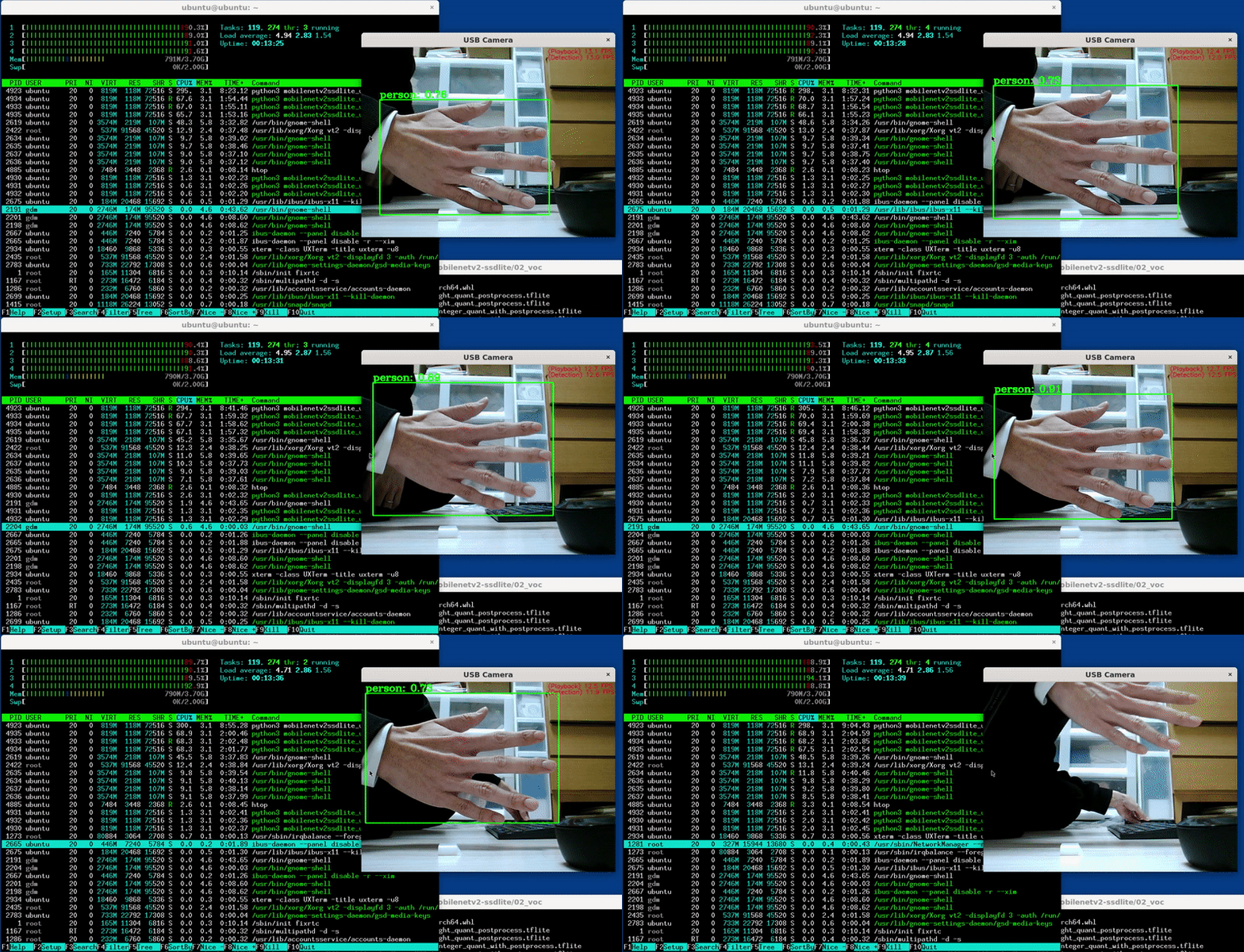
Sample of MultiThread x4 - Real-time inference with a USB camera
============================================================
Tensorflow v1.11.0
============================================================
Python2.x - Bazel 0.17.2
PINTO0309/Tensorflow-bin is a public repo on GitHub by PINTO0309. Prebuilt binary with Tensorflow Lite enabled. For RaspberryPi / Jetson Nano. Support for custom operations in MediaPipe. XNNPACK, XNNPACK Multi-Threads, FlexDelegate.
It declares the Apache-2.0 license on GitHub.
Its maker tagged it for Linux. That is declared by the maker; Take My Repo has not tested it.
Open "Take it" on its page: Take My Repo writes an install plan for your machine and hands it to your AI agent (Claude Code, Codex or Cursor), which asks you before each step. Take My Repo has not tested it on any machine.
UniGetUI: The Graphical Interface for your package managers. Could be terribly described as a package manager manager to manage your package managers
Offline Speech Recognition with OpenAI Whisper and TensorFlow Lite for Android
Automated CI toolchain to produce precompiled opencv-python, opencv-python-headless, opencv-contrib-python and opencv-contrib-python-headless packages.
Its last change on GitHub was on 2024-05-07. Take My Repo does not judge from that whether it is maintained.
Nobody has reviewed it on Take My Repo yet, which says nothing about its quality.
Take My Repo cannot say: it does not audit code and has not run Tensorflow-bin. What is known comes from GitHub. It declares the Apache-2.0 license on GitHub. Its last change was on 2024-05-07. It has 506 stars, which measure popularity, not safety. Nobody has reviewed it on Take My Repo yet, which says nothing about its quality. Read the source before you run it. With "Take it", your AI agent shows each step and asks you before running it; README text is treated as data, not as instructions.