grateful
Facilitate citation of R packages
- 245
- 2 wk ago
Repo Pakillo/grateful, read from GitHub 8 h ago. Pakillo has not joined Take My Repo.
In short
Pakillo/grateful is a public repo on GitHub by Pakillo. Facilitate citation of R packages. It declares no license on GitHub. Public does not mean open source: without a license, nobody is granted the right to reuse it. It is written mainly in R, has 245 stars and last changed on 2026-11-09. Nobody has reviewed it on Take My Repo yet, which says nothing about its quality. Read from GitHub on 2026-11-25.
Similar repos

grateful: Facilitate citation of R packages 
The goal of grateful is to make it very easy to cite R and the R packages used in any analyses, so that package authors receive their deserved credit. By calling a single function, grateful will scan the project for R packages used and generate a BibTeX file containing all citations for those packages.
grateful can then generate a new document with citations in the desired output format (Word, PDF, LaTeX, HTML, Markdown). These references can be formatted for a specific journal, so that we can just paste them directly into our manuscript or report.
Alternatively, we can use grateful directly within an Rmarkdown or Quarto document. In this case, a paragraph containing in-text citations of all used R packages will (optionally) be inserted into the Rmarkdown/Quarto document, and these packages will be included in the reference list when rendering.
Installation
You can install the stable release of {grateful} from CRAN:
install.packages("grateful")
Or the latest development version from R-universe:
install.packages("grateful", repos = c("https://pakillo.r-universe.dev", "https://cloud.r-project.org"))
Or from GitHub:
# install.packages("remotes")
remotes::install_github("Pakillo/grateful")
Usage
grateful can be used in one of two ways:
to generate a ‘citation report’ listing each package and their citations
to build citation keys to incorporate into an existing R Markdown or Quarto document.
Example
Imagine a project where we are using the packages: dplyr, ggplot2, vegan and lme4. We want to collect all the citations listed for these packages, as well as a citation for base R (and for RStudio, if applicable).
Generate a document with formatted citations
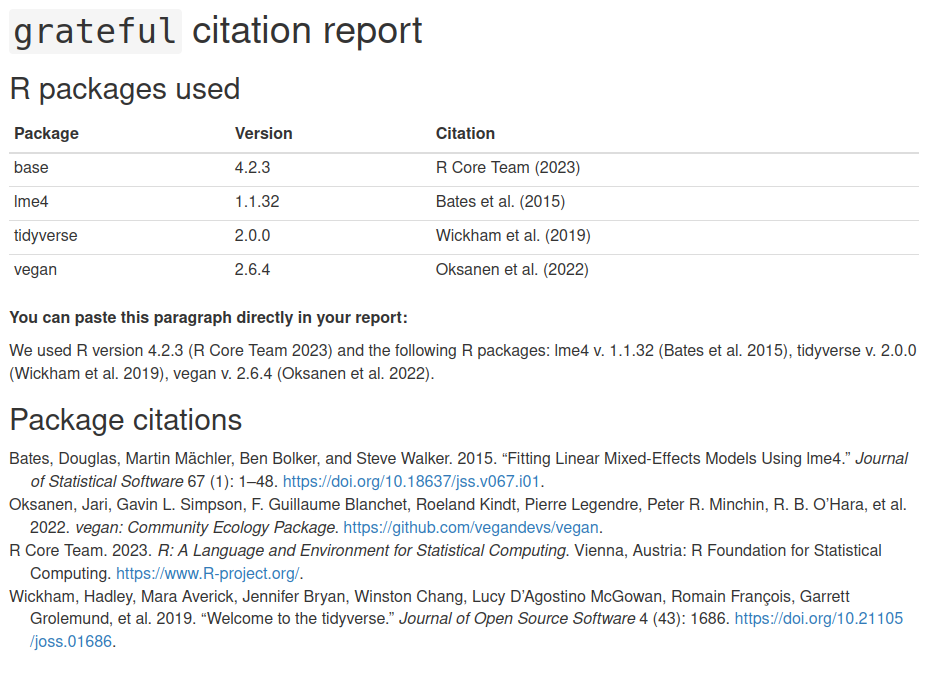
Calling cite_packages() will scan the project, find these packages,
and generate a document with formatted citations.
library(grateful)
cite_packages(out.dir = ".") # save report to working directory
This document can also be a Word or LaTeX document, PDF file, markdown
file, or left as the source Rmarkdown file using out.format:
cite_packages(out.format = "docx", out.dir = ".")
We can specify the citation style for a particular journal using
citation.style.
cite_packages(citation.style = "peerj", out.dir = ".")
In all cases a BibTeX (.bib) file with all package citations will be saved to disk.
Using grateful with Rmarkdown or Quarto
If you are building a document in RMarkdown or Quarto and want to cite R packages, grateful can automatically generate a BibTeX file and ensure these packages are cited in the appropriate format (see template Rmarkdown and Quarto documents).
First, include a reference to the BibTeX file in your YAML header.
bibliography: grateful-refs.bib
(Note: You can reference multiple BibTeX files, if needed)
bibliography:
  - document_citations.bib
  - grateful-refs.bib
Then call cite_packages(output = "paragraph") within a code chunk
(block or inline) to automatically include a paragraph mentioning all
the used packages, and include their references in the bibliography
list.
```{r}
cite_packages(output = "paragraph", out.dir = ".")
```
We used R version 4.2.3 [@base] and the following R packages: lme4 v. 1.1.32 [@lme4], tidyverse v. 2.0.0 [@tidyverse], vegan v. 2.6.4 [@vegan].
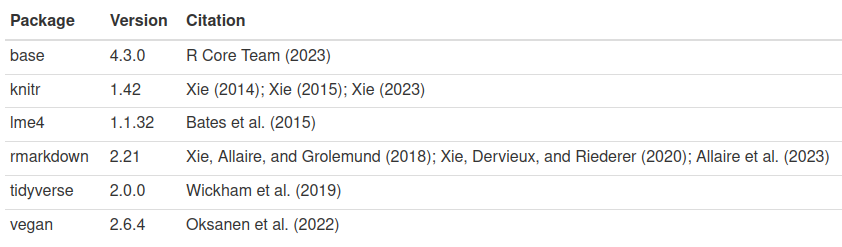
Alternatively, you can get a table with package name, version, and
citations, using output = 'table':
```{r }
pkgs <- cite_packages(output = "table", out.dir = ".")
knitr::kable(pkgs)
```
If you want the references to appear in a particular format, you can specify the citation style in the YAML header:
bibliography: grateful-refs.bib
csl: peerj.csl
Alternatively, you can cite particular packages using the citation keys
generated by grateful, as with any other BibTeX reference, or just
include citations in the References section, using the function
nocite_references(). See the package help and the RMarkdown
cookbook for
more details.
Frequently Asked Questions
Getting just a table with used packages and versions
Use scan_packages
scan_packages()
         pkg version
1     badger   0.2.5
2       base   4.6.2
3       curl   8.1.0
4       desc   1.4.3
5      knitr    1.52
6       mgcv   1.9.5
7    pkgdown   2.2.1
8    remotes   2.5.0
9       renv   1.3.1
10 rmarkdown    2.32
11  testthat   3.3.2
12 tidyverse   2.0.0
13    visreg   3.0.0
Producing a BibTeX file with package references
If you just want to get all package references in a BibTeX file, you can
call get_pkgs_info(). Besides printing a table with package info, it
will also save a BibTeX file with references. By default, the file will
be called grateful-refs.bib, but you can change that (see function
help).
If you want to get the BibTeX references for a few specific packages:
get_pkgs_info(pkgs = c("remotes", "renv"), out.dir = getwd())
#>       pkg version citekeys
#> 1 remotes   2.5.0  remotes
#> 2    renv   1.3.1     renv
Using grateful with the tidyverse
If you use one or several packages from the tidyverse, you can choose to cite the ‘tidyverse’ rather than the individual packages:
cite_packages(cite.tidyverse = TRUE)
Including package dependencies
Most R packages also depend on other packages. To include those package
dependencies in your citations, rather than just the packages you called
directly, use dependencies = TRUE:
cite_packages(dependencies = TRUE)
What about external software dependencies?
Some R packages wrap core external software that should perhaps be cited
too. For example, rjags is
an R wrapper to the JAGS software
written in C++. Ideally, R packages wrapping core external software will
include them in their CITATION file. But otherwise, we can investigate
external software requirements of our used packages, e.g. using
remotes:
remotes::system_requirements(package = c("rjags"), os = "ubuntu-20.04")
#> [1] "apt-get install -y jags"
What software to cite?
Citing software is pretty much like citing papers. Authors have to decide what to cite in each case, which depends on research context.
As written in the Software Citation Principles paper (Smith et al. 2016):
The software citation principles do not define what software should be cited, but rather how software should be cited. What software should be cited is the decision of the author(s) of the research work in the context of community norms and practices, and in most research communities, these are currently in flux. In general, we believe that software should be cited on the same basis as any other research product such as a paper or book; that is, authors should cite the appropriate set of software products just as they cite the appropriate set of papers, perhaps following the FORCE11 Data Citation Working Group principles, which state, “In scholarly literature, whenever and wherever a claim relies upon data, the corresponding data should be cited”
And these are the guidelines from the Software Citation Checklist:
You should cite software that has a significant impact on the research outcome presented in your work, or on the way the research has been conducted. If the research you are presenting is not repeatable without a piece of software, then you should cite the software. Note that the license or copyright of the software has no bearing on whether you should cite it.
This might include:
Software (including scripts) you have written yourself to conduct the research presented. A software framework / platform upon which the software you wrote to conduct the research relies. Software packages, plugins, modules and libraries you used to conduct your research and that perform a critical role in your results. Software you have used to simulate or model phenomena/systems. Specialist software (which is not considered commonplace in your field) used to prepare, manage, analyse or visualise data. Software being evaluated or compared as part of the research presented Software that has produced analytic results or other output, especially if used through an interface.
In general, you do not need to cite:
Software packages or libraries that are not fundamental to your work and that are a normal part of the computational and scientific environment used. These dependencies do not need to be cited outright but should be documented as part of the computational workflow for complete reproducibility. Software that was used during the course of the research but had no impact on research results, e.g. word processing software, backup software.
Apart from citing the software most relevant to the particular
research/analysis performed, I think it is good idea to record the
entire computational environment elsewhere, e.g. using sessionInfo()
or sessioninfo::session_info().
Some packages include several citations
Some packages include more than one citation
(e.g. knitr,
mgcv).
grateful will include all those citations by default, as it is
impossible to decide automatically which citations should be included in
each case. The user may manually remove citations from the produced
reference list after calling cite_packages. If using Quarto or
Rmarkdown, we can generate the citation paragraph and manually remove
the unwanted references so they will not appear cited.
For example, mgcv package provides multiple references to be cited:
citation("mgcv")
To choose just one of them to be cited, we could generate a citation
paragraph using cite_packages
cite_packages("paragraph", out.dir = ".")

And then manually remove the unwanted citation keys, leaving just those we want to cite:

When rendering the Rmarkdown or Quarto document, only the chosen references will be cited.
Removing unused packages
Before running grateful you might want to run
lintr::unused_import_linter,
funchir::stale_package_check
or annotater to check
for unused packages before citing them.
I’d like to know the functions used from each package
For that, you could use packages like usedthese.
Error: there is no package called…
If getting an error like
Error in (function (pkg, lib.loc = NULL): there is no package called...,
that means that some of your scripts is loading a package that is no
longer available in your computer, so {grateful} cannot grab its
citation. To fix this, there are several options. First, you could omit
that package (or those packages, if more than one) from {grateful}
citations using cite_packages(omit = c("package1", "package2").
Second, you could set a .renvignore file to ignore particular files or
folders (see instructions
here).
Third, try checking if that package is still
needed
for your project and you want to cite it; otherwise remove or comment
that line where the package is loaded. If you still use and want to cite
that package, install it, and then run cite_packages again. Finally,
you could use the argument skip.missing = TRUE
Questions
What is grateful?
Pakillo/grateful is a public repo on GitHub by Pakillo. Facilitate citation of R packages.
Is grateful open source?
It declares no license on GitHub. Public does not mean open source: without a license, nobody is granted the right to reuse it.
Does grateful run on macOS, Windows or Linux?
Its maker has not tagged a system, so it is unknown here. Its README says what it needs.
How do I install grateful?
Open "Take it" on its page: Take My Repo writes an install plan for your machine and hands it to your AI agent (Claude Code, Codex or Cursor), which asks you before each step. Take My Repo has not tested it on any machine.