
Report-OIML
A Test generation software
- 0
- 8 wk ago
Repo Pawan-webdeveloper/Report-OIML, read from GitHub 3 d ago. Pawan-webdeveloper has not joined Take My Repo.
In short
Pawan-webdeveloper/Report-OIML is a public repo on GitHub by Pawan-webdeveloper. A Test generation software. It declares no license on GitHub. Public does not mean open source: without a license, nobody is granted the right to reuse it. It is written mainly in Python, has 0 stars and last changed on 2026-09-30. Nobody has reviewed it on Take My Repo yet, which says nothing about its quality. Read from GitHub on 2026-11-22.
NAWI Type Evaluation Report System
A web-based system for managing type evaluation reports for Non-Automatic Weighing Instruments (NAWIs) compliant with OIML R 76 standards.
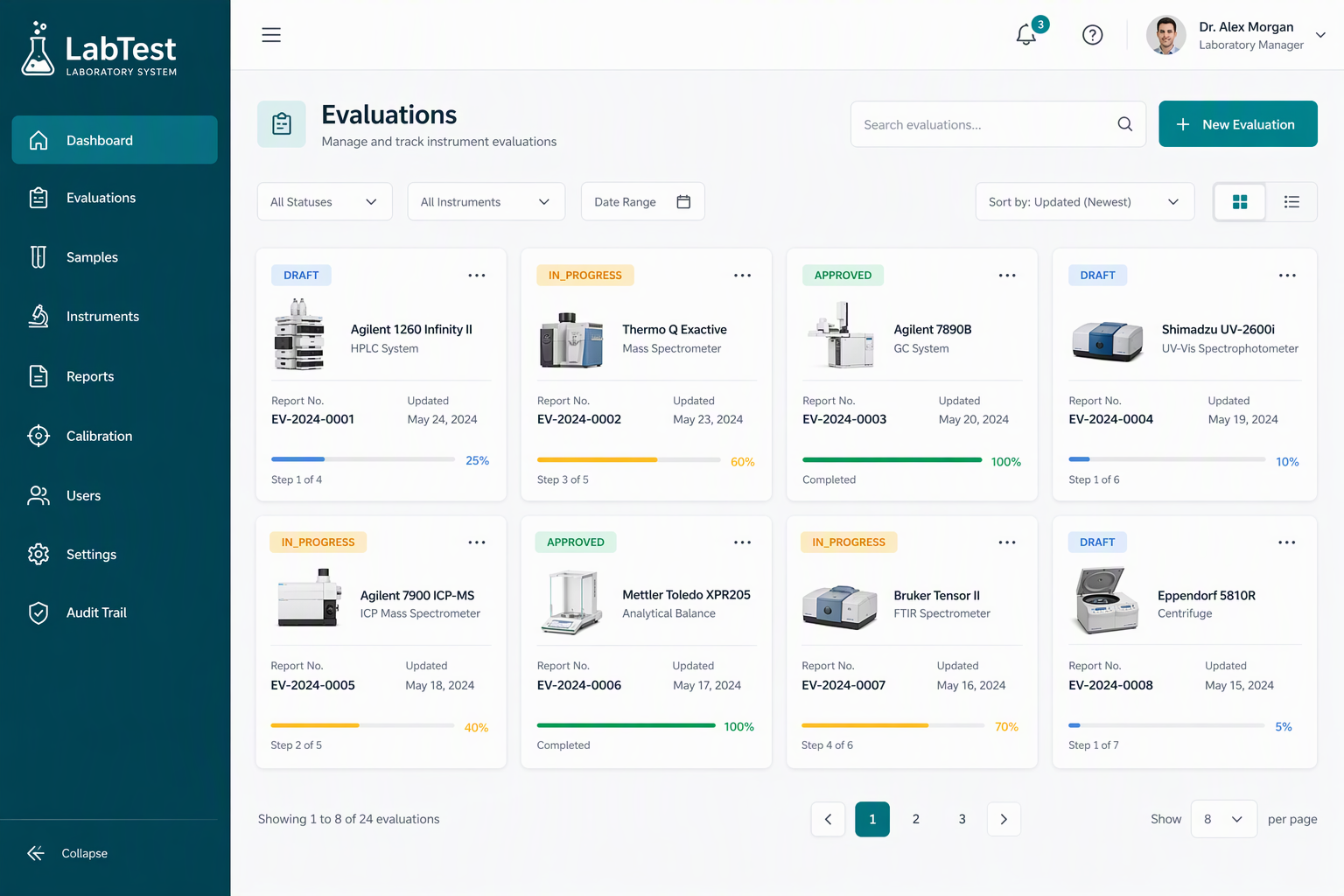
What is this project?
This is a laboratory management system built for legal metrology labs that test and certify weighing instruments (like scales and balances) used in trade and commerce.
In simple words:
- Lab engineers use this system to record test observations for weighing instruments
- The system automatically calculates errors and determines if instruments PASS or FAIL based on international standards (OIML R 76)
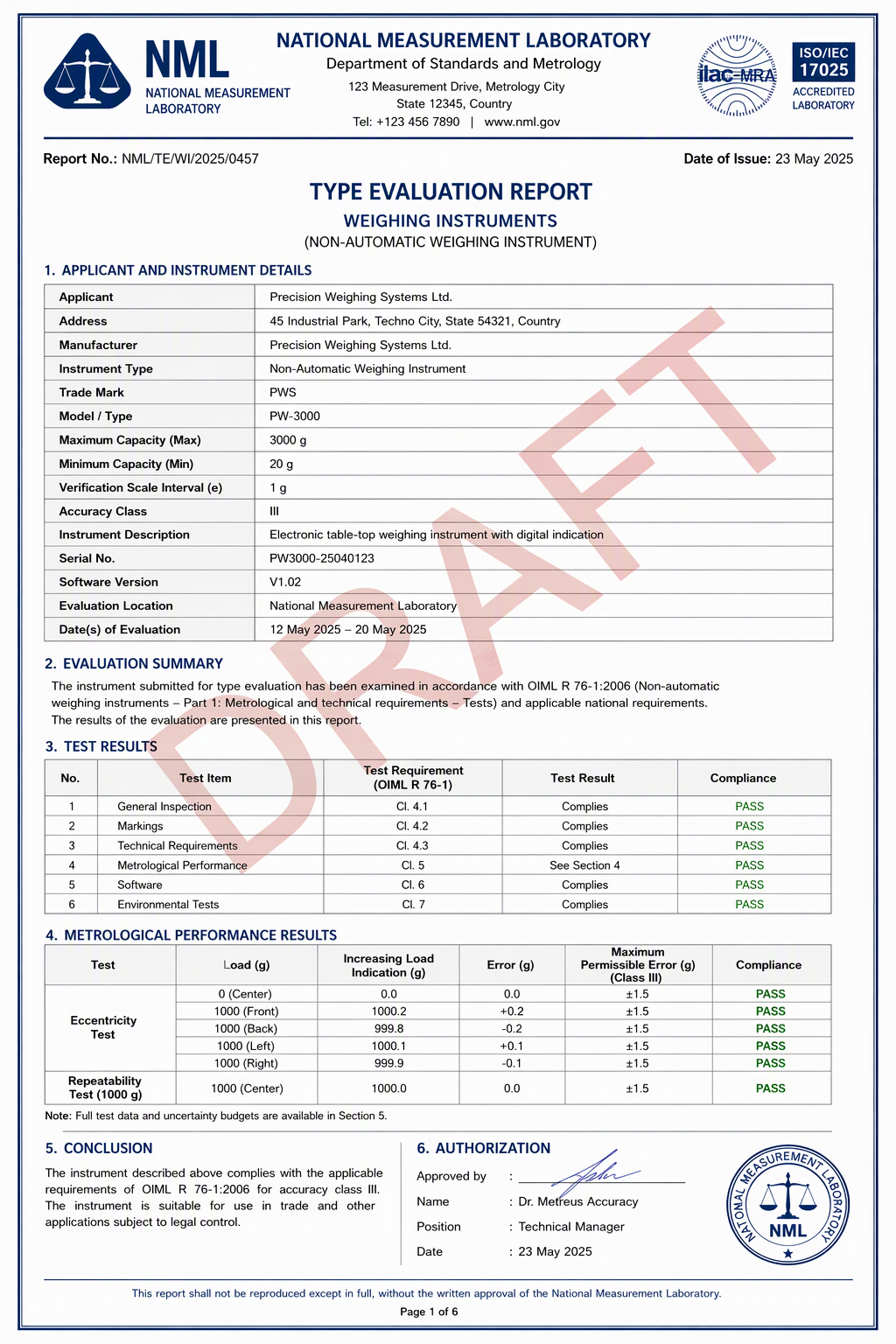
- It generates official type evaluation reports in PDF and Word formats
- All data is stored digitally for easy retrieval and audit trails
Why it matters: Weighing instruments used in shops, industries, and laboratories must be accurate to ensure fair trade. This system helps government labs efficiently test and certify these instruments according to international standards.
Features
Core Functionality
- Evaluation Management - Create and track instrument evaluations from start to finish
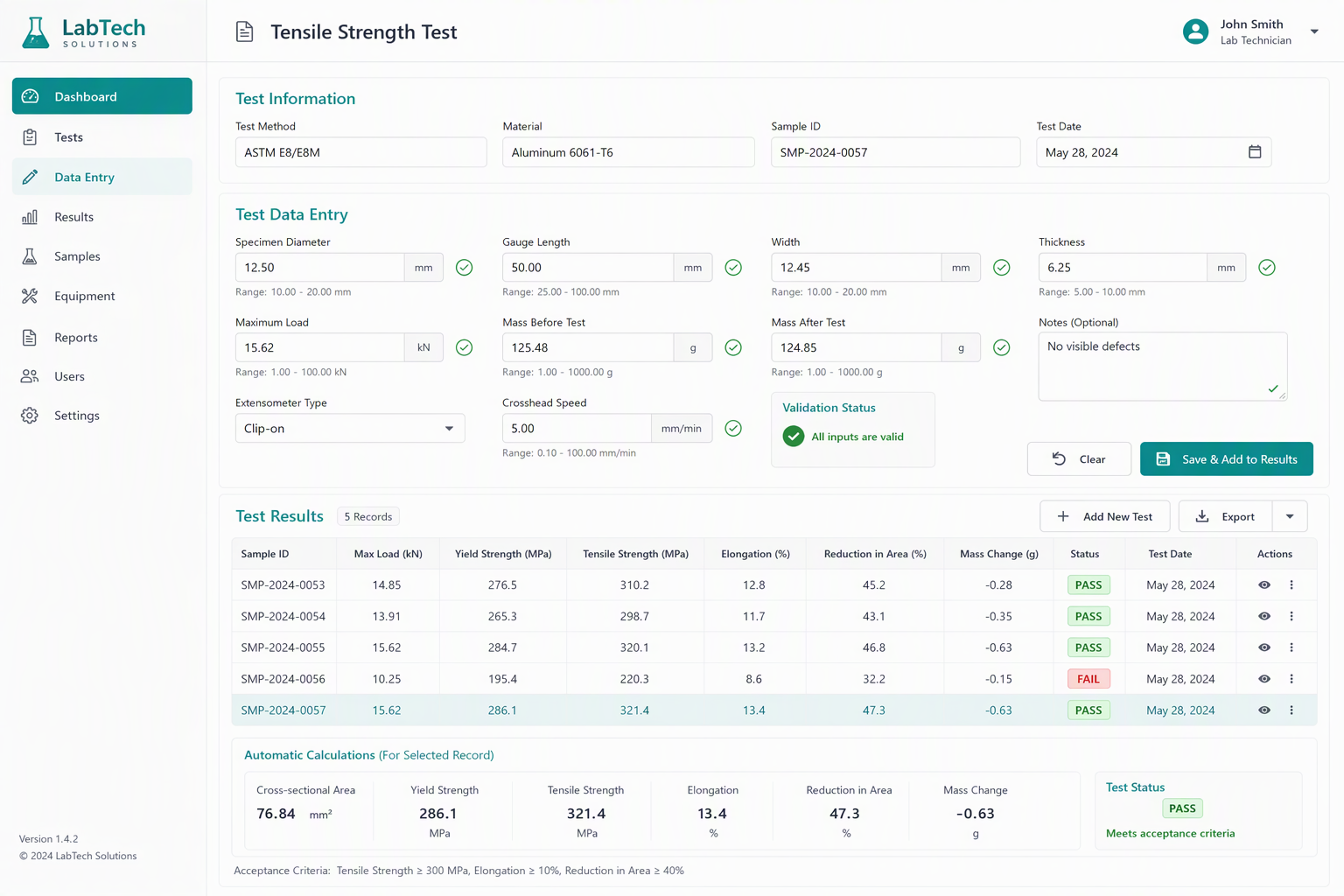
- Automated Calculations - Automatic error calculation and MPE (Maximum Permissible Error) lookup based on OIML R 76
- Real-time Validation - Instant feedback on data entry with validation checks
- Pass/Fail Determination - Automatic verdict calculation for each test and overall instrument
- Multi-format Export - Generate reports in PDF and DOCX formats
- Digital Repository - Search and retrieve past evaluations and reports
Testing & Compliance
- Complete Test Coverage - Supports all OIML R 76 tests:
- Weighing performance
- Eccentricity tests
- Repeatability tests
- Zero return tests
- Creep tests
- Warm-up tests
- Disturbance tests (voltage, dips, burst, surge, ESD, radiated, conducted)
- Damp heat and span stability
- Construction checks
User Management
Role-Based Access Control (RBAC)
- ADMIN - Full system access
- ENGINEER - Create and manage evaluations
- REVIEWER - Review and approve evaluations
- VIEWER - Read-only access to approved reports
Audit Trail - Complete logging of all actions for compliance
Report Features
- Standardized Format - Reports follow exact OIML R 76-2 layout
- Version Control - Track changes and maintain report versions
- Digital Signatures - Optional PDF signing with digital certificates
- QR Codes - Verification codes on reports for authenticity
- SHA-256 Hashing - Ensure report integrity
Technology Stack
| Component | Technology |
|---|---|
| Backend | Python 3.14 + FastAPI |
| Frontend | React 19 + TypeScript + Vite |
| Database | PostgreSQL 16 (SQLite for development) |
| Styling | Tailwind CSS |
| Authentication | JWT tokens with refresh rotation |
| Password Security | Argon2 hashing |
| PDF Generation | WeasyPrint |
| Word Export | python-docx |
| Digital Signatures | pyHanko |
| ORM | SQLAlchemy 2.0 + Alembic |
Screenshots
Dashboard
Test Data Entry
Report Generation
Getting Started
Prerequisites
- Python 3.12 or higher
- Node.js 20 or higher
- PostgreSQL 16 (optional, SQLite works for development)
- Git
Installation
1. Clone the Repository
git clone https://github.com/Pawan-webdeveloper/Report-OIML.git
cd Report-OIML
2. Backend Setup
# Navigate to backend directory
cd backend

# Create virtual environment
python3 -m venv .venv

# Activate virtual environment
# On macOS/Linux:
source .venv/bin/activate
# On Windows:
# .venv\Scripts\activate

# Install dependencies
pip install -r requirements.txt

# Install WeasyPrint dependencies (macOS only)
brew install pango libffi

# Set up environment variables
cp .env.example .env
# Edit .env with your database credentials if using PostgreSQL

# Initialize database (SQLite by default)
alembic upgrade head

# Load seed data (optional)
python -m app.scripts.seed_data
3. Frontend Setup
# Open a new terminal and navigate to frontend directory
cd frontend

# Install dependencies
npm install

# Start development server
npm run dev
4. Start the Application
Backend:
cd backend
# Use the startup script (sets proper environment for WeasyPrint on macOS)
./start.sh

# Or manually:
source .venv/bin/activate
export DYLD_FALLBACK_LIBRARY_PATH="/opt/homebrew/lib:${DYLD_FALLBACK_LIBRARY_PATH}"  # macOS only
uvicorn app.main:app --reload --host 127.0.0.1 --port 8000
Frontend:
cd frontend
npm run dev
The application will be available at:
- Frontend: http://127.0.0.1:5173
- Backend API: http://127.0.0.1:8000
- API Documentation: http://127.0.0.1:8000/docs
Default Login Credentials
Username: admin
Password: admin123
Important: Change the default password after first login!
Usage Guide
Creating a New Evaluation
- Log in to the system with your credentials
- Navigate to Evaluations from the dashboard
- Click "New Evaluation"
- Fill in instrument details:
- Manufacturer information
- Instrument model and serial number
- Accuracy class and capacity
- Application details
- Set evaluation conditions (temperature, humidity, etc.)
- Save the evaluation
Recording Test Results
- Open an evaluation from the list
- Click on a test type (e.g., "Weighing", "Eccentricity")
- Enter test observations:
- Load values
- Indication values
- Environmental conditions
- The system automatically:
- Calculates errors
- Determines pass/fail status
- Validates data
- Repeat for all required tests
Generating Reports
- Navigate to a completed evaluation
- Click "Export" button
- Choose format:
- PDF - Official report with digital signature option
- DOCX - Editable Word document
- Download or view the report
- Reports are automatically versioned and stored
Review and Approval Workflow
- Engineer completes evaluation and submits for review
- Reviewer examines the evaluation:
- Checks test data
- Verifies calculations
- Reviews warnings
- Reviewer approves or returns with comments
- Once approved, report can be exported and issued
Project Structure
Report-OIML/
├── backend/
│   ├── app/
│   │   ├── api/              # API endpoints
│   │   ├── core/             # Configuration, security, database
│   │   ├── models/           # SQLAlchemy models
│   │   ├── reporting/        # PDF/DOCX generation
│   │   ├── routers/          # FastAPI routers
│   │   ├── rulesets/         # OIML R 76 rules
│   │   ├── schemas/          # Pydantic schemas
│   │   └── services/         # Business logic
│   ├── alembic/              # Database migrations
│   ├── requirements.txt
│   └── start.sh              # Startup script
│
├── frontend/
│   ├── src/
│   │   ├── api/              # API client
│   │   ├── components/       # React components
│   │   ├── pages/            # Page components
│   │   ├── store/            # Zustand state management
│   │   └── lib/              # Utilities
│   ├── package.json
│   └── vite.config.ts
│
└── docs/                     # Documentation
Development
Running Tests
Backend:
cd backend
pytest
Frontend:
cd frontend
npm test
Database Migrations
cd backend
# Create new migration
alembic revision --autogenerate -m "Description"

# Apply migrations
alembic upgrade head

# Rollback one step
alembic downgrade -1
Deployment
Docker (Recommended)
# Build and run with Docker Compose
docker-compose up -d
Manual Deployment
Backend:
- Use gunicorn with uvicorn workers
- Set up reverse proxy (nginx/Caddy)
- Configure PostgreSQL database
- Set proper environment variables
Frontend:
- Build production bundle:
npm run build - Serve static files with nginx or CDN
- Build production bundle:
See docs/deployment.md for detailed deployment instructions.
Compliance & Standards
This system implements:
- OIML R 76-1:2006 - Non-automatic weighing instruments - Technical requirements
- OIML R 76-2:2007 - Non-automatic weighing instruments - Test procedures
- Legal Metrology Act, 2009 (India)
- Legal Metrology (General) Rules, 2011 (India)
Contributing
Contributions are welcome! Please:
- Fork the repository
- Create a feature branch (
git checkout -b feature/amazing-feature) - Commit your changes (
git commit -m 'Add amazing feature') - Push to the branch (
git push origin feature/amazing-feature) - Open a Pull Request
License
This project is developed for the Department of Consumer Affairs, Government of India under the Smart India Hackathon 2026.
Support & Contact
For questions, issues, or contributions:
- GitHub Issues: Report a bug
- Email: pawan572893@gmail.com
Acknowledgments
- Department of Consumer Affairs, Government of India - Problem statement
- OIML (International Organization of Legal Metrology) - Standards and specifications
- Smart India Hackathon 2026 - Platform for development
Built with precision for legal metrology compliance
Questions
What is Report-OIML?
Pawan-webdeveloper/Report-OIML is a public repo on GitHub by Pawan-webdeveloper. A Test generation software.
Is Report-OIML open source?
It declares no license on GitHub. Public does not mean open source: without a license, nobody is granted the right to reuse it.
Does Report-OIML run on macOS, Windows or Linux?
Its maker has not tagged a system, so it is unknown here. Its README says what it needs.
How do I install Report-OIML?
Open "Take it" on its page: Take My Repo writes an install plan for your machine and hands it to your AI agent (Claude Code, Codex or Cursor), which asks you before each step. Take My Repo has not tested it on any machine.