PadForge
🎮 Turn a keyboard and mouse into a virtual Xbox 360 or DualShock 4 controller. Free, open source, WinUI 3, MIT.
- 0
- MIT
- 16 h ago
Repo PrimeBuild-pc/PadForge, read from GitHub 8 min ago. PrimeBuild-pc has not joined Take My Repo.
In short
PrimeBuild-pc/PadForge is a public repo on GitHub by PrimeBuild-pc. 🎮 Turn a keyboard and mouse into a virtual Xbox 360 or DualShock 4 controller. Free, open source, WinUI 3, MIT. It declares the MIT license on GitHub. It is written mainly in C#, has 0 stars and last changed on 2026-11-22. Nobody has reviewed it on Take My Repo yet, which says nothing about its quality. Read from GitHub on 2026-11-22.
PadForge 🎮
Free, open-source keyboard and mouse to controller for Windows: a virtual Xbox 360 or DualShock 4 pad, tuned aim and visual mapping, with no account and no paid tier.
Built for games that only take a pad, or that give aim assist to controller input.
Features · Install · Input hiding · Build · Testing · Support
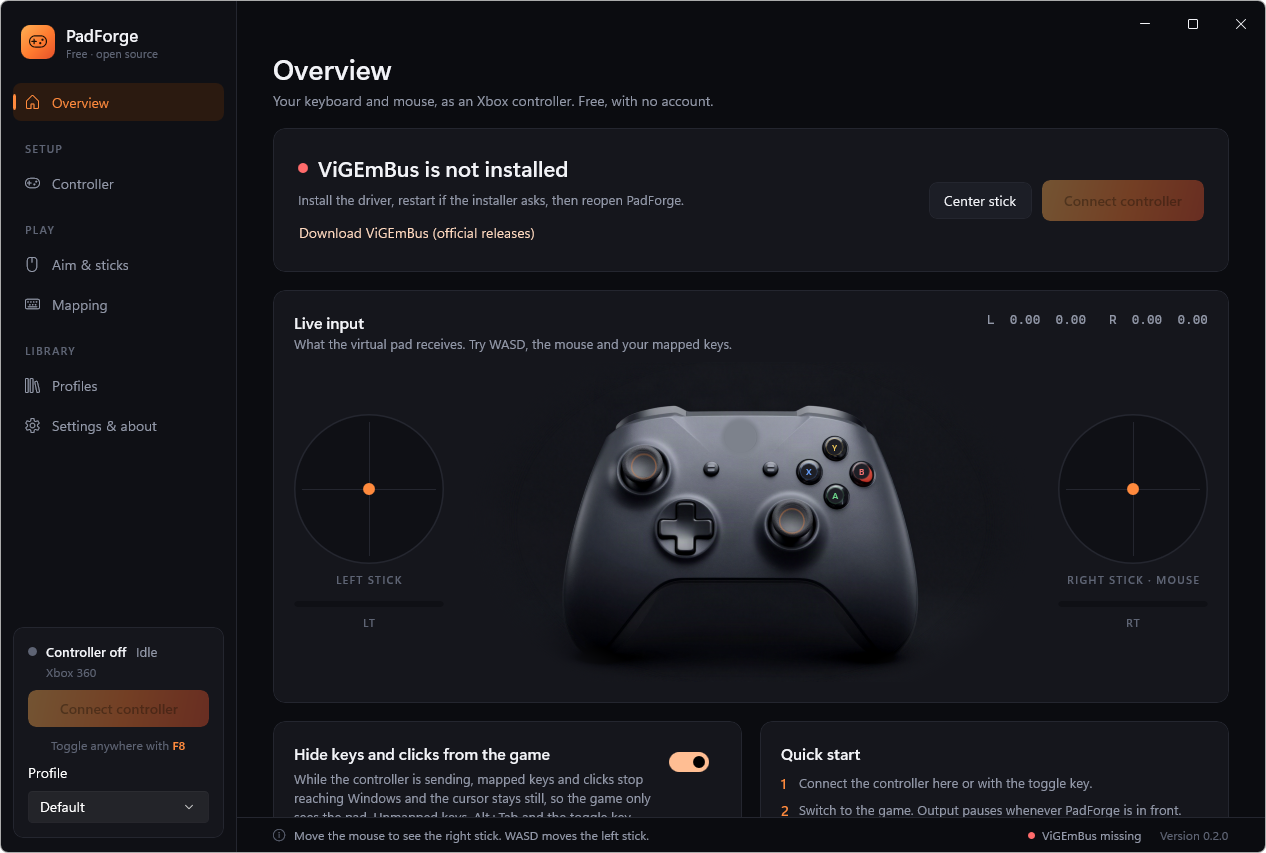
PadForge 0.2.0 beta, real screenshot. More below.
PadForge turns your keyboard and mouse into a virtual Xbox 360 or DualShock 4 controller. Games see a real controller while you keep playing on keyboard and mouse. It does not inject code into games: it creates a standard virtual pad through the ViGEmBus driver.
[!WARNING] Beta. Expect rough edges and please report problems. Use PadForge only in games that allow controller emulators: some anti-cheat systems flag virtual controllers or input hooks.
✨ Features
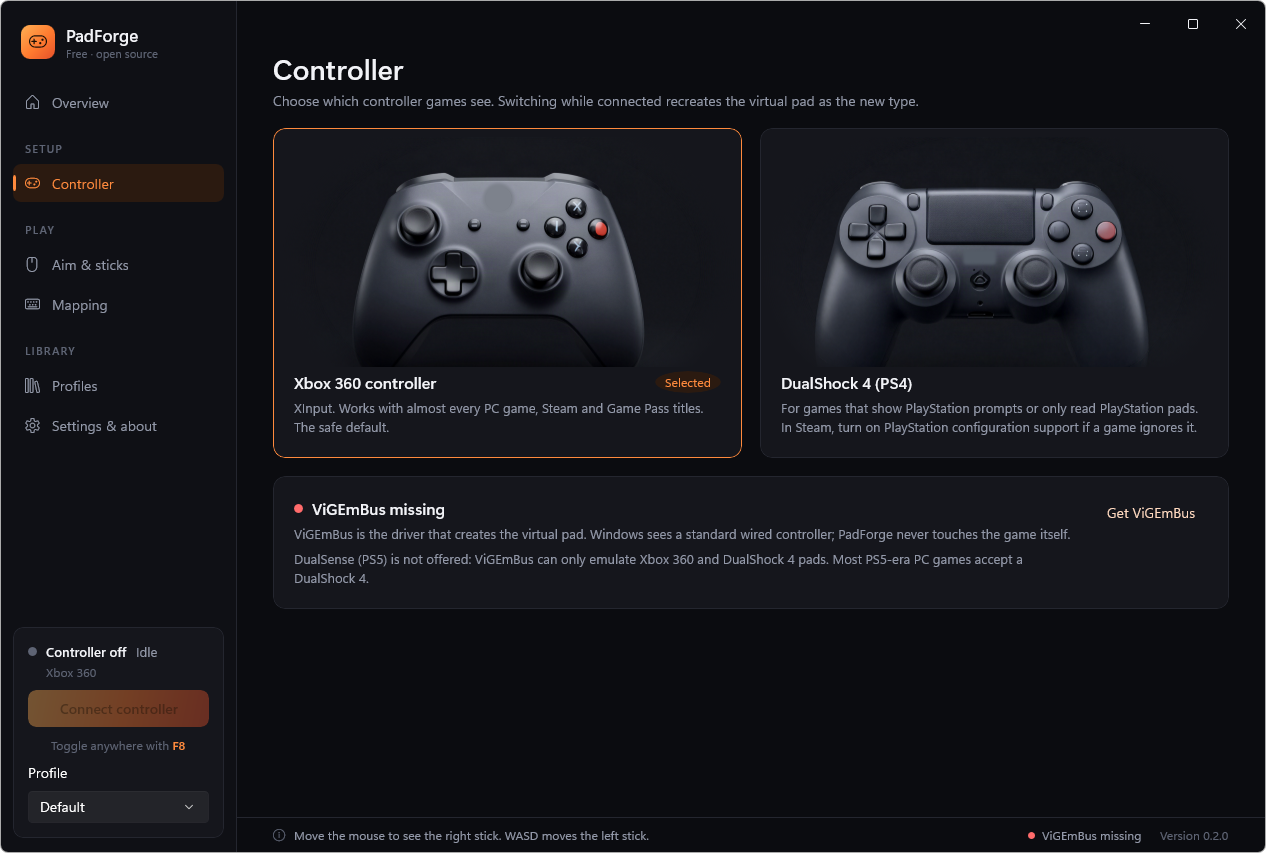
- Xbox 360 or DualShock 4 output: pick the pad games see. Mapping labels, the live render and the virtual device follow your choice, and switching while connected recreates the pad. DualSense (PS5) is not available because ViGEmBus cannot emulate it.
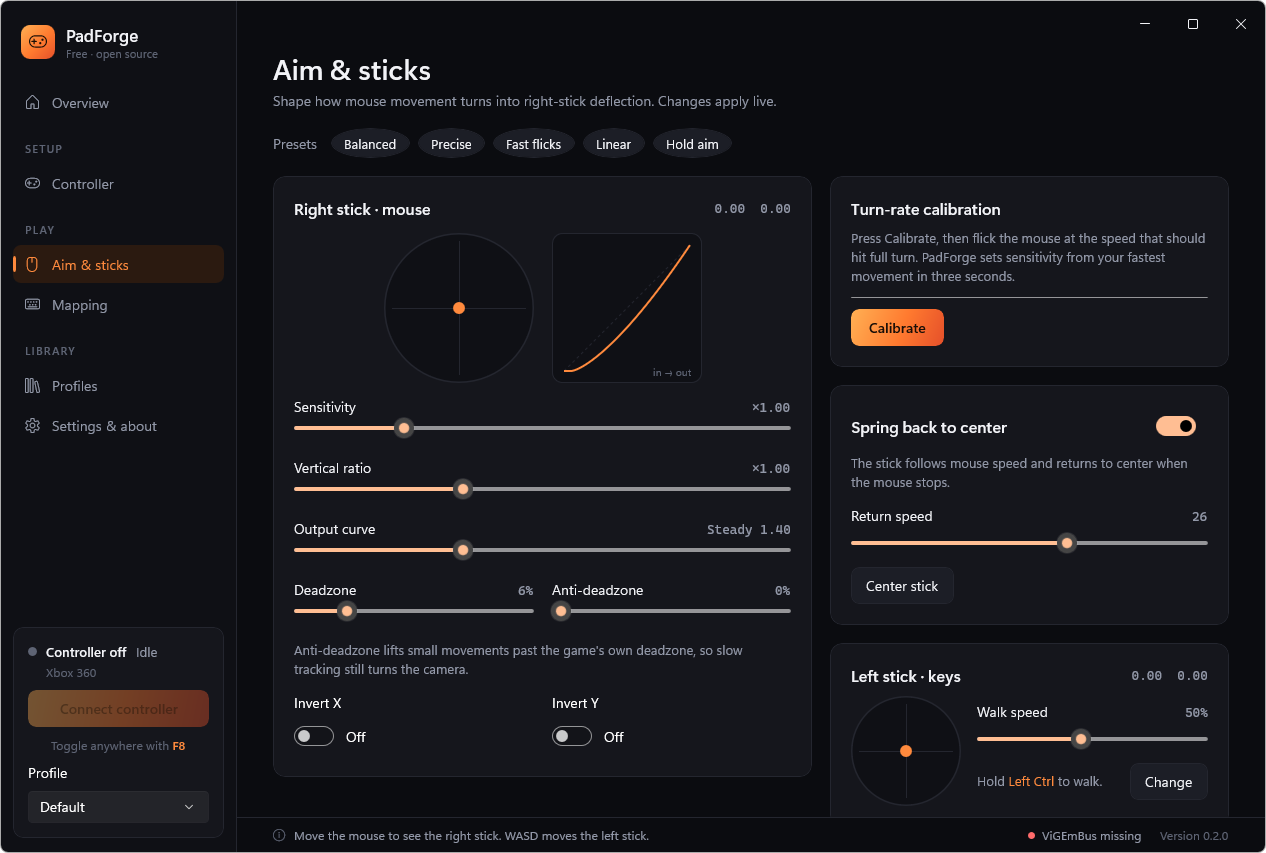
- Mouse to right stick with sensitivity, a vertical ratio, an output curve, deadzone, anti-deadzone, X/Y invert and spring-back to center (or hold mode).
- Presets: Balanced, Precise, Fast flicks, Linear and Hold aim, as starting points.
- Turn-rate calibration: flick the mouse for three seconds and PadForge sets sensitivity from your fastest movement.
- Live view: stick gauges, a response curve with a live marker, and a controller drawing that lights up as you press.
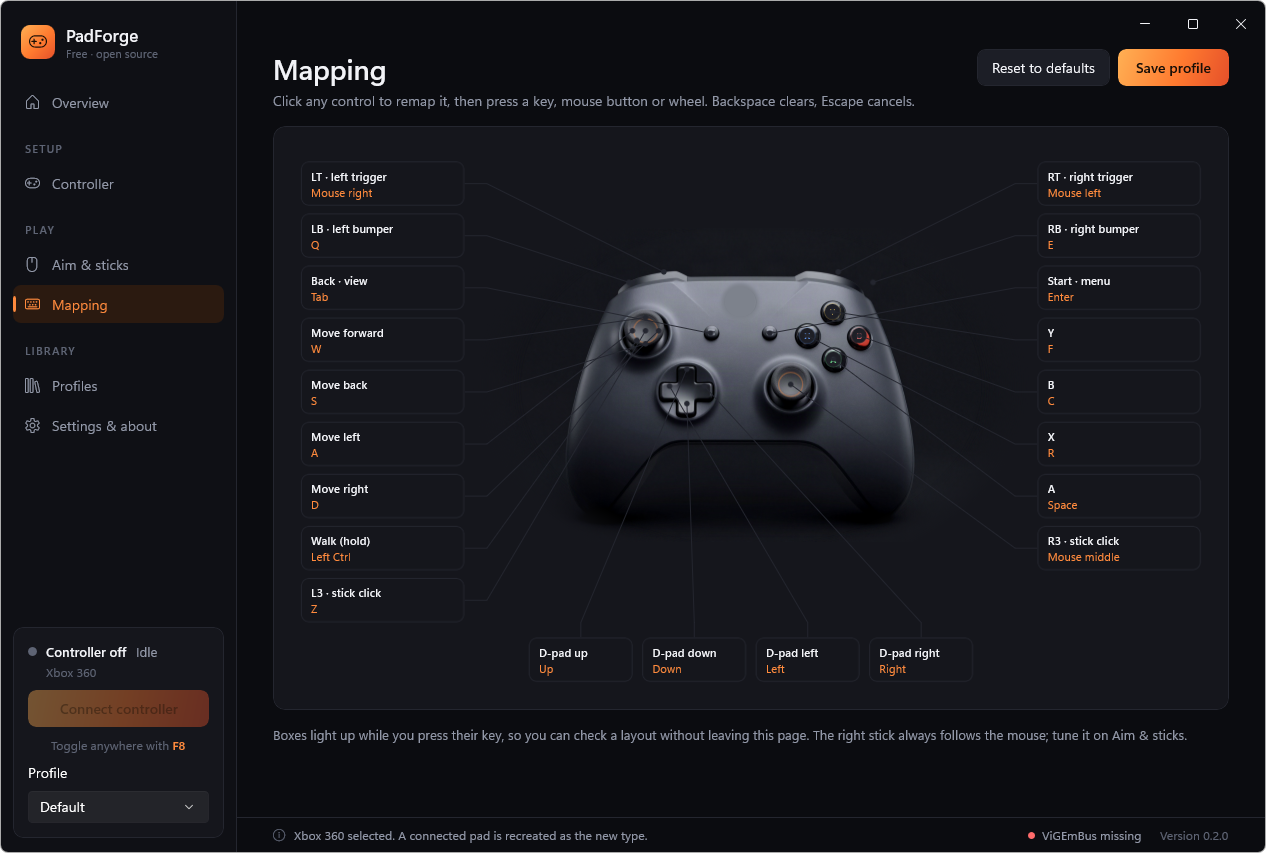
- Visual mapping: click any control on the pad and press a key, mouse button or mouse wheel notch.
- Walk key: hold a key (Left Ctrl by default) to move the left stick at a set fraction.
- Hide keys and clicks from the game: while the pad is sending, mapped keys and mouse buttons stop reaching Windows and the cursor stays still, so the game sees only the controller. Unmapped keys, Alt+Tab and the toggle key keep working.
- Global toggle hotkey (F8 by default). Output pauses while PadForge itself is in front, so you can tune safely.
- Profiles: create, duplicate, save under a new name and delete them. PadForge reopens the last one you used. Each is a plain JSON file under
%LocalAppData%\PadForge\profiles.
| Controller | Aim & sticks |
|---|---|
 |
 |
| Mapping (Xbox) | Mapping (DualShock 4) |
 |
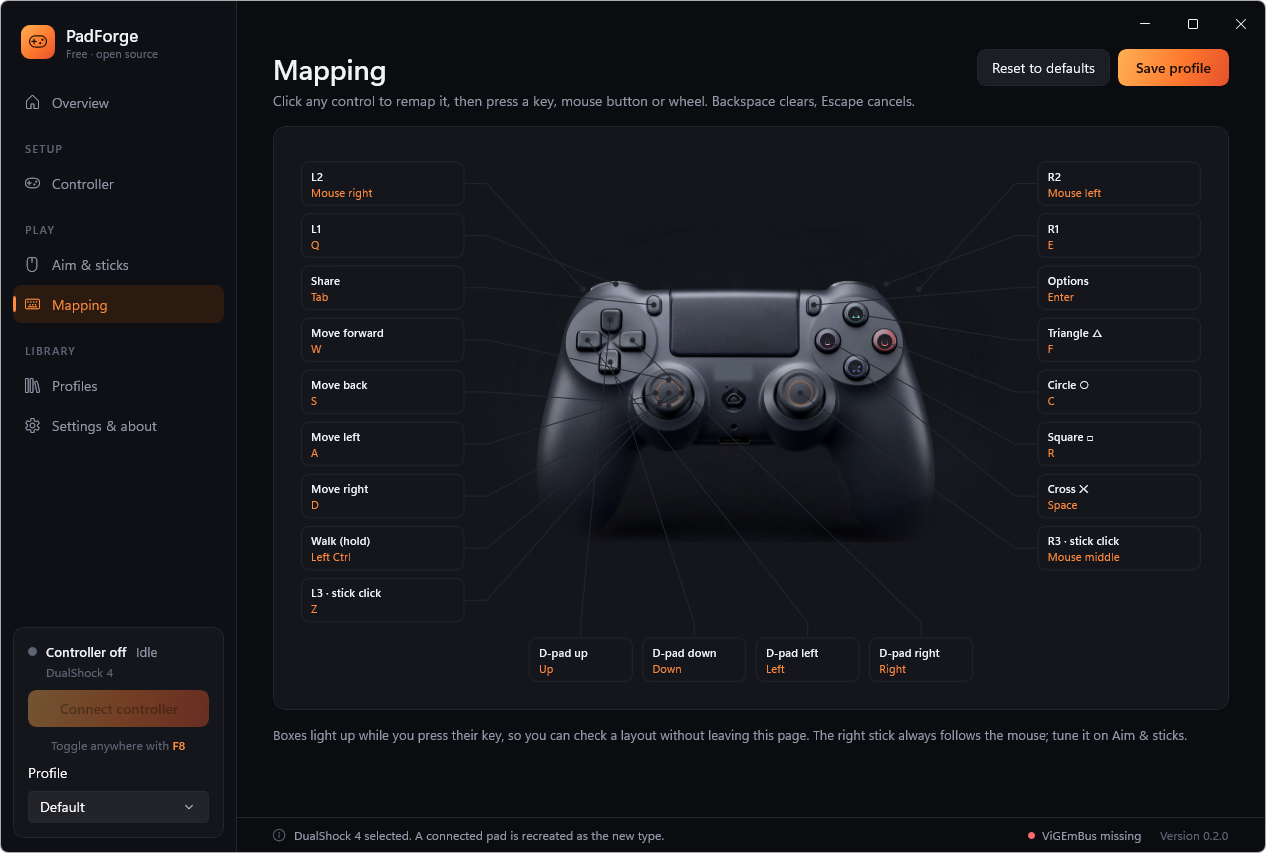 |
The controller renders were generated for PadForge with Higgsfield (Z Image) and edited to remove marks. They are not official product images.
📦 Install
- Install ViGEmBus, then restart if the installer asks.
- Download
PadForge-<version>-win-x64.zipfrom Releases, extract it anywhere and runPadForge.exe. The build is self-contained, so you need no .NET or Windows App SDK install. - Click Connect controller (or press F8), switch to the game, and play.
Requirements: Windows 10 1809 or later, or Windows 11, x64.
🔒 How input hiding works, and its limit
PadForge reads mouse motion with Raw Input and keys with GetAsyncKeyState. While the pad is sending and Hide keys and clicks is on, low-level keyboard and mouse hooks swallow mapped keys, mapped mouse buttons, mapped wheel notches and cursor movement. PadForge keeps its own state for the keys it swallows, so the pad still sees them.
A release is swallowed only when its press was, so a key never sticks down in Windows when hiding switches on or off. When PadForge comes to the front, sending pauses and hiding stops.
Limit: Windows still delivers mouse motion to programs that read it through Raw Input, so games that use Raw Input for the mouse can still see the mouse move. Hiding that needs a separate filter driver. PadForge does not install one, on purpose. Keyboard keys are hidden completely, including from Raw Input.
🔨 Build from source
You need the .NET 8 SDK.
dotnet test tests/PadForge.Core.Tests -c Release
dotnet build src/PadForge/PadForge.csproj -c Release
dotnet run --project src/PadForge/PadForge.csproj -c Release
To build the same zip as a release:
dotnet publish src/PadForge/PadForge.csproj -c Release -r win-x64 --self-contained -p:Platform=x64 -o out/PadForge
Run Package release candidate on main with a version such as 0.2.0-beta.1 to build and verify the unsigned ZIP. The run records its source commit and provides the ZIP and its SHA-256 sidecar as Actions artifacts. See the release workflow guide for confirmation and release steps.
📁 Project layout
src/PadForge.Core: mouse-to-stick shaping, the controller report, profiles and the high-priority output loop. It has no WinUI or ViGEm reference, so its tests run anywhere.src/PadForge: the unpackaged WinUI 3 app, the Raw Input and hook thread (Platform/InputPump.cs) and the ViGEm Xbox 360 target.tests/PadForge.Core.Tests: curve, deadzone, spring, bindings, walk key, input hiding rules, profile migration and the connect/submit loop.tools/PadForge.Smoke: end-to-end checks against real hardware paths (see below).
🧪 Testing on a machine you also game on
ViGEmBus is a kernel driver, and anti-cheat on that Windows installation can see it. Building, the live preview and the unit tests do not need it. To exercise the driver path, use a test virtual machine:
# in the VM, after installing ViGEmBus
PadForge.Smoke.exe driver   # creates the pad, drives it through PadEngine, reads it back with XInput
PadForge.Smoke.exe ds4      # creates a DualShock 4 and checks that Windows enumerates it
PadForge.Smoke.exe hooks    # checks key, wheel and cursor hiding with synthetic input only
ViGEmBus cannot load inside Windows Sandbox. In a Hyper-V VM, run driver from a signed-in desktop session: from a session without a desktop (PowerShell Direct, services), Windows stops delivering the pad's reports after the first few, even to a plain ViGEm writer.
💖 Support the project
PadForge is free and will stay free. If it is useful to you, consider starring the repository, reporting problems, sharing feedback, or supporting development with a small donation on Ko-fi.
📄 License
PadForge is released under the MIT License.
Copyright (c) 2026 Prime Build.
🙏 Credits
PadForge is an original implementation. These projects shaped the idea, and none of their code or artwork is included:
- ViGEmBus and Nefarius.ViGEm.Client by Nefarius, which provide the virtual Xbox 360 device.
- Mouse2Joystick by memethyl, a reference for turning mouse movement into a virtual controller.
- OmniControl, a paid app whose clean layout (sidebar sections, live stick views, callout mapping) inspired PadForge's interface.
Questions
What is PadForge?
PrimeBuild-pc/PadForge is a public repo on GitHub by PrimeBuild-pc. 🎮 Turn a keyboard and mouse into a virtual Xbox 360 or DualShock 4 controller. Free, open source, WinUI 3, MIT.
Is PadForge open source?
It declares the MIT license on GitHub.
Does PadForge run on macOS, Windows or Linux?
Its maker tagged it for Windows. That is declared by the maker; Take My Repo has not tested it.
How do I install PadForge?
Open "Take it" on its page: Take My Repo writes an install plan for your machine and hands it to your AI agent (Claude Code, Codex or Cursor), which asks you before each step. Take My Repo has not tested it on any machine.
Is PadForge still maintained?
Its last change on GitHub was on 2026-11-22. Take My Repo does not judge from that whether it is maintained.
What do people who ran PadForge say?
Nobody has reviewed it on Take My Repo yet, which says nothing about its quality.