
android-awesome-libraries
A curated list of Android libraries that can be used to ace up the development.
- 11
- MIT
- 4 y ago
The maintainer has not written a description at the source.
Repo ProMode7/agentic-android-samples, read from GitHub 1 min ago. ProMode7 has not joined Take My Repo.
ProMode7/agentic-android-samples is a public repo on GitHub by ProMode7. It declares the Apache-2.0 license on GitHub. It is written mainly in Kotlin, has 0 stars and last changed on 2026-11-17. Nobody has reviewed it on Take My Repo yet, which says nothing about its quality. Read from GitHub on 2026-11-20.
Working code for Agentic Android, a weekly series on how AI agents call, read, run inside and build Android apps, traced through the real platform source. Each episode adds to this repo, and each episode has a git tag (e01, e02, …) so the code linked from an article never changes under it.
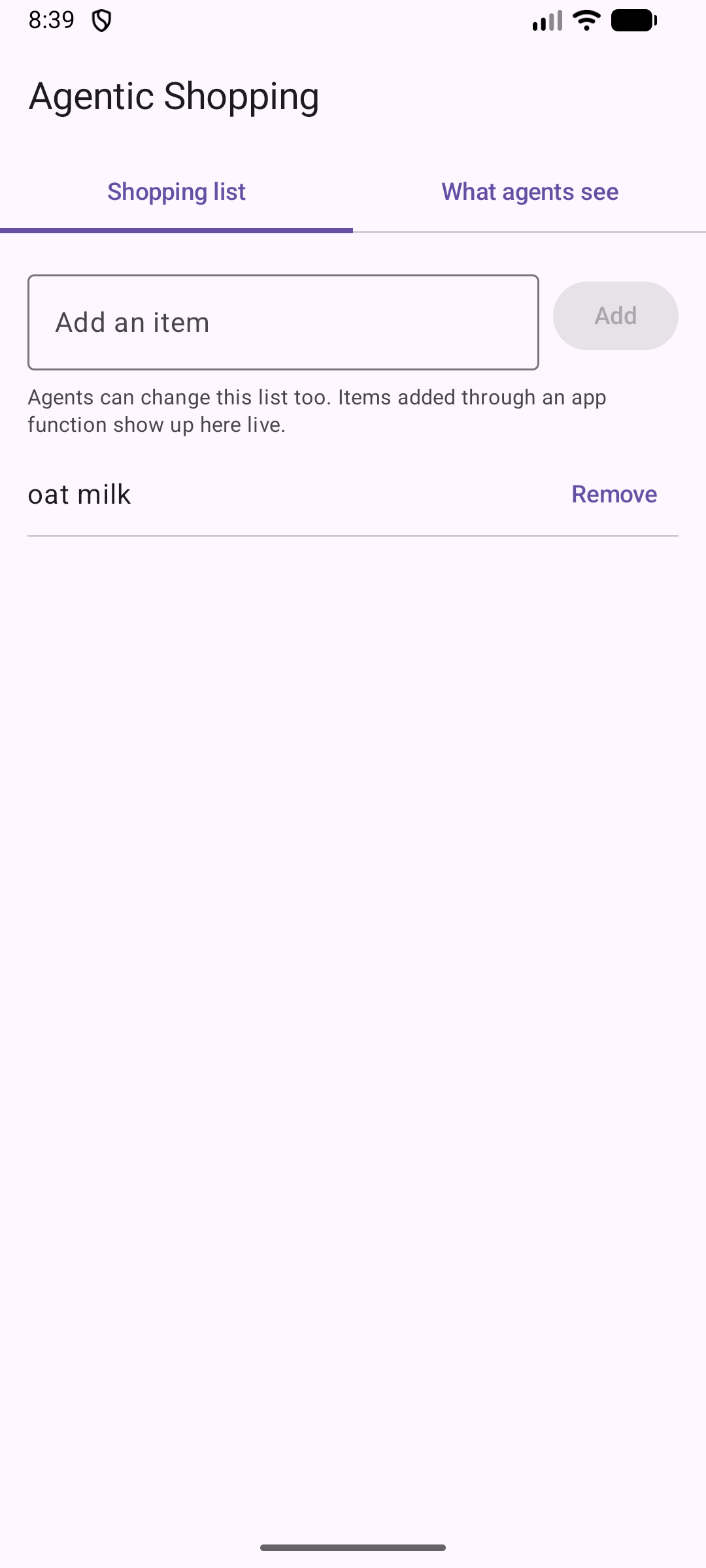
The sample is a small shopping-list app. Its list can be changed from the UI or by an agent through AppFunctions, Android's on-device way for apps to expose functions to agents.
Article: Your Android App Is Now an MCP Server (link added on publication).
What this tag shows:
| File | What it demonstrates |
|---|---|
BaseShoppingFunctionService.kt |
Three functions declared with @AppFunctionDeclaration(isDescribedByKDoc = true) inside an @AppFunctionServiceEntryPoint service. The KDoc is what agents read. |
AndroidManifest.xml |
The service declaration the system indexer needs: the BIND_APP_FUNCTION_SERVICE permission, the AppFunctionService intent filter, and the android.app.appfunctions.v2 property pointing at the generated XML. |
AgentViewScreen.kt |
Runs searchAppFunctions() on the app's own package (no permission needed) and shows what the system indexed. |
ShoppingList.kt |
The shared data. Changes made by an agent show up in the UI live. |


At build time the AppFunctions KSP compiler generates ShoppingFunctionService and assets/shopping_functions.xml. At install time, AppSearch's apps indexer in system_server reads that XML out of the APK, and agents search the resulting index. Your app's code doesn't run for any of that.
Article: What Happens When an Agent Calls Your App (link added on publication).
What this tag adds:
| File | What it demonstrates |
|---|---|
ShoppingApplication.kt |
Application.onCreate runs on every process start, including starts an agent causes. A switch simulates 800 ms of SDK-style init. |
BaseShoppingFunctionService.kt |
Each function logs its thread and stamps its first call into ApplicationStartInfo. addItem is a suspend function that moves its write off the main thread. |
AgentCallsScreen.kt |
Reads ActivityManager.getHistoricalProcessStartReasons(): why each process started (an agent call shows SERVICE, cold) and the fork, bindApplication and Application.onCreate timestamps. |
tools/agent_call_timing.py |
Times agent-style calls cold, warm, and cold with heavy init. |

Reproduce it:
adb shell am force-stop com.promode.agenticandroid.shopping
adb shell cmd app_function execute-app-function \
  --package com.promode.agenticandroid.shopping \
  --function "com.promode.agenticandroid.shopping.BaseShoppingFunctionService#addItem" \
  --parameters "'{\"itemName\":\"coffee\"}'"
adb shell dumpsys activity start-info com.promode.agenticandroid.shopping
The newest record reads reason=SERVICE startType=COLD with
intent=Intent { act=android.app.appfunctions.AppFunctionService … }: the call started the process.
Measured with tools/agent_call_timing.py on an Android 17 emulator (API 37), 5 runs each, host-side
around the adb command (adb overhead included):
| Scenario | Median | Range |
|---|---|---|
| Cold: process not running | 244.5 ms | 222 to 252 ms |
| Warm: process already running | 32.3 ms | 26 to 35 ms |
Cold with 800 ms in Application.onCreate |
1074.0 ms | 1059 to 1082 ms |
Article: Not Every Agent Gets to Call Your App (link added on publication).
What this tag adds:
| File | What it demonstrates |
|---|---|
BaseShoppingFunctionService.kt |
clearList ships disabled (isEnabled = false). When enabled, it still refuses with AppFunctionDeniedException while the phone is locked. |
AgentAccessScreen.kt |
An "Agent access" tab: a switch that calls setAppFunctionEnabled for clearList, and the packages on this device that hold EXECUTE_APP_FUNCTIONS or EXECUTE_APP_FUNCTIONS_SYSTEM. |
agent/ |
Tiny Agent, a second app that requests EXECUTE_APP_FUNCTIONS and calls addItem. It's an ordinary app, so the system refuses it. |

Reproduce it:
./gradlew :app:installDebug :agent:installDebug

# 1. An ordinary app asks. Refused before the shopping app starts.
adb shell am force-stop com.promode.agenticandroid.shopping
adb shell am start -n com.promode.agenticandroid.agent/.TinyAgentActivity --ez run true
adb logcat -d -s TinyAgent
#   EXECUTE_APP_FUNCTIONS granted: false
#   Error 1000: Caller does not have permission to execute the appfunction

# 2. The shell holds the permission, but clearList is disabled.
adb shell cmd app_function execute-app-function \
  --package com.promode.agenticandroid.shopping \
  --function "com.promode.agenticandroid.shopping.BaseShoppingFunctionService#clearList" \
  --parameters "'{}'"
#   ... The app function is disabled (code 1002) ...

# 3. Turn it on (the app's switch, or the shell), lock the phone, call again.
adb shell cmd app_function set-enabled \
  --package com.promode.agenticandroid.shopping \
  --function "com.promode.agenticandroid.shopping.BaseShoppingFunctionService#clearList" \
  --state enable
#   With a PIN set and the screen locked:
#   ... Unlock the phone to clear the shopping list. (code 1000) ...
adb commands below. The app installs on Android 16 (API 36), but the cmd app_function shell command first appears in Android 17.Pinned toolchain (see gradle/libs.versions.toml): AGP 9.4.0 with built-in Kotlin, Kotlin 2.3.10, KSP 2.3.10, androidx.appfunctions 1.0.0-beta01, compileSdk/targetSdk 37, minSdk 36.
./gradlew :app:installDebug
From tag e03 the repo also has a second app, :agent (Tiny Agent). Install it with ./gradlew :agent:installDebug.
Then see what the system indexed:
adb shell cmd app_function list-app-functions
Look for the three function IDs ending in #addItem, #removeItem and #getItems. If they're missing, check the service's android:permission first. Trimmed output from an Android 17 emulator (API 37):
adb shell cmd app_function list-app-functions --package com.promode.agenticandroid.shopping
{
  "com.promode.agenticandroid.shopping": [
    {
      "AppFunctionStaticMetadata-com.promode.agenticandroid.shopping": {
        "serviceName": [
          "com.promode.agenticandroid.shopping.ShoppingFunctionService"
        ],
        "description": [
          "Adds an item to the user's shopping list."
        ],
        "response": [
          {
        …
        "functionId": [
          "com.promode.agenticandroid.shopping.BaseShoppingFunctionService#addItem"
        ],
        …
Call a function the way an agent would (this works even when the app isn't running):
adb shell cmd app_function execute-app-function \
  --package com.promode.agenticandroid.shopping \
  --function "com.promode.agenticandroid.shopping.BaseShoppingFunctionService#addItem" \
  --parameters "'{\"itemName\":\"oat milk\"}'"
{
  "androidAppfunctionsReturnValue": [
    1
  ]
}
Open the app and "oat milk" is on the list.
To see the silent failure the article describes, remove the android:permission attribute from the service in AndroidManifest.xml, reinstall and list again. On an Android 17 emulator the build succeeds and the list comes back empty: the indexer skips the service and nothing reports an error.
Inspect the generated XML inside the APK:
unzip -p app/build/outputs/apk/debug/app-debug.apk assets/shopping_functions.xml
androidx.appfunctions:appfunctions and, through KSP, androidx.appfunctions:appfunctions-compiler (same version).androidx.appfunctions.AppFunctionService, annotate it with @AppFunctionServiceEntryPoint(serviceName = ..., appFunctionXmlFileName = ...), and put your @AppFunctionDeclaration functions inside it. Since 1.0.0-alpha13 the annotation is @AppFunctionDeclaration; older samples that use @AppFunction won't compile.isDescribedByKDoc = true and write KDoc for a reader who sees nothing else: a one-line summary, @param for each parameter and @return.adb shell cmd app_function list-app-functions.AppFunctions is a beta/experimental preview feature in the platform and 1.0.0-beta01 in Jetpack. APIs may change between releases; each episode tag records the versions it was verified against.
ProMode7/agentic-android-samples is a public repo on GitHub by ProMode7. Its maker has not written a description.
It declares the Apache-2.0 license on GitHub.
Its maker has not tagged a system, so it is unknown here. Its README says what it needs.
Open "Take it" on its page: Take My Repo writes an install plan for your machine and hands it to your AI agent (Claude Code, Codex or Cursor), which asks you before each step. Take My Repo has not tested it on any machine.
Its last change on GitHub was on 2026-11-17. Take My Repo does not judge from that whether it is maintained.
Nobody has reviewed it on Take My Repo yet, which says nothing about its quality.
A curated list of Android libraries that can be used to ace up the development.

A sample demonstration of Android's New In-App Review Api which lets you prompt users to submit Play Store ratings and reviews without the inconvenience of leaving your app or game.
A comprehensive collection of ADB (Android Debug Bridge) commands, tips, and tricks.
A Compose app showcasing Android 17's platform changes: AppFunctions, adaptive layouts, the Handoff API, on-device NPU inference, and security hardening