docmost
Docmost is an open-source collaborative wiki and documentation software. It is an open-source alternative to Confluence and Notion.
- 22k
- TypeScript
- AGPL-3.0
- 6 h ago
MediaWiki extension for adding interactive network visualizations to your wiki pages
Repo ProfessionalWiki/Network, read from GitHub 1 min ago. ProfessionalWiki has not joined Take My Repo.
ProfessionalWiki/Network is a public repo on GitHub by ProfessionalWiki. MediaWiki extension for adding interactive network visualizations to your wiki pages. It declares no license on GitHub. Public does not mean open source: without a license, nobody is granted the right to reuse it. It is written mainly in PHP, has 33 stars and last changed on 2026-11-02. Nobody has reviewed it on Take My Repo yet, which says nothing about its quality. Read from GitHub on 2026-11-22.
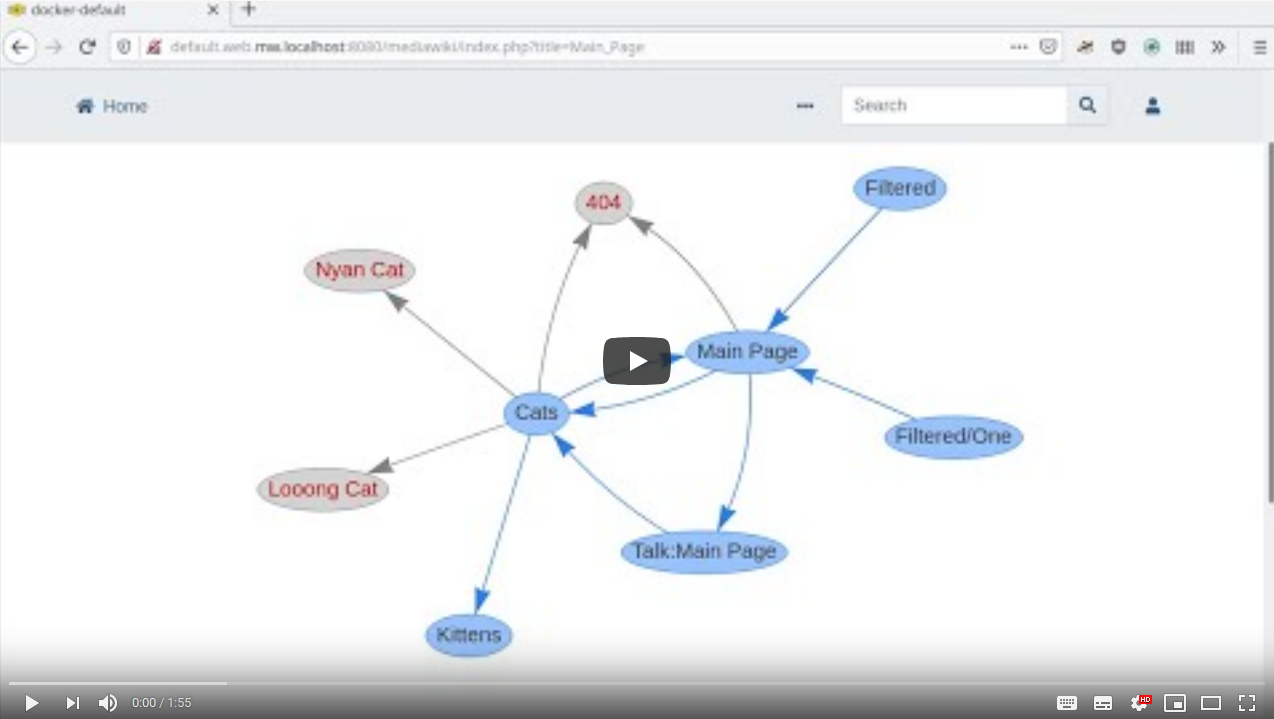
The Network extension allows visualizing connections between wiki pages via an interactive network graph.
It was created by Professional Wiki and funded by KDZ - Centre for Public Administration Research.

See the release notes for more information on the different versions of Network.
The recommended way to install Network is using Composer with MediaWiki's built-in support for Composer.
On the commandline, go to your wikis root directory. Then run these two commands:
COMPOSER=composer.local.json composer require --no-update professional-wiki/network:~4.0
composer update professional-wiki/network --no-dev -o
Then enable the extension by adding the following to the bottom of your wiki's LocalSettings.php file:
wfLoadExtension( 'Network' );
You can verify the extension was enabled successfully by opening your wiki's Special:Version page in your browser.
Finally, please consider sponsoring the project.
Minimal example
{{#network:}}
Example with parameters
{{#network:Page1 | Page2 | Page3
 | class = col-lg-3 mt-0
 | exclude = Main Page ; Sitemap
}}
| Default | Example value | Description | |
|---|---|---|---|
| (page or pages) | The current page | MyPage | The name of the page to show connections for. Can be specified multiple times. The parameter name is optional. Templates are supported |
| class | col-lg-3 mt-0 | Extra css class(es) to add to the network graph | |
| exclude | Sitemap ; Main Page | Pages to exclude from the network graph, separated by semicolon | |
| excludedNamespaces | 2, 4, 8, 12 | Namespaces to exclude from the network graph by namespace number, separated by comma | |
| options | { "nodes": { "shape": "box" } } | vis.js options in JSON. Option names and text values both need to be surrounded with double quotes. Single quotes will not work. Tailing commas also do not work. Two curly brackets closes the parser function, so if you are putting the JSON directly in the parser function rather than using a template, put a tailing space or new line after each closing bracket. | |
| enableDisplayTitle | true | false |
Should the display title rather than
the page title be displayed as a node's label?
Overrides the value of the $wgPageNetworkEnableDisplayTitle configuration variable.
|
| labelMaxLength | 20 | 30 |
The text length of a node's label. If the node label must be truncated, an ellipsis (…) will appended.
A value of 0 indicates that the text length is not limited.
Overrides the value of the $wgPageNetworkLabelMaxLength configuration variable.
|
There is also an includable special page, Special:Network, that can be used to construct graphs interactively. The
special page presents a form that can be filled in with the same parameters listed above and submitted to render a
graph. The special page can also be included in other pages for the same results as the parser function with the
following modifications: the pages must be provided in a single pages parameter, and all values for the pages and
exclude parameters must be separated by newlines. For example,
{{Special:Network
 |pages=Page1
 Page2
 Page3
 | class = col-lg-3 mt-0
 | exclude = Main Page
 Sitemap
}}
The network graphs are located in a div with class network-visualization. The default css for this class is
.network-visualization {
    width: 100%;
    height: 600px;
}
You can add extra CSS in MediaWiki:Common.css. You can also add extra classes to the div via the class parameter.
By default, nodes are represented by OOUI icons. This is specified in the node or group options as (excerpted from the full options):
"nodes": {
    "shape": "image"
},
"groups": {
    "bluelink": {
        "image": "resources/lib/ooui/themes/wikimediaui/images/icons/article-rtl-progressive.svg"
    },
    "redlink": {
        "image": "resources/lib/ooui/themes/wikimediaui/images/icons/articleNotFound-ltr.svg"
    },
    "externallink": {
        "image": "resources/lib/ooui/themes/wikimediaui/images/icons/linkExternal-ltr-progressive.svg"
    }
}
If version 5.1 or later of the Title Icon extension is installed and a page rendered in the graph has at least one title icon defined, one of those title icons will be used for that node's icon. If there are multiple title icons defined for the page, one will be selected in the order in which they were parsed on the page.
Array of vis.js options
{{#network:Page1 | Page2 | Page3
 | options=
{
    "autoResize": true,
    "nodes": {
        "color": "lightblue",
        "shape": "box",
        "borderWidth": 3,
        "font": { "color": "red", "size": 17 }
    }
}
}}
Wrong: "font.color": "red", right: "font": { "color": "red" }, also right: "font": "14 px arial red"
{{#network: {{NetworkPages}}
 | class = col-lg-3 mt-0
 | options= {{NetworkOptions}}
}}
Where NetworkPages contains Page1 | Page2 | Page3 and NetworkOptions contains { "nodes": { "shape": "box" } }
The default value of all parameters can be changed by placing the configuration in "LocalSettings.php". These configuration settings are available:
$wgPageNetworkOptions – options passed directly to the graph visualization library$wgPageNetworkExcludeTalkPages - indicates if talk pages should be excluded$wgPageNetworkExcludedNamespaces - IDs of namespaces to exclude$wgPageNetworkEnableDisplayTitle - indicates if display title should be used for node labels by default$wgPageNetworkLabelMaxLength - default maximum length for node labelsThe default values of these configuration settings can be found in "extension.json". Do not change "extension.json".
$wgPageNetworkOptions
Array of vis.js options. Can be (partially) overridden per network via the options parameter
Example:
$wgPageNetworkOptions = [
    'clickToUse' => true,
    'nodes' => [
        'borderWidth' => 1,
        'borderWidthSelected' => 2,
        'shape' => 'box',
    ],
];
Predefined style groups exist to represent links to existing pages (group "bluelink"), links to missing pages
(group "redlink"), and links to external web pages (group "externallink"). Styling of those groups can be
overridden site-wide using $wgPageNetworkOptions or per graph using the options parameter described above.
Note: to change the width or height, use CSS, not the network options.
$wgPageNetworkExcludeTalkPages
Possible values: true, false
Default value: true (talk pages get excluded)
$wgPageNetworkExcludedNamespaces
List of IDs of namespaces of which all pages should be excluded.
Default value: [ 2, 4, 8, 12 ] (excluding User, Project, MediaWiki and Help)
Examples:
Exclude the User and Project namespaces:
$wgPageNetworkExcludedNamespaces = [ NS_USER, NS_PROJECT ];
Keep the default exclusions and also exclude the Talk namespace:
$wgPageNetworkExcludedNamespaces[] = NS_TALK;
See also: https://www.mediawiki.org/wiki/Manual:Namespace#Built-in_namespaces
$wgPageNetworkEnableDisplayTitle
By default, should the display title rather than the page title be displayed as a node's label?
This can be overridden on a per-graph basis using the enableDisplayTitle parameter to #network.
Possible values: true, false
Default value: true (use display title for node labels)
$wgPageNetworkLabelMaxLength
The default text length of a node's label. If the node label must be truncated, an ellipsis (…) will appended.
A value of 0 indicates that the text length is not limited.
This can be overridden on a per-graph basis using the labelMaxLength parameter to #network.
Possible values: 0 or a positive integer value
Default value: 20
$wgRegisterInternalExternals
By default, MediaWiki does not consider links using external link syntax that point to pages in the wiki to be
internal links. To make them show up as internal links on the network graph, you need to set
$wgRegisterInternalExternals to true in "LocalSettings.php". If pages already exist in your wiki when that
setting is changed, you will need to run the refreshLinks.php MediaWiki maintenance script for the change to
be recognized.
This extension bypasses the MediaWiki page cache. This means that your network graphs will always be up to date, without needing to purge the page cache.
Pull requests to remove those limitations are welcome.
You can also contact Professional Wiki for Professional MediaWiki development services.
If you want to contribute work to the project, please subscribe to the developers' mailing list and have a look at the contribution guideline.
Professional MediaWiki support is available via Professional Wiki
Tests, style checks and static analysis can be run via Make. You can execute these commands on the command line
in the extensions/Network directory:
make ci - run everythingmake cs - run style checksmake test - run the testsFor more details see the Makefile.
The JavaScript tests can only be run by going to the Special:JavaScriptTest page.
The vis-network library is managed via MediaWiki's foreign-resources mechanism. Its version, source URL,
and integrity hash are declared in resources/lib/foreign-resources.yaml.
To upgrade to a new vis-network version:
Edit resources/lib/foreign-resources.yaml: bump version, update src to the new URL, and clear the
integrity value.
From the MediaWiki root, compute the new integrity hash:
php maintenance/run.php manageForeignResources make-sri --extension Network
Copy the printed integrity line into foreign-resources.yaml.
Download the new file:
php maintenance/run.php manageForeignResources update --extension Network
Test the network rendering with the new version. Some upstream releases change default options or APIs.
Commit the updated YAML and the new vis-network.js file.
To verify the on-disk file matches the declared integrity hash:
php maintenance/run.php manageForeignResources verify --extension Network
To regenerate the CycloneDX SBOM (Software Bill of Materials) for the bundled foreign resources:
php maintenance/run.php manageForeignResources make-cdx --extension Network
GNU General Public License v2.0 or later (GPL-2.0-or-later).
Professional Wiki provides commercial MediaWiki development, managed wiki hosting, and MediaWiki support.
Released on May 13th, 2026.
Released on March 2nd, 2026.
Released on July 24th, 2025.
Released on July 7th, 2025.
Released on December 9th, 2023.
Released on July 11th, 2021.
Released on January 9, 2021.
Released on September 8, 2020.
Released on September 7, 2020.
Released on September 7, 2020.
Released on September 7, 2020.
Released on August 30, 2020.
$wgPageNetworkExcludeTalkPages option$wgPageNetworkExcludedNamespaces optionReleased on August 11, 2020.
Initial release
ProfessionalWiki/Network is a public repo on GitHub by ProfessionalWiki. MediaWiki extension for adding interactive network visualizations to your wiki pages.
It declares no license on GitHub. Public does not mean open source: without a license, nobody is granted the right to reuse it.
Its maker has not tagged a system, so it is unknown here. Its README says what it needs.
Open "Take it" on its page: Take My Repo writes an install plan for your machine and hands it to your AI agent (Claude Code, Codex or Cursor), which asks you before each step. Take My Repo has not tested it on any machine.
Its last change on GitHub was on 2026-11-02. GitHub counts 11 open issues and pull requests. Take My Repo does not judge from that whether it is maintained.
Nobody has reviewed it on Take My Repo yet, which says nothing about its quality.
Docmost is an open-source collaborative wiki and documentation software. It is an open-source alternative to Confluence and Notion.
12 weeks, 26 lessons, 52 quizzes, classic Machine Learning for all
Bring data to life with SVG, Canvas and HTML. :bar_chart::chart_with_upwards_trend::tada:
Model Context Protocol (MCP) Server to connect your AI with any MediaWiki
🗺 Maps is the MediaWiki extension that enables visualization of geographic data via dynamic embedded maps.
AI-ready knowledge management system that combines collaborative editing and knowledge graph.