HelloGitHub
:octocat: 分享 GitHub 上有趣、入门级的开源项目。Share interesting, entry-level open source projects on GitHub.
- 191k
- Python
- 3 wk ago
A Guidebook for Dockerize Github project
Repo QuanBlue/dockerize-github-repo, read from GitHub 14 min ago. QuanBlue has not joined Take My Repo.
QuanBlue/dockerize-github-repo is a public repo on GitHub by QuanBlue. A Guidebook for Dockerize Github project. It declares the MIT license on GitHub. It is written mainly in Dockerfile, has 1 stars and last changed on 2023-12-15. Nobody has reviewed it on Take My Repo yet, which says nothing about its quality. Read from GitHub on 2026-11-22.
Containerize code repository using Docker to simplify deployment, improve portability, and streamline development workflows.
Documentation • Report Bug • Request Feature
Before proceeding, make sure you have the following prerequisites installed:
Docker: Install Docker
Git: Install Git
Login to GitHub Container Registry (GHCR)
Create Personal Access Token (PAT) with the write:packages and delete:packages scopes.
For more information, see "Creating a personal access token"
Login to GHCR
# Export PAT
export CR_PAT=<personal-access-token>

# Login to GHCR
echo $CR_PAT | docker login ghcr.io -u <username> --password-stdin
Create a Dockerfile in the root directory of your project. The Dockerfile contains instructions for building a Docker image.
Here's a simple example:
FROM alpine
CMD [ "echo" "Dockerize your Github project"]
Build the Docker image using the `docker build command. Run the following command from the project's root directory:
docker build -t ghcr.io/<username>/<repository>:<tag> .
# Tag the image
docker tag <local-image> ghcr.io/<username>/<repository>:<tag>

# Push the image
docker push ghcr.io/<username>/<repository>:<tag>
Follow the steps in Create a Dockerfile to create a Dockerfile in the root directory of your project.
Create a workflow file (e.g. build.yml) in the .github/workflows directory.
Using this template to create a workflow file:
# .github/workflows/docker-publish.yml
name: Create and publish Docker image/package

on:
   push:
      branches: [main]
   pull_request:
      branches: [main]

env:
   REGISTRY: ghcr.io
   IMAGE_NAME: ${{ github.repository }}

jobs:
   build:
      runs-on: ubuntu-latest
      permissions:
         contents: read
         packages: write

      steps:
         - name: Checkout repository
           uses: actions/checkout@v3

         - name: Log in to the Container registry ${{ env.REGISTRY }}
           if: github.event_name != 'pull_request'
           uses: docker/login-action@f054a8b539a109f9f41c372932f1ae047eff08c9
           with:
              registry: ${{ env.REGISTRY }}
              username: ${{ github.actor }}
              password: ${{ secrets.GITHUB_TOKEN }}

         - name: Extract Docker metadata (tags, labels)
           id: meta
           uses: docker/metadata-action@98669ae865ea3cffbcbaa878cf57c20bbf1c6c38
           with:
              images: ${{ env.REGISTRY }}/${{ env.IMAGE_NAME }}
              tags: |
                 type=ref,event=branch

         - name: Build and push Docker image
           uses: docker/build-push-action@ad44023a93711e3deb337508980b4b5e9bcdc5dc
           with:
              context: .
              push: ${{ github.event_name != 'pull_request' }}
              tags: ${{ steps.meta.outputs.tags }}
              labels: ${{ steps.meta.outputs.labels }}
After push, the workflow will be triggered and the image will be built and pushed to the GHCR.
Note:
- Check this repo Actions here
- See this workflow file in detail (with explain) here
- For detail instruction, see "Github-Actions-cheatsheet"
# build
➜ docker build -t ghcr.io/quanblue/dockerize-github-projects:manually .
[+] Building 25.9s (5/5) FINISHED
 => [internal] load build definition from Dockerfile                       0.1s
 => => transferring dockerfile: 94B                                        0.0s
 => [internal] load .dockerignore                                          0.1s
 => => transferring context: 2B                                            0.0s
 => [internal] load metadata for docker.io/library/alpine:latest           3.6s
 => [1/1] FROM docker.io/library/alpine@sha256:02bb6f428431fbc2809c5d1b4  22.1s
 => => resolve docker.io/library/alpine@sha256:02bb6f428431fbc2809c5d1b41  0.0s
 => => sha256:02bb6f428431fbc2809c5d1b41eab5a68350194fb50 1.64kB / 1.64kB  0.0s
 => => sha256:c0669ef34cdc14332c0f1ab0c2c01acb91d96014b172f1a 528B / 528B  0.0s
 => => sha256:5e2b554c1c45d22c9d1aa836828828e320a26011b76 1.47kB / 1.47kB  0.0s
 => => sha256:8a49fdb3b6a5ff2bd8ec6a86c05b2922a0f7454579 3.40MB / 3.40MB  21.9s
 => => extracting sha256:8a49fdb3b6a5ff2bd8ec6a86c05b2922a0f7454579ecc076  0.1s
 => exporting to image                                                     0.0s
 => => exporting layers                                                    0.0s
 => => writing image sha256:bfd7d991fec0ee73856a73d220f0addb54e94218f14a6  0.0s
 => => naming to ghcr.io/quanblue/dockerize-github-projects:manually        0.0s

# push
➜ docker push ghcr.io/quanblue/dockerize-github-projects:manually
The push refers to repository [ghcr.io/quanblue/dockerize-github-projects]
bb01bd7e32b5: Pushed
manually: digest: sha256:b6cf8bb5fe8270c5f1e39f124f8b5970e15ec9937a65367198b674a8317636e0 size: 527
When you push to the main branch, the workflow will be triggered and build and push the image to the Github Container Registry.
Check Github packages: of this repo here
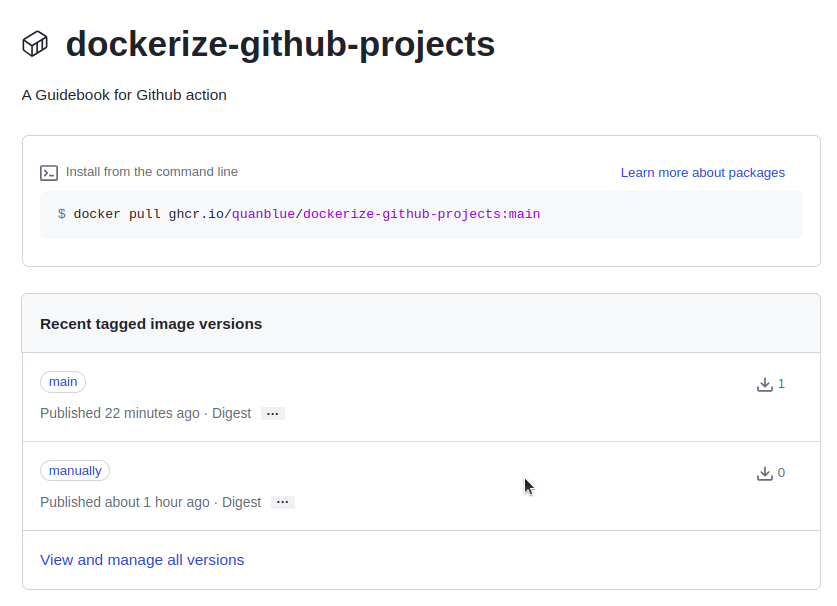 Figure 1. dockerize-github-project package
manually is pushed manuallymain is pushed via Github Actions workflowContributions are always welcome!
This software uses the following open source packages:
Distributed under the MIT License. See LICENSE for more information.
Bento @quanblue · GitHub @QuanBlue · Gmail quannguyenthanh558@gmail.com
QuanBlue/dockerize-github-repo is a public repo on GitHub by QuanBlue. A Guidebook for Dockerize Github project.
It declares the MIT license on GitHub.
Its maker tagged it for macOS, Windows and Linux, or as Docker or cross-platform. That is declared by the maker; Take My Repo has not tested it.
Open "Take it" on its page: Take My Repo writes an install plan for your machine and hands it to your AI agent (Claude Code, Codex or Cursor), which asks you before each step. Take My Repo has not tested it on any machine.
Its last change on GitHub was on 2023-12-15. Take My Repo does not judge from that whether it is maintained.
Nobody has reviewed it on Take My Repo yet, which says nothing about its quality.
:octocat: 分享 GitHub 上有趣、入门级的开源项目。Share interesting, entry-level open source projects on GitHub.
Run your GitHub Actions locally 🚀
A reference containing Styles and Keywords that you can use with MidJourney AI. There are also pages showing resolution comparison, image weights, and much more!
A list of Free Software network services and web applications which can be hosted on your own servers
The 30 Days of Python programming challenge is a step-by-step guide to learn the Python programming language in 30 days. This challenge may take more than 100 days. Follow your own pace. These videos may help too: https://www.youtube.com/channel/UC7PNRuno1rzYPb1xLa4yktw