
fleetcom
A fleet-view supervisor for concurrent shell commands
- 5
- GPL-3.0
- 5 wk ago
Repo ReagentX/fleetcom, read from GitHub 1 min ago. ReagentX has not joined Take My Repo.
In short
ReagentX/fleetcom is a public repo on GitHub by ReagentX. A fleet-view supervisor for concurrent shell commands. It declares the GPL-3.0 license on GitHub. It is written mainly in Rust, has 5 stars and last changed on 2026-10-19. Nobody has reviewed it on Take My Repo yet, which says nothing about its quality. Read from GitHub on 2026-11-20.
fleetcom
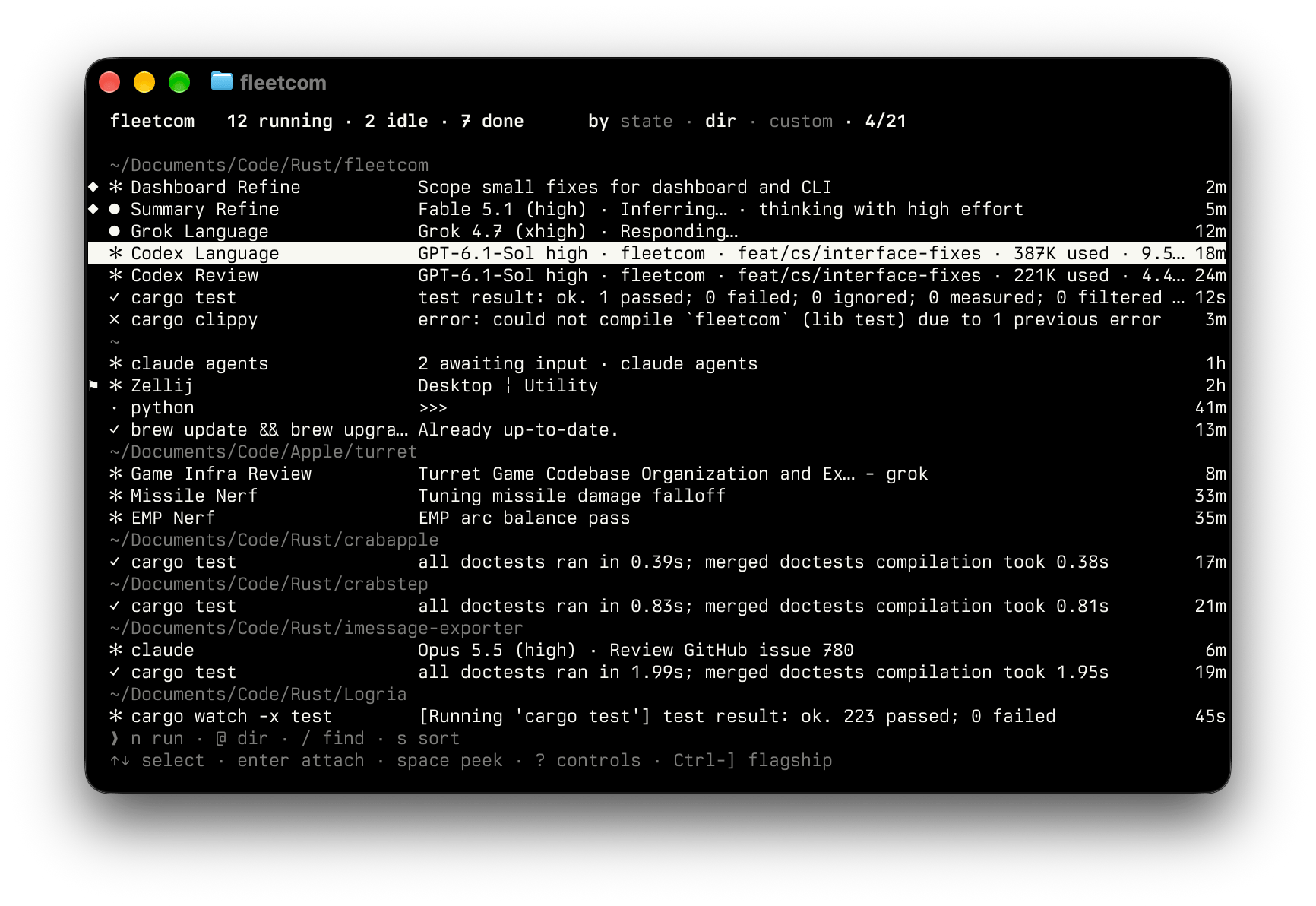
Use fleetcom to supervise your local development fleet: multiplexers, application servers, REPLs, builds, tests, and AI agent sessions.
Key Features
Fleet view
Monitor every task's state and live output from one dashboard: test results, dev servers, and which agent is waiting on you.

Quick peek
Press Space for a quick peek at a task’s live screen without attaching to it.

Attach and interact
Press Enter to take control of a task, then Ctrl-\ to return to the dashboard without interrupting it.

Custom groups
Organize related tasks into named groups across working directories.

Resume agent sessions
Launch claude, codex, grok, or omp from the Agent page (n, then Tab). Rerun the task or reload a saved session to resume the conversation.

Operational model
Managing several long-lived commands across terminal panes is pesky, especially when you need to reconnect later. With fleetcom:
- Run each command in its own PTY and group tasks by state, working directory, or named group.
- Keep tasks running under a daemon across client disconnects.
- Save and reload task recipes: directories, commands, group assignments, display names, tags, the flagship, and which tasks had finished.
- Rerun a completed task in place, keeping its identity, group, and name.
- Launch
claude,codex,grok, andompas managed agents and resume their conversations on rerun and reload. - Recover the current task set from automatic snapshots.
Documentation
See docs/ for configuration, on-disk state, session files, resuming supported agent sessions, commands, and a complete first run.
Installation
Unix only: PTYs and process-group signals (killpg) are required.
Cargo (recommended)
For normal use, install the published crate from crates.io:
cargo install fleetcom
See Source installation to build from a repository clone.
Usage
Connect to the daemon, autostarting it when necessary, and open the dashboard by invoking:
fleetcom
See the invocation reference for sessions, foreground mode, scrollback, and daemon shutdown.
Key Commands
Dashboard
Use the two dashboard hints for common actions; press ? for the expanded key reference:
  ❯ n run · @ dir · / find · s sort
  ↑↓ select · enter attach · space peek · ? controls
Attached
- Press
Ctrl-\to background the task and return to the dashboard. - Press
]on the dashboard to mark a flagship task. PressCtrl-]to attach to it, and again to return. - Other supported input is forwarded to the task's PTY.
See docs/commands.md for every key and launch flag, including the routing mechanics.
How it works
fleetcom runs each task in a separate pseudo-terminal, emulated with alacritty_terminal. The dashboard preview, peek overlay, and attached view all read the same emulated screen grid. This preserves terminal state as you move between views, including for full-screen programs such as vim and htop. See docs/how-it-works.md for terminal emulation, input routing, and activity grouping.
Scope and tradeoffs
Use fleetcom for concurrent build, test, watch, server, and interactive-agent processes. Each task is one command rather than a persistent shell session.
When to use fleetcom
- You need one place to observe, tag, and attach to several long-lived commands.
- You need to reattach to jobs after closing a terminal.
- The same command set is launched often enough to justify a saved session.
- Captured agent conversations (
claude,codex,grok,omp) should resume on rerun.
When to avoid fleetcom
- You primarily need persistent interactive shell workspaces; use
tmuxorzellijdirectly. You can supervise a multiplexer withfleetcom, but cannot use it as a persistent shell workspace. - You need a full process manager: the fleet’s lifetime is bounded by the daemon’s.
Operational limits
- The fleet's lifetime is bounded by the daemon's: the daemon process is the single point of failure.
- Commands are executed through the client's non-interactive shell (
$SHELL -c, or/bin/shwhenSHELLis unset), so functions and aliases defined in~/.zshrcare not available. - Only one client can be connected to the daemon at a time.
See Operational constraints for shutdown and signal mechanics.
Questions
What is fleetcom?
ReagentX/fleetcom is a public repo on GitHub by ReagentX. A fleet-view supervisor for concurrent shell commands.
Is fleetcom open source?
It declares the GPL-3.0 license on GitHub.
Does fleetcom run on macOS, Windows or Linux?
Its maker has not tagged a system, so it is unknown here. Its README says what it needs.
How do I install fleetcom?
Open "Take it" on its page: Take My Repo writes an install plan for your machine and hands it to your AI agent (Claude Code, Codex or Cursor), which asks you before each step. Take My Repo has not tested it on any machine.
Is fleetcom still maintained?
Its last change on GitHub was on 2026-10-19. Take My Repo does not judge from that whether it is maintained.
What do people who ran fleetcom say?
Nobody has reviewed it on Take My Repo yet, which says nothing about its quality.