HarnessKit
English · 简体中文
One home for every agent.
A free, open-source app to manage all your AI coding agents — desktop, CLI, or web.
Website • Docs • Why • Features • Get Started • Roadmap

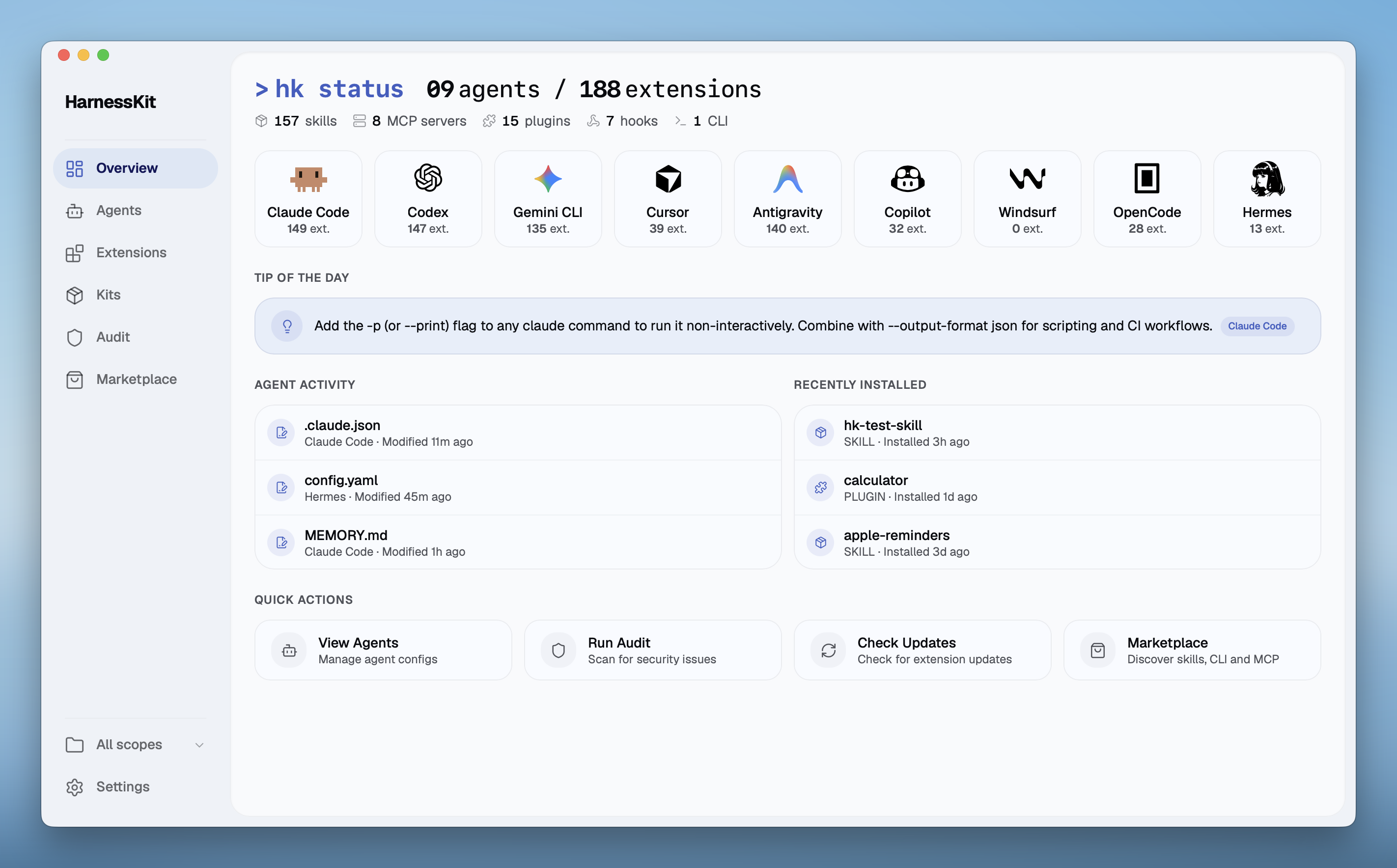
Every supported agent shows on the Overview by default, installed or not. In Settings → Agent Paths, switch to "Detected only" to hide and disable undetected agents, or flip a single agent's "Enabled" toggle off.
Why HarnessKit?
Every agent, a different world. Extensions, configs, memory, and rules — scattered across different directories, in different formats, with different conventions.
HarnessKit brings them all under one roof — see, secure, and manage everything across every agent, from one place.
Key Features
🧩 Full Suite Extension Management
HarnessKit manages all five extension types from a unified interface — Skills, MCP Servers, Plugins, Hooks, and Agent-first CLIs.
| Agent |
Skills |
MCP |
Plugins |
Hooks |
Agent-first CLIs |
| Claude Code |
✓ |
✓ |
✓ |
✓ |
✓ |
| Codex |
✓ |
✓ |
✓ |
✓ |
✓ |
| Gemini CLI |
✓ |
✓ |
✓ |
✓ |
✓ |
| Cursor |
✓ |
✓ |
✓ |
✓ |
✓ |
| Antigravity |
✓ |
✓ |
— |
— |
✓ |
| Copilot |
✓ |
✓ |
✓ |
✓ |
✓ |
| Devin Desktop |
✓ |
✓ |
— |
✓ |
✓ |
| OpenCode |
✓ |
✓ |
✓ |
— |
✓ |
| Hermes |
✓ |
✓ |
✓ |
✓ |
✓ |
| Kiro |
✓ |
✓ |
— |
✓ |
✓ |
| Oh My Pi |
✓ |
✓ |
✓ |
— |
✓ |
| DeepSeek Harness |
✓ |
✓ |
✓ |
— |
✓ |
| Grok Build |
✓ |
✓ |
✓ |
✓ |
✓ |
| Qoder CN |
✓ |
✓ |
✓ |
✓ |
✓ |
| OpenClaw |
✓ |
✓ |
— |
— |
✓ |
| PenguinHarness |
✓ |
— |
— |
— |
— |
| Pi |
✓ |
✓ |
✓ |
— |
✓ |
* "—" means HarnessKit does not manage this extension type for the agent yet.
- Smart organization — Filter by type, agent, or source, and search by name. Extensions from the same repo are automatically grouped into packs for batch management.
- Full visibility — Every extension shows its agents, permissions, trust score, and status at a glance. Open the detail panel for per-agent file paths, directory structure, and audit findings.
- Effortless management — Enable or disable right from the list. Check for updates across all extensions with one click.
- Cross-agent deployment — See which agents have the extension and which don't — deploy to any missing agent with one click. HarnessKit handles the format differences between agents (JSON, TOML, hook conventions, MCP schemas) automatically.
extensions-demo.mp4
extensions-demo2.mp4
🤖 Agent Configs, Memory & Rules
HarnessKit manages every agent's Configs, Memory, Rules, Subagents, and Ignore files from one place. Currently supporting 17 agents: Claude Code, Codex, Gemini CLI, Cursor, Antigravity, Copilot, Devin Desktop, OpenCode, Hermes, Kiro, Oh My Pi, DeepSeek Harness, Grok Build, Qoder CN, OpenClaw, PenguinHarness, and Pi.
- Config file tracking — Automatically discovers every agent's config files — both global and per-project. Add your project directories or custom paths and HarnessKit picks them up alongside the global ones.
- Per-agent dashboard — Each agent gets its own page with all files organized by category, showing scope, path, file size, and a summary of installed extensions. Expand any file to preview its content right in the app.
- Custom paths — Add any file or folder to an agent's dashboard for tracking. Useful for custom configs or scripts that HarnessKit doesn't auto-discover — they show up alongside everything else with the same live preview.
- Real-time detection — The moment a config file is modified, the dashboard reflects it.
agents-demo.mp4
🛡️ Security Audit & Permission Transparency
Every extension is scanned by a built-in security engine with 20 static analysis rules and receives a Trust Score (0–100), grouped into three tiers — Safe (80+), Low Risk (60–79), and Needs Review (below 60). A dedicated Audit page lets you search, filter by tier, and drill into every finding.
- One-click audit — Run a full security scan across all extensions with a single click. The dashboard shows how many extensions were scanned and when the last audit ran.
- Precise tracing — Every finding pinpoints the exact file and line number, so you can trace the issue immediately.
- Per-agent scanning — Even if multiple agents share the same extension, each agent's copy is audited independently — because versions can drift, and a safe copy on one agent doesn't guarantee safety on another.
- Permission transparency — Every extension's permissions are surfaced across five dimensions — filesystem paths, network domains, shell commands, database engines, and environment variables. You see exactly what each extension can reach before you decide to keep it.
audit-demo.mp4
🏪 Marketplace Ecosystem
Discover, evaluate, and install — three marketplaces in one, each with trending lists and search:
- Skills — Browse and install from the skills.sh registry. Also supports install from Git URL or local directory.
- MCP Servers — Browse the Smithery registry of Model Context Protocol servers.
- Agent-first CLI — Discover CLI tools built specifically for agents — the newest frontier of the agent extension ecosystem.
Every listing shows its description, install count, and source. For skills, you can preview the documentation, check third-party security audit scores before installing, and install to any agent with one click — HarnessKit tracks the source so you always know where each extension came from.
marketplace-demo.mp4
🔀 Project-Level Management
The sidebar scope picker switches between Global, All scopes, or any registered project. Agents, Extensions, and Audit all filter by the active scope — per-project setups are managed independently of your global config.
project1.mp4
project2.mp4
📦 Kits
Pack a curated set of skills, MCP servers, rules and memory files into a portable Kit — then deploy the whole bundle to any project with one click. Skip the setup churn every time you spin up a new project.
- Compose once, reuse everywhere — Build a Kit from your existing extensions, rules, and memory files. Pick a target agent at install time and HarnessKit writes everything to the right places.
- Multi-project ready — Install the same Kit to as many projects as you need. The detail drawer shows where each one is currently deployed, and removing it from a project cleans up cleanly.
- Portable bundles — Export any Kit as a self-contained
.hk-kit.zip to share with teammates or carry across machines. Import is one click.
- Origin tracking — Kit-installed extensions keep their marketplace origin in the Extensions list, so you always know where each extension came from.
kit1.mp4
kit2.mp4
kit3.mp4
📂 In-Place Management
HarnessKit works directly with your agents' native directories instead of copying them into a managed folder — no shadow copies, no sync conflicts.
- Native directories — Reads and writes directly to each agent's own config directory. Your files stay exactly where they are.