
FruitJam_Invaders
Space Invaders clone for Adafruit FruitJam
- 0
- MIT
- 10 mo ago
Repo RetiredWizard/FruitJam_Invaders, read from GitHub 19 h ago. RetiredWizard has not joined Take My Repo.
In short
RetiredWizard/FruitJam_Invaders is a public repo on GitHub by RetiredWizard. Space Invaders clone for Adafruit FruitJam. It declares the MIT license on GitHub. It is written mainly in Python, has 0 stars and last changed on 2026-01-29. Nobody has reviewed it on Take My Repo yet, which says nothing about its quality. Read from GitHub on 2026-11-22.
FruitJam Invaders
A Space Invaders Clone for CircuitPython on Adafruit FruitJam
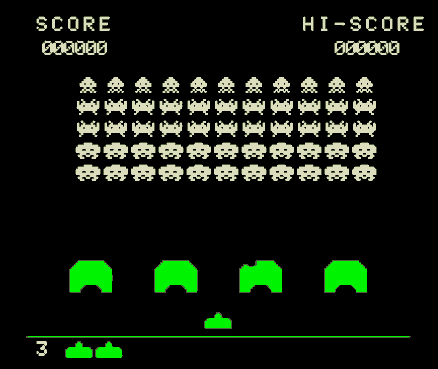
This implementation uses displayio for rendering and is optimized for CircuitPython. It supports both keyboard and gamepad input, with proper error handling for when the USB gamepad library is not available.
To Do
- Save Hi-Score values
- Implement color zoning (maybe)
- laser/missile collision explosion tweak
- Fruit Jam icon and meta data
- Add soundtrack
- Tune player ship motion, allow firing while moving
- Animate player ship explosion
- Implement UFO Flying Saucer
Key Features
- Game state management (PLAYING, GAME_OVER)
- Proper input handling for keyboard and gamepad
- Collision detection between missiles, aliens, and barricades
- Explosion animations with automatic cleanup
- Frame rate controlled main loop
- DisplayIO-based sprite rendering
Controls
| Action | Keyboard | Controller |
|---|---|---|
| Move ship left/right | Arrow Keys | A/D |
| Fire Missile | Space | B Button |
| Restart after Game Over | Enter | Start |
| Quit Game | Q / ESC | Home / SELECT+START |
Hardware Requirements
- Adafruit Fruit Jam
- HDMI monitor
- Game Controller
- Keyboard
- Adafruit SNES controller clone
- USB controllers supported by usb_host_gamepad library
Optional
- speaker/headphones
Installation
1. Install CircuitPython 10
Download and install CircuitPython 10.x for Fruit Jam.
2. Install Required Libraries
Copy these libraries from the Adafruit CircuitPython Bundle to your CIRCUITPY/lib/ folder:
adafruit_imageload/(folder)adafruit_circuitpython_fruitjam/(folder)
OPTIONAL FOR GAMEPAD SUPPORT
Copy these libraries from the Adafruit Community Bundle to your CIRCUITPY/lib/ folder:
relic_usb_host_gamepad(relic_usb_host_gamepad.mpy)relic_usb_host_descriptor_parser(relic_usb_host_descriptor_parser.mpy)
*Note: circup can be used to install the required libraries as follows:
circup install relic_usb_host_gamepad adafruit_imageload adafruit_fruitjam
3. Copy Game Files
Copy the entire contents of this repository to your CIRCUITPY drive:
CIRCUITPY/
├── lib/
│   ├── adafruit_imageload/
│   ├── adafruit_fruitjam/
│   ├── relic_usb_host_gamepad.mpy
│   └── relic_usb_host_descriptor_parset.mpy
├── code.py
├── launcher_config.py (optional)
├── graphics/
│   ├── aliens.bmp
│   ├── barricade.png
│   ├── digits.bmp
│   ├── game_over.png
│   ├── high_score.png
│   ├── laser_explosion.png
│   ├── lasers.bmp
│   ├── missile_explosion.png
│   ├── saucer.bmp
│   ├── score.png
│   ├── spaceship_explosion.png
│   └── spaceship.png
└── sound/
    ├── alien_destroyed.wav
    ├── explosion.wav
    ├── invader_movements.wav
    ├── one_life.wav
    ├── saucer_destroyed.wav
    ├── saucer.wav
    └── shoot.wav
If installing for use with Fruit Jam OS, first create a Pac_Jam folder within the CIRCUITPY/apps folder and then copy the entire contents of this repository to the apps/Pac_Jam folder on your CIRCUITPY drive:
CIRCUITPY/
├── lib/
│   ├── adafruit_imageload/
│   ├── adafruit_fruitjam/
│   ├── relic_usb_host_gamepad.mpy
│   └── relic_usb_host_descriptor_parset.mpy
└── apps/FruitJam_Invaders
         ├── code.py
         ├── metadata.json
         ├── graphics/
         │   ├── aliens.bmp
         │   ├── barricade.png
         │   ├── digits.bmp
         │   ├── game_over.png
         │   ├── high_score.png
         │   ├── laser_explosion.png
         │   ├── lasers.bmp
         │   ├── missile_explosion.png
         │   ├── saucer.bmp
         │   ├── score.png
         │   ├── spaceship_explosion.png
         │   └── spaceship.png
         └── sound/
             ├── alien_destroyed.wav
             ├── explosion.wav
             ├── invader_movements.wav
             ├── one_life.wav
             ├── saucer_destroyed.wav
             ├── saucer.wav
             └── shoot.wav
4. Game Settings
When run with Fruit Jam OS, the audio can be configured to use the speaker or the headphone jack and the volume level can be set by updating/creating the launcher.conf.json file located on the CIRCUITPY/ drive:
launcher.conf.json audio Parameters:
output - "speaker" or "headphone" (defaults to speaker)
volume - 0.0 to 1.0 (defaults to 0.35)
volume_override_danger - 0.0 to 1.0 (defaults to 0.75)
example:
{
  "audio" : {
    "output": "speaker",
	  "volume": 0.55,
	  "volume_override_danger": 0.75,
  },
}
*Note: The volume can not be set higher than the "volume_override_danger" value. It's not recommended to increase the "volume_override_danger" level unless the speaker has been tested and shown not to be over driven by the default values.
*Note: By copying the launcher_config.py helper library from the Fruit Jam OS to the CIRCUITPY drive of your device you can enable the settings functionality when not using Fruit Jam OS
5. Play!
If installed to the CIRCUYITPY/ drive, the game starts automatically when you plug in the device. If installed in the apps/Pac_Jam folder use Fruit Jam OS to start the game. Enjoy! 🎮
Technical Details
Display
- Original Space Invaders: 224x256 pixels
- Fruit Jam game area: 388x320 pixels
- Game area is centered in 640x480 or 720x400 display area
Built with AI Assistance
This project was developed with assistance from GitHub Copilot (Claude) in VS Code. The entire game was built iteratively through conversation.
Credits
- Space Invaders is a trademark of Taito Corporation.
- This is a fan-made educational project, not for commercial use
- Sprites and audio files by Seitoh63
- Built for the amazing CircuitPython community
License
This project is provided for educational purposes. See LICENSE for details.
Special Thanks
Questions
What is FruitJam_Invaders?
RetiredWizard/FruitJam_Invaders is a public repo on GitHub by RetiredWizard. Space Invaders clone for Adafruit FruitJam.
Is FruitJam_Invaders open source?
It declares the MIT license on GitHub.
Does FruitJam_Invaders run on macOS, Windows or Linux?
Its maker has not tagged a system, so it is unknown here. Its README says what it needs.
How do I install FruitJam_Invaders?
Open "Take it" on its page: Take My Repo writes an install plan for your machine and hands it to your AI agent (Claude Code, Codex or Cursor), which asks you before each step. Take My Repo has not tested it on any machine.
Is FruitJam_Invaders still maintained?
Its last change on GitHub was on 2026-01-29. Take My Repo does not judge from that whether it is maintained.
What do people who ran FruitJam_Invaders say?
Nobody has reviewed it on Take My Repo yet, which says nothing about its quality.

