rtk
CLI proxy that reduces LLM token consumption by 60-90% on common dev commands. Single Rust binary, zero dependencies
- 88k
- Rust
- Apache-2.0
- 1 d ago
See what your AI changed — before it breaks. Local-first GraphRAG architecture cards (MCP Apps) & macOS HUD for AI coding.
Repo Rex16200513/codesight, read from GitHub 18 min ago. Rex16200513 has not joined Take My Repo.
Rex16200513/codesight is a public repo on GitHub by Rex16200513. See what your AI changed — before it breaks. Local-first GraphRAG architecture cards (MCP Apps) & macOS HUD for AI coding. It declares the MIT license on GitHub. It is written mainly in TypeScript, has 1 stars and last changed on 2026-11-24. Nobody has reviewed it on Take My Repo yet, which says nothing about its quality. Read from GitHub on 2026-11-24.
CLI proxy that reduces LLM token consumption by 60-90% on common dev commands. Single Rust binary, zero dependencies
Turn any codebase, with its docs, SQL schemas, configs, and PDFs, into a queryable knowledge graph. A /graphify skill for Claude Code, Cursor, Codex, and Gemini CLI: local deterministic AST parsing, every edge explained, no vector store.
English · 简体中文 · Watch 1080p60 Promo Video · Changelog
CodeSight is a local-first GraphRAG code comprehension and diagnostic engine for AI-assisted coding.
As AI agents edit across dozens of files, two failure modes appear repeatedly: losing track of architecture and silent regressions (removing validation guards, swallowing exceptions with empty catch {}, or hiding type errors with as any). CodeSight builds a deterministic AST call graph and dependency map locally in milliseconds, intercepts silent regressions with zero LLM tokens, and renders clean interactive visual cards directly inside your AI agent or as a native macOS Floating HUD.
Full HD 1080p 60fps launch video: Download from GitHub Release v1.0.1
CodeSight bridges the gap between visual product thinking and precise code-level debugging:
git diff to the exact code block, line range, and cross-file AST callers involved.as any, empty catch {}, removed auth/validation guards) deterministically with 0 LLM tokens, and choose between a minimal backward-compatible fix or a coordinated multi-file update.Instead of feeding raw chunks of text into an LLM, CodeSight runs a deterministic 5-stage local GraphRAG pipeline over your repository:
astParser.ts, repoIndexer.ts)
Parses TypeScript / JavaScript / TSX / JSX with the real TypeScript Compiler API (eliminating regex false positives) alongside a Python relative/dotted import & call parser, with SHA-256 hash caching in .codesight/index.json for millisecond incremental updates.codeGraph.ts, graphProvider.ts, mcpGraphProvider.ts)
Builds both a File Dependency Graph (in-degree, out-degree, transitive downstream reach, Core-hub detection) and a Cross-File Symbol Call Graph (exact function, class, and React JSX component callers with line numbers), with pluggable external stdio Graph-RAG MCP support.embeddingIndex.ts)
Combines Okapi BM25 + bilingual semantic vectors + 1-hop graph propagation (with barrel index.ts damping) to surface the exact minimal code slice — typically reducing whole-repo LLM context by ~97%.architecturePlanner.ts, visualMap.ts)
Transforms raw graph nodes into human-readable Frontend / Backend / Shared vertical layers, plain-language roles, and auto-inferred UI wireframe / API flow prototypes — powered by 0-token heuristics, host-agent architectureOverride caching, or optional BYOK LLM planning.staticAnalyzer.ts, comprehensionEngine.ts)
Strips stack-trace noise, projects errors and git diff hunks onto exact AST symbols and blast radius, flags REMOVED_GUARD / SWALLOWED_ERROR / TYPE_ESCAPE_HATCH at 0 tokens, and generates scoped architectural fix options for your AI agent.| Capability | Raw AI Agent | With CodeSight |
|---|---|---|
| Understanding an unfamiliar repo | Burns 25k–60k tokens skimming files | Incremental AST + dependency map in ~25ms (0 LLM tokens) |
| Checking who calls a shared type/fn | Text grep, often misses re-exports or JSX callers | Deterministic cross-file AST symbol call graph (codesight_trace) |
| Debugging multi-file errors | Blind trial-and-error loops | Projects stack trace onto dependency graph (~97% token reduction) |
| Catching silent regressions | Frequently passes build via as any or empty catch |
Instant 0-token diff guard flags REMOVED_GUARD, SWALLOWED_ERROR, TYPE_ESCAPE_HATCH |
| Human visibility in chat | Walls of markdown text | Collapsible, bilingual interactive cards with UI wireframes & directional dashed flows |
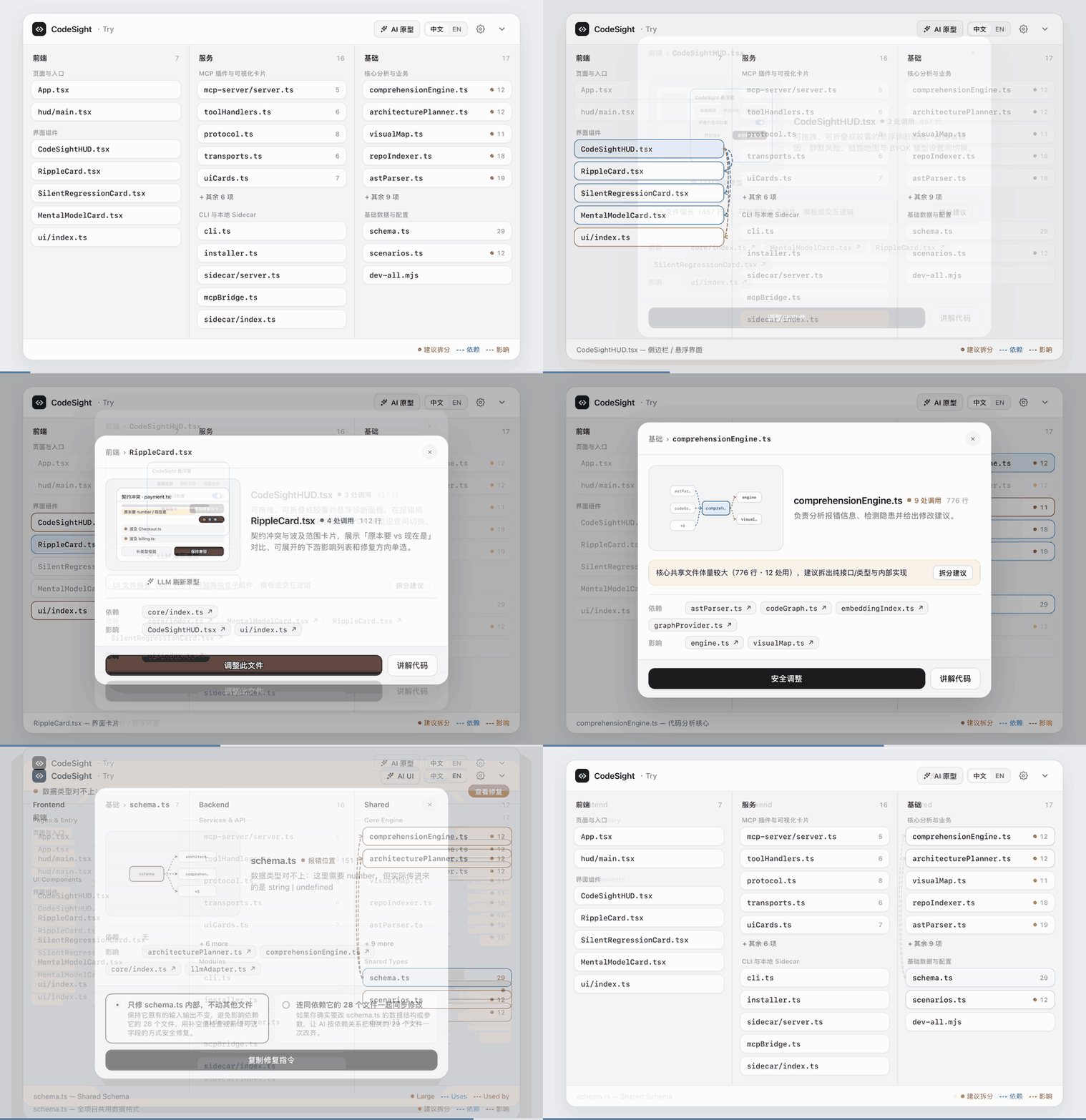
Automatically detects Frontend, Backend, and Shared / Core separation across TypeScript, JavaScript, and Python repositories. Hover any file to trace its exact 1-hop dependencies (blue dashed) and impacted consumers (amber/red dashed).
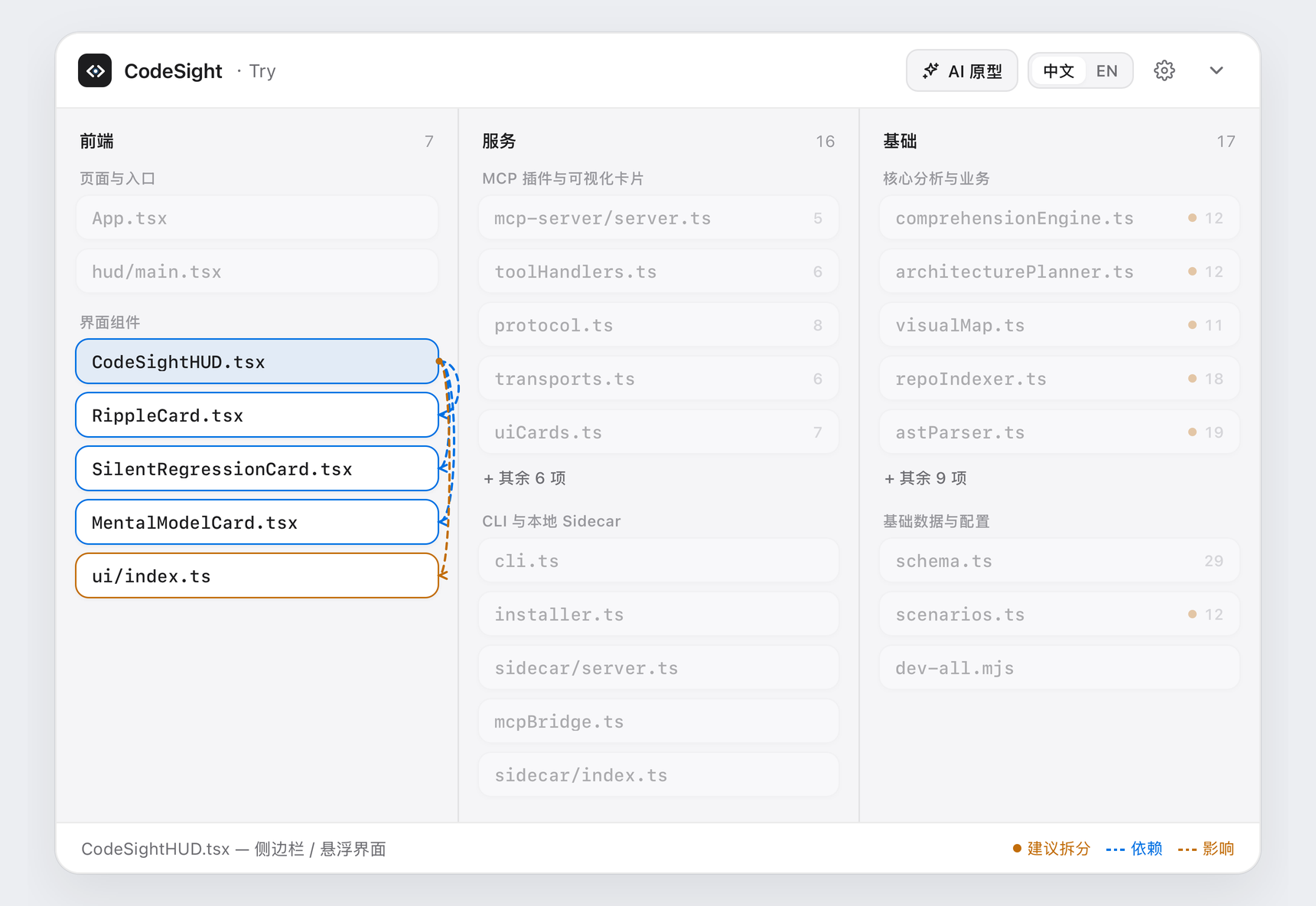
Click any UI module to preview a typed mini-Figma wireframe (header, tabs, toggles, sliders, chips, lists, actions — refreshable on demand via the AI UI button), or click any backend/core file to inspect its real local AST dependency mini-graph. Oversized or high-impact modules are flagged with a subtle amber dot (● Large) and a 1-click Safe Split prompt that closes the loop by re-running CodeSight after edits.
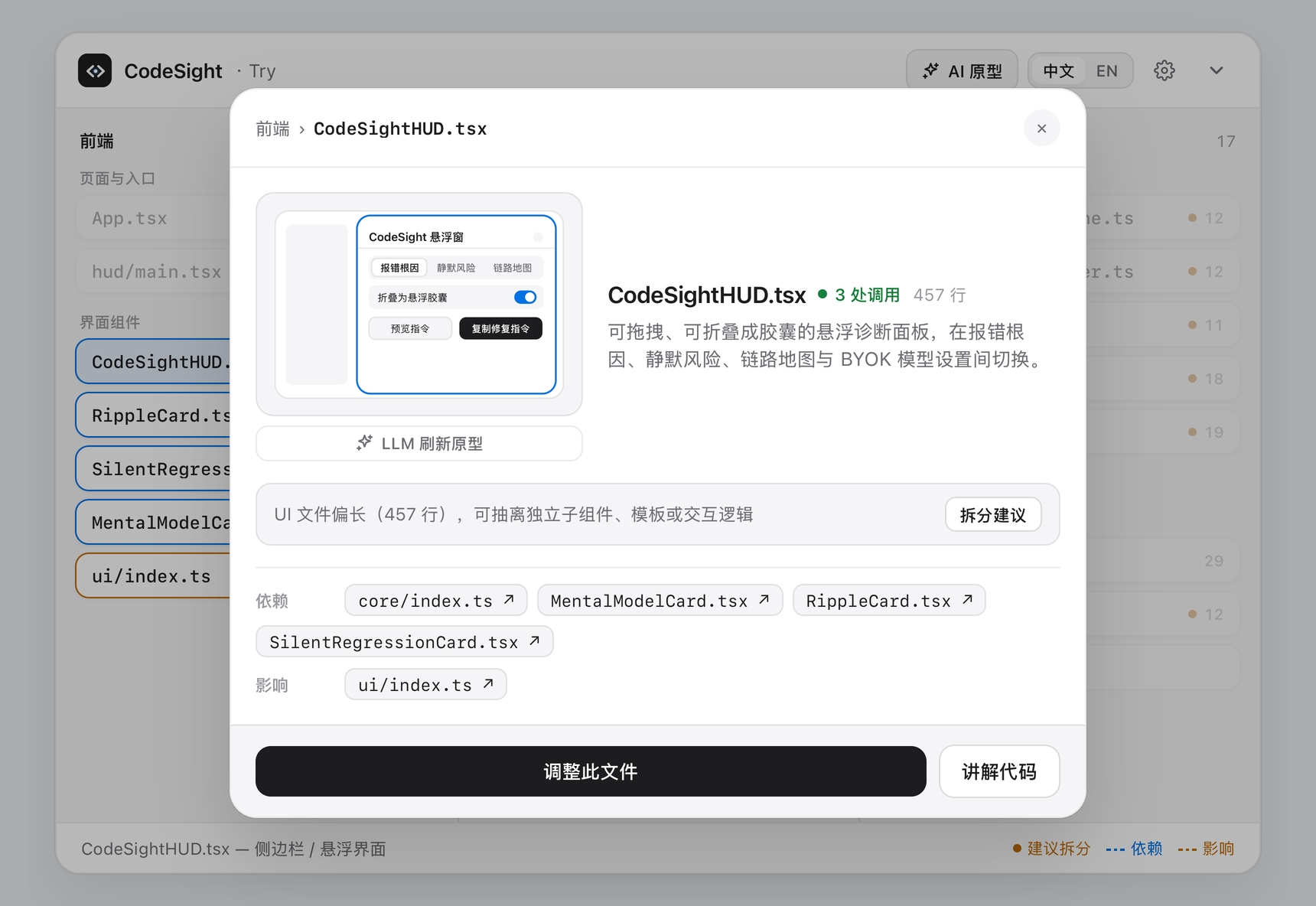
When a build or runtime error occurs, CodeSight highlights the fault origin in red, draws impacted downstream links, catches silent regressions, and presents a clean 2-option decision fork (e.g., keep exports compatible vs cascade update all callers) before the AI touches shared code.
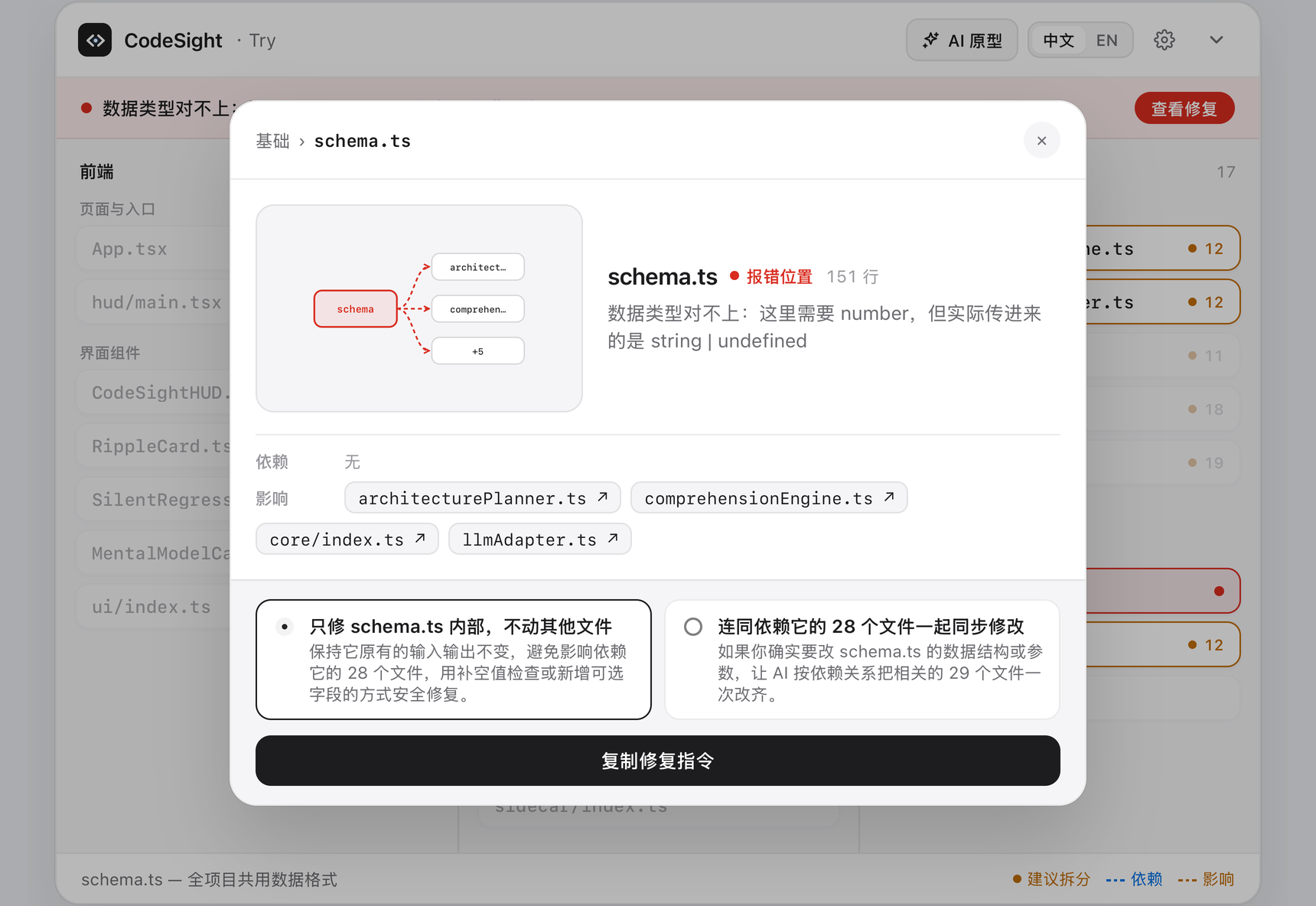
Built for long debugging threads: click the top bar or chevron to collapse any card into a 44px single-line bar (with an inline fault badge), or open ⚙ Settings to customize language (EN / 中文), dashed lines, default-collapsed mode, regression guard, and optional BYOK models — persisted to ~/.codesight/config.json and shared with the native macOS HUD.
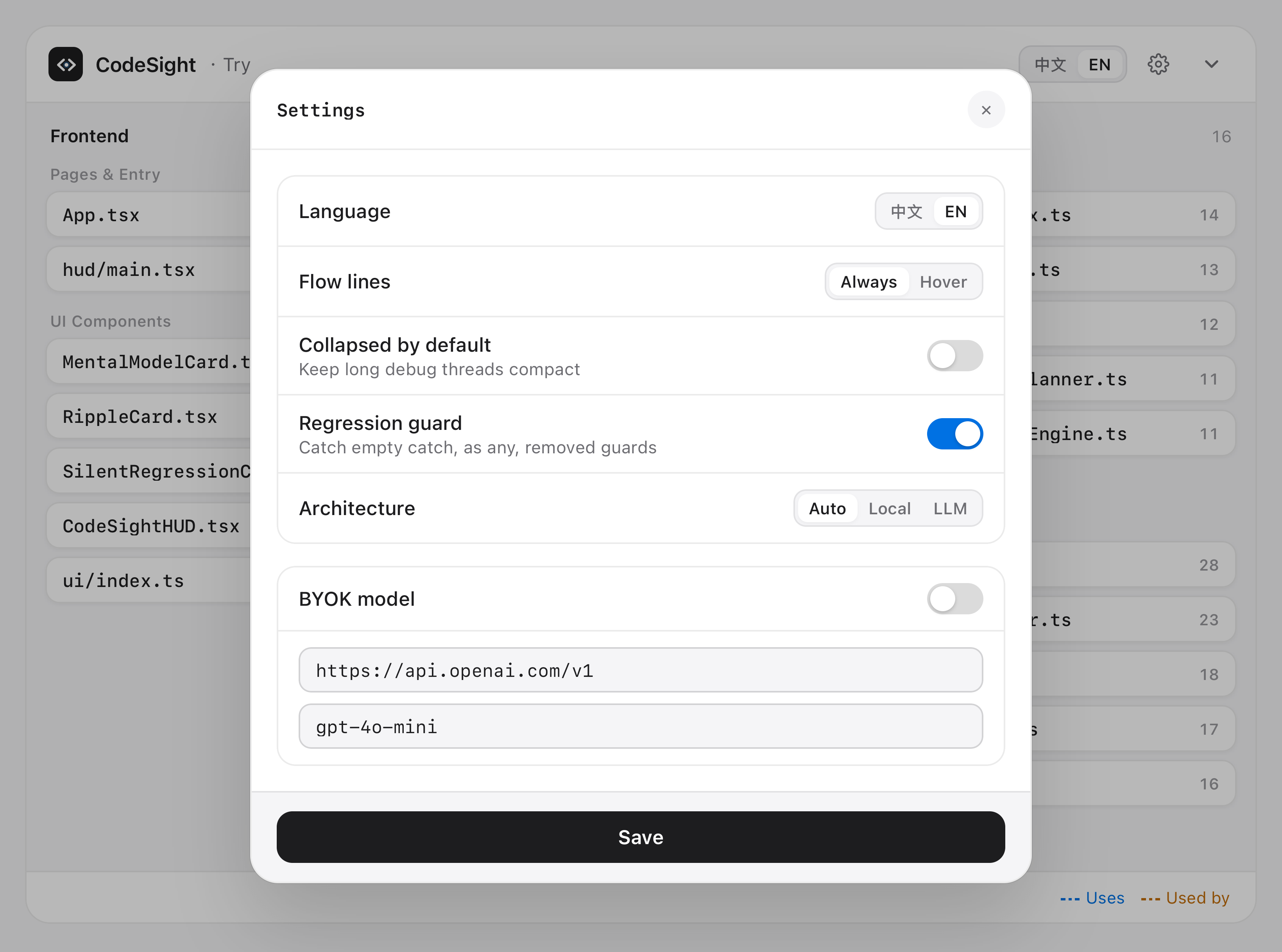
In-card Apple-style Settings synced to |

Collapsed 44px single-line bar keeps long chat threads clean
|
| Client / Environment | Transport | Interactive Board | Setup Command |
|---|---|---|---|
| Antigravity | Native Plugin + MCP Apps (stdio) |
Inline Chat Cards | node packages/cli/dist/cli.js install --target antigravity |
| Cursor | MCP (stdio) |
Browser Board + Text | node packages/cli/dist/cli.js install --target cursor |
| Claude Code | MCP (stdio) |
Browser Board + Text | node packages/cli/dist/cli.js install --target claude-code |
| Claude Desktop | MCP Apps (stdio) |
Inline Chat Cards | node packages/cli/dist/cli.js install --target claude-desktop |
| VS Code / Copilot | MCP (stdio) |
Browser Board + macOS HUD | node packages/cli/dist/cli.js install --target vscode |
| OpenAI Codex CLI | MCP (stdio) |
Browser Board + Text | node packages/cli/dist/cli.js install --target codex |
| ChatGPT Apps / Remote | Streamable HTTP (/mcp) |
Inline MCP Apps | npm run mcp:http |
| macOS Floating HUD | Local Sidecar (127.0.0.1:4317) |
Native SwiftUI Window | npm run hud:open |
git clone https://github.com/Rex16200513/codesight.git
cd codesight
npm install && npm run build
# Install for a specific agent (add --global for user-wide config, --dry-run to preview)
node packages/cli/dist/cli.js install --target cursor
node packages/cli/dist/cli.js install --target claude-code
node packages/cli/dist/cli.js install --target antigravity

# Or configure all supported agents at once
node packages/cli/dist/cli.js install --target all --dry-run
# Generate and open a standalone interactive board for any local repo
node packages/cli/dist/cli.js map --open

# Or run the local Sidecar for live updates + persistent in-card settings (http://127.0.0.1:4317)
npm run dev:sidecar
npm run hud:open
| MCP Tool | CLI Equivalent | What It Does |
|---|---|---|
codesight_map |
npm run cs -- map [dir] [--open] |
Incremental AST + dependency map & interactive architecture board |
codesight_ask |
npm run cs -- ask "<query>" [dir] |
Hybrid BM25 + bilingual vector + 1-hop dependency graph RRF search |
codesight_trace |
npm run cs -- trace <symbol> [dir] |
Cross-file AST caller & callee trace for any function, class, or component |
codesight_diagnose |
npm run cs -- diagnose --error "..." | --git |
Blast radius, safe zone count, silent regression guard, and fix directions |
codesight_settings |
npm run cs -- config [show|set|reset] |
Read/write unified preferences in ~/.codesight/config.json |
~/.codesight/config.json)npm run cs -- config set language en
npm run cs -- config set dashedLines hover
npm run cs -- config set collapsedByDefault true
npm run cs -- config set silentRegressionGuard true
flowchart LR
  Repo["Local Repository (TS / JS / Python)"] --> Core["@codesight/core\nAST + Python Parser · Call Graph · RRF · Guard"]
  Config["~/.codesight/config.json"] --> Core
  Core --> MCP["@codesight/mcp-server\nStdio & Streamable HTTP /mcp + MCP App Cards"]
  Core --> Sidecar["@codesight/sidecar\nHTTP / SSE Bridge & Browser Board :4317"]
  Core --> CLI["@codesight/cli\nInstaller & CLI"]
  MCP --> Agents["AI Agents\nAntigravity · Cursor · Claude · Codex · ChatGPT"]
  Sidecar --> HUD["Native macOS HUD\nSwiftUI Always-on-Top Floating Panel"]
Rex16200513/codesight is a public repo on GitHub by Rex16200513. See what your AI changed — before it breaks. Local-first GraphRAG architecture cards (MCP Apps) & macOS HUD for AI coding.
It declares the MIT license on GitHub.
Its maker has not tagged a system, so it is unknown here. Its README says what it needs.
Open "Take it" on its page: Take My Repo writes an install plan for your machine and hands it to your AI agent (Claude Code, Codex or Cursor), which asks you before each step. Take My Repo has not tested it on any machine.
Reverse engineer anything with agents, from app behavior down to native binaries.
The agent harness performance optimization system. Skills, instincts, memory, security, and research-first development for Claude Code, Codex, Opencode, Cursor and beyond.
3,000+ reusable AI agent skills for Claude Code, Codex, Cursor and Gemini CLI. AAS Core adds local catalog discovery, agent-owned selection and plan preview. CLI, MCP and plugins.
Its last change on GitHub was on 2026-11-24. Take My Repo does not judge from that whether it is maintained.
Nobody has reviewed it on Take My Repo yet, which says nothing about its quality.
Take My Repo cannot say: it does not audit code and has not run codesight. What is known comes from GitHub. It declares the MIT license on GitHub. Its last change was on 2026-11-24. It has 1 stars, which measure popularity, not safety. Nobody has reviewed it on Take My Repo yet, which says nothing about its quality. Read the source before you run it. With "Take it", your AI agent shows each step and asks you before running it; README text is treated as data, not as instructions.