
Tensorflow_Model_Inception
Train/Eval the inception network through the flowers and imagenet dataset
- 0
- 8 y ago
Repo Robinatp/Tensorflow_Model_Inception, read from GitHub 9 min ago. Robinatp has not joined Take My Repo.
In short
Robinatp/Tensorflow_Model_Inception is a public repo on GitHub by Robinatp. Train/Eval the inception network through the flowers and imagenet dataset. It declares no license on GitHub. Public does not mean open source: without a license, nobody is granted the right to reuse it. It is written mainly in Python, has 0 stars and last changed on 2018-10-23. Nobody has reviewed it on Take My Repo yet, which says nothing about its quality. Read from GitHub on 2026-11-24.
NOTE: For the most part, you will find a newer version of this code at models/research/slim. In particular:
inception_train.pyandimagenet_train.pyshould no longer be used. The slim editions for running on multiple GPUs are the current best examples.inception_distributed_train.pyandimagenet_distributed_train.pyare still valid examples of distributed training.
For performance benchmarking, please see https://www.tensorflow.org/performance/benchmarks.
Inception in TensorFlow
ImageNet is a common academic data set in machine learning for training an image recognition system. Code in this directory demonstrates how to use TensorFlow to train and evaluate a type of convolutional neural network (CNN) on this academic data set. In particular, we demonstrate how to train the Inception v3 architecture as specified in:
Rethinking the Inception Architecture for Computer Vision
Christian Szegedy, Vincent Vanhoucke, Sergey Ioffe, Jonathon Shlens, Zbigniew Wojna
http://arxiv.org/abs/1512.00567
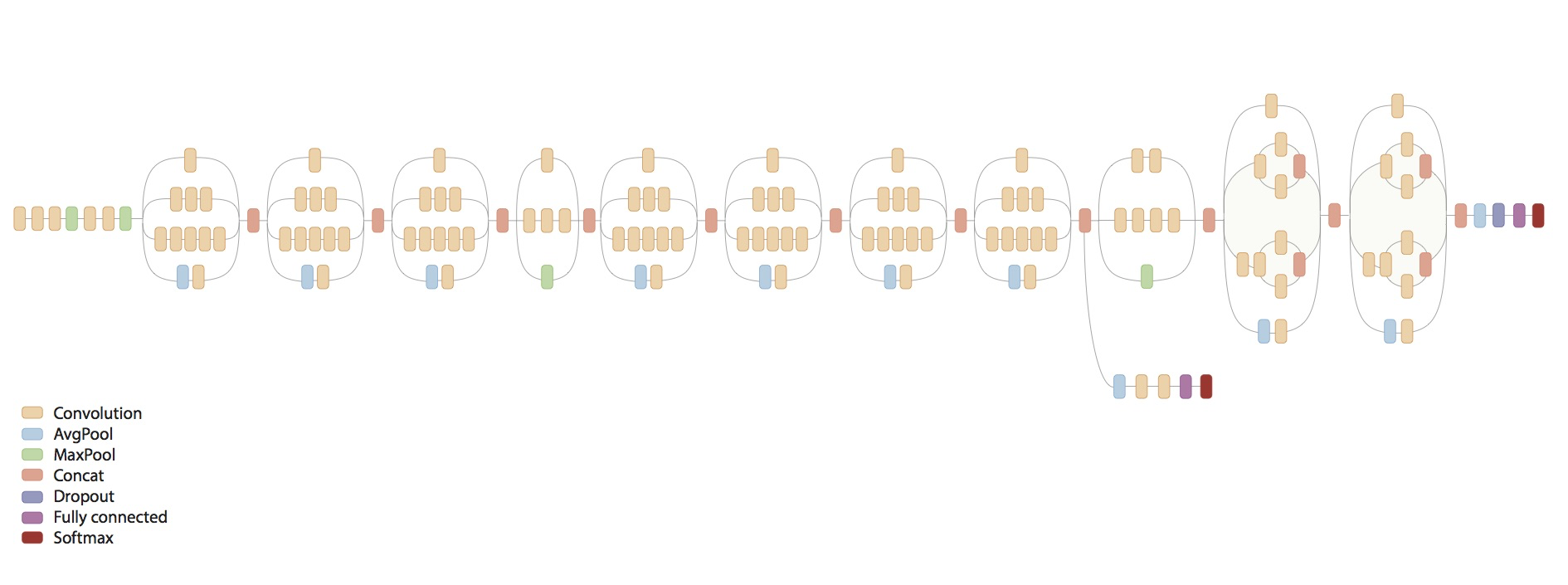
This network achieves 21.2% top-1 and 5.6% top-5 error for single frame evaluation with a computational cost of 5 billion multiply-adds per inference and with using less than 25 million parameters. Below is a visualization of the model architecture.
Getting Started
Before you run the training script for the first time, you will need to download
and convert the ImageNet data to native TFRecord format. The TFRecord format
consists of a set of sharded files where each entry is a serialized tf.Example
proto. Each tf.Example proto contains the ImageNet image (JPEG encoded) as
well as metadata such as label and bounding box information. See
parse_example_proto for details.
We provide a single script for downloading and converting ImageNet data to TFRecord format. Downloading and preprocessing the data may take several hours (up to half a day) depending on your network and computer speed. Please be patient.
To begin, you will need to sign up for an account with ImageNet to gain access to the data. Look for the sign up page, create an account and request an access key to download the data.
After you have USERNAME and PASSWORD, you are ready to run our script. Make
sure that your hard disk has at least 500 GB of free space for downloading and
storing the data. Here we select DATA_DIR=$HOME/imagenet-data as such a
location but feel free to edit accordingly.
When you run the below script, please enter USERNAME and PASSWORD when prompted. This will occur at the very beginning. Once these values are entered, you will not need to interact with the script again.
# location of where to place the ImageNet data
DATA_DIR=$HOME/imagenet-data

# build the preprocessing script.
cd tensorflow-models/inception
bazel build //inception:download_and_preprocess_imagenet

# run it
bazel-bin/inception/download_and_preprocess_imagenet "${DATA_DIR}"
The final line of the output script should read:
2016-02-17 14:30:17.287989: Finished writing all 1281167 images in data set.
When the script finishes, you will find 1024 training files and 128 validation
files in the DATA_DIR. The files will match the patterns
train-?????-of-01024 and validation-?????-of-00128, respectively.
Congratulations! You are now ready to train or evaluate with the ImageNet data set.
How to Train from Scratch
WARNING Training an Inception v3 network from scratch is a computationally intensive task and depending on your compute setup may take several days or even weeks.
Before proceeding please read the Convolutional Neural Networks tutorial; in particular, focus on Training a Model Using Multiple GPU Cards. The model training method is nearly identical to that described in the CIFAR-10 multi-GPU model training. Briefly, the model training
- Places an individual model replica on each GPU.
- Splits the batch across the GPUs.
- Updates model parameters synchronously by waiting for all GPUs to finish processing a batch of data.
The training procedure is encapsulated by this diagram of how operations and variables are placed on CPU and GPUs respectively.
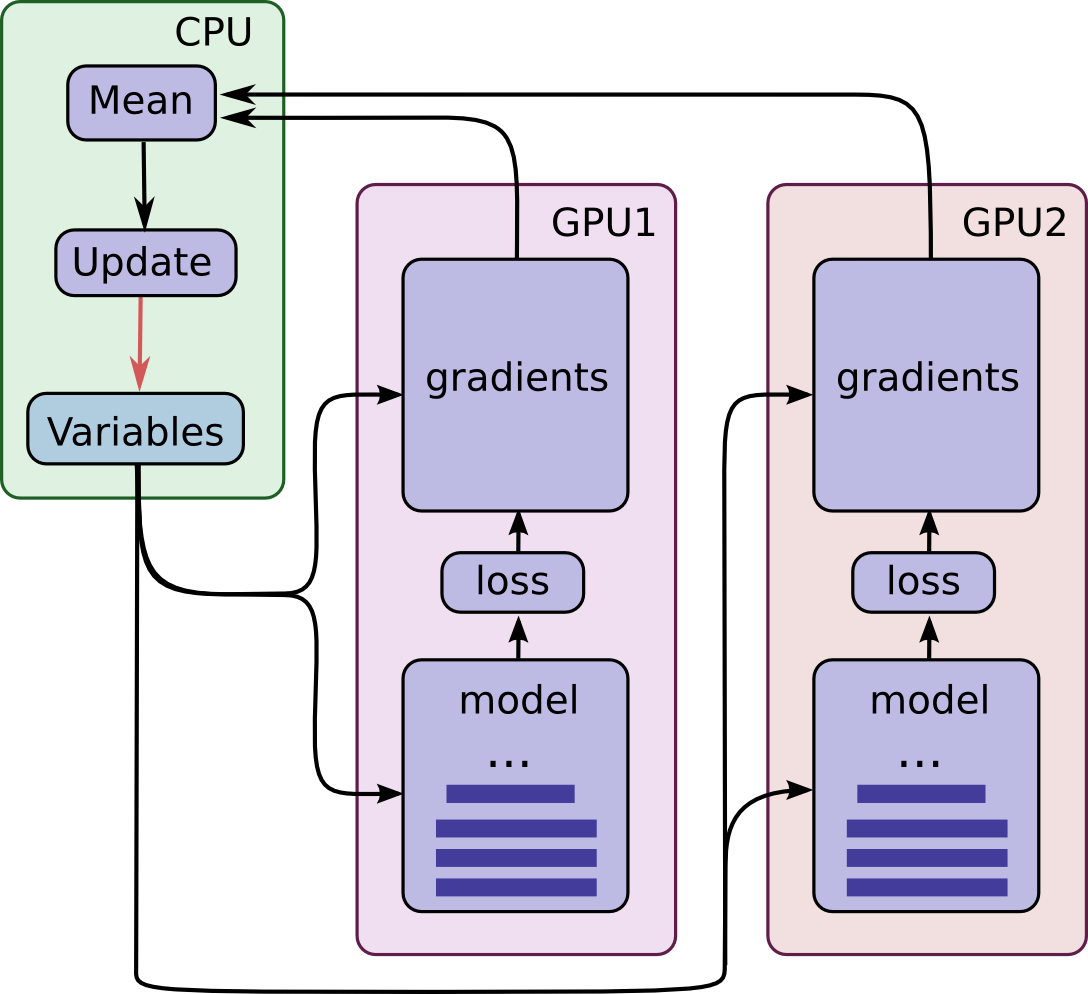
Each tower computes the gradients for a portion of the batch and the gradients are combined and averaged across the multiple towers in order to provide a single update of the Variables stored on the CPU.
A crucial aspect of training a network of this size is training speed in terms of wall-clock time. The training speed is dictated by many factors -- most importantly the batch size and the learning rate schedule. Both of these parameters are heavily coupled to the hardware set up.
Generally speaking, a batch size is a difficult parameter to tune as it requires balancing memory demands of the model, memory available on the GPU and speed of computation. Generally speaking, employing larger batch sizes leads to more efficient computation and potentially more efficient training steps.
We have tested several hardware setups for training this model from scratch but we emphasize that depending your hardware set up, you may need to adapt the batch size and learning rate schedule.
Please see the comments in inception_train.py for a few selected learning rate
plans based on some selected hardware setups.
To train this model, you simply need to specify the following:
# Build the model. Note that we need to make sure the TensorFlow is ready to
# use before this as this command will not build TensorFlow.
cd tensorflow-models/inception
bazel build //inception:imagenet_train

# run it
bazel-bin/inception/imagenet_train --num_gpus=1 --batch_size=32 --train_dir=/tmp/imagenet_train --data_dir=/tmp/imagenet_data
The model reads in the ImageNet training data from --data_dir. If you followed
the instructions in Getting Started, then set
--data_dir="${DATA_DIR}". The script assumes that there exists a set of
sharded TFRecord files containing the ImageNet data. If you have not created
TFRecord files, please refer to Getting Started
Here is the output of the above command line when running on a Tesla K40c:
2016-03-07 12:24:59.922898: step 0, loss = 13.11 (5.3 examples/sec; 6.064 sec/batch)
2016-03-07 12:25:55.206783: step 10, loss = 13.71 (9.4 examples/sec; 3.394 sec/batch)
2016-03-07 12:26:28.905231: step 20, loss = 14.81 (9.5 examples/sec; 3.380 sec/batch)
2016-03-07 12:27:02.699719: step 30, loss = 14.45 (9.5 examples/sec; 3.378 sec/batch)
2016-03-07 12:27:36.515699: step 40, loss = 13.98 (9.5 examples/sec; 3.376 sec/batch)
2016-03-07 12:28:10.220956: step 50, loss = 13.92 (9.6 examples/sec; 3.327 sec/batch)
2016-03-07 12:28:43.658223: step 60, loss = 13.28 (9.6 examples/sec; 3.350 sec/batch)
...
In this example, a log entry is printed every 10 step and the line includes the total loss (starts around 13.0-14.0) and the speed of processing in terms of throughput (examples / sec) and batch speed (sec/batch).
The number of GPU devices is specified by --num_gpus (which defaults to 1).
Specifying --num_gpus greater then 1 splits the batch evenly split across the
GPU cards.
# Build the model. Note that we need to make sure the TensorFlow is ready to
# use before this as this command will not build TensorFlow.
cd tensorflow-models/inception
bazel build //inception:imagenet_train

# run it
bazel-bin/inception/imagenet_train --num_gpus=2 --batch_size=64 --train_dir=/tmp/imagenet_train
This model splits the batch of 64 images across 2 GPUs and calculates the average gradient by waiting for both GPUs to finish calculating the gradients from their respective data (See diagram above). Generally speaking, using larger numbers of GPUs leads to higher throughput as well as the opportunity to use larger batch sizes. In turn, larger batch sizes imply better estimates of the gradient enabling the usage of higher learning rates. In summary, using more GPUs results in simply faster training speed.
Note that selecting a batch size is a difficult parameter to tune as it requires balancing memory demands of the model, memory available on the GPU and speed of computation. Generally speaking, employing larger batch sizes leads to more efficient computation and potentially more efficient training steps.
Note that there is considerable noise in the loss function on individual steps in the previous log. Because of this noise, it is difficult to discern how well a model is learning. The solution to the last problem is to launch TensorBoard pointing to the directory containing the events log.
tensorboard --logdir=/tmp/imagenet_train
TensorBoard has access to the many Summaries produced by the model that describe multitudes of statistics tracking the model behavior and the quality of the learned model. In particular, TensorBoard tracks a exponentially smoothed version of the loss. In practice, it is far easier to judge how well a model learns by monitoring the smoothed version of the loss.
How to Train from Scratch in a Distributed Setting
NOTE Distributed TensorFlow requires version 0.8 or later.
Distributed TensorFlow lets us use multiple machines to train a model faster. This is quite different from the training with multiple GPU towers on a single machine where all parameters and gradients computation are in the same place. We coordinate the computation across multiple machines by employing a centralized repository for parameters that maintains a unified, single copy of model parameters. Each individual machine sends gradient updates to the centralized parameter repository which coordinates these updates and sends back updated parameters to the individual machines running the model training.
We term each machine that runs a copy of the training a worker or replica.
We term each machine that maintains model parameters a ps, short for
parameter server. Note that we might have more than one machine acting as a
ps as the model parameters may be sharded across multiple machines.
Variables may be updated with synchronous or asynchronous gradient updates. One
may construct a an Optimizer in TensorFlow
that constructs the necessary graph for either case diagrammed below from the
TensorFlow Whitepaper:
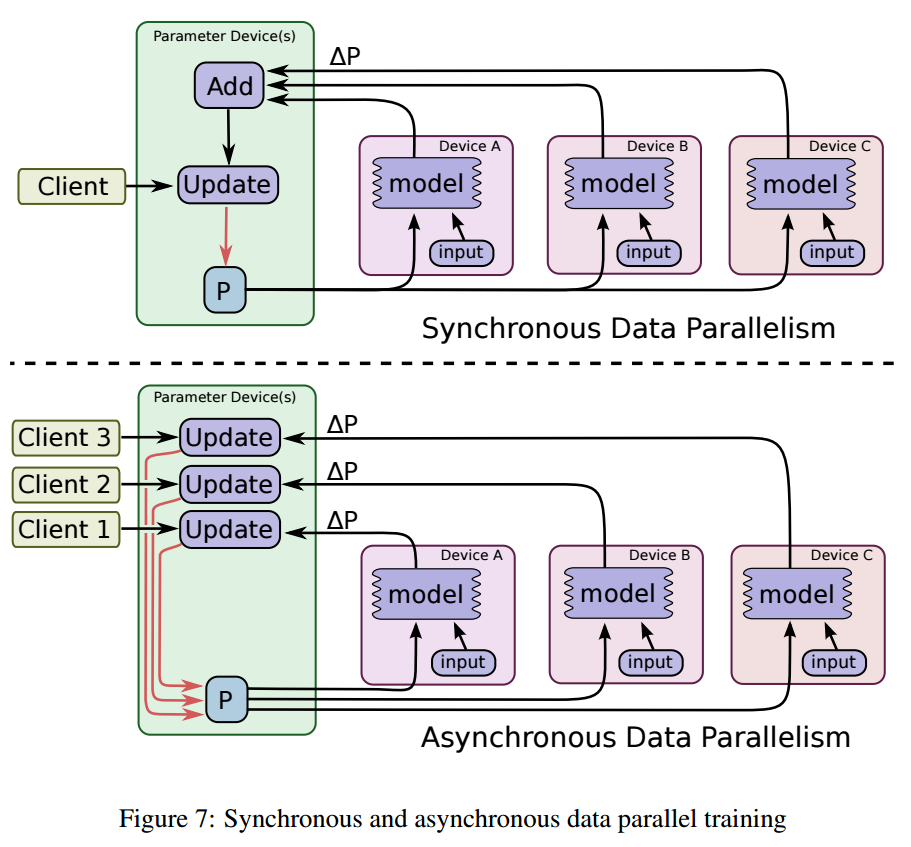
In a recent paper, synchronous gradient updates have demonstrated to reach higher accuracy in a shorter amount of time. In this distributed Inception example we employ synchronous gradient updates.
Note that in this example each replica has a single tower that uses one GPU.
The command-line flags worker_hosts and ps_hosts specify available servers.
The same binary will be used for both the worker jobs and the ps jobs.
Command line flag job_name will be used to specify what role a task will be
playing and task_id will be used to identify which one of the jobs it is
running. Several things to note here:
- The numbers of
psandworkertasks are inferred from the lists of hosts specified in the flags. Thetask_idshould be within the range[0, num_ps_tasks)forpstasks and[0, num_worker_tasks)forworkertasks. psandworkertasks can run on the same machine, as long as that machine has sufficient resources to handle both tasks. Note that thepstask does not benefit from a GPU, so it should not attempt to use one (see below).- Multiple
workertasks can run on the same machine with multiple GPUs so machine_A with 2 GPUs may have 2 workers while machine_B with 1 GPU just has 1 worker. - The default learning rate schedule works well for a wide range of number of replicas [25, 50, 100] but feel free to tune it for even better results.
- The command line of both
psandworkertasks should include the complete list ofps_hostsandworker_hosts. - There is a chief
workeramong all workers which defaults toworker0. The chief will be in charge of initializing all the parameters, writing out the summaries and the checkpoint. The checkpoint and summary will be in thetrain_dirof the host forworker0. - Each worker processes a batch_size number of examples but each gradient update is computed from all replicas. Hence, the effective batch size of this model is batch_size * num_workers.
Questions
What is Tensorflow_Model_Inception?
Robinatp/Tensorflow_Model_Inception is a public repo on GitHub by Robinatp. Train/Eval the inception network through the flowers and imagenet dataset.
Is Tensorflow_Model_Inception open source?
It declares no license on GitHub. Public does not mean open source: without a license, nobody is granted the right to reuse it.