arena-skill
When Claude keeps giving you bad answers, make 100 versions of it fight to the death. Same task, 100 different strategies, a bracket, one answer left. Free Claude Code skill.
- 1.5k
- Python
- MIT
- 8 wk ago
RouterArena: An open framework for evaluating LLM routers with standardized datasets, metrics, an automated framework, and a live leaderboard.
Repo RouteWorks/RouterArena, read from GitHub 1 min ago. RouteWorks has not joined Take My Repo.
RouteWorks/RouterArena is a public repo on GitHub by RouteWorks. RouterArena: An open framework for evaluating LLM routers with standardized datasets, metrics, an automated framework, and a live leaderboard. It declares the Apache-2.0 license on GitHub. It is written mainly in Python, has 159 stars and last changed on 2026-11-16. Nobody has reviewed it on Take My Repo yet, which says nothing about its quality. Read from GitHub on 2026-11-20.


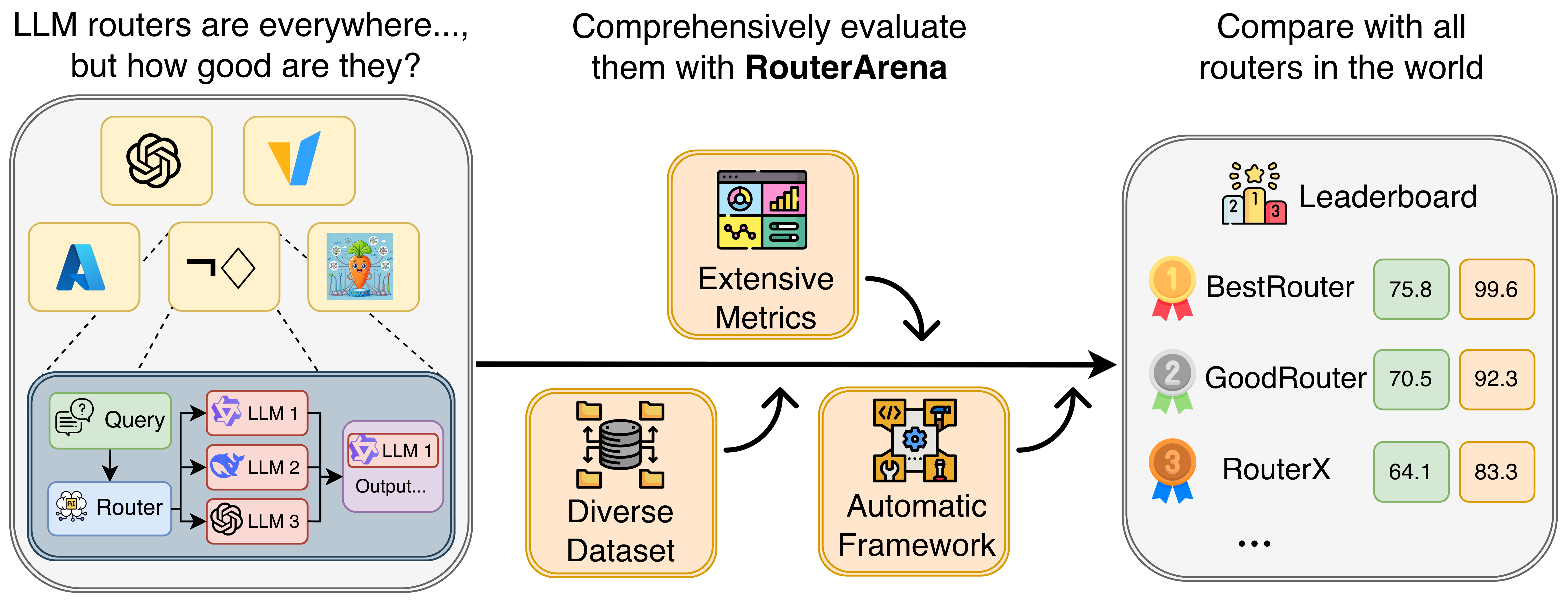
RouterArena is an open evaluation platform and leaderboard for LLM routers—systems that automatically select the best model for a given query. As the LLM ecosystem diversifies with models varying in size, capability, and cost, routing has become critical for balancing performance and cost. Yet, LLM routers currently lack a standardized evaluation framework to assess how effectively they trade off accuracy, cost, and other related metrics.
RouterArena bridges this gap by providing an open evaluation platform and benchmarking framework for both open-source and commercial routers. It has the following key features:
We aim for RouterArena to serve as a foundation for the community to evaluate, understand, and advance LLM routing systems.
Important
RouterArena is an evaluation-only dataset. Submissions that train, fit, or tune any router component on RouterArena data (including the label files) will be rejected, and any accepted submission found in violation will be withdrawn. This includes:
config/eval_config/.cached_results/. Answers copied from other submissions' prediction files are not accepted. A router that uses the official cache must still choose the model for each query from that query alone; the cached answers and their scores must not inform the choice.For more details, please see our website and blog.
| Rank | Router | Affiliation | Acc-Cost Arena | Accuracy | Cost/1K Queries | Optimal Selection | Optimal Cost | Optimal Accuracy | Latency | Robustness |
|---|---|---|---|---|---|---|---|---|---|---|
| 🥇 | Divyam | 👤 @samikd | 77.19 | 80.83 | $0.66 | 17.06 | 19.96 | 93.29 | — | 75.71 |
| 🥈 | BizRouter | 💼 BizRouter | 77.08 | 81.66 | $1.00 | — | — | — | — | 97.38 |
| 🥉 | Sqwish Router | 👤 @namitha-sqwish | 76.34 | 79.88 | $0.69 | 11.46 | 24.13 | 94.36 | — | 51.67 |
| 4 | R**2: Reasonometry Router | 👤 @sashakolpakov | 76.16 | 78.97 | $0.48 | — | — | — | — | 99.76 |
| 5 | KT-ModelRouter | 👤 @DusanBaek | 76.08 | 78.24 | $0.34 | — | — | — | — | 80.48 |
| 6 | LLM Router [PyPI] | 👤 @ypollak2 | 75.77 | 78.54 | $0.49 | — | — | — | — | 100.00 |
| 7 | SapientAI Auto Router | 💼 Publicis Sapient | 75.58 | 78.23 | $0.47 | 5.78 | 19.04 | 92.15 | — | 73.33 |
| 8 | Cross-Router | 👤 @JiaHg | 75.25 | 78.27 | $0.59 | 45.73 | 35.46 | 90.46 | — | 67.14 |
| 9 | nadir-caliper | 👤 @doramirdor | 74.63 | 76.14 | $0.25 | — | — | — | — | 79.76 |
| 10 | vLLM‑SR [Code] [HF] | 🎓 vLLM SR Team | 74.24 | 77.30 | $0.67 | 20.40 | 29.18 | 89.37 | — | 67.62 |
| 11 | BARouter | 👤 @zulk2002 | 73.67 | 76.22 | $0.54 | 66.16 | 46.55 | 93.87 | — | 68.81 |
| 12 | NuRoute Artemis | 💼 NuRoute | 73.63 | 76.19 | $0.54 | — | — | — | — | 80.00 |
| 13 | OrcaRouter‑Adaptive [Code] [Paper] [X] | 🎓 Continuum AI | 72.48 | 75.63 | $0.83 | — | — | — | — | 22.62 |
| 14 | Nadir Router | 🎓 NadirRouter | 72.25 | 74.96 | $0.67 | 100.00 | 100.00 | 100.00 | — | 25.48 |
| 15 | Hybrid Router | 👤 @mikemao27 | 71.20 | 71.46 | $0.13 | 16.67 | 63.09 | 92.81 | — | 96.67 |
| 16 | chuzom-solo-v32 | 👤 @ypollak2 | 70.64 | 70.62 | $0.10 | — | — | — | — | 100.00 |
| 17 | Azure-Model-Router [Web] | 💼 Microsoft | 70.37 | 72.93 | $0.75 | — | — | — | — | 71.43 |
| 18 | Weave Router | 🎓 Weave | 70.00 | 76.22 | $3.21 | — | — | — | — | 100.00 |
| 19 | AsiaInfo-Router | 👤 @Uncle-LL | 70.00 | 75.82 | $2.86 | — | — | — | — | 69.52 |
| 20 | cruq-router | 👤 @nabaruns | 69.89 | 71.41 | $0.41 | — | — | — | — | 81.67 |
| 21 | Auto Router | 👤 @cxf2015 | 69.80 | 70.42 | $0.21 | 47.71 | 60.25 | 86.09 | — | 49.52 |
| 22 | Lynkr | 👤 @vishalveerareddy123 | 67.97 | 68.83 | $0.31 | 13.48 | 19.93 | 84.95 | — | 92.38 |
| 23 | MIRT‑BERT [Code] | 🎓 USTC | 66.89 | 66.88 | $0.15 | 3.44 | 19.62 | 78.18 | 27.03 | 61.19 |
| 24 | NIRT‑BERT [Code] | 🎓 USTC | 66.12 | 66.34 | $0.21 | 3.83 | 14.04 | 77.88 | 10.42 | 49.29 |
| 25 | GPT‑5 | 💼 OpenAI | 64.32 | 73.96 | $10.02 | — | — | — | — | — |
| 26 | CARROT [Code] [HF] | 🎓 UMich | 63.87 | 67.21 | $2.06 | 2.68 | 6.77 | 78.63 | 1.50 | 89.05 |
| 27 | Chayan [HF] | 🎓 Adaptive Classifier | 63.70 | 64.87 | $0.61 | 43.03 | 43.75 | 88.74 | — | — |
| 28 | RouterBench‑MLP [Code] [HF] | 🎓 Martian | 57.56 | 61.62 | $4.83 | 13.39 | 24.45 | 83.32 | 90.91 | 80.00 |
| 29 | NotDiamond | 💼 NotDiamond | 57.29 | 60.83 | $4.10 | 1.55 | 2.14 | 76.81 | — | 55.91 |
| 30 | GraphRouter [Code] | 🎓 UIUC | 57.22 | 57.00 | $0.34 | 4.73 | 38.33 | 74.25 | 2.70 | 94.29 |
| 31 | RouterBench‑KNN [Code] [HF] | 🎓 Martian | 55.48 | 58.69 | $4.27 | 13.09 | 25.49 | 78.77 | 1.33 | 83.33 |
| 32 | RouteLLM [Code] [HF] | 🎓 Berkeley | 48.07 | 47.04 | $0.27 | 99.72 | 99.63 | 68.76 | 0.40 | 100.00 |
| 33 | RouterDC [Code] | 🎓 SUSTech | 33.75 | 32.01 | $0.07 | 39.84 | 73.00 | 49.05 | 10.75 | 85.24 |
Under review: Paix2 (#164), R2-Router (#68) and AgentForge Router (#111) are temporarily removed from the ranking pending an integrity review. See #211, #258 and #259.
🎓 Open-source 💼 Closed-source
curl -LsSf https://astral.sh/uv/install.sh | sh
cd RouterArena
uv sync
Download the dataset from HF dataset.
uv run python ./scripts/process_datasets/prep_datasets.py
In the project root, copy .env.example as .env and update the API keys in .env. This step is required only if you use our pipeline for LLM inferences.
# Example .env file
OPENAI_API_KEY=<Your-Key>
ANTHROPIC_API_KEY=<Your-Key>
# ...
See the ModelInference class for the complete list of supported providers and required environment variables. You can extend that class to support more models, or submit a GitHub issue to request support for new providers.
Follow the steps below to obtain your router's model choices for each query. Start with the sub_10 split (a 10% subset) for local testing. Once your setup works, you can evaluate:
full dataset for full local evaluation and official leaderboard submission.robustness dataset for robustness evaluation.Create a config file in ./router_inference/config/<router_name>.json. An example config file is included here.
{
  "pipeline_params": {
      "router_name": "your-router",
      "router_cls_name": "your_router_class_name",
      "models": [
          "gpt-4o-mini",
          "claude-3-haiku-20240307",
          "gemini-2.0-flash-001"
      ]
  }
}
Every model in your config needs a price. Prices live in model_cost/model_profiles.yaml: one entry per model, keyed by its OpenRouter id, with the other spellings of the same model as aliases. If your model is listed under another spelling, add yours to its aliases. For a new model, add an entry with its price per million tokens and a link to the published price:
  "openai/gpt-4o-mini":
    price: {input: 0.15, output: 0.6}
    aliases: ["gpt-4o-mini"]
    as_of: "2026-10-31"
    source: "https://openrouter.ai/openai/gpt-4o-mini"
Then regenerate model_cost/model_cost.json, which the evaluator reads, with python scripts/pricing/build_model_cost.py. A model name with no entry is charged the highest price in the table.
For a model your router runs itself (on-device or self-hosted), don't enter your own cost. Add local: {base: <id of the listed model whose weights you serve>, bits: <weight precision>}, or local: {active_params_b: <active parameters in billions>, bits: <...>} if no listed model has these weights, plus sync: false. Then run python scripts/pricing/local_price.py --write, which prices it by model_cost/local_pricing.yaml: the listed model's price, or the market price of an open-weight model of that size, times a quantization factor.
Note
Ensure all models in your above config files are listed in ./universal_model_names.py. If you add a new model, you must also add the API inference endpoint in llm_inference/model_inference.py.
Create your own router class by inheriting from BaseRouter and implementing the _get_prediction() method. See router_inference/router/example_router.py for a complete example.
Then, modify router_inference/router/__init__.py to include your router class:
# Import your router class
from router_inference.router.my_router import MyRouter

__all__ = ["BaseRouter", "ExampleRouter", "MyRouter"]
Finally, generate the prediction file:
uv run python ./router_inference/generate_prediction_file.py your-router [sub_10|full|robustness]
Note
<your-router> argument must match your config filename (without the .json extension). For example, if your config file is router_inference/config/my-router.json, use my-router as the argument._get_prediction() method must return a model name that exists in your config file's models list. The base class will automatically validate this.uv run python ./router_inference/check_config_prediction_files.py your-router [sub_10|full|robustness]
This script checks: (1) all model names are valid, (2) prediction file has correct size (809 for sub_10, 8400 for full, 420 for robustness), and (3) all entries have valid global_index, prompt, and prediction fields.
Run the inference script to make API calls for each query using the selected models:
uv run python ./llm_inference/run.py your-router
The script loads your prediction file, makes API calls using the models specified in the prediction field, and saves results incrementally. It uses cached results when available and saves progress after each query, so you can safely interrupt and resume. Results are saved to ./cached_results/ for reuse across routers.
Note
As the last step, run the evaluation script:
uv run python ./llm_evaluation/run.py your-router [sub_10|full|robustness]
Tip
sub_10 or full to evaluate on those datasets.robustness to run robustness-only evaluation (expects <router_name>-robustness.json).To get your router on the leaderboard, you can open a Pull Request with your router's prediction file to trigger our automated evaluation workflow. Details are as follows:
Add your files:
router_inference/config/<router_name>.json - Your router configurationrouter_inference/predictions/<router_name>.json - Your prediction file with generated_result fields populatedrouter_inference/predictions/<router_name>-robustness.json - Your prediction file for robustness evaluation, no generated_result fields needed[!NOTE] Routers that call LLMs themselves. If your router calls an LLM to make its decision (a routing model, a classifier, voters, a critic, or the earlier steps of a cascade), record each call in the row's
router_usagelist as{"model": ..., "input_tokens": ..., "output_tokens": ...}, with an optionalpurpose. Count reasoning tokens inoutput_tokens. The evaluator adds these calls to the row's cost at each model's price. Check your total withuv run python scripts/pricing/compute_cost.py <router_name>.
Open a Pull Request to main branch and call /evaluate in the PR comment
/evaluate in the PR comment to trigger the evaluation workflow. See an example here.main. Only the three files above are taken from your branch, plus any new models you add to the price table (model_cost/model_profiles.yaml and the generated model_cost/model_cost.json) and universal_model_names.py (models already listed keep their price on main)The Figure below shows the evaluation pipeline.

We welcome and appreciate contributions and collaborations of any kind.
We use pre-commit to ensure a consistent coding style. You can set it up by
pip install pre-commit
pre-commit install
Before pushing your code, run the following and make sure your code passes all checks.
pre-commit run --all-files
Feel free to contact us for contributions and collaborations.
Yifan Lu (yifan.lu@rice.edu)
Rixin Liu (rixin.liu@rice.edu)
Jiarong Xing (jxing@rice.edu)
If you find our project helpful, please give us a star and cite us by:
@misc{lu2025routerarenaopenplatformcomprehensive,
  title        = {RouterArena: An Open Platform for Comprehensive Comparison of LLM Routers},
  author       = {Yifan Lu and Rixin Liu and Jiayi Yuan and Xingqi Cui and Shenrun Zhang and Hongyi Liu and Jiarong Xing},
  year         = {2025},
  eprint       = {2510.00202},
  archivePrefix= {arXiv},
  primaryClass = {cs.LG},
  url          = {https://arxiv.org/abs/2510.00202}
}
RouteWorks/RouterArena is a public repo on GitHub by RouteWorks. RouterArena: An open framework for evaluating LLM routers with standardized datasets, metrics, an automated framework, and a live leaderboard.
It declares the Apache-2.0 license on GitHub.
Its maker has not tagged a system, so it is unknown here. Its README says what it needs.
Open "Take it" on its page: Take My Repo writes an install plan for your machine and hands it to your AI agent (Claude Code, Codex or Cursor), which asks you before each step. Take My Repo has not tested it on any machine.
Its last change on GitHub was on 2026-11-16. Take My Repo does not judge from that whether it is maintained.
Nobody has reviewed it on Take My Repo yet, which says nothing about its quality.
When Claude keeps giving you bad answers, make 100 versions of it fight to the death. Same task, 100 different strategies, a bracket, one answer left. Free Claude Code skill.

The agent harness performance optimization system. Skills, instincts, memory, security, and research-first development for Claude Code, Codex, Opencode, Cursor and beyond.
Open-source, high-performance AI gateway that works as your LLM gateway, MCP gateway and agent gateway. One OpenAI-compatible API for 10,000+ models, with failover, load balancing, semantic caching, virtual keys, budgets and MCP Code Mode. Works with any SDK or agent and adds under 200µs of overhead at 5k RPS.
Plano is an AI-native proxy server and data plane for agentic apps. Smart LLM routing, observability, agent orchestration, and guardrails so you stay focused on your agents core logic.