
rea
Reverse engineer anything with agents, from app behavior down to native binaries.
- 477k
- TypeScript
- MIT
- 30 min ago
A flexible playground for Android CTF challenges.
Repo SECFORCE/droidground, read from GitHub 1 min ago. SECFORCE has not joined Take My Repo.
SECFORCE/droidground is a public repo on GitHub by SECFORCE. A flexible playground for Android CTF challenges. It declares the GPL-3.0 license on GitHub. It is written mainly in TypeScript, has 123 stars and last changed on 2026-10-25. Nobody has reviewed it on Take My Repo yet, which says nothing about its quality. Read from GitHub on 2026-11-24.

DroidGround
In traditional CTF challenges, it's common to hide flags in files on a system, requiring attackers to exploit vulnerabilities to retrieve them. However, in the Android world, this approach doesn't work well. APK files are easily downloadable and reversible, so placing a flag on the device usually makes it trivial to extract using static analysis or emulator tricks. This severely limits the ability to create realistic, runtime-focused challenges.
DroidGround is designed to solve this problem.
It is a custom-built platform for hosting Android mobile hacking challenges in a controlled and realistic environment, where attackers are constrained just enough to require solving challenges in the intended way.
Importantly, participants may be jailed inside the app environment. The modularity of the tool allows to set if the user can or cannot spawn a shell, read arbitrary files, or sideload tools. Everything can be setup so that the only way to retrieve the flag is through understanding and exploiting the app itself.
DroidGround enables a wide variety of Android challenges that are otherwise hard to implement in traditional CTF setups. For example, in a remote code execution (RCE) challenge, players might receive an APK for local analysis. After discovering a vulnerability, they can develop a Frida script and run it through DroidGround on the real target device to extract the flag from internal storage. Other challenge types can involve hidden activities, custom broadcast intents, service exploitation, or dynamic analysis using preloaded tools.
With real-time device streaming, fine-grained control over features, Frida integration, and customizable setup and reset scripts, DroidGround empowers CTF organizers to build secure, flexible, and realistic Android challenges that go far beyond what is typically possible.
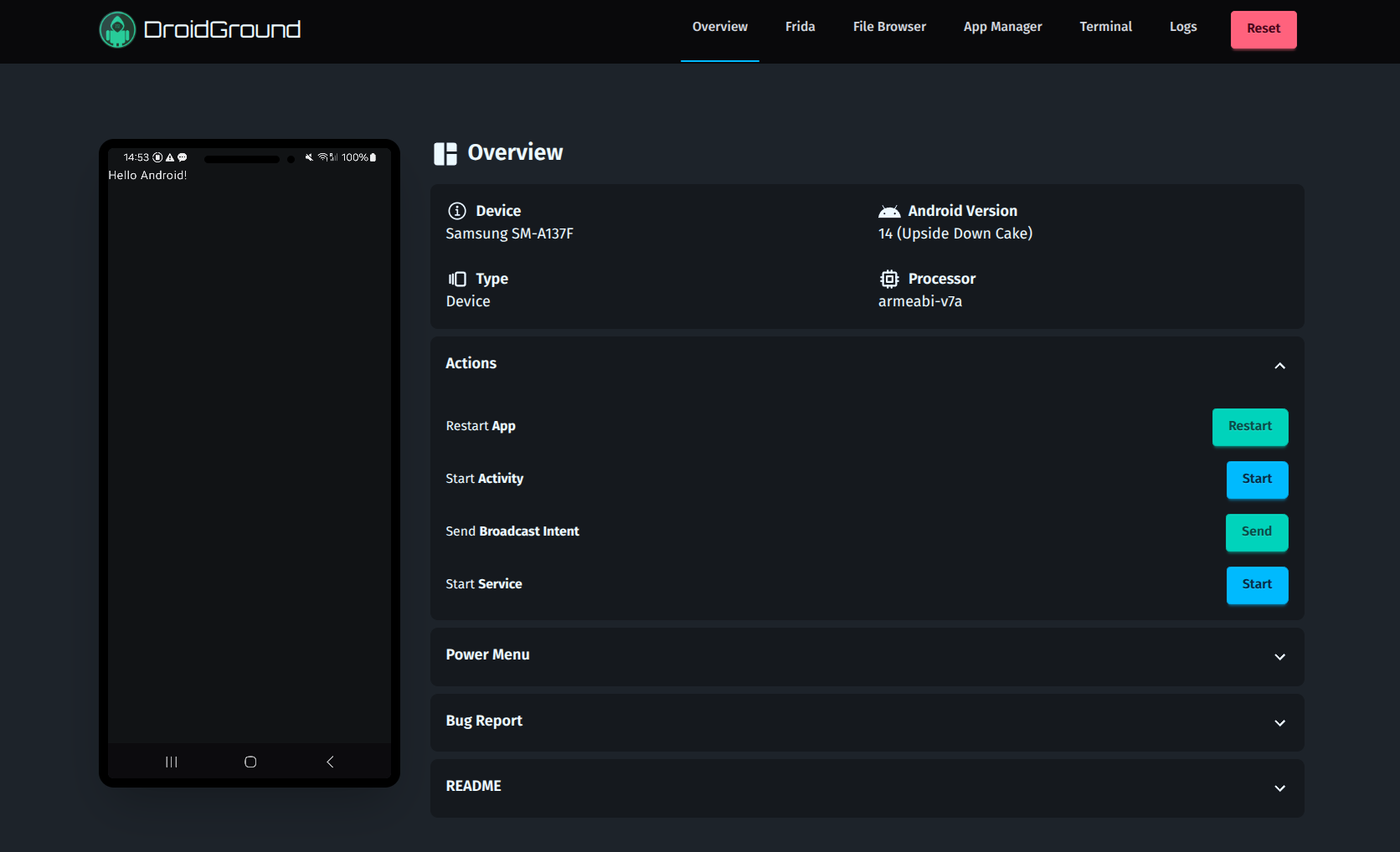
DroidGround provides a rich set of server-controlled features.
scrcpy), with optional mouse, touch, and keyboard controlAlmost all features are modular and defined via environment variables, ensuring precise control over the challenge scope.
 |
 |
|---|---|
| Overview | Start Activity |
 |
 |
| Frida Jailed Mode | Frida Full Mode |
 |
 |
| File Browser | App Manager |
 |
 |
| Terminal | Logs |
The .env.sample file in the root directory is a good starting point. This is the full list of all env variables currently supported:
| Variable | Description | Default |
|---|---|---|
DROIDGROUND_BASE_PATH |
Path of the webapp (useful for hosting on subpaths) | - |
DROIDGROUND_APP_PACKAGE_NAME |
Package name of target app | - |
DROIDGROUND_ADB_HOST |
ADB host | localhost |
DROIDGROUND_ADB_PORT |
ADB port | 5037 |
DROIDGROUND_ADB_SERIAL |
Optional ADB device serial to connect to | - |
DROIDGROUND_DEVICE_TYPE |
usb or network |
usb |
DROIDGROUND_DEVICE_HOST |
IP of Android device (adb) (network mode only) |
- |
DROIDGROUND_DEVICE_PORT |
port of Android device (adb) (network mode only) |
- |
DROIDGROUND_INIT_SCRIPTS_FOLDER |
Folder containing setup.sh and reset.sh |
/init.d |
DROIDGROUND_HOST |
Bind address | 0.0.0.0 |
DROIDGROUND_PORT |
Bind port | 4242 |
DROIDGROUND_RESTART_APP_DISABLED |
Disable app restart | false |
DROIDGROUND_APP_MANAGER_DISABLED |
Disable app manager | false |
DROIDGROUND_BUG_REPORT_DISABLED |
Disable bugreport | false |
DROIDGROUND_FILE_BROWSER_DISABLED |
Disable file browser | false |
DROIDGROUND_FRIDA_DISABLED |
Disable Frida support | false |
DROIDGROUND_FRIDA_TYPE |
jail or full |
jail |
DROIDGROUND_FRIDA_INJECTION |
server or gadget |
server |
DROIDGROUND_LOGCAT_DISABLED |
Disable logcat | false |
DROIDGROUND_REBOOT_ENABLED |
Enable reboot | false |
DROIDGROUND_SHUTDOWN_ENABLED |
Enable shutdown | false |
DROIDGROUND_START_ACTIVITY_DISABLED |
Disable startActivity | false |
DROIDGROUND_START_RECEIVER_DISABLED |
Disable broadcast | false |
DROIDGROUND_START_SERVICE_DISABLED |
Disable startService | false |
DROIDGROUND_TERMINAL_DISABLED |
Disable terminal | false |
DROIDGROUND_RESET_DISABLED |
Disable reset | false |
DROIDGROUND_SCRCPY_CONTROL_ENABLED |
Enable mouse, touch, and keyboard input through the device screen | false |
DROIDGROUND_SCRCPY_MAX_SIZE |
Maximum video dimension in pixels; 0 keeps full device resolution |
1280 |
DROIDGROUND_SCRCPY_MAX_FPS |
Maximum video frame rate; 0 leaves it uncapped |
60 |
DROIDGROUND_SCRCPY_VIDEO_BIT_RATE |
Video bitrate in bits per second | 4000000 |
DROIDGROUND_EXPLOIT_APP_DURATION |
The time (in seconds) the exploit app will be active | 10 |
DROIDGROUND_EXPLOIT_APP_MAX_SIZE |
The max size (in MB) of the exploit app | 50 |
DROIDGROUND_NUM_TEAMS |
The number of teams playing simultaneously | - |
DROIDGROUND_TEAM_TOKEN_<N> |
The token for the nth team. Auto-generated if missing | - |
DROIDGROUND_IP_STATIC |
The static IP address to display. It takes precedence over DROIDGROUND_IP_IFACE |
- |
DROIDGROUND_IP_IFACE |
The network interface for the displayed IP address | - |
DROIDGROUND_LOGO_LINK |
Optionally set the logo click-through link (e.g., your CTF main page) | - |
Set DROIDGROUND_SCRCPY_CONTROL_ENABLED=true and restart DroidGround to make the device screen interactive. Click or tap the screen to focus it, then click, drag, swipe, use multiple touch points, scroll with the mouse wheel, or type. Right-click or press Escape for Android Back. Tab and Shift+Tab move focus out of the screen. Input is shared by everyone viewing the device; during a team exploit run, only viewers authenticated as that team can view or control it. The default remains a view-only screen. Text input uses scrcpy's Android key injection, so character support depends on the device's keyboard mapping.
The DROIDGROUND_IP_IFACE looks for an exact match first and fallbacks to the first interface that starts with the provided value since Docker only allows to specify the network interface prefix within the container.
Screen streaming defaults to a maximum dimension of 1280 pixels, up to 60 fps, and 4 Mbps to reduce encoding, network, and browser work. This trades some fine detail for responsiveness in the embedded device view. Set DROIDGROUND_SCRCPY_MAX_SIZE=0 and DROIDGROUND_SCRCPY_VIDEO_BIT_RATE=10000000 to restore the previous full-resolution quality settings. For slower connections or browsers, try a maximum size of 1024, 30 fps, and 2000000 bits per second. Restart DroidGround after changing these settings.
The browser uses WebCodecs when available and falls back to the software H.264 decoder otherwise. WebCodecs requires a secure context: use HTTPS for remote deployments (localhost also works). Plain HTTP on a remote IP or hostname uses software decoding. Slow viewers skip to a fresh keyframe instead of accumulating a video backlog. If no keyframe arrives within 1.5 seconds, DroidGround requests a video refresh; this supports encoders such as ReDroid's OMX.google.h264.encoder, whose periodic I-frames are not necessarily independently decodable IDR frames. Refresh requests are shared across viewers and may briefly refresh the screen for everyone. The server keeps an internal scrcpy control channel for video refreshes; mouse, touch, keyboard input, and automatic screen wake-up remain gated by DROIDGROUND_SCRCPY_CONTROL_ENABLED. See the WebCodecs specification and scrcpy video documentation for the underlying browser and video settings.
The usage of the DROIDGROUND_NUM_TEAMS variable slightly changes the behaviour of the application under the hood. If this option is set:
SECFORCE/droidground is a public repo on GitHub by SECFORCE. A flexible playground for Android CTF challenges.
It declares the GPL-3.0 license on GitHub.
Its maker tagged it for macOS, Windows and Linux, or as Docker or cross-platform. That is declared by the maker; Take My Repo has not tested it.
Open "Take it" on its page: Take My Repo writes an install plan for your machine and hands it to your AI agent (Claude Code, Codex or Cursor), which asks you before each step. Take My Repo has not tested it on any machine.
Flutter makes it easy and fast to build beautiful apps for mobile and beyond
f.k.a. Awesome ChatGPT Prompts. Share, discover, and collect prompts from the community. Free and open source — self-host for your organization with complete privacy.
⚡ Automatically decrypt encryptions without knowing the key or cipher, decode encodings, and crack hashes ⚡
Its last change on GitHub was on 2026-10-25. GitHub counts 0 open issues and pull requests. Take My Repo does not judge from that whether it is maintained.
Nobody has reviewed it on Take My Repo yet, which says nothing about its quality.
Take My Repo cannot say: it does not audit code and has not run droidground. What is known comes from GitHub. It declares the GPL-3.0 license on GitHub. Its last change was on 2026-10-25. It has 123 stars, which measure popularity, not safety. Nobody has reviewed it on Take My Repo yet, which says nothing about its quality. Read the source before you run it. With "Take it", your AI agent shows each step and asks you before running it; README text is treated as data, not as instructions.




