
strapi
🚀 Strapi is the leading open-source headless CMS. It’s 100% JavaScript/TypeScript, fully customizable, and developer-first.
- 74k
- TypeScript
- 21 h ago
Generator for ssw.com.au/rules
Repo SSWConsulting/SSW.Rules, read from GitHub 1 min ago. SSWConsulting has not joined Take My Repo.
SSWConsulting/SSW.Rules is a public repo on GitHub by SSWConsulting. Generator for ssw.com.au/rules. It declares the Apache-2.0 license on GitHub. It is written mainly in TypeScript, has 28 stars and last changed on 2026-11-25. Nobody has reviewed it on Take My Repo yet, which says nothing about its quality. Read from GitHub on 2026-11-25.
🚀 Strapi is the leading open-source headless CMS. It’s 100% JavaScript/TypeScript, fully customizable, and developer-first.
f.k.a. Awesome ChatGPT Prompts. Share, discover, and collect prompts from the community. Free and open source — self-host for your organization with complete privacy.
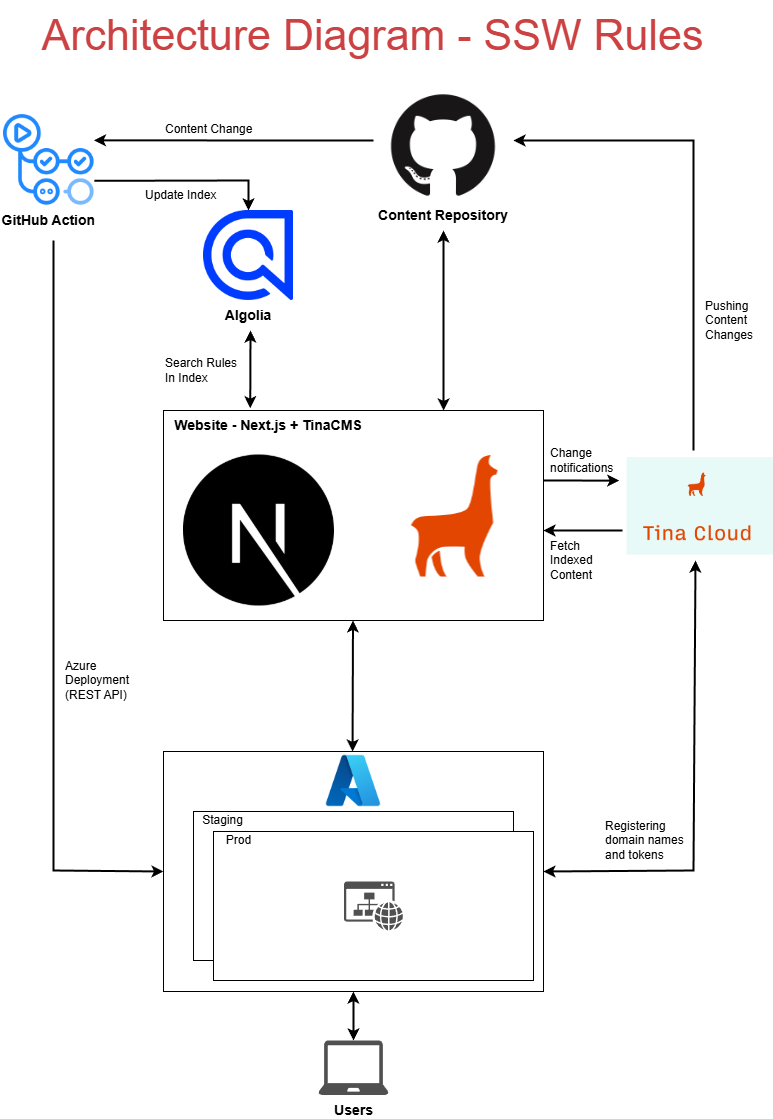
This is a Next.js + TinaCMS website pulling data from:

Clone this repo
Clone SSW.Rules.Content
Place both repos in the same parent directory e.g.
📁 SSW-dev/
├── 📁 SSW.Rules.Content/
└── 📁 SSW.Rules/ <--- This repo
Create a .env file based off .env.example in the root of this repo - get the values from Keeper (SSW.Rules Environment Variables)
Run pnpm install to install packages
Install pyyaml python package: py -3 -m pip install pyyaml
Run pnpm prepare:content to generate required mapping JSON files (they are gitignored)
Run pnpm dev to start the development server
To test changes to MDX rules:
Go to your branch in SSW.Rules.Content
Modify the rule MDX as needed
If there are any changes to categories, re-run pnpm prepare:content
Run pnpm dev in this project to start SSW.Rules locally
Navigate to http://localhost:3000/rules/ to see your changes
Note:
pnpm devdoes not track changes in SSW.Rules.Content, therefore, you will need to re-run the command after you make changes
SSW.Rules.Content), follow the setup steps in the WikiChanges made in SSW.Rules.Content (e.g. rule MDX, categories, images) will go live after the PR is merged.
🎥 Watch the video: TinaCMS for GitHub - The SSW Rules Migration | Jake Bayliss | SSW Consulting
Code changes made to SSW.Rules are deployed as follows:
release/xx branch from the current main commit you want to shipTo deploy a PR preview, add a comment to the PR: /deploy. This creates/updates a preview deployment (slot pr-<number>) and posts a comment with the preview URL.
tina-lock.json in a PR previewThe build process checks whether a branch with the same name as the PR branch exists in SSW.Rules.Content. If found, that branch is used to source content (including tina-lock.json); otherwise it falls back to main.
This means if your PR requires a new tina-lock.json (e.g. you added or changed a TinaCMS collection), you can test it in the PR preview without touching main in the content repo:
SSWConsulting/SSW.Rules.Content with the exact same name as your PR branch.tina-lock.json (and any other content changes) to that branch./deploy on the PR - the preview build will automatically pick up the matching content branch.build-rule-category-map.py
Generates two JSON files:
rule-to-categories.json (maps rules to categories)category-uri-title-map.json (maps category URIs to titles)orphaned_rules.json (maps category URIs to titles)SSW.Rules.Content repo and runs during the build process (via GitHub Actions) or manually from scripts/tina-migration.prepare-content.js
A Node.js script that runs build-rule-category-map.py and moves the JSON files to the correct location for use by the website.
Uses the LOCAL_CONTENT_RELATIVE_PATH environment variable to locate the content repo.
validate-rule-categories.js
Fails when a non-archived rule has no category, or when a rule's categories frontmatter points at a category file that doesn't exist (e.g. after a category was moved), naming every offending rule.
Runs in prepare-content.js and in the build workflow before the Docker build, so the build fails in seconds instead of as a /archived prerender error.
When the check passes, it also writes rule-folders.json, the rule list that generateStaticParams reads.
Run it manually with pnpm validate:rule-categories, which uses LOCAL_CONTENT_RELATIVE_PATH, or pass the content repo path as an argument.
build-rule-category-map.py
Similar logic to the version in PoC. It processes the categories/ folder and .mdx files to create the same JSON maps.
convert-rule-md-to-mdx.py
Converts .md rule files to MDX format compatible with TinaCMS.
Replaces custom markdown patterns (e.g., Figure, good/bad/ok boxes) with structured MDX components like <asideEmbed> and escapes special characters for valid formatting.
modify-sub-categories-frontmatter.py
Updates frontmatter in sub-category files (excluding index.md) to ensure consistency.
modify-top-categories-frontmatter.py
Targets index.md files in sub-category folders and updates frontmatter to match the expected format.
modify-main-category-frontmatter
Updates index.md file at the root of the categories folder.
All rule content (including .mdx files and images) live into the public/ folder.
🎥 The 3 options for storing markdown in GitHub for TinaCMS
public/
└── uploads/
    └── rules/
        ├── rule-a/
        │   ├── rule.mdx
        │   └── img.png
        └── rule-b/
            ├── rule.mdx
            └── img.png
We've integrated TinaCMS with an editorial workflow to support content editing in a more structured way. If you're unfamiliar with how editorial workflows work in Tina, please refer to the official documentation:
👉 TinaCMS Editorial Workflow Documentation
This workflow allows for content changes to be reviewed before being published, improving collaboration and content quality.
The Bookmark feature uses the SSW.Rules.Functions API.
Local debugging setup
SSW.Rules.Functions repository.local.settings.json file and copy the values from Keeper (environment variables for the Functions app).Local endpoint
By default, the API is available at: http://localhost:7248.
Bookmark data is persisted to the staging database.
Install nodejs version specified in .nvmrc (Ideally use nvm to use the right version)
Ensure corepack is enabled - corepack enable (this allows auto-install of the correct yarn version)
Clone the repo from https://github.com/SSWConsulting/SSW.Rules
Run yarn install to install packages
Create environment files .env.development based off .env.template - get the values from Keeper (SSW.Rules Environment Variables)
For GitHub App authentication, set the following environment variables:
GH_APP_ID: Your GitHub App IDGH_APP_PRIVATE_KEY: Your GitHub App private key (PEM format, can be base64 encoded)GITHUB_APP_INSTALLATION_ID: (Optional) The installation ID. If not provided, the first installation will be used.See GitHub App authentication documentation for more details.
SSWConsulting/SSW.Rules is a public repo on GitHub by SSWConsulting. Generator for ssw.com.au/rules.
It declares the Apache-2.0 license on GitHub.
Its maker tagged it for macOS, Windows and Linux, or as Docker or cross-platform. That is declared by the maker; Take My Repo has not tested it.
Open "Take it" on its page: Take My Repo writes an install plan for your machine and hands it to your AI agent (Claude Code, Codex or Cursor), which asks you before each step. Take My Repo has not tested it on any machine.
TinaCMS is the leading open-source headless CMS that supports Markdown and Visual Editing. Your content is stored in your own GitHub repo 🦙 ❤️
Flutter makes it easy and fast to build beautiful apps for mobile and beyond
Payload is the open-source, fullstack Next.js framework, giving you instant backend superpowers. Get a full TypeScript backend and admin panel instantly. Use Payload as a headless CMS or for building powerful applications.
Build Agentic workflows, RAG pipelines, with rich AI model and tool support on one collaborative workspace. Deploy on cloud, VPC, or self-hosted, so teams move from prototype to production without rebuilding the stack.
Its last change on GitHub was on 2026-11-25. GitHub counts 260 open issues and pull requests. Take My Repo does not judge from that whether it is maintained.
Nobody has reviewed it on Take My Repo yet, which says nothing about its quality.
Take My Repo cannot say: it does not audit code and has not run SSW.Rules. What is known comes from GitHub. It declares the Apache-2.0 license on GitHub. Its last change was on 2026-11-25. It has 28 stars, which measure popularity, not safety. Nobody has reviewed it on Take My Repo yet, which says nothing about its quality. Read the source before you run it. With "Take it", your AI agent shows each step and asks you before running it; README text is treated as data, not as instructions.


