
rea
Reverse engineer anything with agents, from app behavior down to native binaries.
- 476k
- TypeScript
- MIT
- 42 min ago
The ultimate single-file SSH tunnel manager. Full TUI, live dashboard, TLS obfuscation, Telegram bot, kill switch, and more. Zero dependencies.
Repo SamNet-dev/tunnelforge, read from GitHub 10 min ago. SamNet-dev has not joined Take My Repo.
SamNet-dev/tunnelforge is a public repo on GitHub by SamNet-dev. The ultimate single-file SSH tunnel manager. Full TUI, live dashboard, TLS obfuscation, Telegram bot, kill switch, and more. Zero dependencies. It declares the GPL-3.0 license on GitHub. It is written mainly in Shell, has 111 stars and last changed on 2026-03-15. Nobody has reviewed it on Take My Repo yet, which says nothing about its quality. Read from GitHub on 2026-11-24.
  ▀▀█▀▀ █  █ █▄ █ █▄ █ █▀▀ █   █▀▀ █▀█ █▀█ █▀▀ █▀▀
    █   █  █ █ ▀█ █ ▀█ █▀▀ █   █▀  █ █ █▀█ █ █ █▀▀
    █    ▀▀  █  █ █  █ ▀▀▀ ▀▀▀ █   ▀▀▀ █ █ ▀▀▀ ▀▀▀
One script. Every tunnel type. Full TUI. Live dashboard.
SOCKS5 • Local Forward • Remote Forward • Jump Hosts • TLS Obfuscation • Telegram Bot • Kill Switch • DNS Leak Protection
One-line install:
curl -fsSL https://raw.githubusercontent.com/SamNet-dev/tunnelforge/main/tunnelforge.sh -o tunnelforge.sh && sudo bash tunnelforge.sh install
Or clone the repo:
git clone https://github.com/SamNet-dev/tunnelforge.git
cd tunnelforge
sudo bash tunnelforge.sh install
Launch the interactive menu:
tunnelforge menu
Or use CLI directly:
tunnelforge create                  # Create your first tunnel
tunnelforge start my-tunnel         # Start it
tunnelforge dashboard               # Watch it live
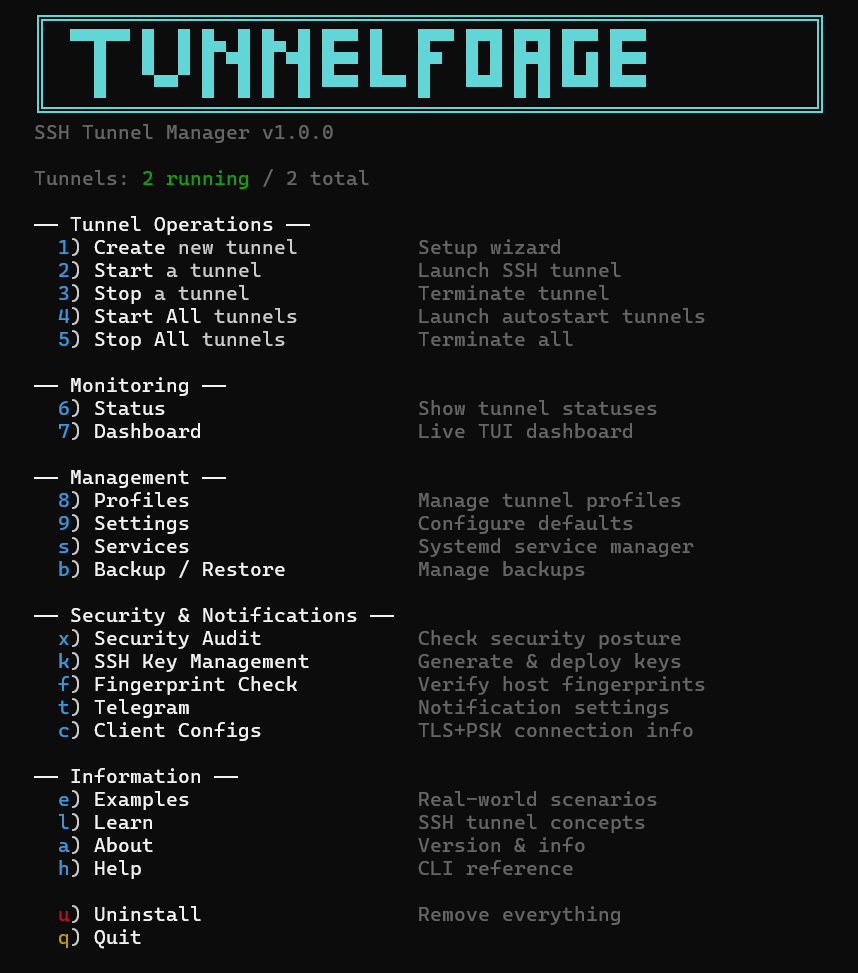
Interactive TUI — manage tunnels, security, services, and more from a single menu
Most SSH tunnel tools are either too simple (just a wrapper around ssh -D) or too complex (requiring Docker, Go, Python, or a dozen config files). TunnelForge is different:
| TunnelForge | Others | |
|---|---|---|
| Installation | Single bash file, zero dependencies | Python/Go/Node.js + package managers |
| Interface | Full TUI menu + CLI + live dashboard | CLI-only or web UI requiring a browser |
| Security | DNS leak protection, kill switch, audit scoring | Basic SSH only |
| Obfuscation | TLS wrapping + PSK to bypass DPI/censorship | Not available |
| Monitoring | Real-time sparkline bandwidth graphs | Log files |
| Notifications | Telegram bot with remote commands | None |
| Persistence | Auto-generated systemd services | Manual configuration |
| Education | Built-in Learn menu with diagrams | External docs |
| Client Sharing | One-click generated scripts (Linux + Windows) | Manual setup |
TunnelForge is the most complete SSH tunnel manager available as a single file.
-D) — Route all traffic through SSH server-L) — Access remote services locally-R) — Expose local services remotely-J) — Chain through bastion serverschattr/tf_status, /tf_list, /tf_ip, /tf_config and more-D)Route all your TCP traffic through a remote SSH server. Your traffic appears to originate from the server's IP address.
┌──────────┐          ┌──────────┐          ┌──────────┐
│  Client   │  SSH     │  SSH     │  Direct  │  Target  │
│           ├─────────►│  Server  ├─────────►│  Website │
│ :1080     │ Encrypted│          │          │          │
└──────────┘          └──────────┘          └──────────┘
     ▲
  Browser
  SOCKS5
Use cases: Private browsing, bypass geo-restrictions, hide your IP, route traffic through a different country.
tunnelforge create    # Select "SOCKS5 Proxy" → set port 1080
tunnelforge start my-proxy
# Configure browser: SOCKS5 proxy → 127.0.0.1:1080
curl --socks5-hostname 127.0.0.1:1080 https://ifconfig.me
-L)Access a remote service as if it were running locally. Map a local port to a service behind the SSH server.
┌──────────┐          ┌──────────┐          ┌──────────┐
│  Client   │  SSH     │  SSH     │  Local   │  MySQL   │
│           ├─────────►│  Server  ├─────────►│  :3306   │
│ :3306     │ Encrypted│          │ Network  │          │
└──────────┘          └──────────┘          └──────────┘
     ▲
  mysql -h
  127.0.0.1
Use cases: Access remote databases, internal web apps, admin panels behind firewalls.
tunnelforge create    # Select "Local Forward" → local 3306 → remote db:3306
tunnelforge start db-tunnel
mysql -h 127.0.0.1 -P 3306 -u admin -p
-R)Expose a local service to the outside world through a remote SSH server. Users connect to the server and reach your local machine.
┌──────────┐          ┌──────────┐          ┌──────────┐
│  Local    │  SSH     │  SSH     │  Public  │  Users   │
│  Dev App  │◄────────►│  Server  │◄─────────│  on Web  │
│ :3000     │ Encrypted│ :9090    │          │          │
└──────────┘          └──────────┘          └──────────┘
Use cases: Webhook development, share local app for testing, NAT traversal, demo to clients.
tunnelforge create    # Select "Remote Forward" → remote 9090 ← local 3000
tunnelforge start dev-share
# Others access: http://your-server:9090
-J)Reach servers behind multiple layers of firewalls by chaining through intermediate SSH servers.
┌──────────┐     ┌──────────┐     ┌──────────┐     ┌──────────┐
│  Client   │────►│  Bastion  │────►│  Jump 2   │────►│  Target  │
│           │ SSH │  Server   │ SSH │  Server   │ SSH │  Server  │
└──────────┘     └──────────┘     └──────────┘     └──────────┘
Use cases: Corporate networks, multi-tier architectures, isolated environments, high-security zones.
tunnelforge create    # Select "Jump Host" → jumps: admin@bastion:22
tunnelforge start corp-tunnel
| Requirement | Details |
|---|---|
| OS | Linux (Ubuntu, Debian, CentOS, Fedora, Arch, Alpine) |
| Bash | 4.3 or higher |
| Privileges | Root access for installation |
| SSH | OpenSSH client (pre-installed on most systems) |
| Optional | autossh (auto-reconnect), stunnel (TLS obfuscation), sshpass (password auth) |
# Option 1: Git clone
git clone https://github.com/SamNet-dev/tunnelforge.git
cd tunnelforge
sudo bash tunnelforge.sh install

# Option 2: Direct download
curl -fsSL https://raw.githubusercontent.com/SamNet-dev/tunnelforge/main/tunnelforge.sh -o tunnelforge.sh
sudo bash tunnelforge.sh install
tunnelforge version
# TunnelForge v1.0.0
After installation, TunnelForge creates:
/opt/tunnelforge/
├── tunnelforge.sh              # Main script
├── config/
│   └── tunnelforge.conf        # Global configuration
├── profiles/
│   └── *.conf                  # Tunnel profiles
├── pids/                       # Running tunnel PIDs
├── logs/                       # Per-tunnel log files
├── backups/                    # Configuration backups
├── data/
│   ├── bandwidth/              # Bandwidth history (sparklines)
│   └── reconnects/             # Reconnect statistics
└── sockets/                    # SSH ControlMaster sockets
A symlink is created at /usr/local/bin/tunnelforge for global access.
tunnelforge create
# → Name: private-proxy
# → Type: SOCKS5
# → Server: user@myserver.com
# → Port: 1080

tunnelforge start private-proxy

# Test it
curl --socks5-hostname 127.0.0.1:1080 https://ifconfig.me

# Configure Firefox: Settings → Network → Manual Proxy → SOCKS5: 127.0.0.1:1080
tunnelforge create
# → Name: prod-db
# → Type: Local Forward
# → Server: admin@db-server.internal
# → Local port: 3306 → Remote: localhost:3306

tunnelforge start prod-db
mysql -h 127.0.0.1 -P 3306 -u dbuser -p
tunnelforge create
# → Name: demo-share
# → Type: Remote Forward
# → Server: user@public-vps.com
# → Remote port: 8080 ← Local: localhost:3000

tunnelforge start demo-share
# Share with anyone: http://public-vps.com:8080
tunnelforge create
# → Name: corp-access
# → Type: Jump Host
# → Jump: admin@bastion.corp.com:22
# → Target: user@internal-server:22
# → SOCKS5 port: 1080

tunnelforge start corp-access
# First, set up stunnel on your VPS
tunnelforge obfs-setup my-tunnel

# Now SSH traffic is wrapped in TLS on port 443
# DPI sees: normal HTTPS traffic
# Reality: SSH tunnel inside TLS
tunnelforge start my-tunnel

# Share with others
tunnelforge client-script my-tunnel    # Generates connect scripts
tunnelforge telegram share my-tunnel   # Send scripts via Telegram
| Command | Description |
|---|---|
tunnelforge start <name> |
Start a tunnel |
tunnelforge stop <name> |
Stop a tunnel |
tunnelforge restart <name> |
Restart a tunnel |
tunnelforge start-all |
Start all autostart tunnels |
tunnelforge stop-all |
Stop all running tunnels |
tunnelforge status |
Show all tunnel statuses |
tunnelforge dashboard |
Launch live TUI dashboard |
tunnelforge logs [name] |
Tail tunnel logs |
| Command | Description |
|---|---|
tunnelforge create |
Create a new tunnel profile (wizard) |
tunnelforge list |
List all profiles |
tunnelforge delete <name> |
Delete a profile |
| Command | Description |
|---|---|
tunnelforge audit |
Run 6-point security audit |
tunnelforge key-gen [type] |
Generate SSH key (ed25519/rsa/ecdsa) |
tunnelforge key-deploy <name> |
Deploy SSH key to server |
tunnelforge fingerprint <host> [port] |
Verify SSH host fingerprint |
| Command | Description |
|---|
SamNet-dev/tunnelforge is a public repo on GitHub by SamNet-dev. The ultimate single-file SSH tunnel manager. Full TUI, live dashboard, TLS obfuscation, Telegram bot, kill switch, and more. Zero dependencies.
It declares the GPL-3.0 license on GitHub.
Its maker has not tagged a system, so it is unknown here. Its README says what it needs.
Open "Take it" on its page: Take My Repo writes an install plan for your machine and hands it to your AI agent (Claude Code, Codex or Cursor), which asks you before each step. Take My Repo has not tested it on any machine.
A GUI client for Windows, Linux and macOS, support Xray and sing-box and others
The agent harness performance optimization system. Skills, instincts, memory, security, and research-first development for Claude Code, Codex, Opencode, Cursor and beyond.
AutoSSH Home Assistant Addon - alternative to cloud or VPN: Permanent port forwarding
Fair-code workflow automation platform with native AI capabilities. Combine visual building with custom code, self-host or cloud, 400+ integrations.
Its last change on GitHub was on 2026-03-15. Take My Repo does not judge from that whether it is maintained.
Nobody has reviewed it on Take My Repo yet, which says nothing about its quality.
Take My Repo cannot say: it does not audit code and has not run tunnelforge. What is known comes from GitHub. It declares the GPL-3.0 license on GitHub. Its last change was on 2026-03-15. It has 111 stars, which measure popularity, not safety. Nobody has reviewed it on Take My Repo yet, which says nothing about its quality. Read the source before you run it. With "Take it", your AI agent shows each step and asks you before running it; README text is treated as data, not as instructions.





