n8n
Fair-code workflow automation platform with native AI capabilities. Combine visual building with custom code, self-host or cloud, 400+ integrations.
- 212k
- TypeScript
- 1 h ago
ScapeGraph MCP Server
Repo ScrapeGraphAI/scrapegraph-mcp, read from GitHub 1 min ago. ScrapeGraphAI has not joined Take My Repo.
ScrapeGraphAI/scrapegraph-mcp is a public repo on GitHub by ScrapeGraphAI. ScapeGraph MCP Server. It declares the MIT license on GitHub. It is written mainly in Python, has 123 stars and last changed on 2026-07-17. Nobody has reviewed it on Take My Repo yet, which says nothing about its quality. Read from GitHub on 2026-11-22.

A production-ready Model Context Protocol (MCP) server that provides seamless integration with the ScrapeGraph AI API. This server enables language models to leverage advanced AI-powered web scraping capabilities with enterprise-grade reliability.
This MCP server targets ScrapeGraph API v2 (https://v2-api.scrapegraphai.com/api), aligned 1:1 with
scrapegraph-py PR #84. Auth uses the
SGAI-APIKEY header. Environment variables mirror the Python SDK:
SGAI_API_URL — override the base URL (default https://v2-api.scrapegraphai.com/api)SGAI_TIMEOUT — request timeout in seconds (default 120)SGAI_API_KEY — API key (can also be passed via MCP scrapegraphApiKey or X-API-Key header)Legacy aliases (still honored):
SCRAPEGRAPH_API_BASE_URLforSGAI_API_URL,SGAI_TIMEOUT_SforSGAI_TIMEOUT.
scrape (POST /scrape, multi-format), extract (POST /extract, URL + prompt)search (POST /search; num_results clamped 3–20)crawl_start / crawl_get_status / crawl_stop / crawl_resumeschema (POST /schema) — generate or augment a JSON Schema from a promptmonitor_create, monitor_list, monitor_get, pause/resume/delete, monitor_activity (paginated tick history)credits, history.agent/ folderv3 renames every MCP tool that diverged from the v2 API docs. Hard rename, no aliases.
| v2 (old) | v3 (new) |
|---|---|
smartscraper |
extract |
searchscraper |
search |
smartcrawler_initiate |
crawl_start |
smartcrawler_fetch_results |
crawl_get_status |
sgai_history |
history |
generate_schema |
schema |
markdownify |
removed — use scrape with output_format="markdown" |
Sign up and get your API key from the ScrapeGraph Dashboard
npx -y @smithery/cli install @ScrapeGraphAI/scrapegraph-mcp --client claude
Ask Claude or Cursor:
That's it! The server is now available to your AI assistant.
| Tool | Role |
|---|---|
scrape |
POST /scrape (output_format: markdown, html, screenshot, branding, links, images, summary) |
extract |
POST /extract (requires website_url + user_prompt; optional output_schema) |
search |
POST /search (num_results 1–20; supports country_search, time_range, output_schema) |
crawl_start |
POST /crawl — extraction_mode markdown / html / links / images / summary / branding / screenshot |
crawl_get_status |
GET /crawl/:id (poll until status: completed) |
crawl_stop, crawl_resume |
POST /crawl/:id/stop | resume |
schema |
POST /schema (generate or augment a JSON Schema from a prompt) |
credits |
GET /credits |
history |
GET /history (paginated, service filter) |
monitor_create, monitor_list, monitor_get, monitor_pause, monitor_resume, monitor_delete |
/monitor API |
monitor_activity |
GET /monitor/:id/activity (paginated tick history: id, createdAt, status, changed, elapsedMs, diffs) |
Removed: sitemap, agentic_scrapper, async-status polling, and (in v3) markdownify — use scrape with output_format="markdown".
To utilize this server, you'll need a ScrapeGraph API key. Follow these steps to obtain one:
For automated installation of the ScrapeGraph API Integration Server using Smithery:
npx -y @smithery/cli install @ScrapeGraphAI/scrapegraph-mcp --client claude
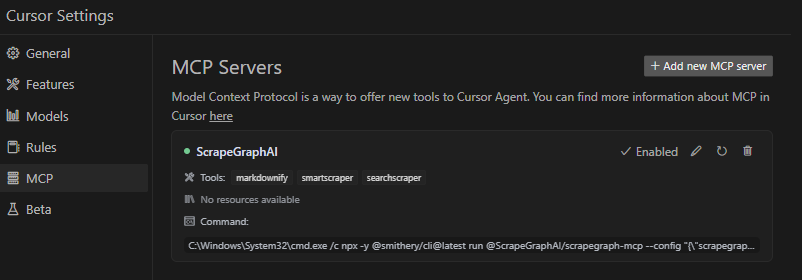
Update your Claude Desktop configuration file with the following settings (located on the top rigth of the Cursor page):
(remember to add your API key inside the config)
{
    "mcpServers": {
        "@ScrapeGraphAI-scrapegraph-mcp": {
            "command": "npx",
            "args": [
                "-y",
                "@smithery/cli@latest",
                "run",
                "@ScrapeGraphAI/scrapegraph-mcp",
                "--config",
                "\"{\\\"scrapegraphApiKey\\\":\\\"YOUR-SGAI-API-KEY\\\"}\""
            ]
        }
    }
}
The configuration file is located at:
%APPDATA%/Claude/claude_desktop_config.json~/Library/Application\ Support/Claude/claude_desktop_config.jsonAdd the ScrapeGraphAI MCP server on the settings:

Connect to our hosted MCP server - no local installation required!
Warning
The legacy MCP endpoint at https://mcp.scrapegraphai.com/mcp will be
deprecated soon. New integrations should use the replacement MCP endpoint:
https://sgai-mcp-main.onrender.com.
Add this to your Claude Desktop config (~/Library/Application Support/Claude/claude_desktop_config.json on macOS):
{
  "mcpServers": {
    "scrapegraph-mcp": {
      "command": "npx",
      "args": [
        "mcp-remote@0.1.25",
        "https://sgai-mcp-main.onrender.com",
        "--header",
        "X-API-Key:YOUR_API_KEY"
      ]
    }
  }
}
Cursor supports native HTTP MCP connections. Add to your Cursor MCP settings (~/.cursor/mcp.json):
{
  "mcpServers": {
    "scrapegraph-mcp": {
      "url": "https://sgai-mcp-main.onrender.com",
      "headers": {
        "X-API-Key": "YOUR_API_KEY"
      }
    }
  }
}To run the MCP server locally for development or testing, follow these steps:
git clone https://github.com/ScrapeGraphAI/scrapegraph-mcp
cd scrapegraph-mcp# Using pip pip install -e . # Or using uv (faster) uv pip install -e .
# macOS/Linux
export SGAI_API_KEY=your-api-key-here

# Windows (PowerShell)
$env:SGAI_API_KEY="your-api-key-here"

# Windows (CMD)
set SGAI_API_KEY=your-api-key-here
You can run the server directly:
# Using the installed command
scrapegraph-mcp

# Or using Python module
python -m scrapegraph_mcp.server
The server will start and communicate via stdio (standard input/output), which is the standard MCP transport method.
Test your local server using the MCP Inspector tool:
npx @modelcontextprotocol/inspector python -m scrapegraph_mcp.server
This provides a web interface to test all available tools interactively.
To use your locally running server with Claude Desktop, update your configuration file:
macOS/Linux (~/Library/Application Support/Claude/claude_desktop_config.json):
{
    "mcpServers": {
        "scrapegraph-mcp-local": {
            "command": "python",
            "args": [
                "-m",
                "scrapegraph_mcp.server"
            ],
            "env": {
                "SGAI_API_KEY": "your-api-key-here"
            }
        }
    }
}
Windows (%APPDATA%\Claude\claude_desktop_config.json):
{
    "mcpServers": {
        "scrapegraph-mcp-local": {
            "command": "python",
            "args": [
                "-m",
                "scrapegraph_mcp.server"
            ],
            "env": {
                "SGAI_API_KEY": "your-api-key-here"
            }
        }
    }
}Note: Make sure Python is in your PATH. You can verify by running python --version in your terminal.
In Cursor's MCP settings, add a new server with:
python["-m", "scrapegraph_mcp.server"]{"SGAI_API_KEY": "your-api-key-here"}Server not starting:
python --versionpip list | grep scrapegraph-mcpecho $SGAI_API_KEY (macOS/Linux) or echo %SGAI_API_KEY% (Windows)Tools not appearing:
~/Library/Logs/Claude/%APPDATA%\Claude\Logs\Import errors:
pip install -e . --force-reinstallpip install -r requirements.txt (if available)The ScrapeGraph MCP server can be integrated with Google ADK (Agent Development Kit) to create AI agents with web scraping capabilities.
pip install google-adk
export SGAI_API_KEY=your-api-key-hereCreate an agent file (e.g., agent.py) with the following configuration:
import os
from google.adk.agents import LlmAgent
from google.adk.tools.mcp_tool.mcp_toolset import MCPToolset
from google.adk.tools.mcp_tool.mcp_session_manager import StdioConnectionParams
from mcp import StdioServerParameters

# Path to the scrapegraph-mcp server directory
SCRAPEGRAPH_MCP_PATH = "/path/to/scrapegraph-mcp"

# Path to the server.py file
SERVER_SCRIPT_PATH = os.path.join(
    SCRAPEGRAPH_MCP_PATH,
    "src",
    "scrapegraph_mcp",
    "server.py"
)

root_agent = LlmAgent(
    model='gemini-2.0-flash',
    name='scrapegraph_assistant_agent',
    instruction='Help the user with web scraping and data extraction using ScrapeGraph AI. '
                'You can convert webpages to markdown, extract structured data using AI, '
                'perform web searches, crawl multiple pages, and automate complex scraping workflows.',
    tools=[
        MCPToolset(
            connection_params=StdioConnectionParams(
                server_params=StdioServerParameters(
                    command='python3',
                    args=[
                        SERVER_SCRIPT_PATH,
                    ],
                    env={
                        'SGAI_API_KEY': os.getenv('SGAI_API_KEY'),
                    },
                ),
                timeout=300.0,)
            ),
            # Optional: Filter which tools from the MCP server are exposed
            # tool_filter=['scrape', 'extract', 'search']
        )
    ],
)
Timeout Settings:
Tool Filtering:
tool_filter to limit which tools are available:
tool_filter=['scrape', 'extract', 'search']
API Key Configuration:
export SGAI_API_KEY=your-keyenv dict: 'SGAI_API_KEY': 'your-key-here'Once configured, your agent can use natural language to interact with web scraping tools:
# The agent can now handle queries like:
# - "Convert https://example.com to markdown"
# - "Extract all product prices from this e-commerce page"
# - "Search for recent AI research papers and summarize them"
# - "Crawl this documentation site and extract all API endpoints"
For more information about Google ADK, visit the official documentation.
The server enables sophisticated queries across various scraping scenarios:
time_range; phrase queries to bias recency in natural language insteadcrawl_start plus crawl_get_status to map and capture multi-page content; there is no separate sitemap tool on v2.extract on individual URLs (or monitor_create on a schedule)monitor_create with interval)credits, historyThe server implements robust error handling with detailed, actionable error messages for:
When running on Windows systems, you may need to use the following command to connect to the MCP server:
C:\Windows\System32\cmd.exe /c npx -y @smithery/cli@latest run @ScrapeGraphAI/scrapegraph-mcp --config "{\"scrapegraphApiKey\":\"YOUR-SGAI-API-KEY\"}"
This ensures proper execution in the Windows environment.
"ScrapeGraph client not initialized"
SGAI_API_KEY environment variable or provide via --config"Error 401: Unauthorized"
"Error 402: Payment Required"
Crawl not returning results
crawl_get_status() until status is "completed"Tools not appearing in Claude Desktop
~/Library/Logs/Claude/ (macOS) or %APPDATA%\Claude\Logs\ (Windows)For detailed troubleshooting, see the .agent documentation.
# Clone the repository
git clone https://github.com/ScrapeGraphAI/scrapegraph-mcp
cd scrapegraph-mcp

# Install dependencies
pip install -e ".[dev]"

# Set your API key
export SGAI_API_KEY=your-api-key

# Run the server
scrapegraph-mcp
# or
python -m scrapegraph_mcp.server
Test your server locally using the MCP Inspector tool:
npx @modelcontextprotocol/inspector scrapegraph-mcp
This provides a web interface to test all available tools.
Linting:
ruff check src/
Type Checking:
mypy src/
Format Checking:
ruff format --check src/
scrapegraph-mcp/
├── src/
│   └── scrapegraph_mcp/
│       ├── __init__.py      # Package initialization
│       └── server.py        # Main MCP server (all code in one file)
├── .agent/                  # Developer documentation
│   ├── README.md           # Documentation index
│   └── system/             # System architecture docs
├── assets/                  # Images and badges
├── pyproject.toml          # Project metadata & dependencies
├── smithery.yaml           # Smithery deployment config
└── README.md               # This file
We welcome contributions! Here's how you can help:
ScapeGraphClient class in server.py:def new_tool(self, param: str) -> Dict[str, Any]: """Tool description.""" url = f"{self.BASE_URL}/new-endpoint" data = {"param": param} response = self.client.post(url, headers=self.headers, json=data) if response.status_code != 200: raise Exception(f"Error {response.status_code}: {response.text}") return response.json()
@mcp.tool()
def new_tool(param: str) -> Dict[str, Any]:
    """
    Tool description for AI assistants.

    Args:
        param: Parameter description

    Returns:
        Dictionary containing results
    """
    if scrapegraph_client is None:
        return {"error": "ScrapeGraph client not initialized. Please provide an API key."}

    try:
        return scrapegraph_client.new_tool(param)
    except Exception as e:
        return {"error": str(e)}
npx @modelcontextprotocol/inspector scrapegraph-mcp
Update documentation:
Submit a pull request
git checkout -b feature/amazing-feature)git commit -m 'Add amazing feature')git push origin feature/amazing-feature)For detailed development guidelines, see the .agent documentation.
For comprehensive developer documentation, see:
https://v2-api.scrapegraphai.com/apiThis project is distributed under the MIT License. For detailed terms and conditions, please refer to the LICENSE file.
Special thanks to tomekkorbak for his implementation of oura-mcp-server, which served as starting point for this repo.
Made with ❤️ by ScrapeGraphAI Team
ScrapeGraphAI/scrapegraph-mcp is a public repo on GitHub by ScrapeGraphAI. ScapeGraph MCP Server.
It declares the MIT license on GitHub.
Its maker tagged it for macOS, Windows and Linux, or as Docker or cross-platform. That is declared by the maker; Take My Repo has not tested it.
Open "Take it" on its page: Take My Repo writes an install plan for your machine and hands it to your AI agent (Claude Code, Codex or Cursor), which asks you before each step. Take My Repo has not tested it on any machine.
Its last change on GitHub was on 2026-07-17. GitHub counts 8 open issues and pull requests. Take My Repo does not judge from that whether it is maintained.
Nobody has reviewed it on Take My Repo yet, which says nothing about its quality.
Fair-code workflow automation platform with native AI capabilities. Combine visual building with custom code, self-host or cloud, 400+ integrations.
Knowledge infrastructure to make your agents smarter. Search, scrape and access 550+ data providers through one API.
12 weeks, 26 lessons, 52 quizzes, classic Machine Learning for all
Bring data to life with SVG, Canvas and HTML. :bar_chart::chart_with_upwards_trend::tada:
An open-source AI agent that brings the power of Gemini directly into your terminal.
🤖 AI-powered web scraping editor with visual workflow builder. Build, test & deploy web scrapers using natural language. Powered by ScrapeGraphAI & LangGraph.
Official Python SDK for the ScrapeGraph AI API. Smart scraping, search, crawling, markdownify, agentic browser automation, scheduled jobs, and structured data extraction
CLI for AI-powered web scraping, structured data extraction, web search, multi-page crawling, and scheduled page-change monitoring powered by the ScrapeGraph AI API. Turn any URL into markdown, HTML, screenshots, links, images, summaries, or brand assets; pull structured JSON with a prompt + schema; watch pages on a cron with webhook alert