

ECC
The agent harness performance optimization system. Skills, instincts, memory, security, and research-first development for Claude Code, Codex, Opencode, Cursor and beyond.
- 310k
- JavaScript
- MIT
- 2 d ago
Agentless Windows workflow orchestration. Self-hosted, open source, alternative to System Center Orchestrator with SCOrch workflow import.
Repo Sev7eNup/NodePilot, read from GitHub 10 h ago. Sev7eNup has not joined Take My Repo.
Sev7eNup/NodePilot is a public repo on GitHub by Sev7eNup. Agentless Windows workflow orchestration. Self-hosted, open source, alternative to System Center Orchestrator with SCOrch workflow import. It declares the Apache-2.0 license on GitHub. It is written mainly in C#, has 205 stars and last changed on 2026-11-23. Nobody has reviewed it on Take My Repo yet, which says nothing about its quality. Read from GitHub on 2026-11-24.
The agent harness performance optimization system. Skills, instincts, memory, security, and research-first development for Claude Code, Codex, Opencode, Cursor and beyond.

Open-source Windows and PowerShell workflow automation. Self-hosted, agentless execution over WinRM, with an import path for System Center Orchestrator runbooks.
Multi-step automation is designed, scheduled, debugged and observed in the browser. PowerShell, file, registry and service operations, REST calls, SQL and further activities are executed across a Windows estate over WinRM, without agents on the targets.
🌐 Website · ▶️ Live demo · 📚 Documentation · ⬇️ Download · 🚀 Install
Open the live demo to try the actual web UI with sample data. It runs entirely in the browser, requires no installation and sends no data anywhere. Each visitor has a private copy, which resets on reload. Workflows can be built, published and run, while the canvas updates live.
It is the product's own frontend on an in-memory backend, so anything that genuinely needs a server (PowerShell on a host, a WinRM test, mail, a restore) reports that limitation instead of pretending.
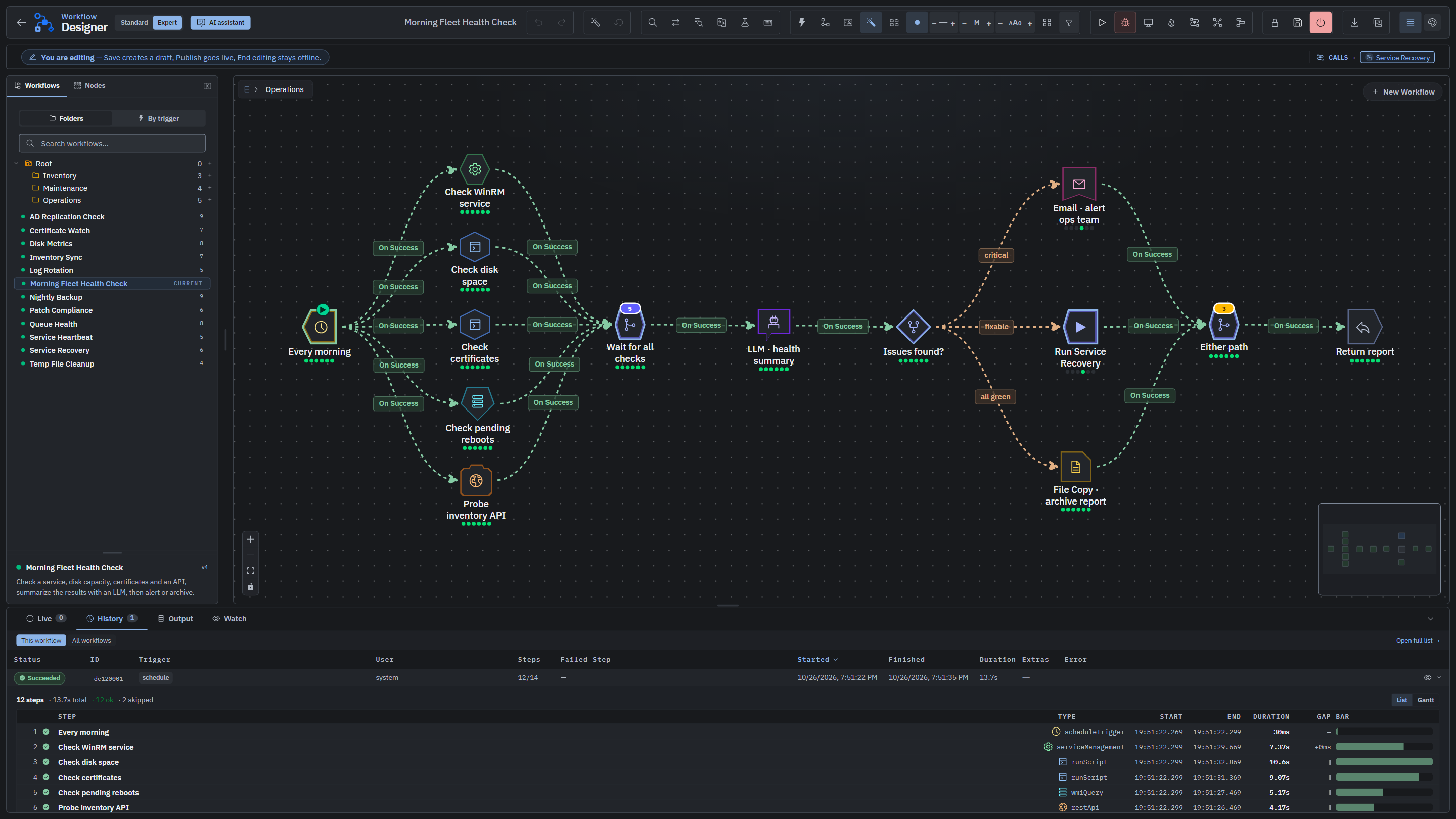
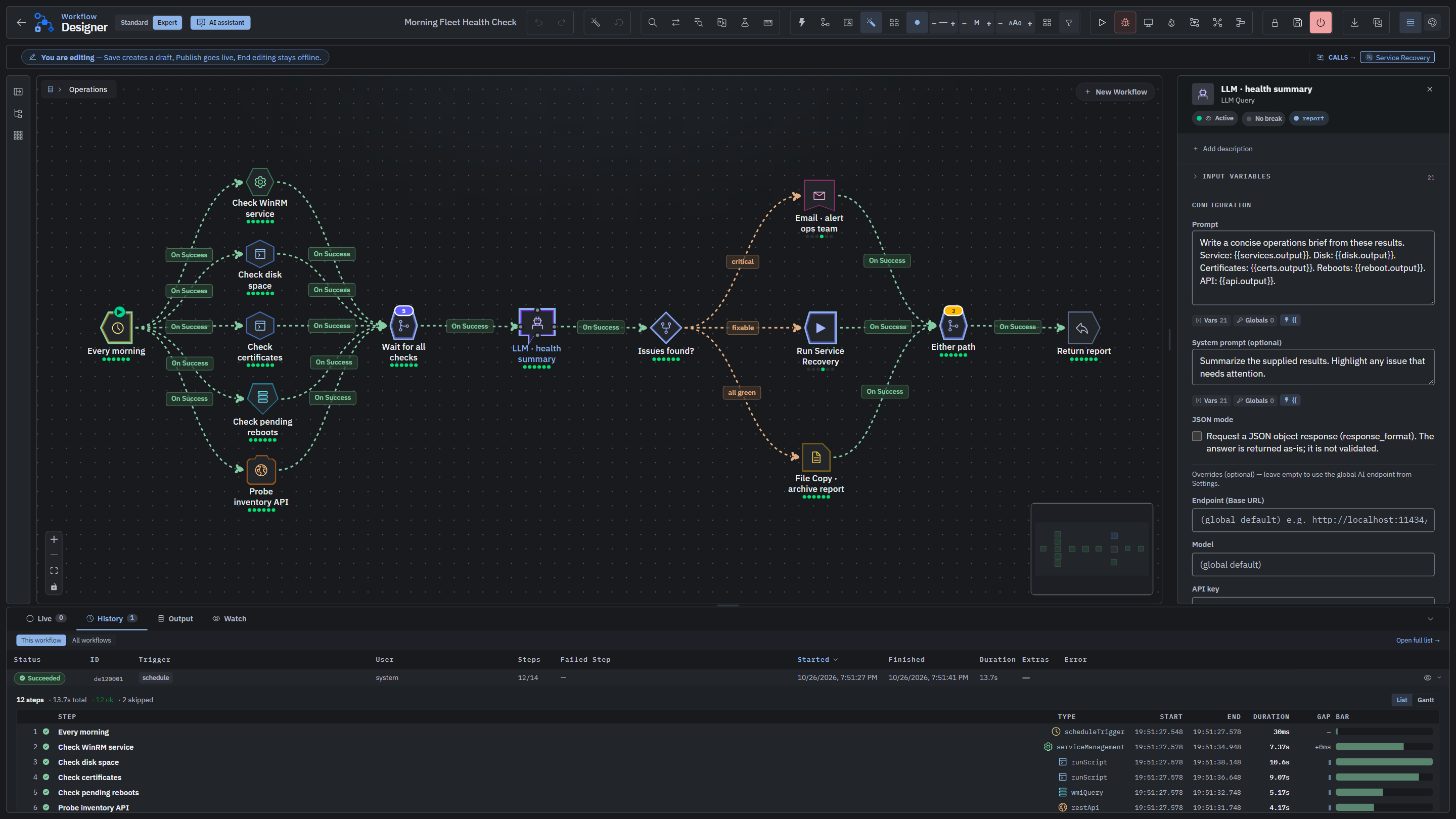
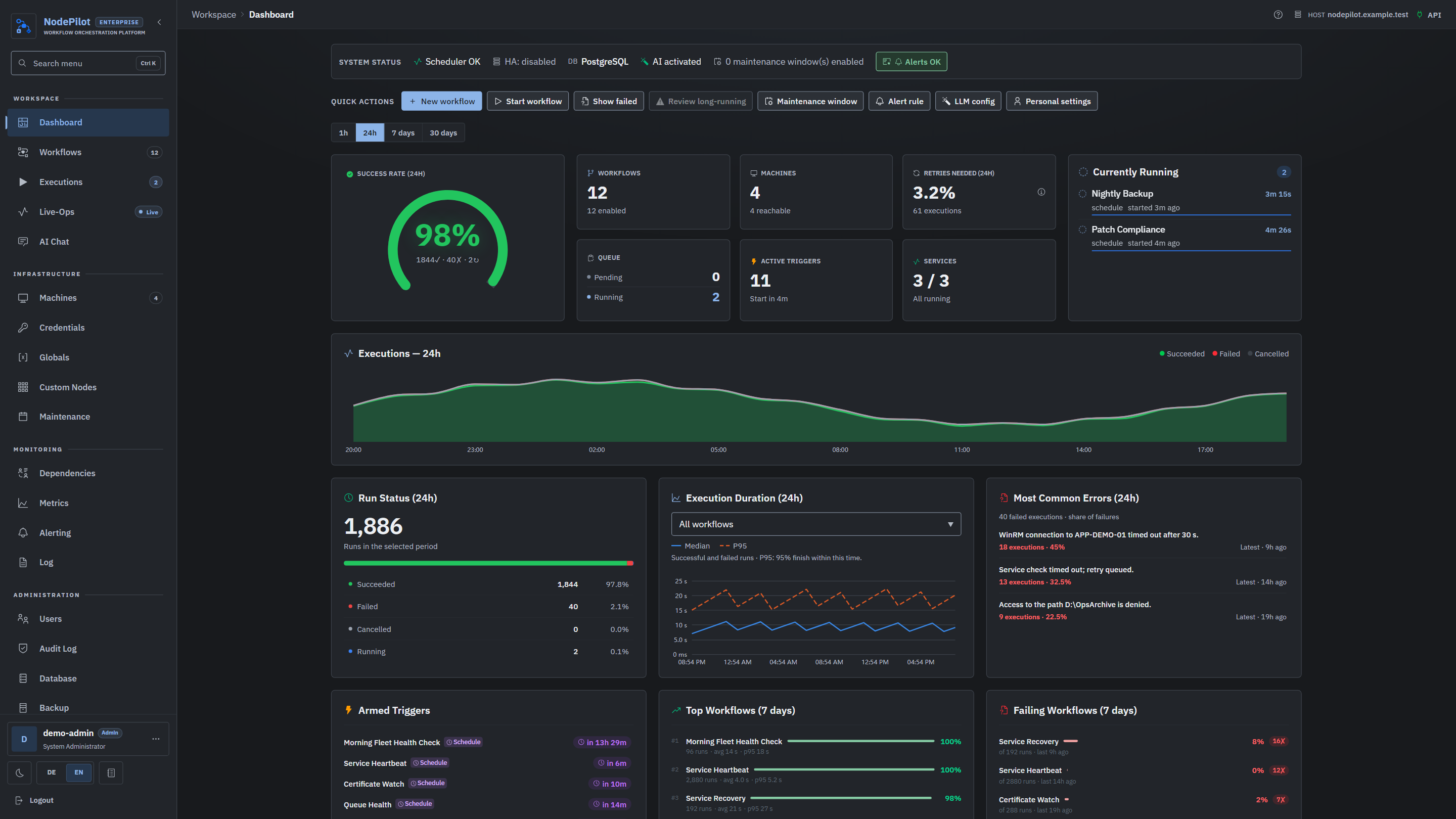
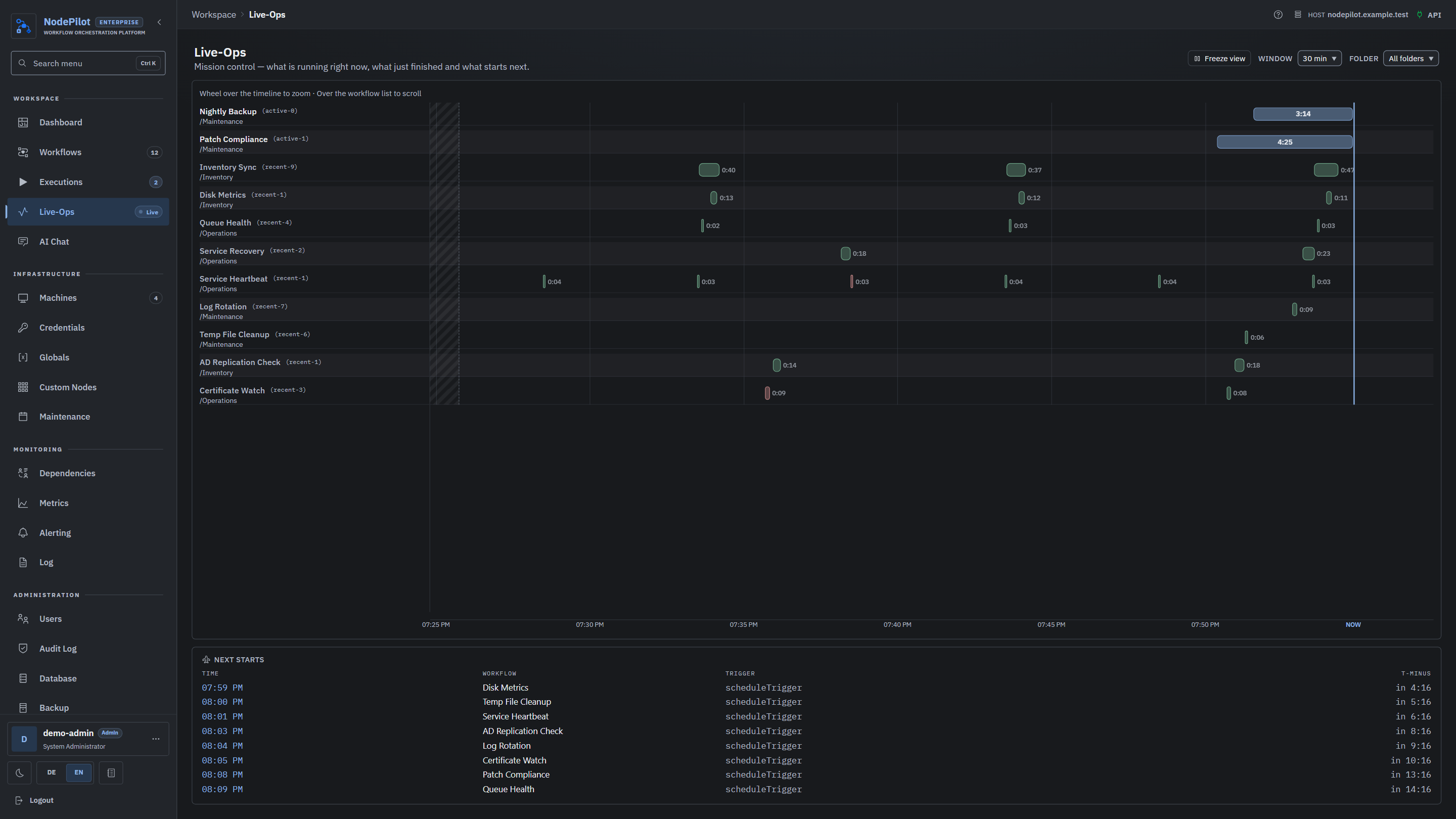
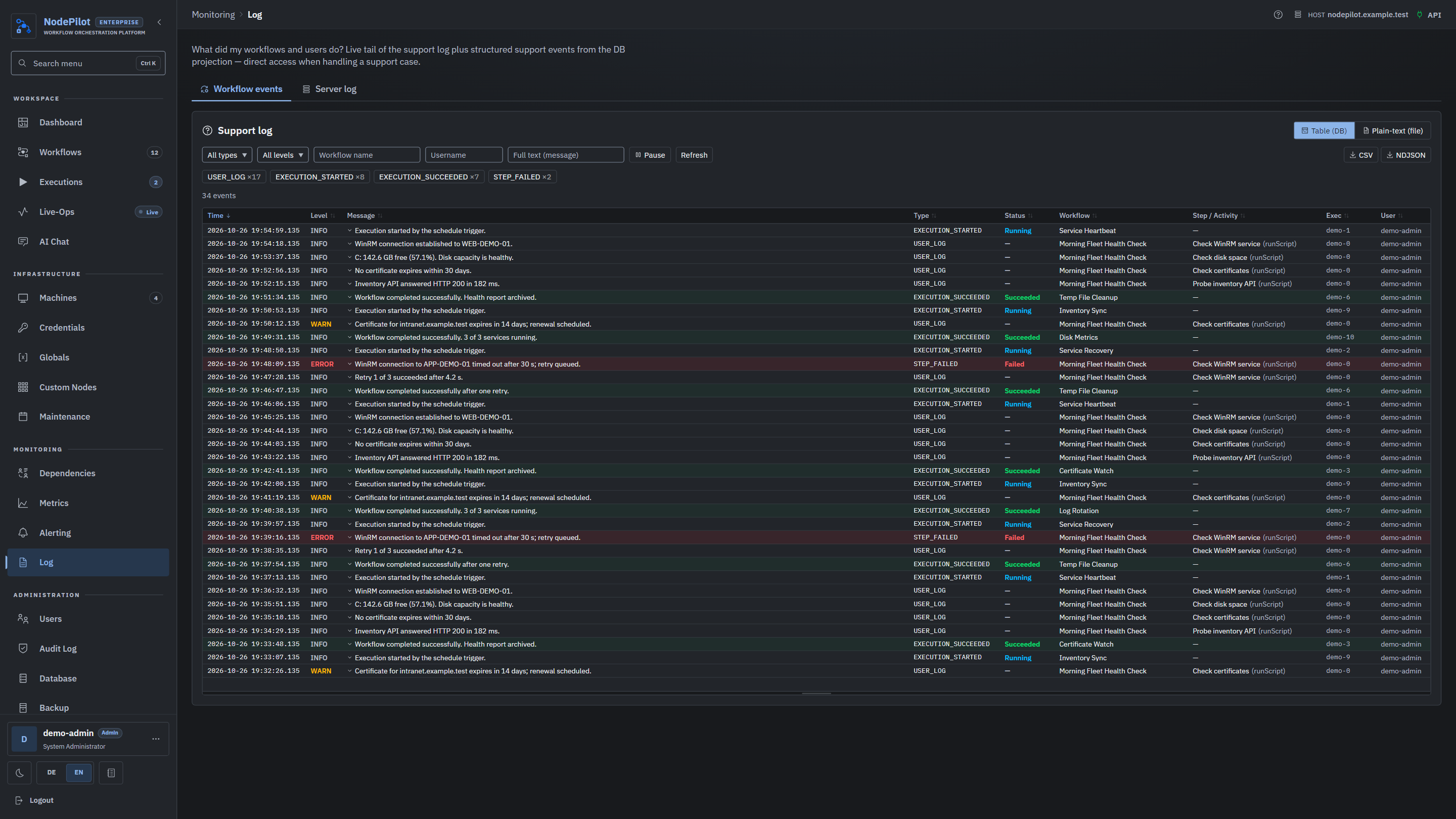
NodePilot is agentless workflow orchestration for Windows, built in the browser and running PowerShell on remote machines over WinRM. It is meant for sysadmins automating Windows estates, for organizations looking for a modern alternative to SCOrch, as well as for private users who rely heavily on PowerShell.
Highlights
np): every operation from the command line, for scripts and pipelines.nodepilot-mcp lets Claude Code and other MCP clients drive NodePilot — 116 tools over 12 groups, destructive operations gated..ois_export runbooks become NodePilot workflows. How it works.NodePilot runs in three supported shapes. Each one leads to a working login on its own.
| 1 · Desktop app | 2 · Windows service | 3 · From source | |
|---|---|---|---|
| For | one person, one machine | a team, a real server | contributors, evaluation |
| You need | Windows 11 x64, local admin | Windows Server 2022/2025, a TLS certificate, a prepared database | .NET 10 SDK, Node, a local PostgreSQL |
| You get | installer .exe with bundled PostgreSQL and .NET runtime, opens a native window |
setup .exe (or the signed .zip + PowerShell installer), Windows service under a gMSA, Kestrel HTTPS |
dotnet run + Vite dev server on your own machine |
| Database | bundled, loopback-only | you provide it | you provide it |
| Offline | yes, fully | yes | no (package restore) |
| Guide | below · details | below · step-by-step | below |
NodePilot is Windows-only by design, because the engine drives PowerShell remoting over WinRM and protects credentials with DPAPI.
On every path the first login creates the Admin account with a one-time setup token. Where the token comes from is noted per path.
A local application for Windows 11 x64. One .exe bundles the app, the .NET 10 runtime and a local PostgreSQL, installs them as background services and opens a native window. It works fully offline.
NodePilot-Desktop-Setup-<version>.exe is downloaded from the latest release and run with local admin rights. The installer hands the setup token straight to the login screen. Since the backend runs as a service, scheduled and webhook triggers keep firing while the window is closed. Help with problems is in docs/desktop-troubleshooting.md, and all log files are listed under Logs & diagnostics.
The build requires the .NET 10 SDK, Node, Inno Setup 6 and the pgsql folder of the PostgreSQL 16 binaries.
deploy\desktop\Build-DesktopInstaller.ps1 -PgBinariesPath 'C:\Packages\pgsql' -Version 1.2.0
# -> deploy\desktop\out\NodePilot-Desktop-Setup-1.2.0.exe
This script does not sign. A signed installer comes from the release build (deploy\Build-Artifact.ps1 -IncludeDesktopInstaller), see deploy/desktop/README.md.
NodePilot runs as a Windows service under a gMSA, with HTTPS directly in Kestrel and in-place upgrades that can roll back.
Prerequisites, all checked by the installer's pre-flight:
-UseLocalSystem works without a domain)Encrypt=Strict / TDS 8.0)Cert:\LocalMachine\My with its private keyWith the wizard. NodePilot-Server-Setup-<version>.exe from the latest release checks every prerequisite before changing anything and can install the runtimes, create the database or issue a lab certificate. It also runs unattended: Setup.exe /VERYSILENT /SUPPRESSMSGBOXES /ANSWERFILE=answers.json. Details are in deploy/server/README.md.
With the scripts, which the wizard uses as well. The signed NodePilot-<version>.zip is downloaded with its manifest files, verified against NodePilot-<version>.SHA256SUMS.txt and installed:
.\deploy\Install-NodePilot.ps1 `
    -ArtifactPath 'C:\Packages\NodePilot-1.2.0.zip' `
    -TrustedArtifactSignerThumbprint '<publisher thumbprint from the release notes>' `
    -CertThumbprint '<your TLS cert thumbprint>' `
    -ServiceAccount 'CONTOSO\svc-nodepilot$' `
    -PublicHostname 'nodepilot.corp.example.com'
The installer refuses unsigned or tampered artifacts. The pinned thumbprint is the trust decision, so no certificate has to be imported beforehand.
Further reading: the Windows Server deployment walkthrough, verification and troubleshooting in docs/deployment-guide.md, and every parameter in deploy/README.md.
For contributors and for evaluation on a workstation.
Prerequisites
Sev7eNup/NodePilot is a public repo on GitHub by Sev7eNup. Agentless Windows workflow orchestration. Self-hosted, open source, alternative to System Center Orchestrator with SCOrch workflow import.
It declares the Apache-2.0 license on GitHub.
Its maker tagged it for Windows. That is declared by the maker; Take My Repo has not tested it.
Open "Take it" on its page: Take My Repo writes an install plan for your machine and hands it to your AI agent (Claude Code, Codex or Cursor), which asks you before each step. Take My Repo has not tested it on any machine.
Fair-code workflow automation platform with native AI capabilities. Combine visual building with custom code, self-host or cloud, 400+ integrations.
A collection of inspiring lists, manuals, cheatsheets, blogs, hacks, one-liners, cli/web tools and more.
Build Agentic workflows, RAG pipelines, with rich AI model and tool support on one collaborative workspace. Deploy on cloud, VPC, or self-hosted, so teams move from prototype to production without rebuilding the stack.
Its last change on GitHub was on 2026-11-23. GitHub counts 147 open issues and pull requests. Take My Repo does not judge from that whether it is maintained.
Nobody has reviewed it on Take My Repo yet, which says nothing about its quality.
Take My Repo cannot say: it does not audit code and has not run NodePilot. What is known comes from GitHub. It declares the Apache-2.0 license on GitHub. Its last change was on 2026-11-23. It has 205 stars, which measure popularity, not safety. Nobody has reviewed it on Take My Repo yet, which says nothing about its quality. Read the source before you run it. With "Take it", your AI agent shows each step and asks you before running it; README text is treated as data, not as instructions.


