dawn
Native WebGPU implementation. Mirror of https://dawn.googlesource.com/dawn. File bugs here: https://crbug.com/dawn/new
- 1.2k
- C++
- 3 d ago
WebGPU for Flutter — GPU compute and rendering from Dart with one API on every platform, powered by wgpu-native and bound through Nitro FFI.
Repo Shreemanarjun/nitro_webgpu, read from GitHub 10 h ago. Shreemanarjun has not joined Take My Repo.
Shreemanarjun/nitro_webgpu is a public repo on GitHub by Shreemanarjun. WebGPU for Flutter — GPU compute and rendering from Dart with one API on every platform, powered by wgpu-native and bound through Nitro FFI. It declares the MIT license on GitHub. It is written mainly in C, has 6 stars and last changed on 2026-07-19. Nobody has reviewed it on Take My Repo yet, which says nothing about its quality. Read from GitHub on 2026-11-24.

WebGPU for Flutter — GPU compute and rendering from Dart with one API on every platform, powered by wgpu-native and bound through Nitro FFI.
One shared C++ core wraps the standard webgpu.h C ABI; shaders are written
once in WGSL (or GLSL) and run on Metal, Vulkan, and D3D12. The Dart API
uses typed descriptors with defaults, Futures instead of callbacks, and
deterministic dispose() with a GC-finalizer safety net. No dart:ffi
types in the public API.
The example app: shader editor, Shadertoy player, GPU particles, the showcase gallery, and GPU-state games.
https://github.com/user-attachments/assets/296912d1-95f7-43b9-92b3-cb751b9affae
https://github.com/user-attachments/assets/5e42166e-366e-43be-b508-ecf87a6c629d
Add the dependency:
# pubspec.yaml
dependencies:
  nitro_webgpu: ^0.0.1
Or track the repository directly:
# pubspec.yaml
dependencies:
  nitro_webgpu:
    git:
      url: https://github.com/Shreemanarjun/nitro_webgpu.git
Android, Windows, and Linux need nothing else — the first build downloads the prebuilt wgpu-native binaries (sha256-pinned) automatically.
macOS and iOS need one command, run from your app directory (xcframework
assembly requires xcodebuild, which can't run inside the build):
dart run nitro_webgpu:setup
WebGpuShaderView owns the device, uniforms, pipeline, and presentation;
you write a fragment shader:
import 'package:flutter/material.dart';
import 'package:nitro_webgpu/nitro_webgpu.dart';

void main() => runApp(MaterialApp(
      home: WebGpuShaderView(fragment: '''
@fragment
fn fs_main(@builtin(position) pos: vec4f) -> @location(0) vec4f {
  let uv = pos.xy / nw.resolution;
  let wave = sin(uv.x * 6.0 + nw.time) * cos(uv.y * 4.0 - nw.time * 0.7);
  return vec4f(0.1 + 0.5 * wave, 0.2 + uv.y * 0.5, 0.6 - 0.3 * wave, 1.0);
}
'''),
    ));
This is a complete app that animates at display rate on all five
platforms. The fragment sees Shadertoy-style built-ins: nw.time,
nw.resolution, nw.mouse, nw.mouseDown, and nw.keys (arrows/WASD).
The source can be swapped live, including hot reload; a compile error
keeps the last good frame running and surfaces through onError, a
custom errorBuilder, or the built-in overlay.
language: ShaderViewLanguage.glsl runs GLSL sources unchanged.
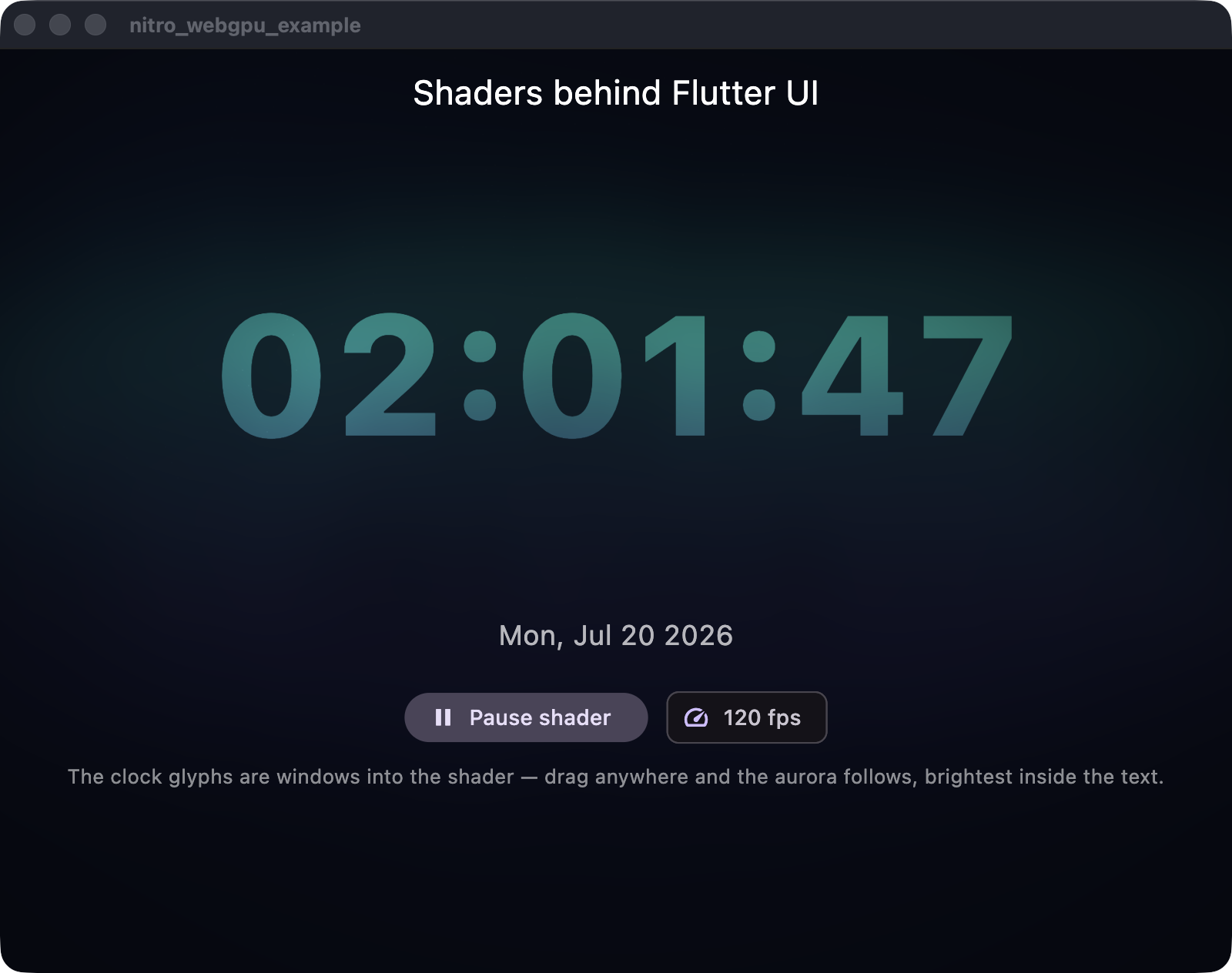
It's an ordinary widget, so it composes with any Flutter UI. Behind
widgets is just a Stack; inside text is a knockout — a scrim with the
glyphs punched out, so they become windows onto the shader. Paint it with
a CustomPainter over the view (blend the scrim rect, not the text —
text blend modes misrender on Impeller):
// CustomPaint(painter: _Knockout('12:00')) stacked over WebGpuShaderView.
@override
void paint(Canvas canvas, Size size) {
  final tp = TextPainter(
    text: TextSpan(
      text: text,
      style: const TextStyle(
          color: Colors.white, fontSize: 96, fontWeight: FontWeight.w800),
    ),
    textDirection: TextDirection.ltr,
  )..layout();
  final rect = Offset.zero & size;
  canvas.saveLayer(rect, Paint());
  tp.paint(canvas,
      Offset((size.width - tp.width) / 2, (size.height - tp.height) / 2));
  canvas.drawRect(
      rect,
      Paint()
        ..color = const Color(0xC8060A14) // scrim; glyphs stay open
        ..blendMode = BlendMode.srcOut);
  canvas.restore();
}
The example app's "Shaders behind Flutter UI" page is exactly this — a live shader-filled clock with Material buttons and controller stats on top:
| Level | You write | It handles |
|---|---|---|
WebGpuShaderView |
a fragment shader string | everything |
WebGpuBuilder + WebGpuView |
a per-frame callback recording passes | device boot, loading/error UI, frame pacing, presentation |
Raw API (Gpu.requestAdapter() …) |
everything | nothing — full WebGPU control |
The tiers compose: the shared WebGpu.device() behind WebGpuBuilder is
a normal GpuDevice, so raw compute and render code runs on it too. All
three widgets take loadingBuilder/errorBuilder, and none of them
rebuilds or allocates per frame.
Each widget pairs with a controller, in the TextEditingController
style:
| Controller | Pairs with | Gives you |
|---|---|---|
WebGpuViewController |
WebGpuView |
pause() / resume(), requestFrame() (one frame while paused); stats: frameCount, fps, elapsed, hasPresented, renderSize |
WebGpuShaderViewController |
WebGpuShaderView |
the same, plus time / resetTime(), lastError / hasError, and setKeyLane(lane, down) to drive nw.keys from on-screen touch buttons |
GpuInputs |
WebGpuInputArea |
the polled input state below |
final shader = WebGpuShaderViewController();
WebGpuShaderView(fragment: src, controller: shader);
// later:
shader.pause();
shader.requestFrame();   // render one frame while paused
shader.resetTime();      // nw.time restarts at 0
Pausing mutes the ticker (no encode, present, or readback), and the elapsed time handed to frames excludes the pause, so animations resume where they stopped.
For interactive content, wrap a view in WebGpuInputArea and poll a
GpuInputs object from your frame callback: pointer position (also
normalized 0-1), buttons, scroll and movement deltas, held keys, and an
arrows/WASD moveAxis vector. Events are plain field writes — no
rebuilds:
final inputs = GpuInputs();
// ...
WebGpuInputArea(
  inputs: inputs,
  child: WebGpuView(device: device, onFrame: _frame),
)
// in _frame: inputs.moveAxis, inputs.uv, inputs.isKeyDown(...),
//            inputs.takeScroll(), inputs.takePointerDelta()
With a GpuInputMap, game code polls named actions instead of keys.
Bindings mix keys and mouse buttons; rebinding at runtime is swapping the
map:
// LogicalKeyboardKey is in package:flutter/services.dart,
// kPrimaryButton in package:flutter/gestures.dart.
final inputs = GpuInputs(
  map: GpuInputMap(
    actions: {
      'fire': GpuInputBinding(
          keys: {LogicalKeyboardKey.space}, buttons: kPrimaryButton),
    },
    axes: {
      'steer': GpuInputAxis(
        negative: GpuInputBinding(keys: {LogicalKeyboardKey.keyA}),
        positive: GpuInputBinding(keys: {LogicalKeyboardKey.keyD}),
      ),
    },
  ),
);
// in _frame: if (inputs.action('fire')) ...; x += inputs.axisValue('steer');
In WebGpuShaderView, the four nw.keys lanes default to arrows/WASD
and remap through keyBindings:.
The same wave with your own uniform layout, pipeline, and render pass;
WebGpuBuilder handles device boot and WebGpuView presentation.
import 'dart:typed_data';

import 'package:flutter/material.dart';
import 'package:nitro_webgpu/nitro_webgpu.dart';

const _shader = '''
struct Uniforms { time: f32, aspect: f32 };
@group(0) @binding(0) var<uniform> u: Uniforms;

@vertex
fn vs_main(@builtin(vertex_index) i: u32) -> @builtin(position) vec4f {
  // Fullscreen triangle, no vertex buffer needed.
  var p = array<vec2f, 3>(vec2f(-1.0, -3.0), vec2f(3.0, 1.0), vec2f(-1.0, 1.0));
  return vec4f(p[i], 0.0, 1.0);
}

@fragment
fn fs_main(@builtin(position) pos: vec4f) -> @location(0) vec4f {
  let uv = pos.xy / 600.0;
  let wave = sin(uv.x * 6.0 + u.time) * cos(uv.y * 4.0 - u.time * 0.7);
  return vec4f(0.1 + 0.5 * wave, 0.2 + uv.y * 0.5, 0.6 - 0.3 * wave, 1.0);
}
''';

void main() => runApp(const MaterialApp(home: WaveDemo()));

class WaveDemo extends StatefulWidget {
  const WaveDemo({super.key});
  @override
  State<WaveDemo> createState() => _WaveDemoState();
}

class _WaveDemoState extends State<WaveDemo> {
  GpuShaderModule? _module;
  GpuBuffer? _uniforms;
  GpuRenderPipeline? _pipeline;
  GpuBindGroup? _bind;

  Future<void> _frame(
      GpuDevice device, GpuRenderTarget target, Duration elapsed) async {
    // Created on the first frame, then reused.
    _module ??= await device.createShaderModule(_shader);
    _uniforms ??= device.createBuffer(
        size: 16, usage: GpuBufferUsage.uniform | GpuBufferUsage.copyDst);
    _pipeline ??= await device.createRenderPipeline(
        module: _module!, targetFormat: target.targetFormat);
    _bind ??= device.createBindGroup(
        layout: _pipeline!.getBindGroupLayout(0),
        entries: [GpuBufferBinding(binding: 0, buffer: _uniforms!)]);

    final t = elapsed.inMicroseconds / 1e6;
    device.queue.writeBuffer(
        _uniforms!,
        Float32List.fromList([t, target.width / target.height, 0, 0])
            .buffer
            .asUint8List());

    final encoder = device.createCommandEncoder();
    encoder.beginRenderPass(colorAttachments: [
      GpuColorAttachmentInfo(view: target.view),
    ])
      ..setPipeline(_pipeline!)
      ..setBindGroup(0, _bind!)
      ..draw(3)
      ..end();
    device.queue.submit([encoder.finish()]);
  }

  @override
  void dispose() {
    _bind?.dispose();
    _pipeline?.dispose();
    _uniforms?.dispose();
    _module?.dispose();
    // The shared device outlives this screen — nothing else to release.
    super.dispose();
  }

  @override
  Widget build(BuildContext context) {
    return Scaffold(
      body: WebGpuBuilder(
        builder: (context, device) => WebGpuView(
          device: device,
          onFrame: (target, elapsed) => _frame(device, target, elapsed),
        ),
      ),
    );
  }
}
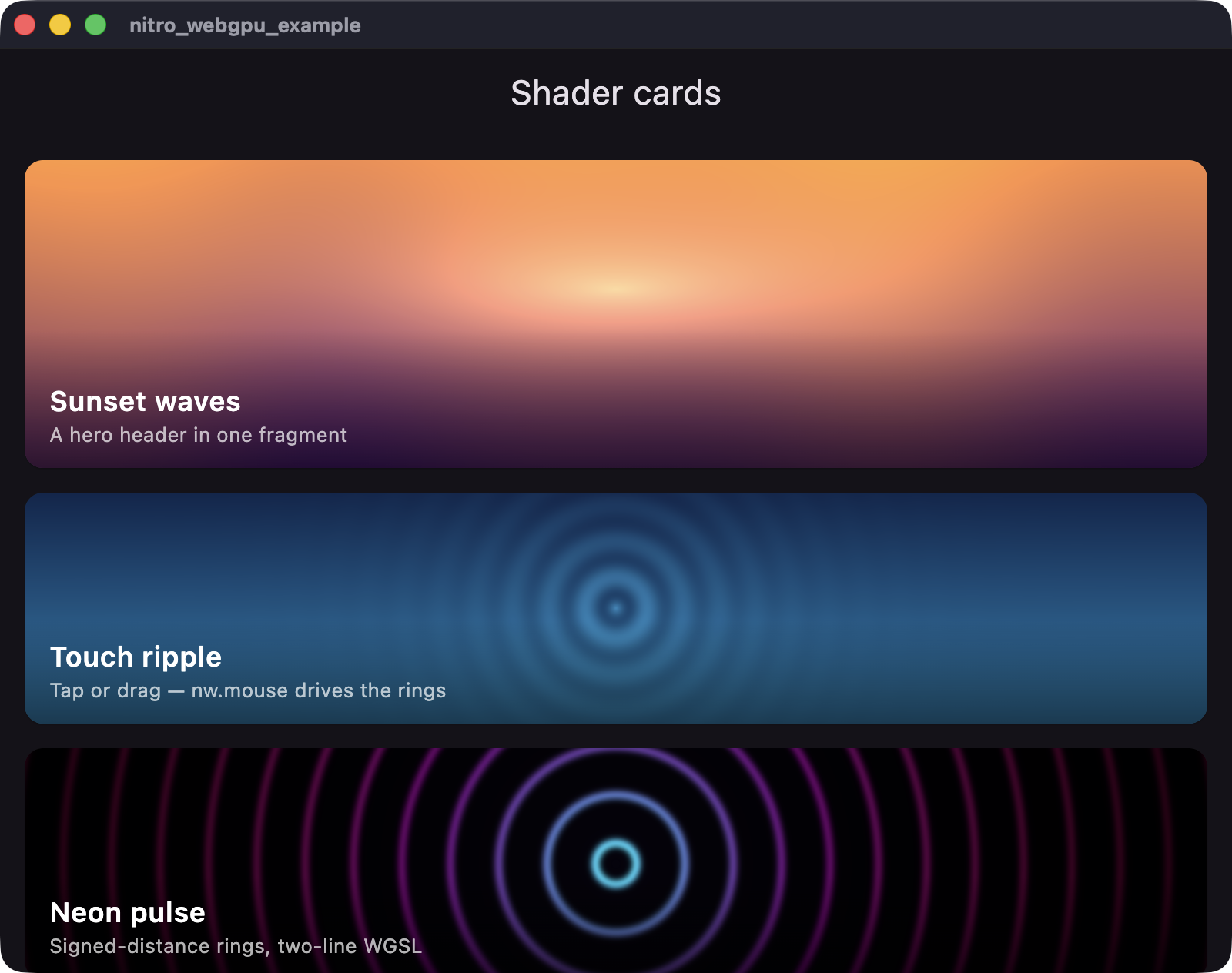
The example app in this repo has more: shader-backed UI pages (the clock above, and animated card backgrounds), a live WGSL/GLSL shader editor, a Shadertoy-compatible player with multi-pass buffers, GPU particles, an 18-scene showcase gallery, and two GPU-state games (Breakout and an endless racer), plus the four integration-test suites that run all of it in CI.
final adapter = await Gpu.requestAdapter();          // real hardware preferred
print('${adapter.info.device} on ${adapter.backendType.name}');

final device = await adapter.requestDevice(
  requireTimestampQueries: adapter.supportsTimestampQueries,
  requiredFeatures: {GpuFeature.textureCompressionBc},
  requiredLimits: GpuRequiredLimits(maxColorAttachmentBytesPerSample: 40),
);
requestAdapter enumerates every adapter and picks real hardware over
software rasterizers, preferring Vulkan/Metal/D3D12 over GL when both exist.
powerPreference selects integrated vs discrete GPUs.
final storage = device.createBuffer(
    size: bytes, usage: GpuBufferUsage.storage | GpuBufferUsage.copySrc);
device.queue.writeBuffer(storage, data);             // zero-copy upload

final staging = device.createBuffer(
    size: bytes, usage: GpuBufferUsage.mapRead | GpuBufferUsage.copyDst);
final result = await staging.mapRead();              // GPU → Dart readback
final module = await device.createShaderModule(wgslSource);

final fs = await device.createShaderModuleGlsl(glslSource,
    stage: GpuShaderStage.fragment);                 // Shadertoy content as-is
Modules and pipelines compile on a background worker thread, so hot-swapping a live shader doesn't stall the UI isolate.
final compute = await device.createComputePipeline(module: module);

final render = await device.createRenderPipeline(
  module: module,                  // vertex + fragment (or fragmentModule:)
  targetFormat: GpuTextureFormat.rgba8Unorm,
  vertexBuffers: [
    GpuVertexLayout(arrayStride: 16, attributes: [
      GpuVertexAttr(
          format: GpuVertexFormat.float32x4, offset: 0, shaderLocation: 0),
    ]),
  ],
);

final encoder = device.createCommandEncoder();
encoder.beginComputePass()
  ..setPipeline(compute)
  ..setBindGroup(0, bind)
  ..dispatchWorkgroups(n)
  ..end();
device.queue.submit([encoder.finish()]);
Bind groups come from pipeline.getBindGroupLayout(0) (auto layout) or
explicit createBindGroupLayout / createPipelineLayout. Render passes
support every draw variant (indexed, instanced, indirect), full
depth/stencil/blend state, MSAA + resolve, multiple render targets, render
bundles, scissor/viewport, and occlusion + timestamp queries.
device.queue.writeTexture(texture, pixels);          // stride derived
device.queue.writeTexture(bc1Texture, bc1Blocks);    // block math automatic
GpuTextureFormat.bc1RgbaUnorm.byteLengthFor(512, 512);
2D/3D/cube textures, storage textures, comparison samplers, mipmaps, and
compressed formats (BC1–7, ETC2/EAC, ASTC) with block-aligned strides
computed for you. copyTextureToBuffer handles 256-byte row alignment and
mip-sized extents.
WebGpuView(
  device: device,
  renderScale: 1.0,                // dynamic resolution knob
  onFrame: (target, elapsed) {
    // record + submit a render pass into target.view
    // create pipelines against target.targetFormat
  },
)
Frames are paced drop-latest (a slow frame skips instead of queueing) and the first frame is gated so views don't flash black.
if (await device.supportsCompute()) { ... }
if (await device.supportsVertexStorage()) { ... }
Shreemanarjun/nitro_webgpu is a public repo on GitHub by Shreemanarjun. WebGPU for Flutter — GPU compute and rendering from Dart with one API on every platform, powered by wgpu-native and bound through Nitro FFI.
It declares the MIT license on GitHub.
Its maker has not tagged a system, so it is unknown here. Its README says what it needs.
Open "Take it" on its page: Take My Repo writes an install plan for your machine and hands it to your AI agent (Claude Code, Codex or Cursor), which asks you before each step. Take My Repo has not tested it on any machine.
Flutter makes it easy and fast to build beautiful apps for mobile and beyond
Rewrite your whole app in Rust, one piece at a time, checked against the original's recorded behavior at every step. CLIs, HTTP servers and libraries in TypeScript, Python, C, Go, Ruby and Java.
Its last change on GitHub was on 2026-07-19. Take My Repo does not judge from that whether it is maintained.
Nobody has reviewed it on Take My Repo yet, which says nothing about its quality.
Take My Repo cannot say: it does not audit code and has not run nitro_webgpu. What is known comes from GitHub. It declares the MIT license on GitHub. Its last change was on 2026-07-19. It has 6 stars, which measure popularity, not safety. Nobody has reviewed it on Take My Repo yet, which says nothing about its quality. Read the source before you run it. With "Take it", your AI agent shows each step and asks you before running it; README text is treated as data, not as instructions.