
torph
Animated text morphing widget for Flutter — a faithful port of lochie/torph (FLIP transitions, spring physics).
- 1
- MIT
- 4 mo ago
Repo SimplifyJobs/torph, read from GitHub 12 h ago. SimplifyJobs has not joined Take My Repo.
In short
SimplifyJobs/torph is a public repo on GitHub by SimplifyJobs. Animated text morphing widget for Flutter — a faithful port of lochie/torph (FLIP transitions, spring physics). It declares the MIT license on GitHub. It is written mainly in Dart, has 1 stars and last changed on 2026-07-16. Nobody has reviewed it on Take My Repo yet, which says nothing about its quality. Read from GitHub on 2026-11-23.
Similar repos
flutter
Flutter makes it easy and fast to build beautiful apps for mobile and beyond

torph
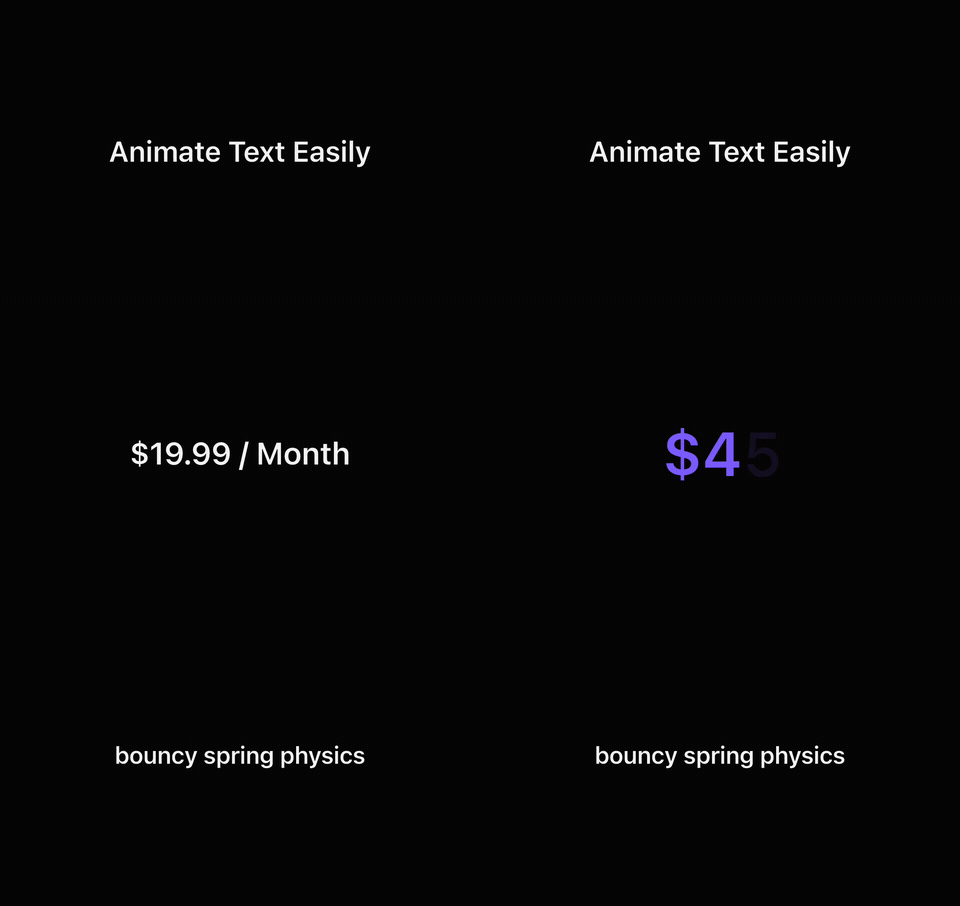
Animated text morphing for Flutter. Wrap a string in a TextMorph widget
and it animates smoothly whenever the text changes — shared letters or words
slide from their old position to the new one, new pieces fade and scale in, and
removed pieces fade, drift, and scale out, all while the container resizes
between the two layouts.
This is a faithful, behavior-for-behavior Flutter port of the torph JavaScript library by Lochie Axon. All of the animation logic — FLIP diffing, the enter/exit/persist transitions, the spring-to-easing solver, the fade timings — mirrors the original. See Credits.
Features
- 🔤 Word or grapheme morphing — segments by word when the text contains spaces, otherwise character-by-character (Unicode grapheme clusters).
- 🎯 FLIP transitions — shared segments animate from their previous layout position to the new one; there is no cross-fade "blink".
- ✨ Enter / exit choreography — new segments fade and scale in (from
0.95) with a slight delay; removed segments fade, drift toward a surviving neighbour, and scale out. - 📐 Animated container resize — the widget smoothly grows and shrinks between layouts.
- 🌊 Spring physics — pass a
SpringEaseand the duration is computed from the spring; or use any FlutterCurveviaCurveEase. - ♿ Reduced-motion aware — honours
MediaQuery.disableAnimationsby default. - 🪶 Dependency-free — only
flutter+characters(a Flutter SDK package).
Installation
Add it to your pubspec.yaml:
dependencies:
  torph:
    git:
      url: https://github.com/rehmatsg/torph.git
Then:
import 'package:torph/torph.dart';
Usage
The whole API is one widget. Give it a String; when that string changes, it
morphs.
class Price extends StatefulWidget {
  const Price({super.key});
  @override
  State<Price> createState() => _PriceState();
}

class _PriceState extends State<Price> {
  bool monthly = true;

  @override
  Widget build(BuildContext context) {
    return GestureDetector(
      onTap: () => setState(() => monthly = !monthly),
      child: TextMorph(
        monthly ? r'Buy for $19.99 / Month' : r'Buy for $200 / Year',
        style: const TextStyle(fontSize: 28, fontWeight: FontWeight.w600),
      ),
    );
  }
}
Shared words (Buy, for, /) hold their place while the price and period
morph.
Spring animations
Pass a SpringEase for physics-based easing. The duration is derived from the
spring, so duration is ignored.
TextMorph(
  label,
  ease: const SpringEase(SpringParams(stiffness: 200, damping: 20)),
)
| Parameter | Type | Default | Description |
|---|---|---|---|
stiffness |
double |
100 |
Spring stiffness coefficient |
damping |
double |
10 |
Damping coefficient |
mass |
double |
1 |
Mass of the spring |
precision |
double |
0.001 |
Threshold for the settled position |
Custom easing
TextMorph(
  label,
  duration: const Duration(milliseconds: 500),
  ease: const CurveEase(Curves.easeOutExpo),
)
The default is torphDefaultEase — a CurveEase(Cubic(0.19, 1, 0.22, 1)),
matching the reference library's default cubic-bezier(0.19, 1, 0.22, 1).
API
TextMorph(
  String text, {                       // the text to display (positional, required)
  Duration duration,                   // default: 400ms (used with CurveEase)
  TextMorphEase ease,                  // CurveEase | SpringEase (default: torphDefaultEase)
  bool scale,                          // exit-scale to 0.95 (default: true)
  Locale? locale,                      // segmentation locale (API parity)
  bool debug,                          // draw magenta/cyan outlines (default: false)
  bool disabled,                       // apply text changes instantly (default: false)
  bool respectReducedMotion,           // honour reduce-motion (default: true)
  VoidCallback? onAnimationStart,      // fired when a (non-initial) morph begins
  VoidCallback? onAnimationComplete,   // fired when the resize transition ends
  TextStyle? style,                    // merged over the ambient DefaultTextStyle
})
These map one-to-one onto the reference library's options
(duration, ease, scale, locale, debug, disabled,
respectReducedMotion, onAnimationStart, onAnimationComplete).
Notes on parity
- Segmentation. The reference relies on the browser's
Intl.Segmenter. Dart has no built-in ICU segmenter, so this port usespackage:charactersfor exact Unicode grapheme clusters, and a UAX#29-approximating tokenizer for words that reproducesIntl.Segmenter's output for typical text (letters and digits group into words,./,/'stay inside numbers/words, and each space, symbol, or punctuation mark becomes its own segment). Spaces are rendered as non-breaking spaces, exactly like the original. - Springs. The reference converts spring parameters into a CSS
linear(...)easing function plus a computed duration. This port reproduces the same sampling (and the trailing-1trimming) as a FlutterCurve(LinearPointsCurve), and derives the identical duration. - Single line. Like the original (
white-space: nowrap), aTextMorphlays its segments out on a single horizontal line.
How it works
Each time the text changes the widget runs a
FLIP pass, mirroring the
reference's createTextGroup:
- First — measure the current segments' positions (
prevMeasures). - Reconcile — diff old vs new segments by a stable id; freeze departing segments in place (out of layout flow) and build the new line.
- Last — measure the new positions (
currentMeasures). - Invert & Play — for every surviving segment, translate it back to its old position and animate to zero (the slide); new segments borrow the delta of their nearest surviving neighbour and fade/scale in; departing segments drift toward their neighbour and fade/scale out. The container width/height transitions in parallel with the same easing.
Interruptions are handled the same way the original does: an in-flight segment's current translate and opacity are read back and folded into the next animation, so rapid text changes stay continuous.
The Dart sources are organised to match the reference file-for-file:
| This port | Reference (packages/torph/src/lib/text-morph) |
|---|---|
lib/src/segment.dart |
utils/segment.ts |
lib/src/spring.dart |
utils/spring.ts |
lib/src/flip.dart |
utils/flip.ts |
lib/src/constants.dart |
utils/constants.ts |
lib/src/text_morph.dart |
index.ts + utils/animate.ts + utils/dom.ts |
Example app
A runnable gallery lives in example/:
cd example
flutter run
It mirrors the original library's demos: a rotating headline, a pricing toggle, a number "typing" sequence, a spring headline, and a live text field.
Recording a demo reel
This repo includes the portable demo-recording tooling:
# boot a simulator first, e.g. xcrun simctl boot 'iPhone 17 Pro' && open -a Simulator
tool/record_demo.sh --target lib/showcase.dart --prefix SHOWCASE --contact
It builds the app, plays the reel once to prove the build, then screen-records
the clean replay and transcodes it to a cropped, constant-fps .mp4 under
.demos/. See example/lib/demo_harness.dart
for the scene/marker contract.
Credits
This is a port. All credit for the concept, the design, the animation technique, and the name goes to the original authors:
- torph by Lochie Axon — the original dependency-free animated text morphing library for React, Vue, Svelte, and vanilla JavaScript.
- Thanks (per the original) to Alex for the site design, Pugson, and Benji for coining the Torph name and outlining the method.
If you find this useful, please star and follow the original project.
License
MIT — matching the original. See LICENSE.
The bundled
LICENSEpreserves the original copyright (Copyright (c) 2025 Lochie Axon) as required by the MIT terms.
Questions
What is torph?
SimplifyJobs/torph is a public repo on GitHub by SimplifyJobs. Animated text morphing widget for Flutter — a faithful port of lochie/torph (FLIP transitions, spring physics).
Is torph open source?
It declares the MIT license on GitHub.
Does torph run on macOS, Windows or Linux?
Its maker has not tagged a system, so it is unknown here. Its README says what it needs.
How do I install torph?
Open "Take it" on its page: Take My Repo writes an install plan for your machine and hands it to your AI agent (Claude Code, Codex or Cursor), which asks you before each step. Take My Repo has not tested it on any machine.