
commit-lens
Chrome extension: richer per-commit stats, custom commit-line templates, and more.
- 3
- 2 mo ago
Repo Soheab/commit-lens, read from GitHub 18 h ago. Soheab has not joined Take My Repo.
In short
Soheab/commit-lens is a public repo on GitHub by Soheab. Chrome extension: richer per-commit stats, custom commit-line templates, and more. It declares no license on GitHub. Public does not mean open source: without a license, nobody is granted the right to reuse it. It is written mainly in JavaScript, has 3 stars and last changed on 2026-09-12. Nobody has reviewed it on Take My Repo yet, which says nothing about its quality. Read from GitHub on 2026-11-24.
GitHub Commit Details
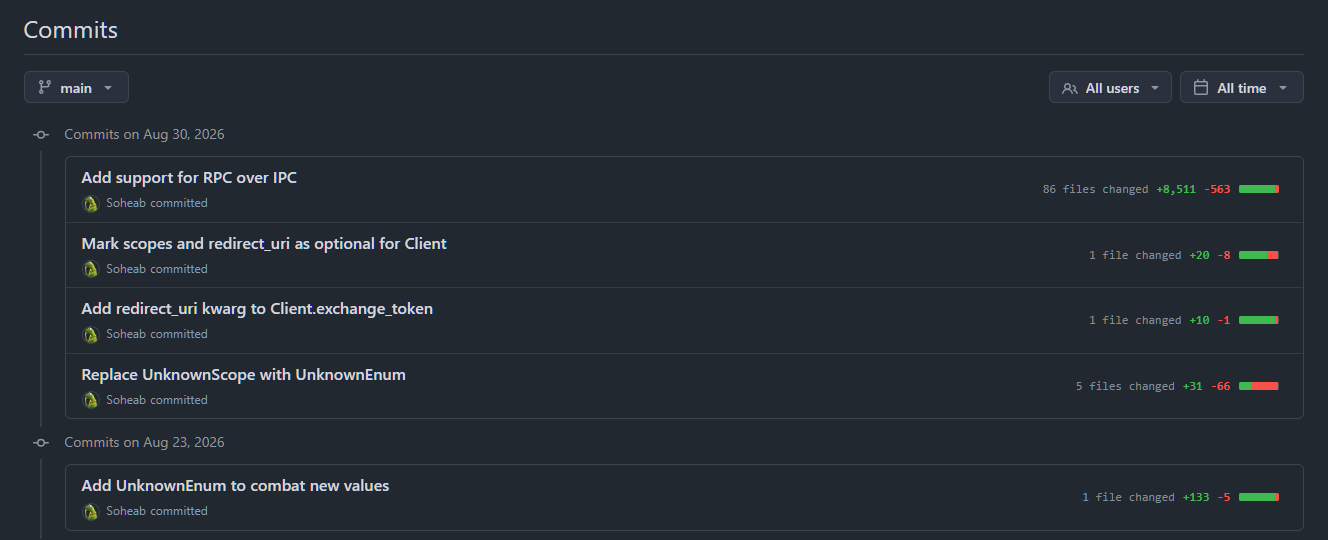
A Chrome extension that adds richer per-commit info to GitHub's commit list pages
(github.com/<owner>/<repo>/commits/<branch>): files changed, additions/deletions,
a mini diff bar, verified-signature badges, merge indicators, comment counts, and a
file list on hover. Fully customizable, so you can toggle any of it off, or hide
GitHub's own avatar, commit time, or SHA button, right from the popup.
Everything is local to your browser. Settings are stored with chrome.storage.local
and nothing is sent anywhere except github.com and api.github.com, plus, if you
opt in, a self-hosted Worker that enables silent token refresh (see
Silent token refresh).
Features
- Per-commit stats on every row: files changed, additions (+), deletions (-)
- Diff bar, a small green/red bar showing the proportion of additions to deletions
- Verified badge when a commit's signature checks out
- Merge indicator for merge commits
- Comment count when a commit has review comments
- File list on hover: hovering the stats shows every changed file as a tooltip
- Comma-formatted numbers (
8,511vs8511), toggleable - Toggle any GitHub element off: author avatar, commit time, SHA button, copy-SHA
button, browse-files (
<>) button - Custom commit line, so you can replace "X committed Y ago" with your own template using placeholders (author, avatar, timestamp, commit message, SHA, repo, stats)
- Flexible timestamp formatting in the custom template: relative by default, or any of nine format codes (short time, long date, full date+time, etc.)
- Compact rows, collapsing each commit down to a single line (message, author, relative time, and stats) instead of GitHub's default two-line layout
- Commit counts, appended to GitHub's own "Commits on <date>" headings so you can see at a glance how many commits landed each day
- Sign in with GitHub via OAuth Device Flow. One click, no password, no manual token needed, and it raises the API rate limit from 60/hour to 5,000/hour
- Manual token support as a fallback, if you'd rather paste your own
- Toolbar popup for quick settings access
- Draggable in-page panel (floating "GC" button) that stays open on the page instead of closing the instant you click elsewhere, and remembers where you left it
- Everything local: settings, tokens, and preferences live only in
chrome.storage.local, nothing is synced or sent anywhere exceptgithub.comandapi.github.com
Install
- Clone this repository (or download it as a ZIP and extract it).
- Open
chrome://extensionsin Chrome (or any Chromium browser, like Edge or Brave). - Turn on Developer mode (top-right toggle).
- Click Load unpacked and select the folder you cloned/extracted.
- Pin the extension (puzzle-piece icon in the toolbar, then pin) for quick access to the popup.
Updating
If you cloned the repo, pull the latest changes, then hit the reload icon on the
extension's card in chrome://extensions (no need to remove and re-add it):
git pull
If you downloaded a ZIP instead, download and extract the latest version over the old folder, then reload the extension the same way.
Then visit any GitHub commits page, e.g. https://github.com/<owner>/<repo>/commits/main.
Sign in (recommended)
GitHub's public API allows 60 unauthenticated requests per hour, per IP. That's enough for a quick look, but a commit list page can burn through it fast. Signing in raises the limit to 5,000/hour.
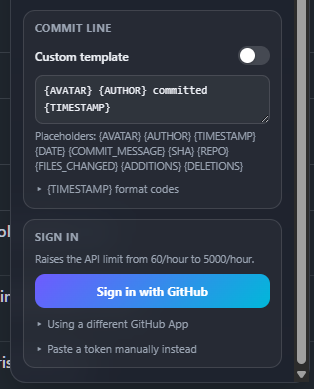
Click the extension icon, then Sign in with GitHub. A GitHub tab opens with a short code pre-filled; approve it. If this is your first time signing in, GitHub will also ask you to install the app and choose which repositories it can access (pick "All repositories," or select specific ones — private repos need to be explicitly granted). Once that's done, the popup will show ✓ Signed in with GitHub within a few seconds. No password is needed on GitHub's side. This uses GitHub's OAuth Device Flow, which issues a token to the extension without ever exposing a client secret.
Device-flow access tokens are short-lived (typically a few hours). By default, once one lapses the extension just falls back to unauthenticated requests (60/hour), and you'll need to sign in again to get back to 5,000/hour. To avoid that, deploy the small OAuth proxy Worker and paste its URL into Worker URL (see below), which lets the extension renew its token in the background on its own.
If you'd rather use your own token, expand Paste a token manually instead at the bottom of the popup and paste a classic personal access token (no scopes needed for public repos, leave every checkbox unchecked). Set its expiration to "No expiration" if you don't want to repeat this later; a fine-grained token works too, but those always expire (90 days max) and need read-only "Contents" repo access.
Silent token refresh (optional)
Renewing a token before it lapses requires a client_secret, which can't safely
live in the extension's source since anyone can read it. worker/ is a
small, stateless Cloudflare Worker that holds that secret and proxies GitHub's two
OAuth endpoints. It's the only piece of infrastructure in this project that isn't
"fully local," and it's entirely optional. See worker/README.md
for deploy steps. Once deployed, paste its *.workers.dev URL into Worker URL
(popup or in-page panel, next to Using a different GitHub App) and the
extension will keep itself signed in without any further action from you.
Using your own GitHub App instead
The extension ships with a built-in GitHub App Client ID so sign-in works out of the box. If you'd rather sign in through your own app:
- Create a new GitHub App (or OAuth App).
- Enable Device Flow in its settings.
- Copy its Client ID. This is not secret, but never enter a client secret anywhere in this extension; it isn't needed.
- In the popup, expand Using a different GitHub App and paste the Client ID.
What it shows
On every commit row:
- Files changed, additions (+), deletions (-), with numbers optionally
comma-formatted (
8,511vs8511) - A small green/red diff bar giving a proportional at-a-glance sense of the change
- A ✓ Verified badge when the commit's signature checks out
- A ⑂ Merge tag for merge commits
- A 💬 comment count when a commit has review comments
- Hovering the stats shows the list of changed files as a tooltip
Any of these, plus GitHub's own avatar, commit time, SHA button, copy button, and
browse-files (<>) button, can be turned off, per your preference. Changes apply
immediately, no page reload needed.
Custom commit line
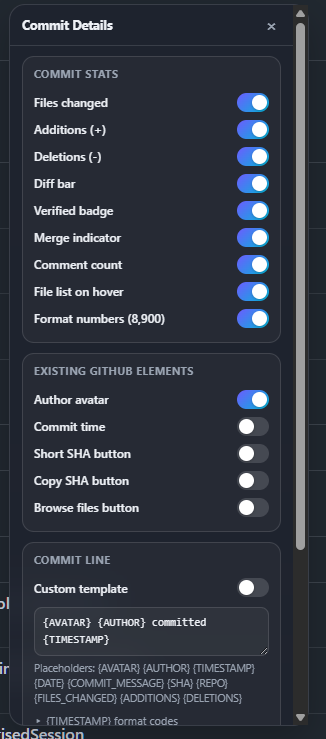
By default the line under each commit title reads like GitHub's own ("Soheab committed 3 hours ago"). Turn on Custom template and you can rewrite it with placeholders:
{AVATAR} {AUTHOR} committed {TIMESTAMP}
Available placeholders: {AVATAR} {AUTHOR} {TIMESTAMP} {DATE}
{COMMIT_MESSAGE} {SHA} {REPO} {FILES_CHANGED} {ADDITIONS} {DELETIONS}.
{TIMESTAMP} supports format codes, written as {TIMESTAMP:CODE}, so you're not
stuck with relative time everywhere:
| Code | Output | Description |
|---|---|---|
{TIMESTAMP} |
3 hours ago | Relative (default, no code needed) |
{TIMESTAMP:R} |
3 hours ago | Relative (same as default, explicit) |
{TIMESTAMP:t} |
16:20 | Short Time |
{TIMESTAMP:T} |
16:20:30 | Medium Time |
{TIMESTAMP:d} |
04/20/2021 | Short Date |
{TIMESTAMP:D} |
April 20, 2021 | Long Date |
{TIMESTAMP:f} |
April 20, 2021 at 16:20 | Long Date, Short Time |
{TIMESTAMP:F} |
Tuesday, April 20, 2021 at 16:20 | Full Date, Short Time |
{TIMESTAMP:s} |
04/20/2021, 16:20 | Short Date, Short Time |
{TIMESTAMP:S} |
04/20/2021, 16:20:30 | Short Date, Medium Time |
e.g. {AUTHOR} · {TIMESTAMP:D} renders as "Soheab · April 20, 2021".
Compact rows
Turn on Compact rows and each commit collapses to one line: the commit message (truncated with an ellipsis), author (or "Author +N" for co-authored commits), relative time, and the stats badge, all inline. GitHub's own two-line layout (message, then a separate avatar/author/time line) is hidden while this is on.
Commit counts
Turn on Show counts and each of GitHub's own "Commits on <date>" headings gets a small commit count appended (e.g. "Commits on Sep 12, 2026 8 commits"). A running total and a per-day breakdown are also available in the in-page panel.
Settings live in the toolbar popup, and also in a small draggable panel you can open directly on the commits page (a floating "GC" button in the corner). That's handy since the toolbar popup closes as soon as you click elsewhere. Drag it by its header to wherever it doesn't cover the commit list; it remembers where you left it.
How it works
- A content script (
content.js) scans each commit row, reads the owner/repo/SHA straight from GitHub's own row markup, and callsGET /repos/{owner}/{repo}/commits/{sha}on the GitHub REST API. - Rows are processed in small batches (a handful at a time, with a short delay between batches) rather than firing every row's request at once, so a large commits page doesn't burst dozens of concurrent requests on load.
- Results are cached per session so re-scrolling or re-rendering doesn't refetch.
- A
MutationObserver(plus GitHub'sturbo:load/pjax:endevents) keeps it working as you navigate GitHub's single-page app. - Sign-in runs via OAuth Device Flow, polled from a background service worker so
it keeps working even if you close the popup while approving. Without a Worker
URL configured this is entirely client-side, direct to
github.com; with one configured, the device-code and token requests go through that proxy instead (see Silent token refresh), and expiring access tokens are refreshed automatically ahead of expiry via a second alarm.
Privacy
- No data leaves your browser except requests to
github.com(sign-in) andapi.github.com(commit stats), which is exactly what you'd get browsing GitHub normally. - Your token, sign-in state, and preferences live only in
chrome.storage.local. They're local to this browser, not synced to any account or server.
Uninstall / sign out
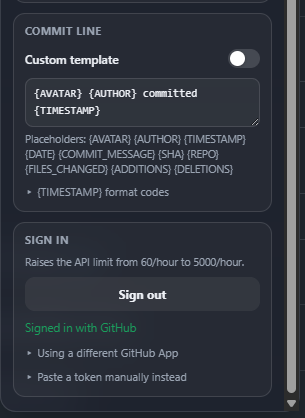
- Sign out: open the popup (or the in-page panel) and click Sign out. This clears the stored token.
- Uninstall:
chrome://extensions, then remove. This also clears all stored settings and tokens for the extension.
Questions
What is commit-lens?
Soheab/commit-lens is a public repo on GitHub by Soheab. Chrome extension: richer per-commit stats, custom commit-line templates, and more.
Is commit-lens open source?
It declares no license on GitHub. Public does not mean open source: without a license, nobody is granted the right to reuse it.
Does commit-lens run on macOS, Windows or Linux?
Its maker has not tagged a system, so it is unknown here. Its README says what it needs.
How do I install commit-lens?
Open "Take it" on its page: Take My Repo writes an install plan for your machine and hands it to your AI agent (Claude Code, Codex or Cursor), which asks you before each step. Take My Repo has not tested it on any machine.