
PAVAS
[CVPR 2026 (Oral)] PAVAS: Physics-Aware Video-to-Audio Synthesis
- 27
- MIT
- 2 mo ago
Repo SonyResearch/PAVAS, read from GitHub 37 min ago. SonyResearch has not joined Take My Repo.
In short
SonyResearch/PAVAS is a public repo on GitHub by SonyResearch. [CVPR 2026 (Oral)] PAVAS: Physics-Aware Video-to-Audio Synthesis. It declares the MIT license on GitHub. It is written mainly in Python, has 27 stars and last changed on 2026-09-21. Nobody has reviewed it on Take My Repo yet, which says nothing about its quality. Read from GitHub on 2026-11-25.
PAVAS: Physics-Aware Video-to-Audio Synthesis
CVPR 2026 (Oral)
Oh Hyun-Bin1,†, Yuhta Takida2, Toshimitsu Uesaka2, Tae-Hyun Oh4, Yuki Mitsufuji2,3
1POSTECH 2Sony AI 3Sony Group Corporation 4KAIST
†Work done during an internship at Sony AI.
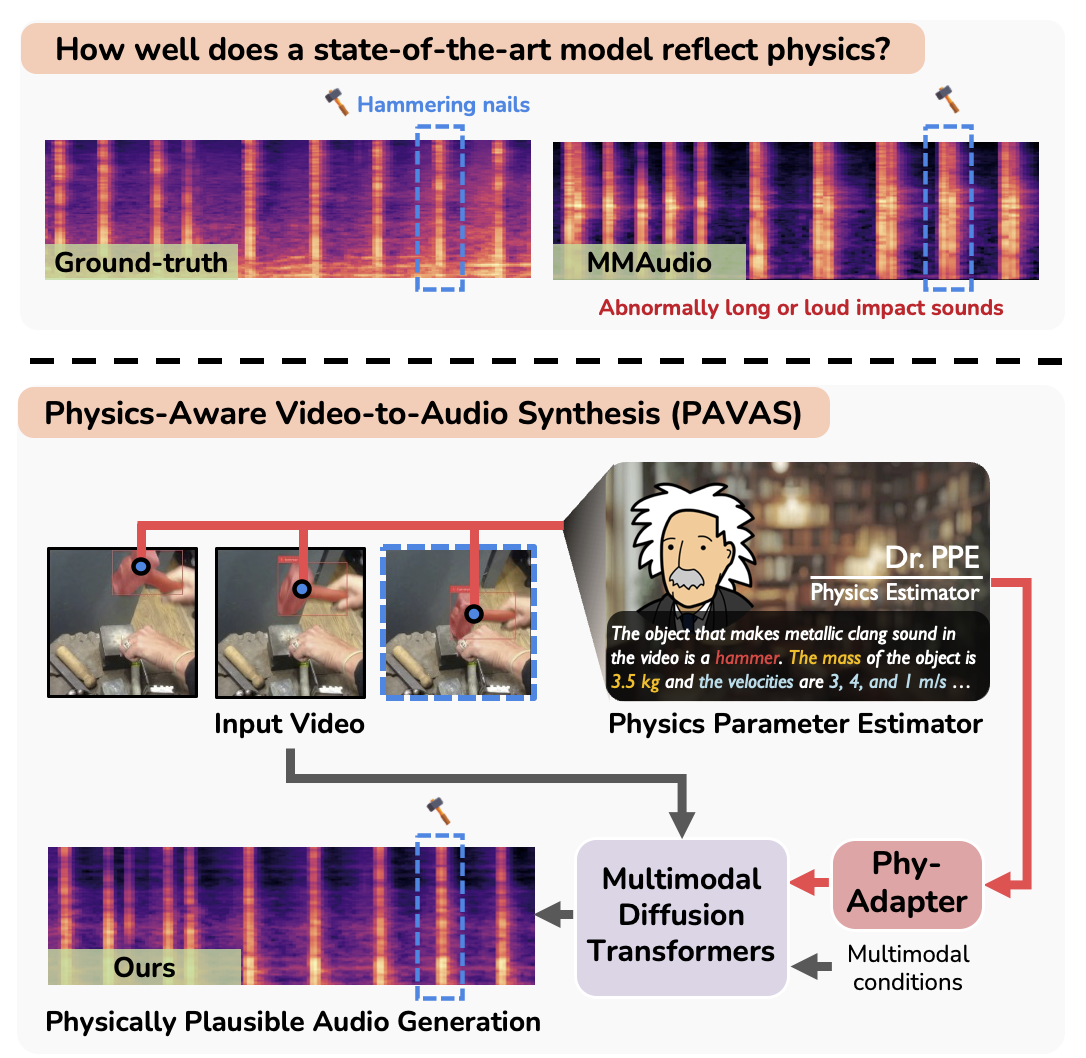
PAVAS is a physics-aware video-to-audio synthesis system built on top of MMAudio.
It augments the generation backbone with object-centric conditioning derived from mass, velocity,
segmentation, and patch-level visual features so that generated audio better reflects the physical
interactions in a video.
Repository Overview
The repository contains the PAVAS model and training code in pavas/core, the independent Physics Parameter Estimator (PPE) and other offline stages in precompute, and the training and evaluation entrypoints.
PPE is training-free: its pretrained estimators extract moving objects, mass, segmentation, and velocity without training PAVAS. You can use these outputs in other tasks; see the standalone PPE guide.
Training and benchmark evaluation use prepared features. For efficient
training, PPE, Phy-Adapter input preparation, and the generator backbone have
not yet been streamlined into a single raw-video inference path. An end-to-end
generate.py for arbitrary videos is planned for a later release.
Only need benchmark scores? The VGGSound precomputed results let you evaluate existing caches without training PAVAS or extracting the full training dataset. FoleyBench, VGGSounder, and FlatSound results are planned for a later release.
Getting Started
The following steps prepare a VGGSound training run and cache-based evaluation. Full-dataset VGGSound feature caches, CLIP patch grids, and PPE outputs can require tens of terabytes of storage. These intermediate features are not distributed here; prepare sufficient storage and extract them locally. If you only want to evaluate the released results, skip to Evaluate Precomputed Results.
1. Install and Check the Environment
From the repository root, use Python 3.10+ on a machine with an NVIDIA GPU:
bash scripts/setup_env.sh
source .venv/bin/activate
bash scripts/run_smoke_tests.sh
The smoke tests check imports and data contracts, not full GPU inference. See INSTALL.md for manual installation and FFmpeg requirements.
2. Prepare VGGSound and External Weights
Download VGGSound and arrange videos as /path/to/vggsound/video/<id>.mp4,
where <id> comes from sets/vgg-{train,val,test}.tsv. The videos and their
audio are needed to produce the feature caches; the dataset is not bundled.
Place the VAE, vocoder, empty-string embedding, and Synchformer assets in
ext_weights/ using the required filenames.
Download an MMAudio model checkpoint
separately for PAVAS training initialization. The visual encoders download
their pretrained weights on first use: DFN5B-CLIP for MMAudio visual features
and LAION CLIP ViT-B/16 for PAVAS patch features. Ensure the Hugging Face
cache is accessible. INSTALL.md lists the exact weights and paths.
3. Extract VGGSound Feature Caches
Follow MMAudio's training guide
to extract the audio/video/text feature caches for train, val, and test.
PAVAS expects each split's vgg-<split>.tsv and matching vgg-<split>/
memmap directory. These are VGGSound feature caches, not the
av-benchmark ground-truth audio cache used for metrics. See the
cache notes for the PAVAS-side layout.
4. Extract CLIP Patch Features
Run the extractor once for each split:
for split in train val test; do
  python precompute/clip_patches/extract_clip_patches_mp.py \
    --video_root /path/to/vggsound/video \
    --tsv "sets/vgg-${split}.tsv" \
    --output_dir "/path/to/clip_patches/${split}" \
    --clip_model vit_b_16 --clip_size 224 \
    --batch_size 8 --num_workers 8
done
Each split produces vgg-patches.tsv and vgg-patches/clip_patches.npy.
Use the generated TSV and NPY from the same run in the config, not the
input sets/vgg-*.tsv. Patch grids are especially storage-intensive; see the
CLIP patch guide before a full run.
5. Extract PPE Outputs
Download the public pretrained PPE assets, then try one video before processing the entire dataset:
python precompute/ppe/scripts/download_ppe_assets.py
python precompute/ppe/scripts/run_ppe_pipeline.py \
  --tsv sets/vgg-train.tsv \
  --video-root /path/to/vggsound/video \
  --output-root /path/to/ppe --limit 1
Inspect the summary under /path/to/ppe/work/, then rerun without --limit
for the full train split. Repeat with sets/vgg-val.tsv and
sets/vgg-test.tsv for the other splits. Outputs are written to
/path/to/ppe/{mass,segmentation,velocity}/; work/ holds intermediate
files. For multiple GPUs, run every shard index from 0 to N-1, one
process per GPU. The runner can resume completed outputs. See the
PPE guide for sharding, retries, and standalone
use on a different collection of videos.
6. Point the Configs to Your Outputs
Set these paths for ExtractedVGG, ExtractedVGG_val, and
ExtractedVGG_test in configs/data/base.yaml:
| Config key in each split | Expected output |
|---|---|
tsv, memmap_dir |
VGGSound feature-cache TSV and matching memmap directory |
clip_patches.tsv, clip_patches.npy |
Generated CLIP patch index and NPY from the same run |
object_cond.mass_root, seg_root, velocity_root |
PPE mass/, segmentation/, velocity/ directories |
gt_cache (val/test) |
Separate av-benchmark VGGSound ground-truth audio cache |
For the GT cache, follow MMAudio's evaluation guide.
Check external-weight paths in configs/base_config.yaml
and the model variant in the training and
evaluation configs. configs/paths.example.yaml is
a worksheet, not an active Hydra config.
7. Train PAVAS
This single-GPU example uses the MMAudio checkpoint only to initialize training:
source .venv/bin/activate
OMP_NUM_THREADS=4 torchrun --standalone --nproc_per_node=1 \
  train.py exp_id=pavas_finetune model=small_16k batch_size=4 \
  weights=/path/to/mmaudio_small_16k.pth
The configured global batch size is 512; this example overrides it to
fit one GPU. Match model= to the checkpoint variant. Training writes
<exp_id>_last.pth for evaluation and <exp_id>_ckpt_last.pth for resuming
training in its output directory. See Training.
Evaluate Your Trained Model
Use the PAVAS weights produced by your own training run and the prepared test features and GT cache:
source .venv/bin/activate
python scripts/download_eval_assets.py
OMP_NUM_THREADS=4 torchrun --standalone --nproc_per_node=1 \
  evaluate.py model=small_16k \
  +test.weight_path=/path/to/pavas_finetune_last.pth
evaluate.py generates audio, extracts its prediction cache, and computes
metrics with av-benchmark in the same run. Do not run a separate metric step
afterward. The model variant must match your trained weights. See
Evaluation.
Evaluate Precomputed Results
The VGGSound prediction cache on Hugging Face provides a shorter route to the metrics: download and extract its cache, prepare the matching VGGSound test GT cache using the MMAudio evaluation guide, and run:
source .venv/bin/activate
python scripts/download_eval_assets.py
python scripts/evaluate_precomputed.py \
  --gt-cache /path/to/vggsound_eval_cache \
  --pred-cache /path/to/PAVAS_large_vggsound_cache
This computes metrics from existing caches without generating audio or repeating prediction feature extraction. Install and asset details are in INSTALL.md; cache format and options are in Evaluation. FoleyBench, VGGSounder, and FlatSound results will be added later.
Documentation
Acknowledgements
This project makes use of the following open-source repositories and modules:
Copies of third-party license and notice files used in this repository are collected under third_party_licenses/.
Related Projects
If you are also interested in a more versatile and actively updated Sony video(+text)-to-audio line of work, we recommend checking out Woosh.
Citation
If you find this repository or research useful, please cite both PAVAS and MMAudio.
@inproceedings{hyun2026pavas,
  title={PAVAS: Physics-Aware Video-to-Audio Synthesis},
  author={Hyun-Bin, Oh and Takida, Yuhta and Uesaka, Toshimitsu and Oh, Tae-Hyun and Mitsufuji, Yuki},
  booktitle={CVPR},
  year={2026}
}

@inproceedings{cheng2025taming,
  title={{MMAudio}: Taming Multimodal Joint Training for High-Quality Video-to-Audio Synthesis},
  author={Cheng, Ho Kei and Ishii, Masato and Hayakawa, Akio and Shibuya, Takashi and Schwing, Alexander and Mitsufuji, Yuki},
  booktitle={CVPR},
  year={2025}
}
Contact
Questions
What is PAVAS?
SonyResearch/PAVAS is a public repo on GitHub by SonyResearch. [CVPR 2026 (Oral)] PAVAS: Physics-Aware Video-to-Audio Synthesis.
Is PAVAS open source?
It declares the MIT license on GitHub.
Does PAVAS run on macOS, Windows or Linux?
Its maker has not tagged a system, so it is unknown here. Its README says what it needs.
How do I install PAVAS?
Open "Take it" on its page: Take My Repo writes an install plan for your machine and hands it to your AI agent (Claude Code, Codex or Cursor), which asks you before each step. Take My Repo has not tested it on any machine.
Is PAVAS still maintained?
Its last change on GitHub was on 2026-09-21. Take My Repo does not judge from that whether it is maintained.